1. Nga Tohutohu Haumaru Nui
Pānuihia ngā tohutohu katoa i mua i te whakamahinga o te taputapu. Puritia tēnei pukapuka ā-ringa hei tirotiro māu ā muri ake nei. Ki te kore e whai i ēnei tohutohu, ka pāngia pea koe e te ru hiko, te ahi, te whara rānei.
- Kaua e ngana ki te whakahaere i tenei oumu me te tuwhera te kuaha na te mea ka puta he kino ki te hiko ngaruiti.
- Kaua e waiho he ahanoa i waenganui i te mata o mua o te oumu me te kuaha, kaua ranei e waiho te oneone, te toenga pokekore ranei kia whakaemi ki runga i nga mata hiri.
- Kaua e whakahaere i te oumu mena kua pakaru. He mea nui kia kati te tatau o te oumu kia kore he kino o te: (1) Te tatau (piko), (2) Nga hiri me nga here (kua pakaru, kua wetekina ranei), (3) Nga hiri kuaha me nga papa hiri.
- Kaua e whakatikaia, e whakatika ranei te oumu ma tetahi atu engari ko nga kaimahi ratonga e tika ana.
- Me whakarite kia tika te turanga o te taputapu.
- Kaua e whakamahia nga matū pirau me nga kohu i roto i tenei taputapu.
- Kaua e whakamahana wai me etahi atu kai ki roto i nga ipu kua hiri na te mea ka pahū.
- Whakamahia i nga wa katoa nga taputapu tunu kai ngaruiti.
- Matakihia nga tamariki i te wa e whakamahia ana te taputapu.
2. Hua Neke Atuview
The Hisense 800W Manual Microwave Oven H28MOBS17 is designed for efficient and convenient food preparation. It features a 28-liter capacity, 800W power output, 10 power levels, 6 preset programs, and a child lock for safety.
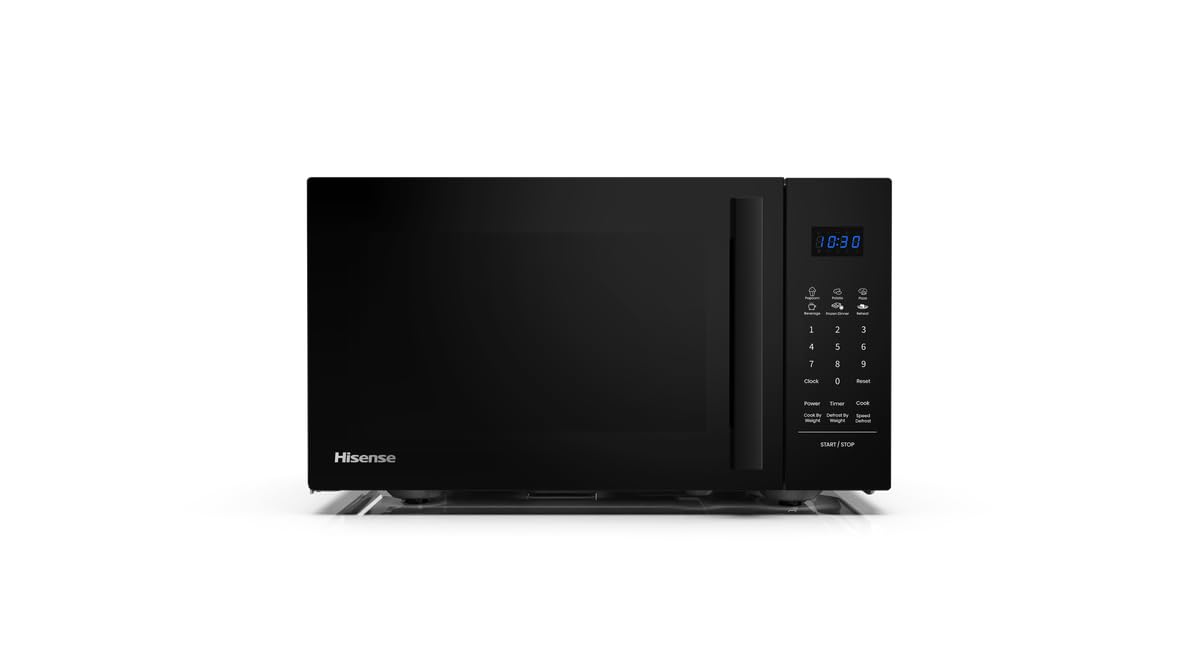
Whakaahua 1: Mua view of the Hisense 800W Manual Microwave Oven H28MOBS17.
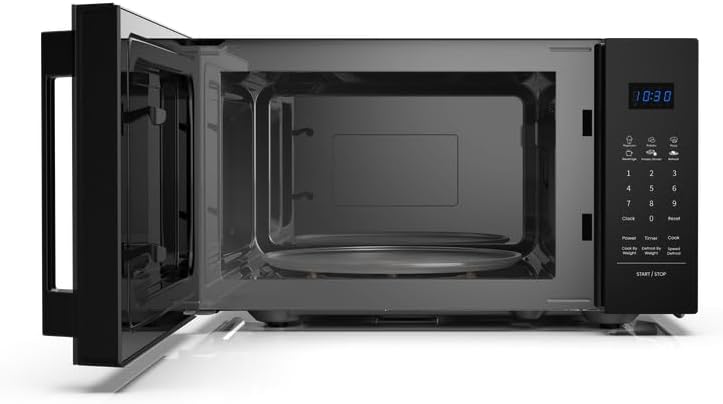
Whakaahua 2: Roto view of the microwave oven, showing the glass turntable.
Āhuatanga matua:
- Mahinga 28L: Spacious interior for various dish sizes.
- 800W Putanga Hiko: Ka whakarite te tunu kai tere me te whai hua.
- 10 Taumata Hiko: Ka taea te whakarite i ngā tautuhinga wera mō te tunu kai tika.
- 6 Papatono Tatūkē: Convenient one-touch options for common recipes.
- Time & Weight Defrost: Efficient thawing based on time or food weight.
- Tunu Waamaha: Program step-by-step cooking for optimal results.
- LED Display & Digital Controls: Intuitive interface for ease of use.
- Maukati Tamariki: Keeps controls secure for added safety.
3. Tatūnga
3.1 Te Wetewete
Carefully remove the microwave oven and all packing materials from the carton. Check the oven for any damage, such as dents or a misaligned door. Do not operate the oven if it is damaged. Contact Hisense customer service.
3.2 Whakanoho
Place the oven on a flat, stable surface that can support its weight and the heaviest food item likely to be cooked in it. Ensure adequate ventilation by leaving a minimum of 20 cm (8 inches) of space above the oven, 10 cm (4 inches) at the rear, and 5 cm (2 inches) on each side. Do not block air vents. Keep the oven away from heat sources and strong magnetic fields.

Figure 3: Microwave oven dimensions and recommended clearances for proper ventilation.
3.3 Hononga Hiko
Plug the oven into a standard household electrical outlet (220-240V, 50Hz). Ensure the outlet is properly grounded. Do not use extension cords or adapters.
3.4 Te horoi tuatahi
I mua i te whakamahinga tuatahi, horoia te roto me waho o te oumu me te panuiamp cloth. Wash the glass turntable and roller ring in warm, soapy water, rinse, and dry thoroughly. Place the roller ring and turntable back into the oven.
4. Nga Tohutohu Whakahaere
4.1 Paewhiri Mana Ki rungaview
The control panel features an LED display, number buttons (0-9), and function buttons for various cooking modes, power levels, and settings. Refer to the diagram in your quick start guide for specific button locations.
4.2 Te whakatu i te Karaka
- Pehia te Karaka kotahi te paatene.
- Use the number buttons to enter the current time (e.g., 12:30).
- Pehia te Karaka patene ano hei whakau.
4.3 Tunu Ngaruiti Taketake
- Whakanohoia he kai ki roto i te ipu haumaru ngaruiti i runga i te tepu hurihuri. Katia te tatau.
- Whakamahia ngā pātene tau hei whakauru i te wā tunu e hiahiatia ana.
- Pehia te Mana button repeatedly to select the desired power level (e.g., P100 for 100% power, P80 for 80% power).
- Pehia te Tīmata/Kati paatene ki te tiimata te tunu kai.
4.4 Using Power Levels
The microwave offers 10 power levels to suit different cooking needs, from softening to high-heat cooking.

Figure 4: Recommended uses for different power levels.
4.5 Defrosting (Time/Weight)
This function allows for efficient thawing of food.
- Wā Whakahau: Pehia te Defrost (Time) button, enter the desired defrosting time, then press Tīmata/Kati.
- Taumaha Whakahau: Pehia te Defrost (Weight) button, enter the food weight, then press Tīmata/Kati. Ka tatau aunoa te oumu i te wa whakamaroke.
4.6 Tautuhi Papatono
The oven includes 6 preset programs for common food items. Consult the label inside the oven door or the quick start guide for a list of these programs and their corresponding numbers.
- Pehia te Kuki button repeatedly to cycle through the preset programs.
- Once the desired program is displayed, press Tīmata/Kati.
4.7 Maha-Stage Te tunu kai
This feature allows you to program two or three cooking stages to achieve optimal results.

Whakaahua 5: Example of a two-step multiphase cooking process.
- Enter the settings for the first cooking stage (time and power level). Do not press Tīmata/Kati.
- Enter the settings for the second cooking stage (time and power level).
- Mena he tuatoru stage is desired, enter its settings.
- Perehi Tīmata/Kati to begin the multi-stage te mahi tunu kai.
4.8 Maukati Tamariki
Hei ārai i te mahi kāore i te tūmanakohia, whakahohehia te raka tamariki.
- Hei whakahohe: Patohia me te pupuri i te Kati pātene mo te 3 hēkona. Ka puta he tohu raka ki te whakaaturanga.
- Hei whakaweto: Patohia me te pupuri i te Kati pēhi anō i te pātene mō te 3 hēkona. Ka ngaro te tohu raka.
5. Tiaki me te Tiaki
Mā te horoi auau me te tiaki tika ka roa te ora me te mahi tino pai o tō oumu ngaruiti.
5.1 Te horoi o roto
Horoia te kōhao o te oumu i muri i ia whakamahinga ki te pānuitangaamp cloth to remove food splatters. For stubborn stains, use a mild detergent and water. Do not use abrasive cleaners or scouring pads.
5.2 Te horoi i waho
Horoia te mata o waho ki te ngohengohe, damp cloth. Avoid getting water into the ventilation openings. The matte black finish and tempered glass are designed for easy cleaning.
5.3 Te Whakapai i te Ripanga Tahuri me te Mowhiti Roera
Ka taea te tango i te karaihe hurihuri me te mowhiti roera mo te horoi. Horoia ki te wai mahana, hopipi, ki roto ranei i te horoi rihi. Me whakarite kua maroke katoa i mua i te whakahoki ano ki te oumu.
5.4 Hiri Kuaha
Me horoi i nga wa katoa nga hiri kuaha me nga waahanga e tata ana ki te panuiamp he kakahu hei whakarite i te hiri tika me te ārai i te turuturu o te ngaruiti.
6. Te Raru
If you encounter any issues with your microwave oven, refer to the following table for common problems and solutions.
| Raruraru | Take pea | Rongoā |
|---|---|---|
| Kare te umu e timata | Ko te taura hiko kaore i te mono; Karekau te kuaha i kati tika; Kua pupuhihia, kua takahia ranei te wehenga ara iahiko. | Me whakarite kia mau te mono o te taura hiko; Katia te tatau kia mau; Tirohia te fiusi o te whare, te tautuhi anō rānei i te pakaru hiko. |
| Kai kore whakamahana | Kāore te tatau i kati tika; Kāore te wā tunu, te taumata hiko rānei i whakatakotoria he hē; Kāore te kai e pai mō te ngaruiti. | Close the door firmly; Adjust cooking time and power level; Use microwave-safe cookware. |
| Papa hurihuri kaore i te hurihuri | Karekau i te tika te tuunga o te ripanga hurihuri, te mowhiti roera ranei; He para i raro i te tepu hurihuri. | Ensure turntable and roller ring are correctly seated; Clean under the turntable. |
| Te mura i roto i te oumu | Metal or foil in oven; Microwave-safe cookware not used. | Remove any metal objects; Use only microwave-safe cookware. |
| Rama e kore e mahi | Me whakakapi te rama. | Whakapa atu ki nga kaimahi ratonga whai mana mo te whakakapinga rama. |
If the problem persists after attempting these solutions, contact Hisense customer service for assistance.
7. Whakatakotoranga
Detailed technical specifications for the Hisense 800W Manual Microwave Oven H28MOBS17.
| Whakatakotoranga | Uara |
|---|---|
| Waitohu | Hisense |
| Tau tauira | H28MOBS17 |
| Tae | Pango |
| Te kaha | 28 rita |
| Putanga Mana | 800 watts |
| Rauemi | Karaihe, Metal |
| Rahi Hua (D x W x H) | 43.9D x 35.5W x 25.8H henimita |
| Taumaha Tūemi | 13.4 kg |
| Nga waahanga motuhake | LED Display, Timer, Child Lock |
| Kāhua Kuaha | Side Swing |
| Nga Waahanga kei roto | 1 x Hisense 800W Manual Microwave Oven with Handle |
8. Pūtāhui me te Tautoko
For warranty information, service, or technical support, please refer to the warranty card included with your product or visit the official Hisense webpae. Puritia to tohu hoko mo nga kereme whakamana.


