1. Kupu Whakataki
The LAUNCH X-431 i-TPMS is a professional handheld tool designed for comprehensive Tire Pressure Monitoring System (TPMS) services. It supports activation, programming, relearn, and diagnosis of TPMS sensors, specifically compatible with LAUNCH 315/433MHz sensors. This manual provides detailed instructions for the proper use and maintenance of your i-TPMS device.
2. Hua Neke Atuview
The X-431 i-TPMS is a portable and user-friendly device. It can operate in two primary modes: bound with a LAUNCH X-431 diagnostic scanner or standalone via the i-TPMS mobile application. Its core functions include reading sensor ID, tire pressure, tire temperature, and battery status, as well as performing sensor activation, programming, and relearn procedures.

Figure 2.1: LAUNCH X-431 i-TPMS device in operation.
2.1 Waenga Pūrere

Figure 2.2: Labeled components of the X-431 i-TPMS device.
- Sensor Slot: Area for interacting with TPMS sensors.
- Whakatakihia te LED: E tohu ana i te mana utu.
- Whakaatu Mata: Shows operational information and menus.
- Pātene UP: Navigates menus upwards or increases values.
- Pihi POWER: Ka whakakā/whakaweto i te taputapu.
- KATOA PARAU: Navigates menus downwards or decreases values.
- OK (Confirm) Button: Ka whakaū i nga whiringa, i nga mahi ranei.
- Tauranga Whakatau: Tauranga USB moroiti mo te utu i te taputapu.
3. Tatūnga
3.1 Whakataki Tuatahi
Before first use, ensure the i-TPMS device is fully charged. Connect the device to a power source using the provided USB cable via the Charging Port. The Charging LED will indicate the charging status.
3.2 Kei te Hiko / Weto
- Hei whakakaha: Patohia me te pupuri i te Pātene POWER kia tiaho rā anō te mata.
- Hei whakaweto: Pēhi me te pupuri i te Pātene POWER kia tutakina te taputapu.
4. Nga Tohutohu Whakahaere
The LAUNCH X-431 i-TPMS offers two modes of operation: binding with a compatible LAUNCH X-431 scanner or operating standalone with the i-TPMS mobile application.
4.1 Operation with LAUNCH X-431 Scanner
When bound with a LAUNCH X-431 scanner (8-inch screen or above), the i-TPMS can perform a full range of TPMS services including activation, programming, relearn, and diagnosis for sensors.

Whakaatu 4.1: Neke Atuview of TPMS functions available with an X-431 scanner.
- Whakahohenga: Read sensor ID, tire pressure, tire temperature, sensor battery, sensor position, and frequency.
- Papatonotanga: Create new sensor IDs for LAUNCH sensors. Supports auto-creation for 1-16 sensors or manual input.
- Ako Anō: Perform Stationary Relearn, Automatic Relearn, or OBD Relearning procedures to link new sensor IDs to the vehicle's ECU.
- Tātaritanga: Pānuihia, ka ūkui hoki i ngā waehere hapa TPMS.
4.2 Standalone Operation with i-TPMS Mobile App
The i-TPMS can also function independently when paired with the i-TPMS mobile application on an Android phone. This mode supports sensor activation and programming.
- Replace Tire Pressure Sensor: Guide through the process of replacing a sensor.
- Whakahohe Pūoko: Initiate communication with the sensor to read its data.
- Program Sensor ID: Create new sensor IDs.
- Query Sensor OE Part Number: Retrieve original equipment part numbers for sensors.
- Generate Tire Pressure Detection Reports: Create reports based on sensor data.
4.3 TPMS Pūoko Papatonotanga
The i-TPMS allows for programming LAUNCH LTR RF sensors to replace original equipment (OE) sensors. This process can be done automatically or manually.

Figure 4.2: Sensor ID programming options.
- Auto Create Sensor ID: If the original sensor ID is unknown, the i-TPMS can automatically generate a new ID.
- Manual Create Sensor ID: Allows the user to manually input a specific sensor ID.
4.4 TPMS Relearn Procedures
After replacing or programming a sensor, a relearn procedure is necessary to ensure the vehicle's ECU recognizes the new sensor IDs.

Figure 4.3: TPMS Relearn options.
- Ako Anō mō te OBD: Connects to the vehicle's OBD-II port to transfer sensor IDs.
- Ako Anō Aunoa: Sensors are automatically learned by driving the vehicle.
- Ako Anō Tuturu: Requires specific steps to be performed while the vehicle is stationary.
4.5 Reading and Clearing Fault Codes
The i-TPMS can diagnose issues within the TPMS by reading and clearing diagnostic trouble codes (DTCs).
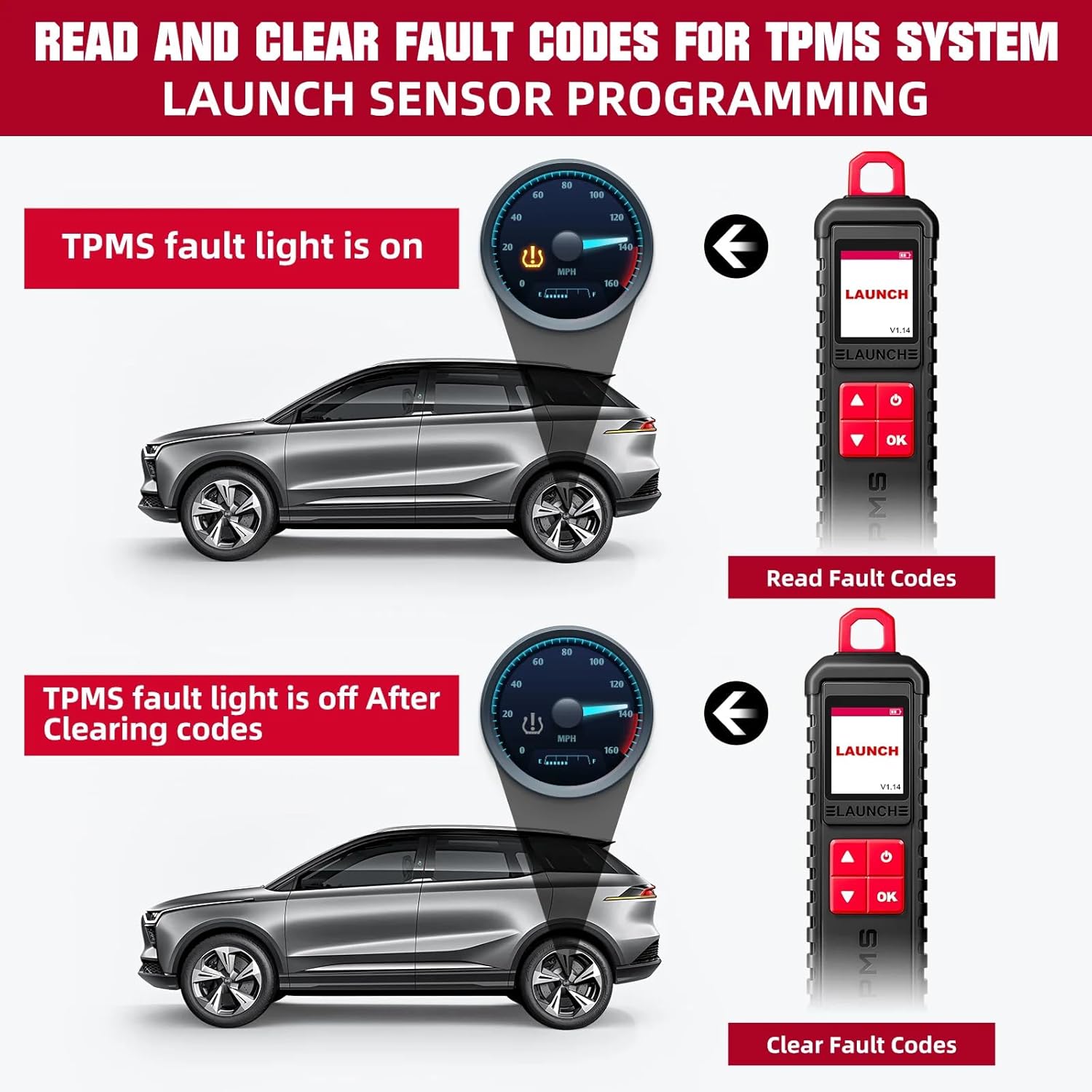
Figure 4.4: Process of reading and clearing TPMS fault codes.
- Pānuihia ngā Waehere Hapa: Access and display current and stored TPMS-related DTCs.
- Clear Fault Codes: Erase DTCs from the vehicle's ECU after repairs or sensor replacements.
5. Hototahi
5.1 Compatible LAUNCH X-431 Devices
The LAUNCH X-431 i-TPMS is designed to work with various LAUNCH X-431 intelligent diagnostic tools that feature an 8-inch or larger screen.

Figure 5.1: Compatible LAUNCH X-431 scanner models.
- LAUNCH X-431 PRO
- LAUNCH X-431 V/PRO V5.0
- LAUNCH X-431 PRO TT/DYNO
- LAUNCH X-431 PRO 3
- LAUNCH X-431 PRO3S+/PRO3S+ V5.0
- LAUNCH X-431 V+
- LAUNCH X-431 PRO3 ACE/APEX
- LAUNCH X-431 PAD III
- LAUNCH X-431 PAD V
- LAUNCH X-431 PAD VII
Tuhipoka: The i-TPMS requires a compatible LAUNCH diagnostic tablet (8-inch or above) for full functionality. It cannot be used for advanced functions if purchased separately without a compatible scanner.
5.2 Supported Vehicle Brands and Protocols
The i-TPMS supports over 98% of mainstream vehicles equipped with a TPMS system. For OBDII diagnostics, it is compatible with most cars built in 1996 or later, supporting various protocols:
- ISO 14230-4 (KWP2000)
- ISO 15765-4 (CAN)
- ISO 9141-2 (ISO)
- ISO 14229 (UDS)
- SAE J1850 (VPW & PWM)
- Original protocols of various manufacturers
For advanced functions like active tests, all system diagnostics, and maintenance services, it covers approximately 95% of car models, including:
- Ahia: Daewoo, Honda, JP Isuzu, Kia, Mazda, Mitsubishi, Nissan, SGM, Subaru, Suzuki, Toyota, Hyundai, Ssangyong.
- Ūropi: Aston Martin, Audi, Benz, BMW, Citroen, Ferrari, Fiat, Land Rover, Maserati, Opel, Porsche, Renault, Rover, Saab, Seat, Skoda, Smart, Sprinter, Volvo, VW, Peugeot.
- Amerika: Chrysler, USA-Ford, GM.
6. Tiaki
- Te horoi: Whakamahia he ngohengohe, damp cloth to clean the device. Avoid abrasive cleaners or solvents.
- Rokiroki: Whakaorangia te taputapu ki te waahi makariri, maroke atu i te ra tika me te wera nui.
- Tiaki Pūhiko: Hei whakaroa i te ora o te pākahiko, kaua e whakawetohia te pākahiko i ngā wā katoa. Utuhia i ia wā.
- Whakahōu Pūmanawa: Regularly check for and install software updates for both the i-TPMS device and any paired X-431 scanner or mobile application to ensure optimal performance and compatibility.
7. Te Raru
This section addresses common issues you might encounter with the LAUNCH X-431 i-TPMS.
| Raruraru | Take pea | Rongoā |
|---|---|---|
| Kaore te taputapu i te hiko. | He iti te pākahiko; he hapa te pūrere. | Charge the device fully. If issue persists, contact customer service. |
| Cannot activate sensor. | Sensor out of range; sensor faulty; incorrect frequency. | Ensure device is close to the sensor. Verify sensor type and frequency (315/433MHz). Check sensor battery. |
| Programming fails. | Sensor not a LAUNCH LTR RF sensor; device not properly connected to scanner/app. | Ensure you are using LAUNCH LTR RF sensors. Verify connection to X-431 scanner or i-TPMS app. |
| Relearn procedure unsuccessful. | Incorrect relearn procedure for vehicle; vehicle not in relearn mode. | Consult vehicle's service manual for correct relearn procedure. Ensure vehicle is in TPMS relearn mode. |
8. Whakatakotoranga
| Āhuahira | Taipitopito |
|---|---|
| Waitohu | Whakarewa |
| Tau tauira | X-431 i-TPMS (SDC447) |
| Taumaha Tūemi | 2.2 pauna |
| Supported Sensor Frequencies | 315/433MHz (LAUNCH sensors only) |
| Operating System (for paired scanner) | Windows 10 (as per product data, likely refers to scanner OS) |
| UPC | 810139309857 |
| Kaihanga | ITCARDIAG-Official |
9. He aha kei roto i te Pouaka
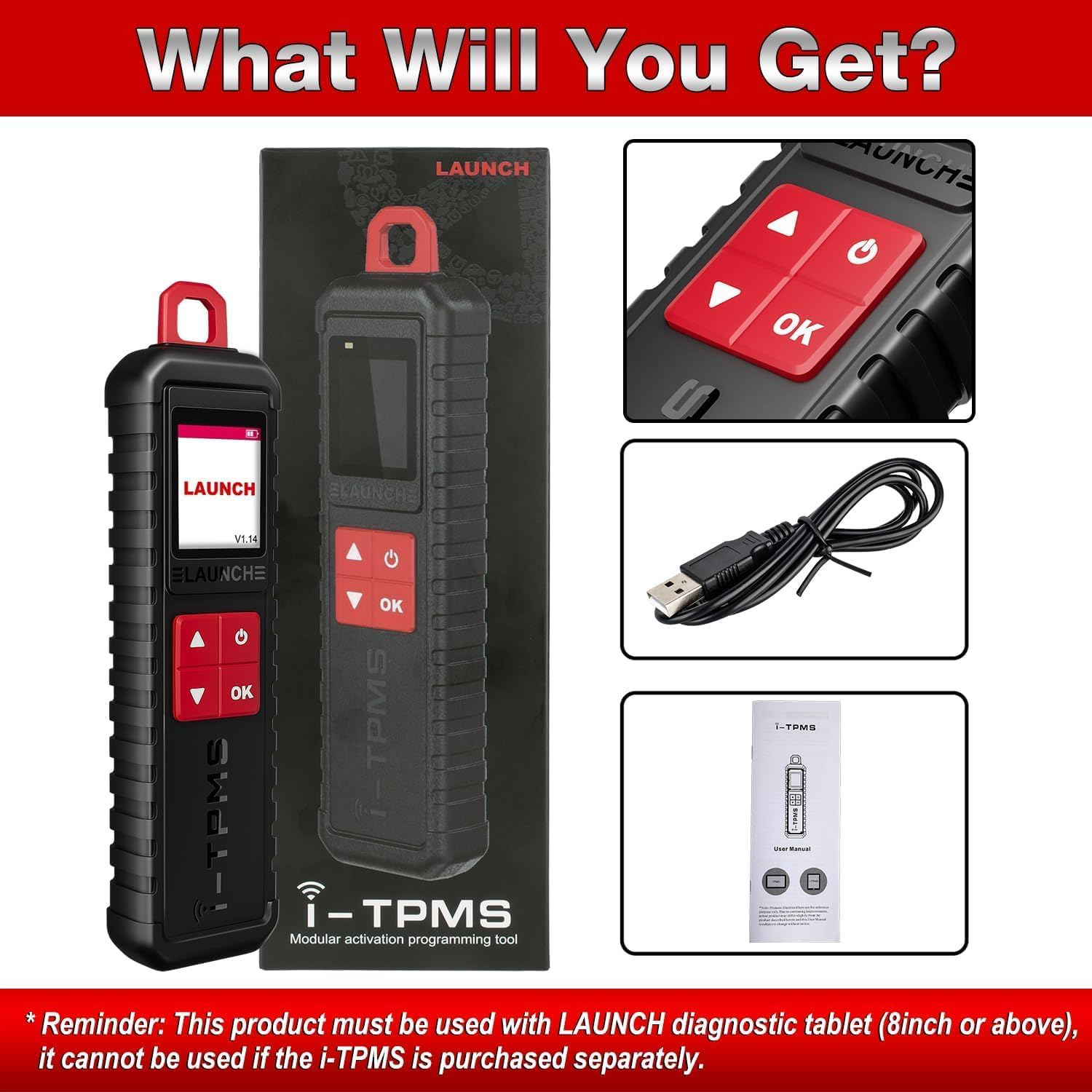
Whakaahua 9.1: Nga ihirangi mokete.
- 1 x LAUNCH X-431 i-TPMS Device
- 1 x USB Utaura Whakatau
- 1 x Manual Kaiwhakamahi (tenei tuhinga)
10. Pūtāhui me te Tautoko
The manufacturer offers a free replacement or return service within 30 days of purchase. For any issues encountered during installation or use, please contact customer service for assistance.
For further inquiries or support, please refer to the contact information provided with your purchase or visit the official LAUNCH webpae.
Online repair resources, including operating skills, DTC help, tech handbook, repair cases, and a tire pressure maintenance database, are available to assist with diagnosis and repair.


