Kupu Whakataki
Welcome and thank you for choosing the HTC Wireless Earbuds TWS6 5.3. This manual provides detailed instructions to help you set up, operate, and maintain your earbuds for optimal performance. Please read this manual thoroughly before using your device.
Ihirangi mokete
Tena koa tirohia kei roto katoa nga taonga kei roto i to kete:
- 2 x HTC Earbuds
- 1 x USB-C Taura Whakamaa
- 1 x Puhi utu
- 2 Ngā Takirua x Ngā Tipi Taringa Rapa (S/L)
- 1 x Quick Start Guide (physical document)

Ka mutu te huaview
Familiarize yourself with the components of your HTC TWS6 earbuds.
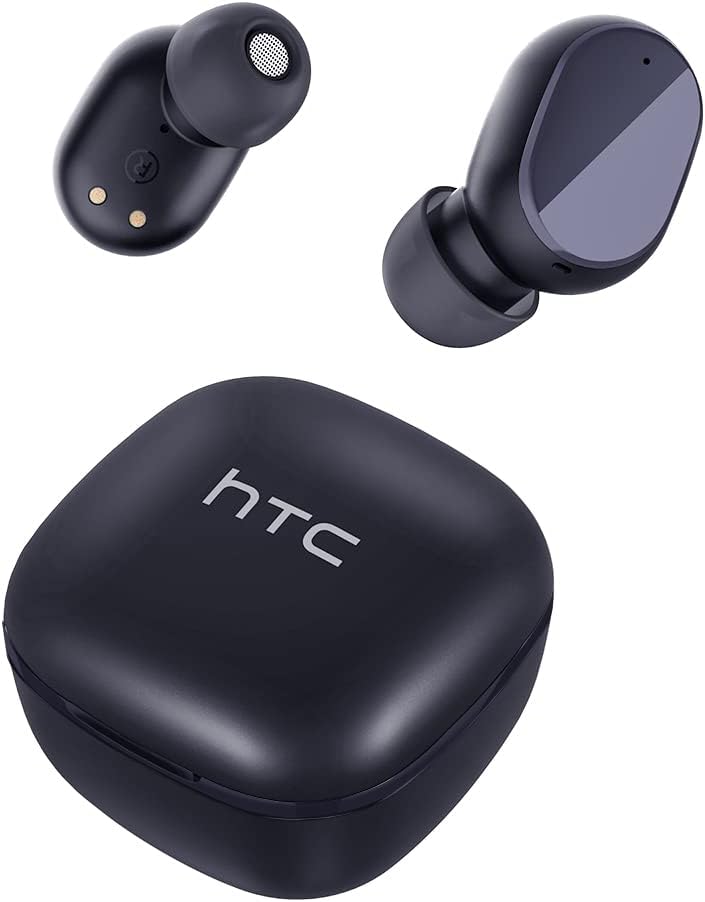

Tatūnga
Te Whakataki i nga Pukarongo me te Puhi
I mua i te whakamahi tuatahi, whakakiia katoatia nga pukoro taringa me te putea utu.
- Whakanohoia nga purongo ki roto i te pukoro utu.
- Honoa te taura USB-C ki te tauranga utu i runga i te pouaka me te pūtake hiko.
- Ko te rama tohu kei runga i te keehi ka whakaatu i te mana utu.
- A full charge provides approximately 5 hours of playback for earbuds and up to 22 hours with the charging case.

Tauira Nihokikorangi
Whāia ēnei mahi hei hono i ō pane taringa ki tō pūrere:
- Whakatuwherahia te putea utu. Ka uru aunoa nga taringa ki te aratau takirua.
- I runga i to taputapu (waea atamai, papa, aha atu), whakaahei i a Nihokikorangi.
- Rapua "HTC TWS6" i roto i te rārangi o ngā taputapu Nihokikorangi e wātea ana.
- Select "HTC TWS6" to connect. A voice prompt will confirm successful pairing.

E mau ana i nga Paorooro
For optimal sound quality and comfort, choose the correct eartip size and wear the earbuds properly.
- Select the eartips (S, M, L) that best fit your ears.
- Whakauruhia marietia ia purongo ki roto i to takere taringa.
- Rotate slightly to ensure a secure and comfortable fit.
Nga Tohutohu Whakahaere
Mana Paa Ataata
The HTC TWS6 earbuds feature intuitive touch controls:
- Purei/Tatari Puoro: Pao kotahi ki runga i tetahi purongo.
- Riu Panuku: Pao rua ki te purongo matau.
- Riu o mua: Pao rua ki te purongo maui.
- Runga Runga: Takitoru te pao ki te purongo katau.
- Raro Raro: Takitoru te pao ki te taha maui.
- Whakautu/Whakamutu Waea: Pao kotahi ki runga i tetahi purongo.
- Whakakore Waea: Patohia me te pupuri i tetahi purongo mo te 2 hēkona.
- Whakahohe i te Kaiawhina Reo: Patohia me te pupuri i tetahi purongo mo te 3 hēkona.

Te Hiko / Whakaweto
The earbuds automatically power on when removed from the charging case and power off when placed back into the case and the lid is closed.
To manually power on, press and hold the touch area for 3 seconds. To manually power off, press and hold the touch area for 5 seconds.
Te Tiaki me te Tiaki
Te horoi
Horoia ō pane taringa me te pouaka utu i ia wā kia pai ai te mahi me te akuaku.
- Whakamahia he kakahu ngohengohe, maroke, korekore ki te muru i nga purongo me te putea utu.
- Tangohia nga taringa ka horoi ki te hopi ngawari me te wai, ka maroke i mua i te whakapiri ano.
- Kaua e whakamahi i nga kai horoi me nga whakarewa.
Ātete Wai (IPX5)
The HTC TWS6 earbuds are IPX5 sweatproof, meaning they are resistant to splashes and sweat.
Tuhipoka: They are not designed for submersion in water. Avoid exposing them to heavy rain, showering, or swimming. Ensure the charging port is dry before charging.

Rokiroki
Mena karekau e whakamahia, penapenahia nga purongo ki roto i to pukoro hei tiaki kia mau tonu te utu.
Whakaorangia ki te waahi makariri, maroke atu i nga wera nui.
Raparongoā
| Raruraru | Rongoā |
|---|---|
| Karekau nga taringa e hono ana | Ensure earbuds are charged. Turn off and on Bluetooth on your device. Forget "HTC TWS6" from your device's Bluetooth list and re-pair. |
| Kotahi anake te pukoro e mahi ana | Whakahokia ngā pane taringa e rua ki roto i te pouaka utu, katia te taupoki, kātahi ka whakatuwherahia anō. Kia tino utua ngā pane taringa e rua. |
| He iti te oro, he ngoikore ranei te oro | Adjust volume on your device. Clean eartips and earbud mesh. Try different eartip sizes for a better seal. |
| Take utu | Check USB-C cable and power adapter. Ensure charging contacts on earbuds and case are clean and dry. |
| Ka momotu pinepine ngā taringa | Ensure your device is within the Bluetooth range (approx. 10 meters/33 feet) and there are no significant obstructions. |
Mena kei te haere tonu nga take, tena koa whakapiri atu ki te tautoko a nga kaihoko.
Whakatakotoranga
| Āhuahira | Taipitopito |
|---|---|
| Ingoa Tauira | TWS6 |
| Putanga Nihokikorangi | 5.3 |
| Hangarau Hononga | Ahokore |
| Hangarau Whakawhitiwhiti Ahokore | Nihokikorangi |
| Te ora o te Pūhiko (Ngā taringa) | 5 haora |
| Wā Takaro Tapeke (me te Puhi) | 22 haora |
| Wā Whakatau (Puhi) | Tata ki te 5 haora |
| Taumata Atete Wai | IPX5 (Tarewerawera) |
| Tikanga Mana | Paa |
| hopuoro | Yes (with ENC) |
| Pūrere Hototahi | Android and iOS Smartphones, Gaming Devices |
| Rauemi | Kirihou |
| Taumaha Tūemi | 3.17 hekere |
| UPC | 734257974554 |
| Mana Haruru | Whakakore Haruru urutau |
| Momo Atekōkiri Ororongo | Atekōkiri Hihiko |
| Te aukati | 199.99 Aue |
Pūtāhui me te Tautoko
HTC provides a 360-day warranty extension for this product, as detailed in the product information.
For technical assistance, warranty claims, or any inquiries, please contact HTC customer support.
Tautoko Kiritaki: Refer to the contact information provided in your product packaging or visit the official HTC webpaetukutuku mō ngā kōwhiringa tautoko hou rawa atu.


