1. Kupu Whakataki
This manual provides essential information for the proper use and maintenance of your HOTWAV R9 Pro Rugged Tablet. Please read it thoroughly before operating the device to ensure optimal performance and longevity.

Whakaahua: Mua me muri view of the HOTWAV R9 Pro Rugged Tablet, highlighting its robust design and 11-inch display.
2. He aha kei roto i te Pouaka
Manatokona kei roto katoa nga taonga kei roto i te kete:
- 1x HOTWAV R9 Pro Rugged Tablet
- 1x Pukapuka Ā-ringa (tēnei tuhinga)
- 1x Pouaka Taapapa
- 1x Explosion-proof Film
- 1x USB Momo-C Cable
- 1x OTG Cable
3. Hua Neke Atuview me nga waahanga matua
3.1. Rugged Design and Durability
The HOTWAV R9 Pro is engineered for extreme environments, featuring IP68/IP69K waterproof and dustproof ratings, and MIL-STD-810H certification for shock resistance. Its construction includes a double-shot TPU+PC+glass fiber back cover for enhanced protection.

Image: Visual representation of the tablet's ruggedness, showing it submerged in water, covered in dust, and surviving a drop, alongside its LED camping light in use.
3.2. Pūhiko me te Whakatau
Equipped with a large 20080mAh battery, the R9 Pro offers extended usage times. It supports 20W fast charging to quickly replenish power.

Image: Diagram illustrating the 20080mAh battery capacity and 20W fast charging capability of the tablet.
3.3. Whakaatu
The tablet features an 11-inch FHD+ display with a resolution of 1200x1920 pixels and 450cd/m² brightness. It is protected by Corning Glass 3 and supports glove touch functionality, making it suitable for outdoor use.

Image: The tablet's 11-inch display showing various applications, alongside icons indicating FHD+ resolution, 60Hz refresh rate, and dual SIM support.
3.4. Mahinga me te Rokiroki
Powered by an Octa-Core Unisoc T606 processor, the R9 Pro includes 20GB RAM (6GB physical + 14GB virtual) and 256GB internal storage. Storage can be expanded up to 2TB using a T-flash card.

Image: A visual representation of the Unisoc T606 octa-core chipset, detailing 20GB RAM and 256GB ROM with 2TB expandable memory.
3.5. Pūnaha Kāmera
The tablet features a 64MP rear camera with PDAF and f/1.8 aperture, and a 16MP front camera for photography and video calls.

Whakaahua: Examples of photos taken with the 64MP rear camera and the 16MP front camera, demonstrating their capabilities.
3.6. Integrated Camping Maama
A unique 6W camping light with 350 lumens and 246 LEDs is integrated into the tablet, providing illumination for various outdoor activities or emergencies.
4. Tatūnga
4.1. Te Whakataki i te Papa
Before first use, fully charge the tablet using the provided USB Type-C cable and a compatible 20W power adapter (not included). Connect the cable to the tablet's USB-C port and the adapter to a power outlet. The charging indicator will show the charging status.
4.2. Installing SIM and T-flash Cards
The tablet supports dual SIM cards and a T-flash (microSD) card for expandable storage.
- Locate the SIM/SD card tray on the side of the tablet.
- Whakamahia te taputapu ejector SIM kua whakaratohia hei whakatuwhera i te paepae.
- Carefully place your Nano-SIM cards and/or T-flash card into the designated slots. Ensure correct orientation.
- Pehia ata te paepae ki roto i te papa kia pao noa ki tona waahi.
4.3. Te Whakakaha/Weto
- Hei Whakahiko: Press and hold the Power button until the HOTWAV logo appears.
- Hei Whakaweto: Patohia me te pupuri i te paatene Mana kia puta ra ano te tahua whiringa hiko, ka kowhiri i te "Power Off".
- Hei Tīmata anō: Pēhia, pupuritia te pātene Mana kia puta rā anō te tahua kōwhiringa mana, kātahi ka tīpakohia "Tīmata Anō".
5. Nga Tohutohu Whakahaere
5.1. Pūnaha Whakahaere Android 14
The HOTWAV R9 Pro runs on Android 14, offering a user-friendly interface and access to a wide range of applications via the Google Play Store.
5.2. Whakaterenga
Navigate the tablet using touch gestures:
- Tap: Tīpakohia tētahi tūemi.
- Swipe: Panuku i roto i nga mata, rarangi ranei.
- Tiki: Topa atu, neke atu ranei i runga i nga whakaahua me web wharangi.
- Panui Roa: Uru ki nga tahua horopaki, nukuhia ranei nga ata.
5.3. Glove Touch Mode
The display supports glove touch, allowing you to operate the tablet while wearing gloves. This feature is automatically enabled.
5.4. Face Unlock
For convenient and secure unlocking, set up Face Unlock:
- Haere ki Tautuhinga > Haumarutanga me te tūmataiti > Wewete kanohi.
- Whaia nga tohutohu i runga mata hei rehita i to kanohi.
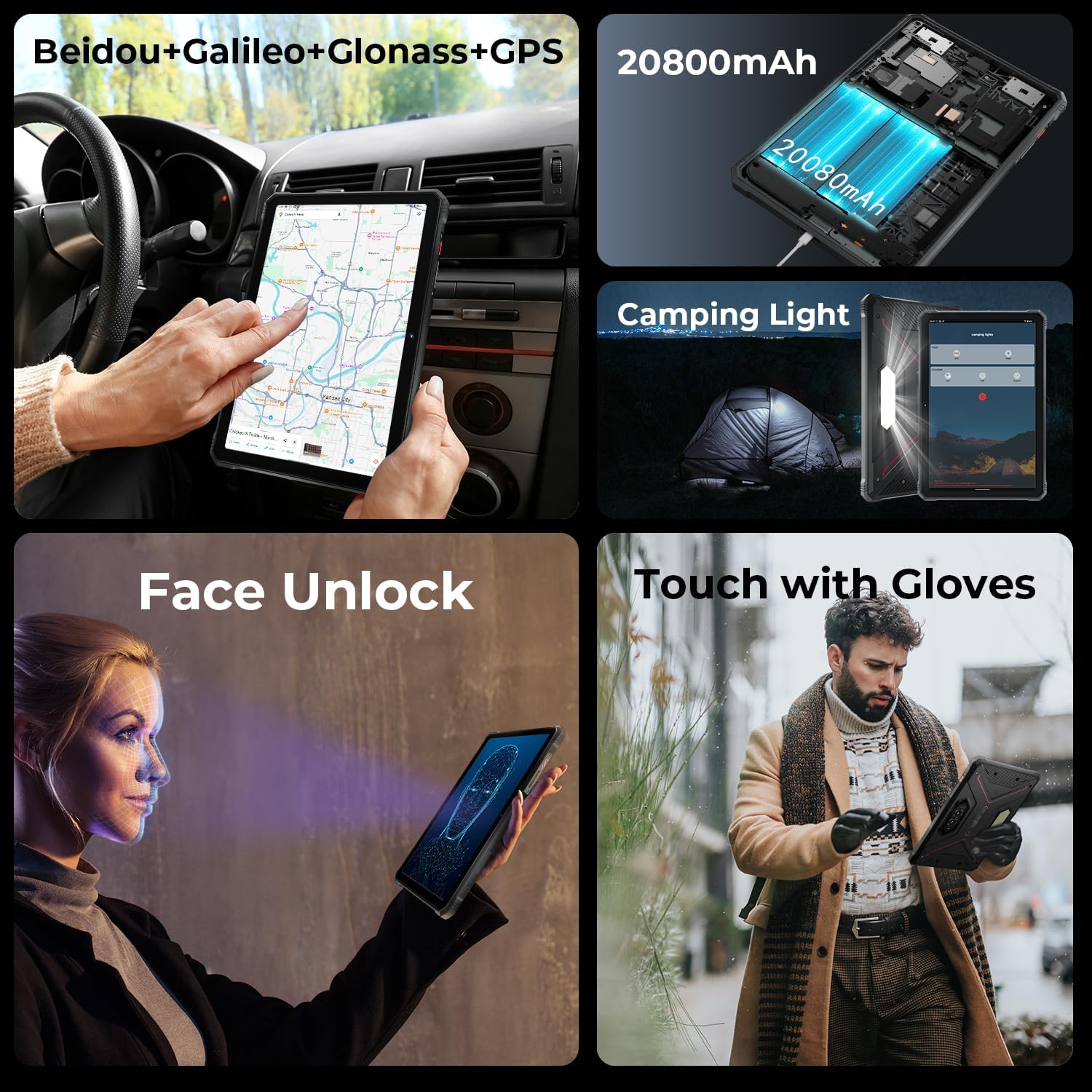
Image: A collage showing the tablet's GPS navigation, camping light in action, face unlock in progress, and a user operating the tablet with gloves.
5.5. Dual SIM Functionality
The tablet supports two SIM cards, allowing you to manage two different phone numbers or network providers simultaneously. You can configure preferred SIM for calls, messages, and data in Tautuhinga > Whatunga me te ipurangi > Nga SIM.
6. Whakamahinga Camera
The HOTWAV R9 Pro is equipped with a 64MP rear camera and a 16MP front camera.
- Opening the Camera: Tap the Camera icon on the home screen or app drawer.
- Huri Kāmera: Patohia te ata whakawhiti kamera hei takahuri i waenga i nga kamera o mua me muri.
- Whakaahua: Patohia te paatene marumaru hei hopu pikitia.
- Hopu Ataata: Hurihia ki te aratau ataata ka paato i te paatene rekoata hei timata/whakamutu te tuhi.
- Ngā Tautuhinga Kāmera: Access various settings like resolution, flash, and modes from within the camera app.
7. Camping Light Functionality
The integrated 6W camping light provides powerful illumination.
- Activating the Light: Ko te camping light can typically be activated via a dedicated button (if present) or through a quick settings toggle in the notification panel.
- Adjusting Brightness/Modes: Some models may offer adjustable brightness levels or different lighting modes. Refer to the on-screen controls once the light is activated.
8. Hononga
- Wi-Fi: Tūhono ki ngā whatunga ahokore mā Tautuhinga > Whatunga me te ipurangi > Ipurangi.
- Nihokikorangi: Hono atu ki ngā taputapu Nihokikorangi (ngā pane whakarongo, ngā kaikorero) mā Tautuhinga > Nga taputapu hono > Nga manakohanga hononga > Nihokikorangi.
- GPS: The tablet supports Beidou, Galileo, Glonass, and GPS for accurate location services. Ensure location services are enabled in Tautuhinga > Tauwāhi.
9. Tiaki
- Te horoi: Whakamahia he ngohengohe, damp cloth to clean the tablet's surface. Avoid harsh chemicals or abrasive materials.
- Puranga wai: While waterproof, ensure all ports are securely closed before exposing the tablet to water. After water exposure, dry the tablet thoroughly, especially the charging port, before charging.
- Te pāmahana: Avoid exposing the tablet to extreme temperatures (hot or cold) for prolonged periods.
- Rokiroki: When not in use for extended periods, store the tablet in a cool, dry place.
10. Te Raru
| Raruraru | Rongoa pea |
|---|---|
| Kaore te papa e kaha ana. | Me whakarite kei te utaina te pākahiko. Hono atu ki te rihi mo te iti rawa 30 meneti. Ki te kore tonu e aro, mahia he whakaara ano ma te pupuri i te paatene Hiko mo te 10-15 hēkona. |
| Te mahi puhoi. | Close unused applications. Clear cache regularly. Consider uninstalling unnecessary apps. Restart the tablet. |
| Nga take hononga Wi-Fi. | Whakawetohia, whakakāhia hoki te Wi-Fi. Tīmata anō i tō pouara. Warewaretia te whatunga ka hono anō. |
| Ka tere te pau o te pākahiko. | Reduce screen brightness. Close background apps. Disable unused features like GPS, Bluetooth, or Wi-Fi when not needed. Check battery usage in settings to identify power-hungry apps. |
| Kāore te kāmera e mahi. | Ensure the camera app has necessary permissions. Restart the tablet. Clear the camera app's cache and data in Tautuhinga > Taupānga. |
11. Whakatakotoranga
| Āhuahira | Taipitopito |
|---|---|
| Tauira | R9 Pro |
| Pūnaha Mahi | Android 14 |
| Rahi Whakaatu | 11 Inihi |
| Whakatau Mata | 1200 x 1920 pika (FHD+) |
| Tukatuka | Unisoc T606 Octa-Core (1.6 GHz) |
| Kaitukatuka Whakairoiro | Mali G57 MP1@650MHz |
| RAM | 20GB (6GB tinana + 14GB mariko) |
| Rokiroki Roto | 256GB |
| Rokiroki Whakawhanui | Up to 2TB (T-flash card) |
| Kāmera Whakamuri | 64MP (PDAF, f/1.8 aperture) |
| Kāmera Mua | 16MP |
| Pūhiko Raukaha | 20080mAh |
| Te utu | 20W Utu Tere |
| Ruggedness | IP68/IP69K Waterproof & Dustproof, MIL-STD-810H |
| Hononga | Dual SIM, Wi-Fi, Bluetooth, GPS (Beidou, Galileo, Glonass) |
| Camping Maama | 6W (350 lumens, 246 LEDs) |
| Ahu (LxWxH) | 10.61 x 0.7 x 7.16 inihi |
| Taumaha | 2.35 pauna |
12. Pūtāhui me te Tautoko
HOTWAV offers comprehensive after-sales service for the R9 Pro Rugged Tablet:
- Kaupapa Whakahoki: 30-day no-reason return.
- Pūtāhui: 2-tau free pūtāhui.
- Tautoko Hangarau: Tautoko hangarau ora.
- Ratonga Ipurangi: 24/7 ratonga kiritaki ipurangi.
For support, please contact HOTWAV customer service through their official channels or visit their webpae.


