Ka mutu te huaview
The Twotrees TS2-40 Max is a high-power laser engraver and cutter machine designed for precision and versatility. Featuring a 40W laser module, it is capable of engraving and cutting a wide range of materials including wood, acrylic, glass, metal, and more. Its large working area of 35.43" x 17.72" (900mm x 450mm) accommodates diverse creative and industrial projects. The machine incorporates advanced LD+FAC+C lens technology for ultra-fine compression, achieving an engraving accuracy of 0.01mm and a maximum engraving speed of 6000mm/min.
Key features include a one-click power shift between 20W and 40W, multiple safety protection devices such as flame detection, tilt protection, and a safety cover for UV filtration, and an emergency stop button. It supports various operation methods including APP, offline, and online control, and is compatible with MacOS and Windows systems. The TS2-40 Max is engineered for ease of use, offering automatic laser lift and touch auto-focus functions.

Image: The Twotrees TS2-40 Max laser engraver, showcasing its large bed size and the laser module. Various finished products like engraved wood, a scorpion model, and customized drinkware are displayed in the foreground, illustrating the machine's versatility.

Image: A visual comparison highlighting the significantly larger engraving area of the TS2-40 Max (17.72" x 35.43" or 450x900mm) compared to typical smaller engravers (15.75" x 15.75" or 400x400mm), indicating a 153.1% increase in size.
Aratohu Tatūnga
1. Te Wetewete me te Tirotiro
Carefully unpack all components from the packaging. Verify that all parts listed in the packing list are present and undamaged. Report any missing or damaged parts to customer support immediately.
2. Huihuinga
Follow the detailed assembly instructions provided in the separate assembly manual. Key steps typically include:
- Assemble the main frame components, ensuring all screws are securely tightened.
- Install the X and Y axis belts. Ensure proper tensioning using the belt tension adjustment mechanism.
- Mount the laser module onto the gantry.
- Connect all necessary cables, utilizing the shifting chains for organized cable management.
- Ensure the Y-axis motors are independently secured for stability and synchronization.
3. Tāuta Pūmanawa
The TS2-40 Max supports popular laser engraving software such as LaserGRBL (for Windows) and LightBurn (common for both MacOS and Windows). Download and install the recommended software from the official Twotrees website or the software provider's webpae.
- Install the necessary drivers for your operating system (MacOS/Windows).
- Connect the machine to your computer via USB, or configure Wi-Fi connectivity if available.

Image: The laser engraver connected to a desktop computer running LightBurn software, a laptop, and mobile devices, illustrating its multi-platform compatibility and various control options (WiFi, TF card, USB).
4. Initial Calibration and Focus
Before first use, perform initial calibration and focus adjustments:
- Place a test material on the working bed.
- Utilize the automatic laser lift module to adjust the laser distance.
- Engage the laser touch auto-focus function for precise focal length setting.
Nga Tohutohu Whakahaere
1. Te Hiko / Whakaweto
Connect the power adapter to the machine and a suitable power outlet. Press the main power button to turn on the machine. The emergency stop button is prominently located for immediate power cut-off in case of an emergency.
2. Te Whakarite Rawa
Ensure the material to be engraved or cut is clean, flat, and securely placed on the honeycomb working bed. The TS2-40 Max can process a wide variety of materials, including:
- Wood (plywood, bamboo)
- Acrylic (black, clear)
- Glass (blackened surface required for engraving)
- Metal (stainless steel)
- Ceramic, Stone, Food, Plastic, Leather, Cardboard
- Round objects (requires additional roller accessory, sold separately)

Image: A collage of various items demonstrating the machine's capability to engrave and cut different materials, including a wooden model, phone cases, tumblers, a dog tag, glass cups, and a decorative wooden gnome.
3. Whakaritenga Mana Taiaho
The TS2-40 Max features a one-click power shift function, allowing seamless switching between 20W and 40W laser power. Select the appropriate power setting based on the material type and desired engraving/cutting depth.

Image: A close-up of the laser module showing a switch for one-click power shifting between 20W and 40W, indicating the machine's dual power capability.
4. Te Tukanga Whakairo/Tapahi
- Te Whakarite Hoahoa: Create or import your design in the chosen software (e.g., LightBurn).
- Tautuhinga Tawhā: Adjust engraving/cutting parameters such as speed, power, and passes according to the material and desired outcome. Refer to material test guides for optimal settings.
- Turanga: Use the software to position your design on the virtual workspace, aligning it with the physical material on the machine bed.
- Tīmata Mahi: Initiate the engraving or cutting process from the software interface. The machine will begin executing the design.

Image: Demonstrates the cutting power of the 40W laser head, showing clean cuts through 20mm thick plywood, 12mm thick black acrylic, and 0.1mm thick stainless steel in a single pass.
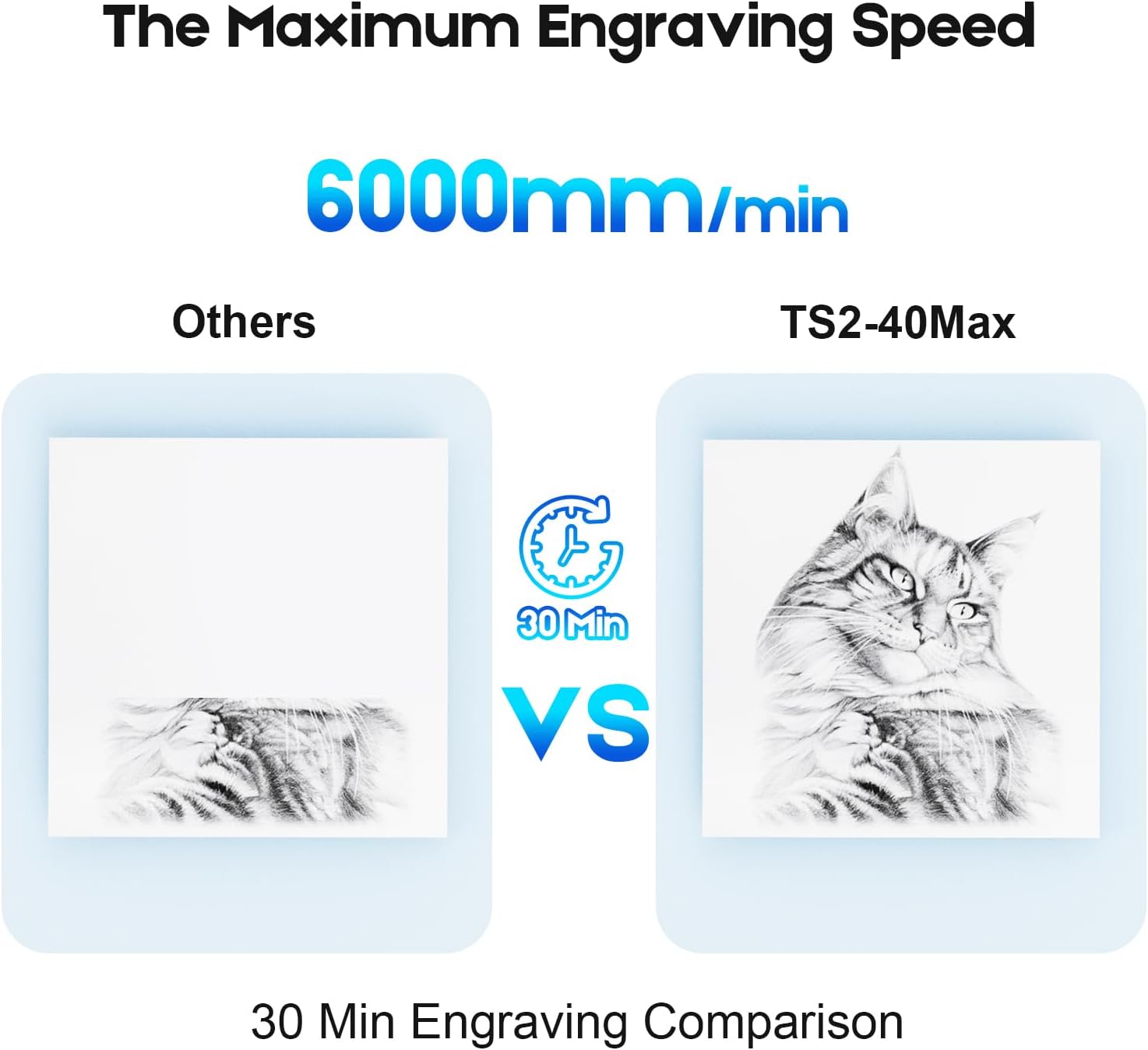
Image: A visual comparison showing the engraving speed, with the TS2-40 Max completing a detailed cat engraving in 30 minutes, significantly faster than other machines for the same task, highlighting its 6000mm/min maximum engraving speed.
5. Whakatupato Haumaru i te wa e mahi ana
Always prioritize safety when operating the laser engraver:
- Parenga kanohi: Always wear the provided safety goggles to protect your eyes from laser radiation. The laser safety cover filters 97% of UV rays.
- Rapunga mura: The machine is equipped with a flame detection alarm system. If a flame is detected, the machine will alarm and stop operation.
- Trigger Protection: If the machine measures trigger protection within 10 seconds of running, the laser light will stop to prevent burning objects.
- Tilt/Drop Protection: If the machine tilts, turns over, or drops more than 15 degrees, the laser head will automatically stop to prevent accidents.
- Whakahau: Ensure adequate ventilation in your workspace to dissipate fumes and smoke generated during engraving/cutting.
- Tirohanga: Kaua rawa e waiho te miihini kia kore e tiakina i te wa e mahi ana.
Te tiaki
Regular maintenance ensures optimal performance and extends the lifespan of your Twotrees TS2-40 Max.
1. Cleaning the Laser Lens
Periodically inspect and clean the laser lens to ensure clear laser beam transmission. Use a lint-free cloth and a specialized lens cleaning solution. Avoid abrasive materials that could scratch the lens.
2. Te Whakarerekētanga o te Kukū o te Whitiki
The X/Y axes are equipped with belt tension mechanisms. Over time, belts may stretch or loosen. Check belt tension regularly and adjust as needed to maintain engraving accuracy and smooth movement. Belts should be taut but not overly tight.
3. Whakapai Whanui
Keep the machine free from dust, debris, and material residue. Use a soft brush or compressed air to clean the rails, motors, and working bed. Accumulated debris can affect machine movement and performance.
Raparongoā
This section addresses common issues you might encounter with your TS2-40 Max laser engraver.
1. Laser Not Firing or Weak Output
- Taki Hiko: Ensure the machine is powered on and connected correctly.
- Maama mo te Arotahi: A dirty laser lens can significantly reduce output. Clean the lens as described in the Maintenance section.
- Arotahi: Incorrect focus will result in weak or no engraving. Re-focus the laser using the auto-focus function.
- Tautuhinga Pūmanawa: Verify that laser power settings in your software are appropriate for the material.
2. Engraving/Cutting Inaccuracy or Skipping
- Rikiwa Whitiki: Loose X or Y axis belts can cause inaccurate movement. Adjust belt tension.
- Material Secureness: Ensure the material is firmly secured and does not shift during operation.
- Pūmautanga Miihini: The machine should be placed on a stable, level surface.
- Ngā Take Pūmanawa/Atekōkiri: Ensure your software and drivers are up to date.
3. Machine Not Connecting to Computer/App
- Hononga USB: Whakamātauria tētahi tauranga USB rerekē, taura rānei.
- Wi-Fi/Network: Verify network settings and ensure the machine and device are on the same network.
- Kaitaraiwa: Reinstall or update the necessary drivers.
- Pūmanawa: Restart the engraving software and the machine.
4. Safety Alarm Triggered
- Rapunga mura: Check for any signs of fire or excessive smoke. Immediately stop operation and address the cause.
- Tilt/Drop Sensor: Ensure the machine is stable and has not been moved or tilted beyond its operational limits.
- Kati ohorere: If the emergency button was pressed, reset it before attempting to restart.
Whakatakotoranga
| Āhuahira | Taipitopito |
|---|
| Tauira No. | TS2-40 Max |
| Tae | Pango & Whero |
| Mahinga Miihini | Sheet Metal + Aluminium Profile + Acrylic |
| Taumaha Kupenga Hua | 7.6 KG |
| Taumaha Katoa Hua | 11.0 KG |
| Nga Rahi Te Taapiri | 1255 x 321 x 220 mm |
| Hunga Hua | 735 x 1230 x 190 mm (28.94 x 48.43 x 7.48 inihi) |
| Awhe Mahi | 450 x 900 mm (17.7" x 35.4") |
| Pūmanawa Programming | LaserGRBL (Windows), Lightburn (Common), etc. |
| X/Y-axis Positioning Accuracy | 0.1mm |
| Te Whakairo Tika | 0.01mm |
| Tere Whakairo Morahi | 6000mm/min |
| Whakaterenga Morahi | 1000mm/s² |
| Pūnaha Tautoko | MacOS / Windows |
| Reo Pūmanawa | Chinese/English/Italian/French/German |
| TF Memory Card / USB Port | Tautokohia |
Pūtāhui me te Tautoko
Nga korero Whakaputanga
Specific warranty terms and conditions for the Twotrees TS2-40 Max laser engraver are provided by the manufacturer, Shenzhen TwoTrees Technology Co., Ltd., or the authorized seller at the time of purchase. Please refer to your purchase documentation or contact the seller directly for detailed warranty coverage, duration, and claim procedures.
Tautoko Kiritaki
For technical assistance, troubleshooting, or any inquiries regarding your Twotrees TS2-40 Max, please contact Twotrees customer support. Contact information can typically be found on the official Twotrees webpae, na roto ranei i to turanga hoko.
Kaihanga: Shenzhen TwoTrees Technology Co., Ltd.
Rauemi ipurangi: Visit the official Twotrees webpae tukutuku mō ngā FAQ, ngā tango pūmanawa, me ngā rauemi tāpiri.


