1. Kupu Whakataki
Thank you for choosing a Whirlpool appliance. This user manual provides essential information for the safe and efficient operation, installation, and maintenance of your new Whirlpool WPM 97W ADS IT washing machine. Please read these instructions carefully before using the appliance and keep them for future reference.
2. Nga korero haumaru
Haumaru Whānui:
- Me whakarite kia tika te turanga o te taputapu.
- Kaua e tukua nga tamariki ki te whakahaere, ki te takaro ranei ki te miihini horoi.
- Kia matara atu nga taonga takai i nga tamariki.
- Kaua e pa ki te taputapu me nga ringa makuku me nga waewae.
- Wewetehia te taputapu i mua i te horoi, te tiaki ranei.
Haumarutanga Tāuta:
- Tangohia ngā pūtu kawe katoa i mua i te whakamahinga. Ki te kore e pērā, ka kino rawa atu.
- Ensure the appliance is level to prevent excessive vibration and noise.
- Connect to a cold water supply only.
- Kaua e whakamahi i nga taura toronga me nga taapiri maha.
3. Hua Neke Atuview
Nga waahanga matua
- Hangarau 6th SENSE: Intelligent sensors automatically adapt time, energy, and water based on the load, ensuring optimal results with maximum resource savings.
- HomeWhiz: Control the washing machine remotely with the HomeWhiz app. Start cycles, receive notifications, and customize settings from anywhere.
- AutoDose: Automatically dispenses detergent and fabric softener for each cycle. Provides up to 26 washes with a single refill, preventing waste.
- Sense Wash: Three intelligent sensors adapt the program and duration based on fabric type, soil level, and load quantity.
- Adaptive Wash: The washing machine learns from your habits and optimizes results based on your feedback, providing personalized care for each cycle.
Waehanga

Whakaahua 1: Mua view of the Whirlpool WPM 97W ADS IT washing machine with the loading door open, showing the drum interior and control panel.

Whakaahua 2: Kati-ake view of the detergent and fabric softener dispenser drawer, highlighting the AutoDose compartments.

Whakaahua 3: Taipitopito view of the washing machine's stainless steel drum interior, showing the paddles and water jets.
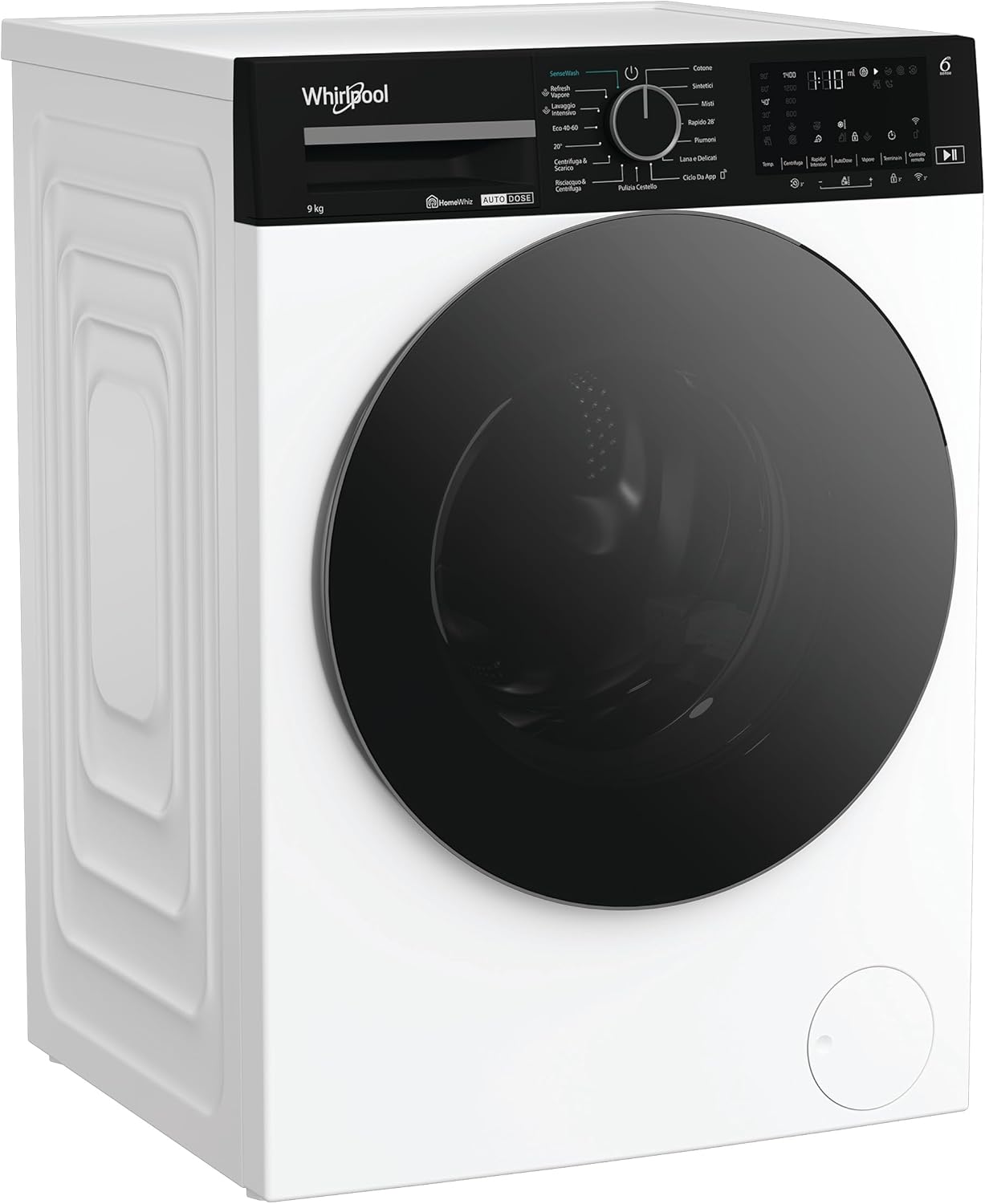
Whakaahua 4: Mua view of the Whirlpool WPM 97W ADS IT washing machine with the loading door closed, displaying its sleek design.
4. Tatūnga me te Tāuta
4.1 Te Wetewete
- Kia ata tango i nga taonga kapi katoa.
- Remove the transport bolts located at the rear of the machine. These bolts secure the drum during transit and must be removed before operation. Keep them for future transport.
- Monohia nga rua ki nga potae kirihou kua whakaratohia.
4.2 Turanga
- Whakanohoia te miihini horoi ki runga i te mata papatahi, pumau.
- Adjust the leveling feet to ensure the appliance is perfectly stable and level. Use a spirit level to verify.
- Me whakarite he waahi tika huri noa i te miihini mo te hau me te uru.
4.3 Hononga Wai me te Hiko
- Tūhonohia te ngongo ngongo wai ki te tap wai matao me te miro 3/4". Kia mau te hononga kia kore e pakaru.
- Position the drain hose into a standpipe or over the edge of a sink, ensuring it is securely fixed to prevent displacement during draining. The height of the drain should be between 65 cm and 100 cm.
- Monohia te taura hiko ki roto i te putanga hiko kua tu. Me whakarite te voltage me te auau ki nga whakaritenga o to taputapu.
4.4 Whakamahi Tuatahi
- Before the first wash, run a short cycle (e.g., 'Rinse & Spin') without laundry and detergent to clean the drum and remove any manufacturing residues.
5. Nga Tohutohu Whakahaere
5.1 Uta horoi horoi
- Whakatuwheratia te tatau uta.
- Load laundry into the drum, ensuring not to overload the machine. Leave enough space for the clothes to tumble freely.
- Katia te tatau kia pao noa.
5.2 Adding Detergent and Softener (AutoDose)
- Pull out the detergent dispenser drawer (Figure 2).
- Fill the detergent compartment with liquid detergent and the softener compartment with fabric softener. The AutoDose system will automatically dispense the correct amount for each cycle.
- For manual dosing or specific additives, refer to the markings in the dispenser.
- Whakahokia te pouaka toha ki roto rawa.
5.3 Te Kowhiri i te Papatono
- Turn the program selector knob to choose the desired washing program (e.g., Cotton, Synthetics, Delicates, Eco 40-60).
- Ka whakaatu te mata i te pāmahana taunoa me te tere hurihuri mō te hōtaka kua tīpakohia.
5.4 Special Functions and Options
- Te pāmahana: Press the temperature button to adjust the wash temperature if desired.
- Tere Tere: Press the spin speed button to modify the spin cycle speed.
- TANGATA 6: This technology is active on most programs, automatically optimizing resources.
- HomeWhiz: Use the HomeWhiz app on your smartphone to select programs, monitor cycles, and receive notifications remotely. Refer to the HomeWhiz app instructions for pairing.
- Timuaki: Select programs may offer a steam option for enhanced hygiene or easier ironing.
- Whakaroa i te tiimata: Set a delay for the program to start at a later time.
5.5 Starting, Pausing, and Canceling a Cycle
- Tīmata: Press the 'Start/Pause' button to begin the selected program. The indicator light will illuminate.
- Okioki: Press the 'Start/Pause' button during a cycle to pause it. Press again to resume.
- Whakakore: To cancel a running program, turn the program selector knob to 'OFF' or press and hold the 'Start/Pause' button for a few seconds.
6. Tiaki me te Whakapai
Ko te tiaki i nga wa katoa ka mau te roa me te mahi tino pai o to miihini horoi.
6.1 Te Whakapai i te Kaihoko Hoahoa
- Hutia rawatia te pouaka toha.
- Tangohia ngā mea whakauru ka taea te tango, ka horoia ngā wāhanga katoa i raro i te wai rere.
- Use a brush to clean any residue.
- Huihuia ka whakauru ano i te pouaka.
6.2 Te horoi i te Pahu
- Run a 'Drum Clean' or high-temperature cycle (e.g., Cotton 90°C) with an empty drum and a descaling agent or washing machine cleaner once a month.
- Leave the door ajar after each wash to allow the drum to air dry and prevent odors.
6.3 Te horoi i te Tātari
- Kimihia te taupoki tātari i te taha raro o mua o te mīhini.
- Whakanohoia he ipu papau ki raro i te tātari hei hopu i te toenga wai.
- Carefully open the filter cover and unscrew the filter.
- Remove any lint, coins, or foreign objects.
- Rinse the filter under running water and screw it back in securely. Close the cover.
6.4 Te horoi o waho
- Horoia nga mata o waho ki te ngohengohe, damp kakahu.
- Kaua e whakamahi i nga kai horoi me nga whakarewa.
7. Te Raru
I mua i te whakapiri atu ki te ratonga kiritaki, tirohia nga take e whai ake nei:
| Raruraru | Take pea | Rongoā |
|---|---|---|
| Kaore e timata te miihini | Power cord unplugged; door not closed; program not selected; 'Start/Pause' not pressed. | Check power connection; ensure door is latched; select program and press 'Start/Pause'. |
| Karekau he inu wai | Katia te pa wai; kua piko te ngongo o roto; ka tapahia te tuku wai. | Whakatuwherahia te tap wai; whakatika ngongo; tirohia te tuku wai o te whare. |
| Kaore te wai e whakaheke | Ko te ngongo ngongo wai kua wiriwiri, kua purua ranei; kapohia te tātari papu. | Straighten/clear drain hose; clean pump filter (Section 6.3). |
| Wiri nui / haruru | Kaore i tangohia nga tutaki waka; miihini kore taumata; kawenga koretake. | Tangohia ngā pūtu kawe; whakatikahia ngā waewae whakataurite; tohaina anō ngā kākahu horoi. |
| Te toenga horoi i roto i te dispenser | Low water pressure; clogged dispenser. | Check water pressure; clean dispenser (Section 6.1). |
8. Whakatakotoranga
| Āhuahira | Taipitopito |
|---|---|
| Waitohu | Awhiowhio |
| Tau tauira | WPM 97W ADS IT (869991700600) |
| Nga Ahinga (D x W x H) | 58 x 60 x 84.5 cm |
| Taumaha | 76 kg |
| Te kaha | 9 Kirokaramu |
| Momo Uta | Tuhinga o mua |
| Morahi Tere Miro | 1400 RPM |
| Karaehe Pungao Pungao | A-10% (as per product title) |
| Tae | Mā |
| Rauemi | Te maitai |
| Momo Mana | Remote (via HomeWhiz) and Rotary Knob |
| Nga waahanga motuhake | 6th SENSE, HomeWhiz, AutoDose, Sense Wash, Adaptive Wash, Steam |
9. He aha kei roto i te Pouaka
- Whirlpool WPM 97W ADS IT Washing Machine
- taura hiko
- Te ngongo uru wai
- Ngongo waikeri
- Transport bolt caps
- Pukapuka Kaiwhakamahi (tenei tuhinga)
10. Pūtāhui me te Tautoko
Your Whirlpool appliance is covered by a manufacturer's warranty. Please refer to the separate warranty card included with your purchase for specific terms and conditions, including warranty duration and coverage details.
For technical assistance, spare parts, or to schedule a service appointment, please contact Whirlpool Customer Service. Contact details can typically be found on the Whirlpool webpae, i roto ranei i nga tuhinga whakamana.


