1. Kupu Whakataki
This manual provides essential instructions for the safe installation, operation, and maintenance of your GHHSBO ZA-D12 Variable Frequency Drive (VFD). The VFD is designed to control the speed of AC motors by varying the frequency and voltage of the power supplied to the motor. Please read this manual thoroughly before attempting to install or operate the device to ensure proper function and prevent damage or injury.
2. Nga korero haumaru
WHAKATŪPATO: Risk of electrical shock. Always read the user manual before operation. Disconnect all power sources and wait at least 10 minutes after removing power before servicing to allow capacitors to discharge. Only qualified personnel should perform installation and maintenance.
- Ensure the VFD is properly grounded.
- Do not operate the VFD with damaged cables or if the enclosure is open.
- Tiakihia te VFD mai i te makuku, te puehu, me te hau kino.
- Manatokohia te urunga voltage matches the VFD's specifications before connecting power.

Whakaahua 2.1: Mua view of the GHHSBO ZA-D12 VFD, showing the control panel and a prominent warning label regarding electrical safety and the need to read the user manual.
3. Hua Neke Atuview
The GHHSBO ZA-D12 VFD is a compact and efficient device for precise motor speed control. It features a digital display, a control panel with various function buttons, and a potentiometer for speed adjustment.
3.1. External Features
Whakaahua 3.1: Mua view of the VFD, highlighting the digital display, control buttons (PRG, MF, RUN, STOP/RESET, arrow keys, ENTER), and the speed adjustment potentiometer.

Image 3.2: Side and rear perspective of the VFD, illustrating the cooling fins and ventilation slots essential for heat dissipation during operation.
4. Tatūnga me te Tāuta
4.1. Whakapiki
Mount the VFD vertically on a stable, non-flammable surface in an area with adequate ventilation. Ensure sufficient clearance around the unit for airflow and maintenance. Avoid direct sunlight, excessive vibration, and environments with high humidity or corrosive substances.
4.2. Waaho
All wiring must comply with local and national electrical codes. Use appropriate wire gauges for power connections. Ensure all connections are secure to prevent loose contacts and potential hazards.
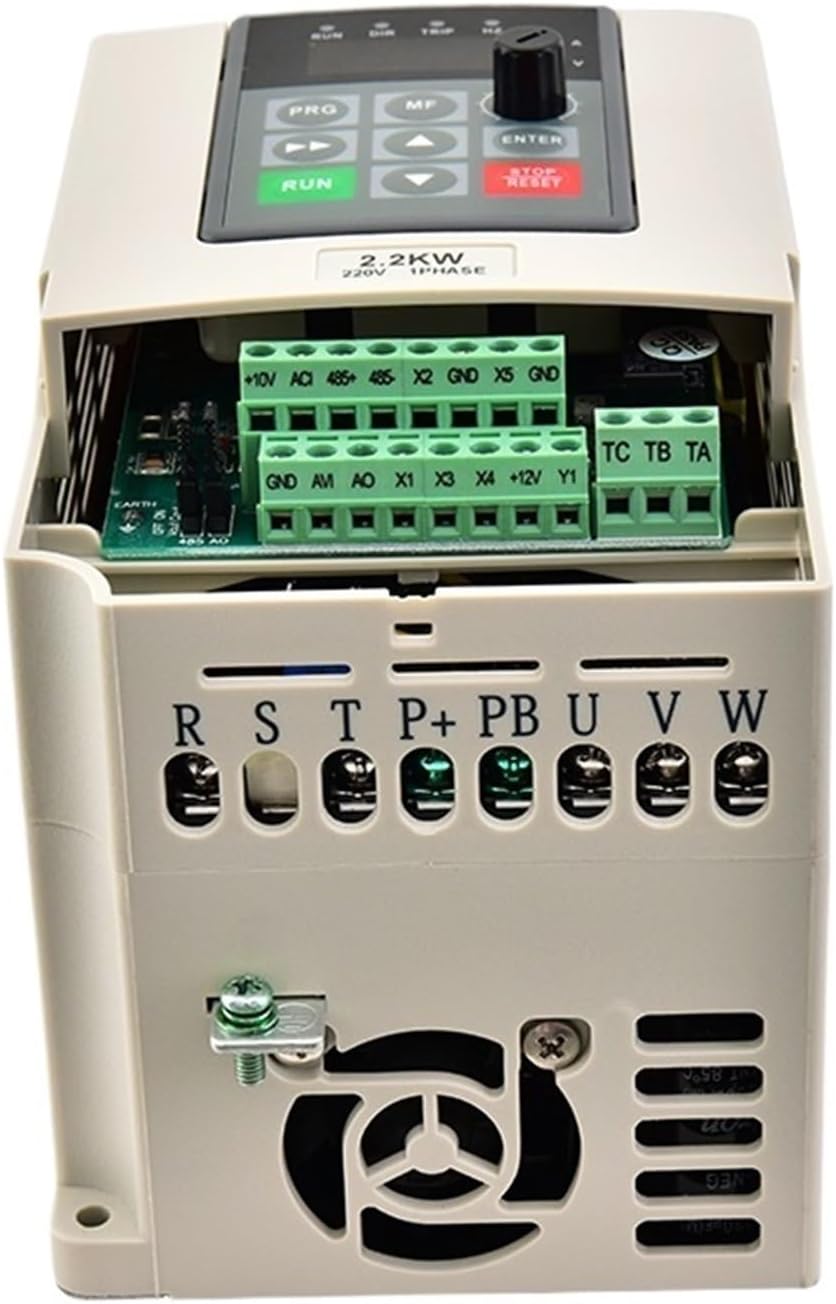
Whakaahua 4.1: Runga view of the VFD with the protective cover removed, revealing the power and control terminal blocks for wiring connections.

Whakaahua 4.2: Example wiring diagram showing connections from a circuit breaker to the VFD's input terminals (R, S, T) and from the VFD's output terminals (U, V, W) to a three-phase motor. Control terminals are also visible.
Power Input (R, S, T):
Connect the main power supply to these terminals. For the 1PH220VAC model, connect the single-phase input to R and S, leaving T unused or bridged as per specific model instructions. Ensure proper grounding.
Putanga Motika (U, V, W):
Connect the motor's three-phase windings to these terminals. Ensure correct phase sequence for desired motor rotation.
Nga Kapeka Mana:
These terminals are for external control signals such as start/stop commands, speed reference (e.g., 0-10V, 4-20mA), and fault indicators. Refer to the detailed wiring diagram for specific terminal functions.
5. Nga Tohutohu Whakahaere
5.1. Nga Mahi Paewhiri Mana
- OMA: Ka timata te motini.
- KATI/TATAHI ANU: Stops the motor or clears fault indications.
- PRG (Pataka): Enters or exits the parameter setting mode.
- MF (Multi-Function): Ka whakamahia mo nga momo mahi i runga i te horopaki.
- ▲ / ▼ (Up/Down Arrows): Navigates through parameters or adjusts values.
- Whakauru: Confirms selections or saves parameter changes.
- Potentiometer: Adjusts the output frequency/motor speed.
5.2. Mahi Taketake
- Whakahiko: Apply power to the VFD. The display will illuminate.
- Tautuhi Tere: Adjust the potentiometer to the desired frequency/speed.
- Tīmata Motini: Pehia te RERE pātene. Ka tere te motuka ki te tere kua whakaritea.
- Kati Motini: Pehia te KAUPAPA / KAUPAPA pātene. Ka tere haere te motuka ka mutu.
6. Tautuhinga Parameter
The VFD has numerous parameters that can be configured to optimize performance for specific applications. These include motor parameters, acceleration/deceleration times, maximum/minimum frequencies, and control modes.
To access parameters:
- Pehia te PRG button to enter parameter mode.
- Whakamahia te ▲ / ▼ arrow buttons to navigate through parameter groups and individual parameters.
- Perehi KAUPAPA ki view or edit a parameter's value.
- Whakamahia te ▲ / ▼ arrow buttons to change the value.
- Perehi KAUPAPA again to save the new value.
- Perehi PRG to exit parameter mode.
Refer to the comprehensive parameter list provided with your VFD for detailed descriptions and recommended settings for each parameter.
7. Tiaki
Regular maintenance ensures the longevity and reliable operation of your VFD.
- Te horoi: Periodically clean the VFD's exterior and cooling vents to prevent dust accumulation, which can hinder heat dissipation. Use a soft, dry cloth. Do not use liquid cleaners.
- Tirotiro: Regularly inspect all wiring connections for tightness and signs of wear or damage. Check the cooling fan for proper operation and obstructions.
- Taiao: Me whakarite kia noho tonu te taiao whakahaere i roto i nga awhe pāmahana me te haumākū kua tohua.
Momotuhia te hiko i mua i te mahi tiaki.
8. Te Raru
If you encounter issues with your VFD, refer to the following common problems and solutions:
| Raruraru | Take pea | Rongoā |
|---|---|---|
| Kaore e rere te motuka | No power, incorrect wiring, fault condition, stop command active | Check power supply, verify wiring, clear fault (STOP/RESET), check control signals |
| Ka whakaatu a VFD i tetahi waehere hapa | Nui rawa atu, kaha rawatage, whakahekeheketage, overload, overheating | Refer to the VFD's specific error code list for diagnosis and resolution. Address the underlying cause (e.g., reduce load, check input voltagme). |
| Motor speed is unstable | Incorrect motor parameters, unstable input voltage, poor grounding | Verify motor parameters in VFD settings, check power supply stability, ensure proper grounding. |
| VFD overheats | Insufficient ventilation, excessive ambient temperature, VFD overloaded | Improve ventilation, reduce ambient temperature, check motor load, ensure VFD is adequately sized. |
For persistent issues or complex problems, contact technical support.
9. Whakatakotoranga
The following table outlines the key technical specifications for the GHHSBO ZA-D12 VFD (1.5KW, 1PH220VAC-3PH220VAC model):
| Āhuahira | Whakatakotoranga |
|---|---|
| Tau tauira | ZA-D12 |
| Whakatauranga Mana | 1.5KW (also available in 0.4KW, 0.75KW, 2.2KW) |
| Whakauru Voltage | 1PH 220VAC (also available in 3PH 220VAC, 3PH 380VAC) |
| Putanga Voltage | 3PH 220VAC (matches input voltage whirihoranga) |
| Auautanga Putanga | 0-999.99Hz |
| Momo | DC/AC Inverter |
| Momo Putanga | Wāhanga Takitoru |
| Taumaha Tūemi | 50 Karamu (tata ki te 1.76 hekere) |
| Ahu mōkihi | 0.39 x 0.39 x 0.39 inihi |
10. Pūtāhui me te Tautoko
For warranty information, please refer to the terms and conditions provided at the time of purchase or contact your seller directly. For technical support or further assistance, please reach out to the manufacturer or authorized service center.


