Kupu Whakataki
Welcome to your Angrox Universal Replacement Remote Control. This manual provides detailed instructions for setting up and operating your new remote, designed for seamless compatibility with various Philips Smart 4K UHD Android TVs. Please read this manual thoroughly to ensure optimal performance and longevity of your remote control.
1. Tatūnga
1.1 Tāuta Pūhiko
E rua ngā pākahiko AAA kawakore e hiahiatia ana mō te mana mamao (kāore i roto).
- Kimihia te uhi o te wahanga pākahiko kei muri o te mana mamao.
- Patohia te ripa ka paheke te uhi ki raro kia tuwhera.
- Whakauruhia kia rua nga pākahiko AAA, kia tika te hono o nga pito pai (+) me te kino (-) ki nga tohu kei roto i te waahanga.
- Whakahokia te uhi o te pākahiko ki tona waahi kia paoho pai.
1.2 Hononga Tuatahi
This Angrox replacement remote control is designed for immediate use with compatible Philips Smart TVs. No programming or pairing is required. Simply insert the batteries, and the remote is ready to operate your television.
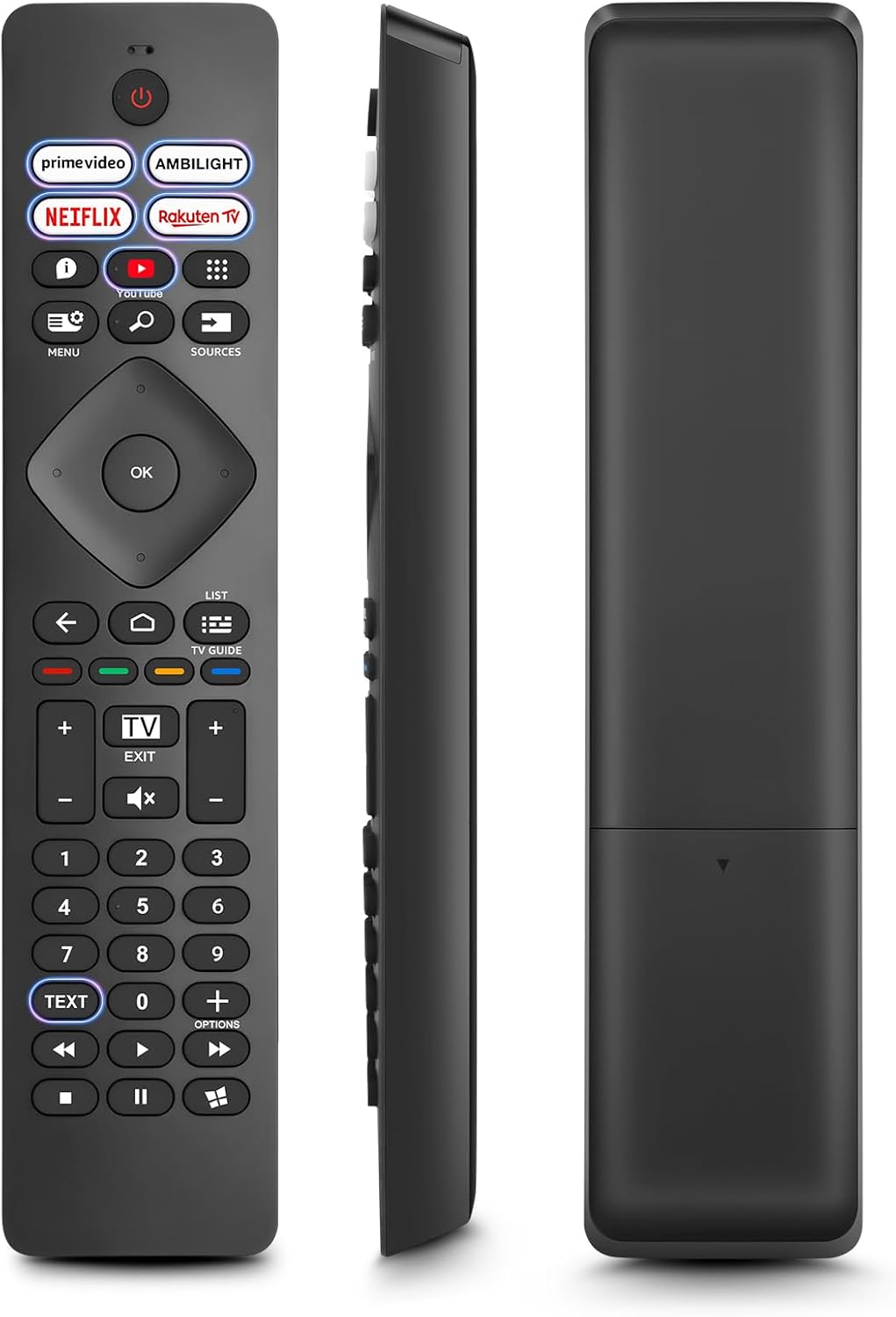
Image: Front, side, and back views of the Angrox Universal Replacement Remote Control. This image illustrates the physical design and battery compartment location.
2. Nga Tohutohu Whakahaere
2.1 Ngā Mahi Pātene Neke atu i teview
Familiarize yourself with the remote control's buttons and their primary functions.
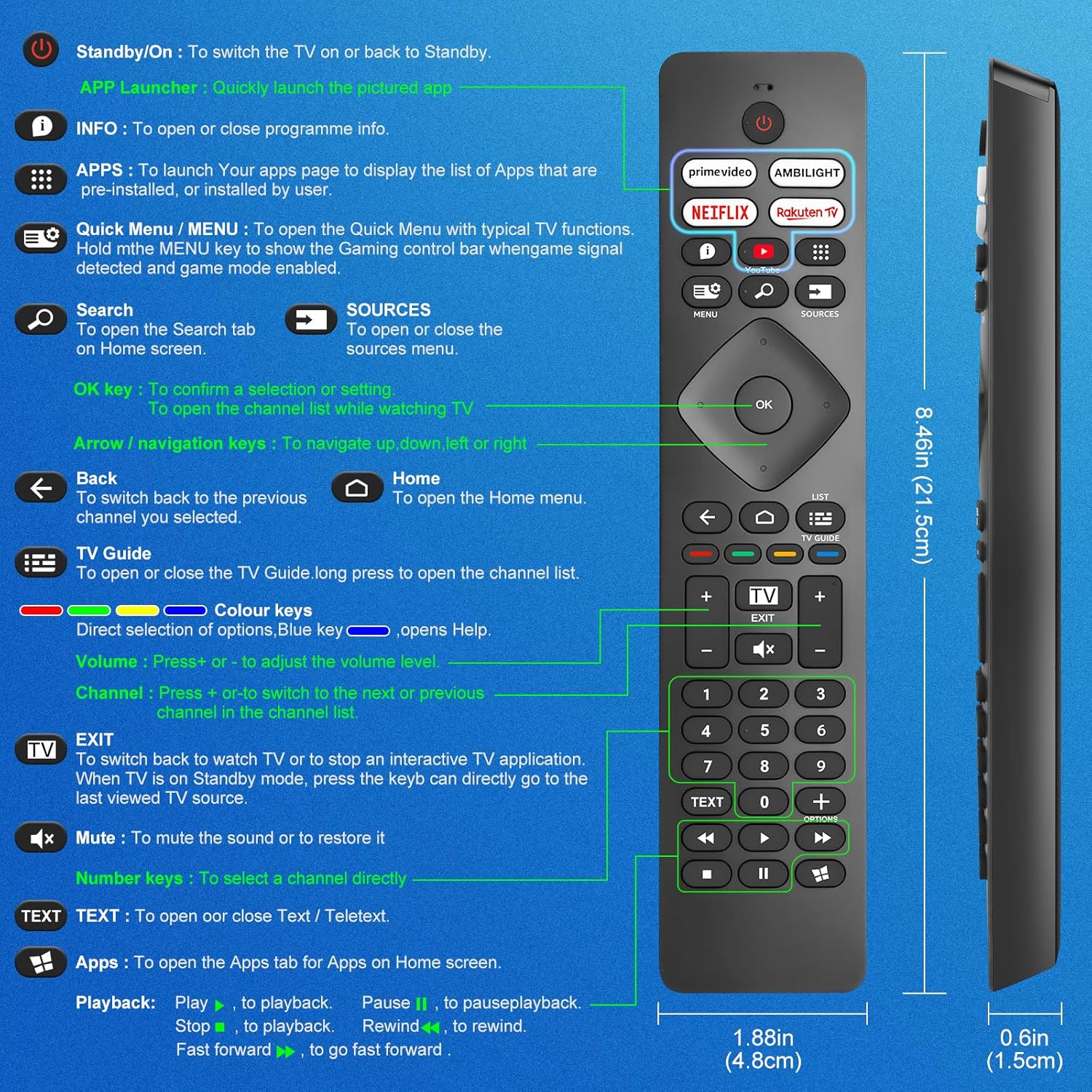
Image: A detailed diagram illustrating each button on the Angrox remote control and its corresponding function.
Detailed Button Descriptions:
- Standby/On (Power Button): Hei whakahuri i te pouaka whakaata ki runga, ki te hoki ki Standby.
- APP Launcher: Quickly launch the pictured app.
- KORERO: To open or close programme info.
- APPS: To launch your apps page to display the list of apps that are pre-installed or installed by the user.
- Quick Menu / MENU: To open the Quick Menu with typical TV functions. Hold the MENU key to show the Gaming control bar when game signal detected and game mode enabled.
- Rapu: To open the Search tab on Home screen.
- NGĀ PUTANGA: To open or close the sources menu.
- Kī OK: To confirm a selection or setting. To open the channel list while watching TV.
- Arrow/Navigation keys: Hei whakatere whakarunga, whakararo, maui, matau ranei.
- Hoki: Hei huri hoki ki te hongere o mua i tohua e koe.
- Kāinga: To open the Home menu.
- Arataki TV: To open or close the TV Guide. Long press to open the channel list.
- Colour keys (Red, Green, Yellow, Blue): Direct selection of options. Blue key opens Help.
- Rōrahi +/-: Hei whakatika i te taumata oro.
- Channel +/-: Hei huri ki te hongere o muri, o mua ranei i te rarangi hongere.
- EXIT: To switch back to watch TV or to stop an interactive TV application. When TV is on Standby mode, press the key to directly go to the last viewed TV source.
- Wahangu: Hei wahangu i te oro, hei whakaora ranei.
- Kī Tau (0-9): Hei whiriwhiri tika i tetahi hongere.
- KUPU: To open or close Text / Teletext.
- Apps (Netflix, Prime Video, Rakuten TV, YouTube): Quick access to dedicated streaming applications.
- Ngā Mana Purei Anō (Purei, Whakamutu, Kati, Whakamuri, Whakamua Tere): Mō te purei anō i ngā pāpāho.
2.2 Patene Pokatata
The remote features dedicated shortcut buttons for popular streaming services and Ambilight control.

Image: The Angrox remote control with highlighted shortcut buttons for Prime Video, Ambilight, Netflix, Rakuten TV, and YouTube.
- Ataata Pirimia: Direct access to Amazon Prime Video.
- Ambilight: Control Philips Ambilight features.
- Netflix: Direct access to Netflix.
- Rakuten TV: Direct access to Rakuten TV.
- YouTube: Direct access to YouTube.
3. Hototahi
This Angrox replacement remote control is universally compatible with a wide range of Philips Smart TVs, including:

Image: Visual representation of the Angrox remote's compatibility with Philips 4K Ambilight TV, 4K Ultra HD TV, LED 4K TV, and OLED 4K TV.
- 4K Ambilight TV
- 4K Ultra HD TV
- TV 4K LED
- OLED 4K TV
It is designed to function with all Philips Smart TV models that utilize an infrared remote control.
4. Nga Mahi Mahi

Image: Graphics indicating a 0.2-second fast response and a 10-meter transmitting distance for the remote control.
- Whakautu Tere: Enjoy a quick response time of approximately 0.2 seconds for button presses.
- Tawhiti Whakawhiti: Effective operating range up to 10 meters (approximately 33 feet).
5. Tiaki
- Te horoi: Whakamahia he kakahu ngohengohe, maroke hei horoi i te mana mamao. Kaua e whakamahi i ngā wai horoi, i ngā rauemi whakakoi rānei.
- Tiaki Pūhiko: If the remote will not be used for an extended period, remove the batteries to prevent leakage and potential damage. Replace batteries when the remote's response becomes sluggish or inconsistent.
- Rokiroki: Whakaorangia te mamao ki te waahi makariri, maroke atu i te ra tika me te wera nui.
6. Te Raru
6.1 Kāore te Mamao e Urupare
- Tirohia nga Pikohiko: Me whakarite kia tika te whakaurunga o ngā pākahiko, ā, kia tika hoki te polarity (+/-). Whakakapia ngā pākahiko tawhito, kua pau rānei ki ngā pākahiko AAA hou.
- Raina Tirohanga: Kia mārama te tirohanga i waenganui i te mana mamao me te pūoko infrared o te pouaka whakaata. Ka ārai pea ngā arai i te tohu.
- Pūoko Mamao: Ensure the TV's infrared sensor is not blocked or dirty.
6.2 Ngā Mahi Whakaiti
- While this remote is broadly compatible, some specific advanced functions unique to certain original Philips remote models might not be replicated. Verify the button functions against the provided diagram.
6.3 Ambilight Functionality
Ko etahi kaiwhakamahiviews indicate that Ambilight functionality might vary. If your Ambilight button does not work as expected, ensure your TV's Ambilight feature is enabled and configured correctly in your TV settings.
7. Whakatakotoranga
| Āhuahira | Taipitopito |
|---|---|
| Waitohu | Angrox |
| Tauira | pour Philips TV |
| Pūrere Hototahi | Philips Smart TV (4K Ambilight, 4K UHD, LED 4K, OLED 4K) |
| Āhuahira Motuhake | Whānui |
| Momo Tuhono | Infrared |
| Momo Pūhiko | 2 x AAA Alkaline (kāore i whakaurua) |
| Te Ahu o te Tuemi | 22.7 x 6.2 x 2.4 cm |
| Taumaha Tūemi | 60 g |
| Tae | Pango |
Tuhipoka: Ko nga korero ka huri ki te kore korero i mua.
8. Pūtāhui me te Tautoko
For product support or warranty inquiries, please contact your retailer or the manufacturer, Angrox, directly. Please refer to your purchase documentation for specific warranty terms and contact information.
Kaihanga: Angrox
ASIN: B0F83X2FQG


