Kupu Whakataki
The BAOFENG F22 is a portable FRS two-way radio designed for reliable communication. It features 22 FRS channels, NOAA weather alerts, a built-in flashlight, and a 1400mAh rechargeable battery with USB-C charging. This manual provides essential information for the proper setup, operation, and maintenance of your device.
Ihirangi mokete
Manatokona kei roto katoa nga mea kei roto i to kete:
- 4 x BAOFENG F22 Two-Way Radios
- 4 x Whitiki Topenga
- 4 x Ringa Here
- 4 x 1400mAh Pūhiko
- 2 x 2-in-1 Type-C Chargers
- 2 x Pukapuka Kaiwhakamahi
Ka mutu te huaview
Familiarize yourself with the components and features of your BAOFENG F22 radio.

Figure 1: BAOFENG F22 Radio Components
- Antenna
- Ripa Maukati Whitiki
- Patene PTT (Push-to-Talk).
- Flashlight Emergency Button
- Whakaaturanga LCD Backlit
- Weather Monitor Button
- Pātene Matawai
- Tahua/Maka Patene
- Pihi Mana / Waea
- Pihi Whakatika
- Patene Raro
- Kaikōrero
- rama rama
- Tauranga Taonga
- Tauranga Momo-C
- Raki Tuku Pūhiko

Figure 2: Key Features - FRS, NOAA, LED Flashlight, Channel Monitor, Call Alert, Type-C USB Jack, Keypad Lock, VOX
Tatūnga
Tāuta Pūhiko
Before first use, ensure the battery is properly installed and charged.
- Rapua te wahanga pākahiko kei muri o te reo irirangi.
- Tangohia te taupoki pākahiko.
- Hiranga: If there is an insulating sheet at the bottom of the battery, tear it off before inserting the battery. Failure to do so will prevent the radio from powering on or charging.
- Insert the 1400mAh Li-ion battery pack into the compartment, ensuring the contacts align.
- Whakakapia te uhi pākahiko.

Figure 3: Battery Installation - Remember to remove the insulating gasket.
Te Whakataki i te Pūhiko
The BAOFENG F22 uses a convenient Type-C USB charging port.
- Connect the Type-C USB cable to the Type-C port on the side of the radio.
- Connect the other end of the cable to a compatible USB power source (e.g., PC, car charger, power bank, or wall adapter).
- The charging indicator on the radio will show the charging status.
- A full charge typically takes several hours. The 1400mAh battery supports long standby times.
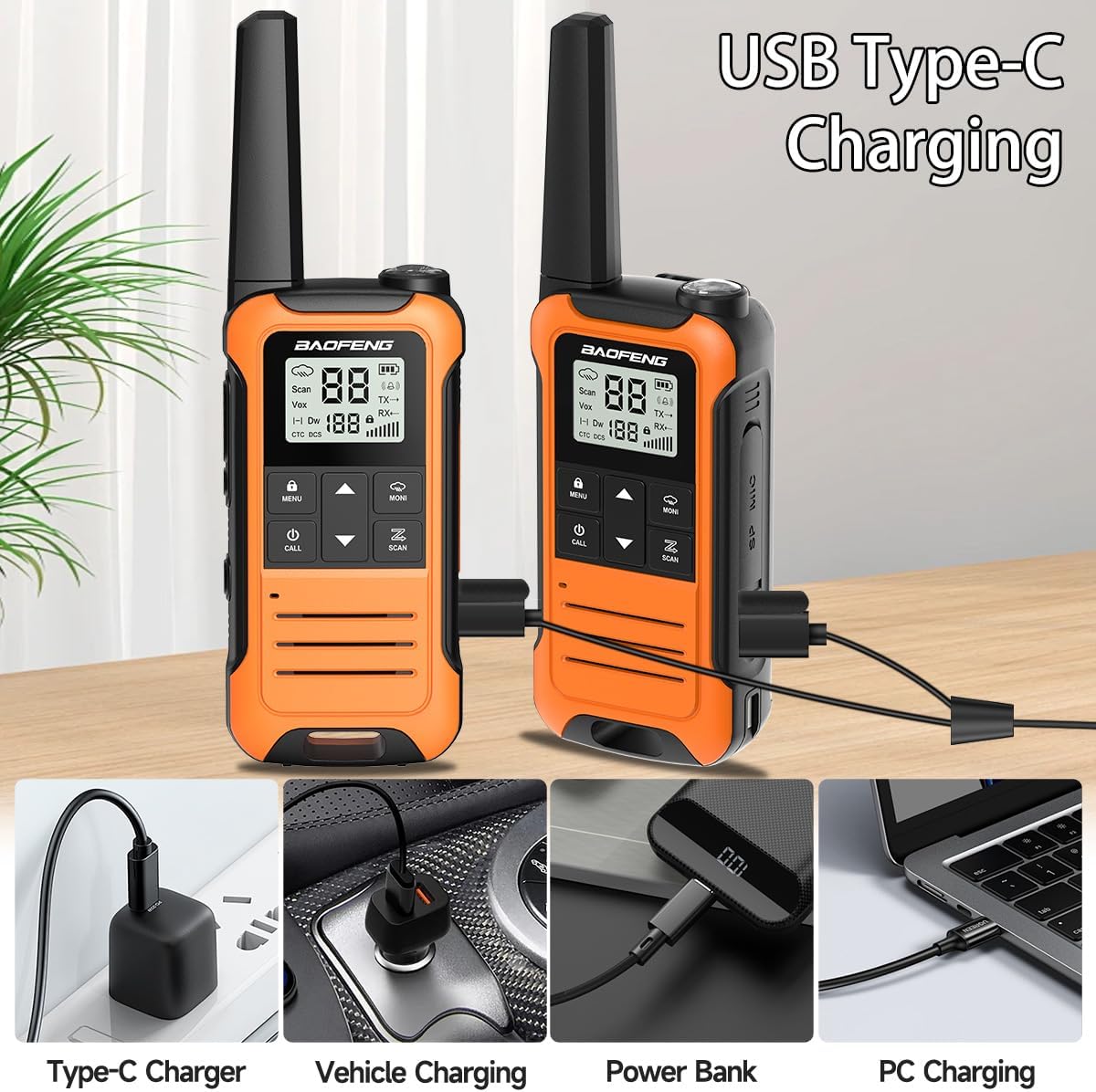
Pikitia 4: Ngā Kōwhiringa Utu USB Momo-C
Nga Tohutohu Whakahaere
Te Hiko / Whakaweto
- Kia kaha tonu, paatohia kia mau te Pihi Mana / Waea (9) until the display illuminates.
- Ki te whakaweto, patohia kia mau te Pihi Mana / Waea (9) until the display turns off.
Kōwhiringa Hongere
The F22 radio operates on 22 FRS channels.
- Whakamahia te Pihi Whakatika (10) me Patene Raro (11) to select your desired channel.
- Me whakarite nga reo irirangi katoa e pirangi ana koe ki te whakawhiti korero ki te hongere kotahi.
Privacy Codes (CTCSS/DCS)
The F22 supports 50 CTCSS and 105 DCS privacy codes to minimize interference from other users on the same channel.
- To set a privacy code, press the Tahua/Maka Patene (8) rua.
- Whakamahia te Pihi Whakatika (10) ranei Patene Raro (11) to select OFF, CTC, or DCS.
- If selecting CTC or DCS, use the Up/Down buttons to choose the specific code.
- Pehia te Tahua/Maka Patene (8) again to confirm and exit.
- For communication, all radios must be on the same channel and have the same privacy code setting.
Te tuku me te whiwhi
- Hei tuku, pehia me te pupuri i te Patene PTT (Push-to-Talk). (3) on the side of the radio. Speak clearly into the microphone.
- Tukua te Pihi PTT (3) to receive messages.
Huarahi Panui Weather NOAA
The F22 includes NOAA weather alert functionality, scanning 12 NOAA Weather channels (available in the United States and Canada).
- To activate the weather alert function, press the Weather Monitor Button (6).
- When activated, the radio will alert you to severe weather conditions, providing time to prepare for events like tornadoes, hurricanes, or floods.

Figure 5: NOAA Weather Channels and Alert Function
rama rama
- Pehia te Flashlight Emergency Button (4) to turn the built-in LED flashlight (13) on or off.
VOX (Te Whakawhitinga Reo) Mahi
The VOX function allows for hands-free operation, transmitting when it detects your voice.
- Refer to the detailed user manual for specific steps to enable and adjust VOX sensitivity.
Maukatakiriiri
The keypad lock prevents accidental changes to your radio settings.
- Hei maukati i te papapātuhi, pehia me te pupuri i te Tahua/Maka Patene (8).
- Hei iriti, pehia me te pupuri i te Tahua/Maka Patene (8) ano.
Te tiaki
- Keep the radio dry. If it gets wet, wipe it dry immediately.
- Kaua e tukuna te reo irirangi ki nga wera nui.
- Horoia te reo irirangi ki te ngohe, damp kakahu. A ape i te whakamahi matū kino, whakarewa ranei.
- Ensure the Type-C port cover is securely closed when not charging to protect against dust and moisture.
Raparongoā
| Raruraru | Te Take Taea / Rongoa |
|---|---|
| Kāore te reo irirangi e whakakā, e utu rānei. | Ensure the insulating sheet at the bottom of the battery has been removed. Verify the battery is correctly inserted and charged. Check the charging cable and power source. |
| Kāore e taea te kōrero ki ētahi atu reo irirangi. | Ensure all radios are on the same channel and have identical privacy code (CTCSS/DCS) settings. If privacy codes are enabled on one radio and not another, or if they differ, communication will not occur. Try setting privacy codes to OFF on all radios. |
| Poor communication range or static. | Obstructions like buildings, dense foliage, or terrain can reduce range. Move to a more open area. Ensure batteries are fully charged. |
| Sub-tone function interference. | If experiencing interference or difficulty connecting, try turning off the Sub-tone function. Press the Tahua/Maka Patene (8) twice to access sub-tone settings, then use the Up/Down buttons to select OFF. |
Whakatakotoranga
| Āhuahira | Whakatakotoranga |
|---|---|
| Tau tauira | Baofeng F22 |
| Te maha o nga hongere | 22 FRS Channels |
| Waehere Tūmataitinga | 50 CTCSS, 105 DCS |
| Awhe Auautanga | 462-467 MHz |
| Pūhiko Raukaha | 1400mAh (Li-ion) |
| Voltage | 3.7 Volts |
| Tauranga Whakatau | Patohia-C USB |
| Te Awhe Korero Morahi | Up to 5 miles (in open areas) |
| Nga waahanga motuhake | NOAA Weather Radio, Flashlight, VOX, Keypad Lock |
| Taumata Atete Wai | Ehara i te wai ātete |
| Taumaha Tūemi | Approximately 1.79 pounds (for the pack of 4) |
Nga korero Whakaputanga
Warranty information for this product is not explicitly provided in the product details. Please refer to your purchase documentation or contact the seller for specific warranty terms.
Tautoko
For technical assistance or customer service inquiries, please refer to the contact information provided with your purchase or reach out to the seller. Customer service is available to assist with product-related questions.


