1. Kupu Whakataki
This manual provides detailed instructions for the setup, operation, and maintenance of your Frienhund Automatic Pet Feeder with 2 Cameras. Designed for convenience and pet well-being, this feeder allows you to manage your pets' feeding schedules remotely, monitor their activities, and ensure they receive fresh food consistently. Please read this manual thoroughly before using the device to ensure proper function and safety.
2. Nga korero haumaru
- Me whakarite kia whakatakotoria te whāngai ki runga i te mata pumau, papatahi hei ārai i te takahuri.
- Keep the power adapter and cable away from water and out of reach of pets to prevent chewing or electrical hazards.
- Whakamahia anake te urutau hiko kua whakaratohia.
- Do not immerse the main feeder unit in water. Refer to the cleaning section for detachable parts.
- This device is designed for dry pet food only. Do not use wet food, canned food, or treats larger than 15mm (0.59 inches).
- Kaua e taea e nga tamariki.
- Always unplug the feeder before cleaning or performing maintenance.
3. Ihirangi mokete
Manatokohia ko nga mea katoa kei raro nei kei roto i to kete:
- Automatic Pet Feeder Unit (with 2 Cameras) x 1
- Stainless Steel Feeding Bowls x 2
- Paepae Peihana x 1
- Uhi x 1
- Wāwāhi Kai x 1
- Pūurutau Hiko x 1
- Tauira USB x 1
- Peeke Whakarewa x 1
- Matau Pakitara ABS x 1
- Tiuri x 4
- Punga x 4
- Pukapuka Kaiwhakamahi x 1

This image illustrates the complete set of items you should find in your Frienhund Automatic Pet Feeder package, including the main feeder unit, bowls, power accessories, and mounting hardware.
4. Hua Neke Atuview
The Frienhund Automatic Pet Feeder is designed with user-friendly features and robust construction. Key components include:
- Puke Kai: 7L (29 cups) capacity, transparent for easy monitoring of food levels. Made from BPA-Free ABS material.
- Te taupoki: Features a safety twist-lock mechanism and a compartment for the desiccant bag to maintain food freshness.
- Turanga Kaiwhangai: Houses the dispensing mechanism, control panel, and dual cameras. Designed for stability to resist overturning.
- Ngā Kāmera Tārua: Two Full HD 3-megapixel cameras with infrared night vision for monitoring pets and food levels.
- Paewhiri Mana: Includes buttons for manual feeding and network connection.
- Feeding Bowls: Two stainless steel bowls, detachable and dishwasher safe, placed 18.7 inches apart for comfortable multi-pet feeding.
- Tuku Hiko Takirua: Operates via DC 5V power adapter with an option for 3 D cell batteries (not included) as backup.

This image displays the overall design of the feeder, highlighting its dual bowls, transparent food tank, and integrated camera system.

This infographic provides a quick visual summary of the feeder's main functionalities and specifications, such as its large food capacity and advanced connectivity.
5. Aratohu Tatūnga
5.1 Huihuinga
- Place the feeder base on a stable, flat surface.
- Insert the meal splitter into the designated slot in the feeder base.
- Place the bowl tray onto the feeder base, ensuring it is securely seated.
- Place the two stainless steel bowls into the designated slots on the bowl tray.
- Fill the food tank with dry pet food (recommended food size: 5-15mm).
- Insert the desiccant bag into the compartment under the lid.
- Place the lid securely on top of the food tank, ensuring the twist-lock mechanism is engaged.

The transparent food tank allows for easy visual inspection of the remaining food quantity, ensuring you know when to refill.

This image provides guidance on the appropriate dimensions and varieties of pet food suitable for use with the feeder, ensuring smooth operation and preventing blockages.
5.2 Hononga Hiko
Connect the power adapter to the feeder and plug it into a wall outlet. For continuous operation during power outages, install 3 D cell batteries (not included) in the battery compartment at the bottom of the feeder. A nylon braided power cord is included to prevent pet chewing.

This diagram shows how the feeder can be powered by both the included DC 5V adapter and optional D cell batteries, ensuring uninterrupted feeding even during electrical disruptions.

This image illustrates the robust design of the power cord, which is braided to resist damage from pet chewing, enhancing safety and durability.
5.3 Network Connection (App Setup)
The Frienhund Automatic Pet Feeder supports dual-band WiFi (2.4GHz & 5GHz) for stable and fast connectivity. Download the "Smart Life" App from your device's app store.
Follow the instructions in the video below to connect your feeder to the network:
This video provides a step-by-step guide on how to connect your Frienhund Automatic Pet Feeder to your home Wi-Fi network using the Smart Life app, ensuring remote control and monitoring capabilities.
Key steps for network connection:
- Plug in the power supply. The indicator light will blink blue and a voice prompt will sound, indicating it's ready for network connection.
- Ensure your phone's Bluetooth, WLAN (Wi-Fi), and GPS are turned on.
- Open the "Smart Life" App and select "Add Device".
- The app may automatically detect the feeder. If not, manually select "Small Home Appliances" > "Pet Feeder with Camera (2.4GHz & 5GHz)".
- Enter your Wi-Fi information (SSID and password).
- For camera models, you may need to scan a QR code displayed on your phone screen using the feeder's camera. Hold your phone 15-20 cm away from the feeder's camera until you hear a long beep, indicating successful scanning.
- The feeder will then connect to your network. Once connected, the blue indicator light will remain solid.
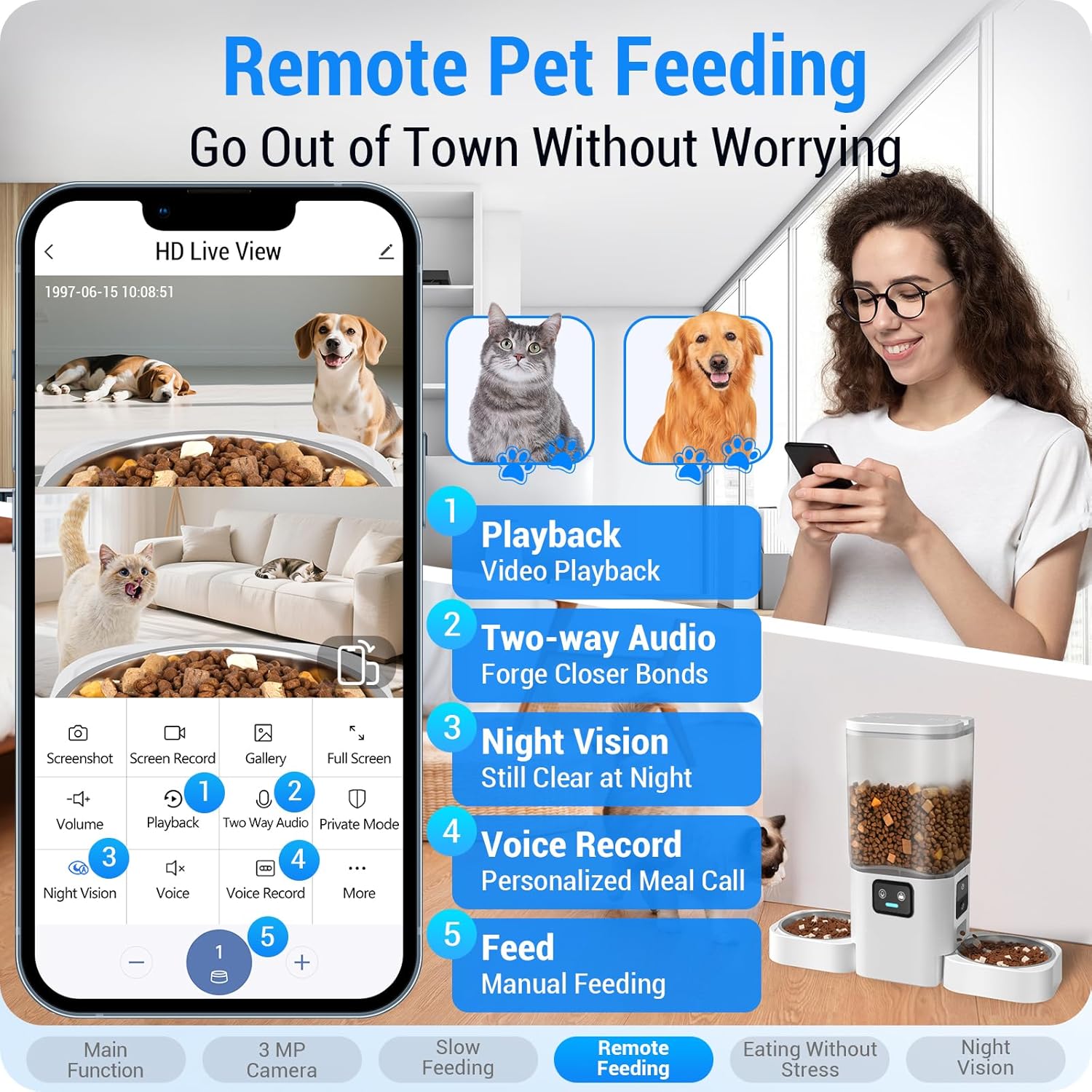
This image illustrates the mobile application's interface, showcasing the various remote control features available for managing your pet's feeding and monitoring their activities from anywhere.

This image demonstrates the location-based feeding feature, which can automatically adjust the feeding schedule when you leave or return home, providing flexibility for pet owners.
6. Nga Tohutohu Whakahaere
6.1 Te Whakatakoto i ngā Wātaka Whāngai
Using the "Smart Life" App, you can set up to 20 meals per day, with a maximum of 12 portions per meal. This allows for precise control over your pet's diet and feeding habits.
- Open the app and navigate to your feeder's control interface.
- Select "Feeding Schedule" and tap "Add" to create a new feeding time.
- Choose the desired time, number of portions, and days of the week for the feeding.
- Save the schedule. You can view your pet's feeding history within the app.

This image shows the app's ability to keep a clear record of every meal dispensed, aiding in monitoring your pet's dietary intake.
6.2 Te whangai a-ringa
You can dispense food manually at any time using the app or the physical button on the feeder.
- Mā te Taupānga: On the feeder's control interface, select the number of portions and tap "Feed".
- Via Feeder: Press the manual feed button on the feeder's control panel.
6.3 Aratau Whāngai Pōturi
To prevent fast eating, regurgitation, bloating, and obesity, enable the slow feeding mode. When activated, the feeder dispenses one portion of food every minute.
- Access the feeder settings in the "Smart Life" App.
- Toggle the "Slow Feeding Mode" option on or off as needed.

This image highlights how the slow feeding mode addresses common issues like rapid consumption and digestive problems, promoting healthier eating habits for pets.
6.4 Nga waahanga kamera
The feeder's two Full HD 3-megapixel cameras offer comprehensive monitoring capabilities:
- Ora View: Access real-time video of your pets and food bowls through the app.
- Matakitenga po: Infrared sensors ensure clear visibility even in low-light conditions.
- Hopu Whakaahua/Ataata: Capture moments and store them via TF card (up to 128GB, not included) or cloud storage (subscription may be required).
- Kitenga Nekehanga: Receive alerts on your phone when your pet is active near the feeder.
- Ororongo Ara-rua: Communicate with your pets remotely using the built-in microphone and speaker.

This image demonstrates the dual camera system, allowing for comprehensive supervision of your pets' eating habits and overall activity around the feeder.

This image highlights the feeder's infrared night vision, ensuring clear monitoring of your pets even in complete darkness, providing peace of mind around the clock.
6.5 Te Whāngai i ngā Mōkai Maha
The feeder is designed with two bowls spaced 18.7 inches apart, providing ample room for two pets to eat simultaneously without interference or conflict.
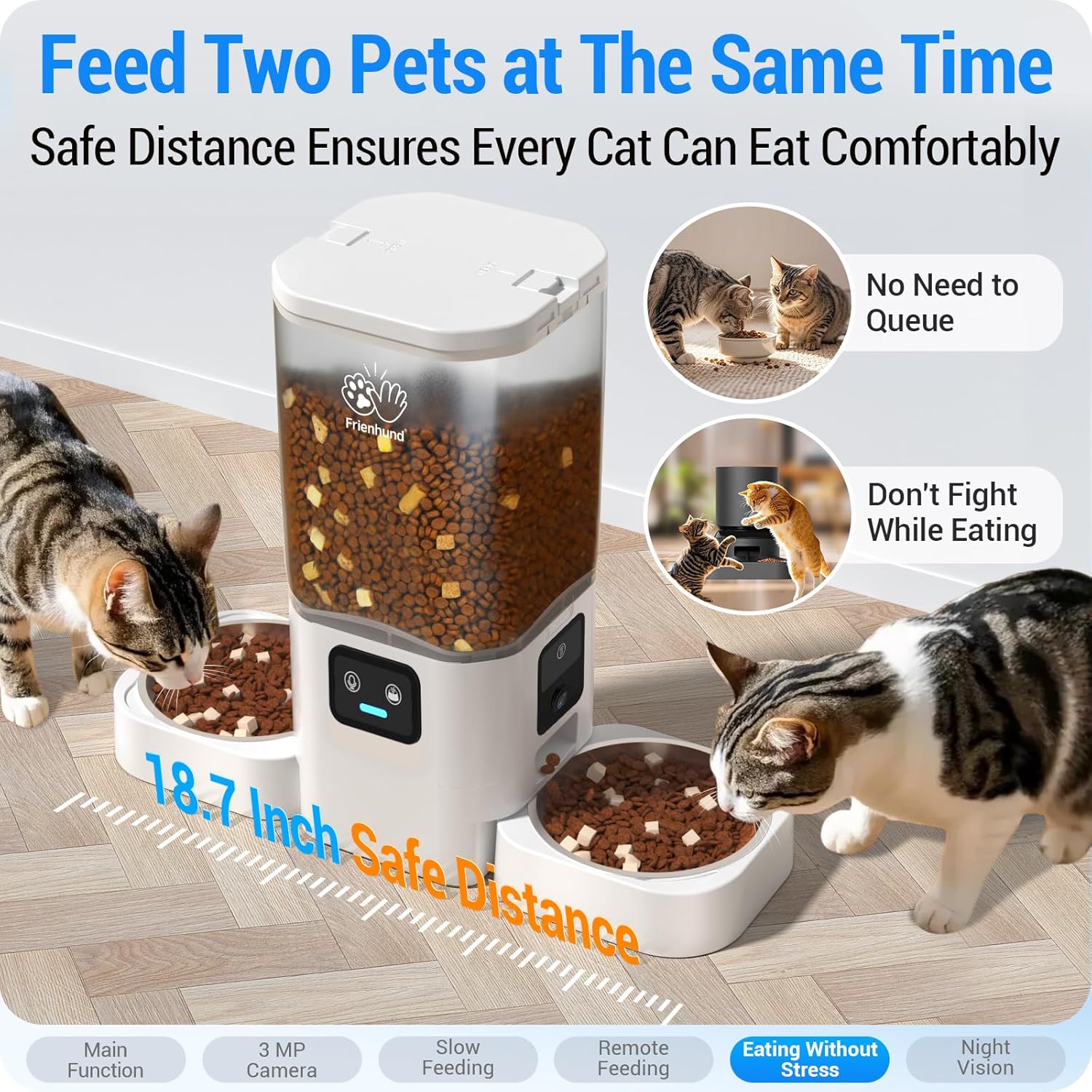
This image demonstrates the thoughtful design of the feeder, providing a safe and comfortable distance between the two feeding bowls to prevent pets from fighting over food.
7. Tiaki me te horoi
Regular cleaning ensures hygiene and extends the life of your feeder. The detachable design makes cleaning easy.
- Unplug the Feeder: Always disconnect the power adapter and remove backup batteries before cleaning.
- Wewetehia: Remove the lid, food tank, meal splitter, bowl tray, and stainless steel bowls.
- Nga Peera Ma: The stainless steel bowls are dishwasher safe.
- Clean Food Tank & Tray: The food tank and bowl tray can be hand-washed with mild soap and water. Ensure they are completely dry before reassembly.
- Horoi Wae Matua: Wipe the exterior of the main feeder unit with a damp kakahu. Kaua e rumakina ki te wai.
- Replace Desiccant: Replace the desiccant bag every 1-2 months to maintain food freshness.
- Huihuia: Once all parts are dry, reassemble the feeder in reverse order of disassembly.

This image demonstrates the ease of cleaning due to the feeder's detachable components, with parts suitable for both hand washing and dishwasher use, ensuring optimal hygiene.
8. Te Raru
If you encounter issues with your Frienhund Automatic Pet Feeder, refer to the following common problems and solutions:
| Raruraru | Take pea | Rongoā |
|---|---|---|
| Karekau te kai whangai e tuku kai. | Food tank empty; food jammed; dispensing mechanism blocked; power issue. | Refill food tank. Check for food blockages and clear. Ensure power adapter is securely plugged in and/or batteries are installed correctly. |
| Kāore te whāngai e hono ana ki te Wi-Fi. | Incorrect Wi-Fi password; feeder too far from router; 5GHz network not supported (older models); phone settings (Bluetooth/GPS off). | Double-check Wi-Fi password. Move feeder closer to router. Ensure your router supports 2.4GHz (this model supports both 2.4GHz and 5GHz). Turn on phone's Bluetooth, WLAN, and GPS. Refer to Section 5.3. |
| Camera feed is blurry or dark. | Lens dirty; poor lighting; network instability. | Gently clean camera lens. Ensure adequate lighting or verify night vision is active. Check Wi-Fi signal strength. |
| Voice prompt not heard during setup. | Volume too low; speaker malfunction. | Ensure feeder volume is not muted (if applicable). Contact customer support if issue persists. |
| Feeder is unstable or tips over. | Uneven surface; pets pushing it. | Place on a flat, stable surface. Consider using the included wall hook for added stability, especially with active pets. |

This image highlights the feeder's robust and stable design, engineered to resist overturning by active pets, ensuring food remains accessible and the unit stays upright.

This diagram illustrates the option to fix the feeder to a wall using the provided ABS wall hook, offering enhanced stability and preventing accidental tipping, especially useful for playful pets.
9. Whakatakotoranga
- Ingoa Tauira: automatic cat feeder with two camera
- Tauira Tūemi: ACF180W-US-D
- Raukaha: 7L (approx. 29 cups)
- Rauemi: Acrylonitrile Butadiene Styrene (ABS), Stainless Steel (bowls)
- Taumaha Tūemi: 4.1 Pauna
- Rahi Hua: 18.7 x 7.1 x 15.8 inihi
- Tuku Hiko: Pūrere Hiko DC 5V, 3 x Pūhiko Pūtau D (kāore i roto)
- Hononga: Dual-band WiFi (2.4GHz & 5GHz)
- Kāmera: Full HD 3-megapixel, Infrared Night Vision, 145-degree wide angle
- Hōtaka Whangai: Up to 20 meals/day, 1-12 portions/meal
- Rahi Kai e Manakohia ana: 5-15mm (0.19-0.59 inihi)
- Tohutohu tiaki: Detachable food tank and stainless steel bowls (dishwasher safe), main unit hand wash only.
10. Raihana me te Tautoko
Frienhund offers a free one-year warranty for your automatic cat feeder. For any issues, questions, or support needs, please contact our customer service team.
- Wā Pūtāhui: One (1) Year from date of purchase.
- Ratonga Kiritaki: 24/7 online support available.
- Whakapā: Refer to your purchase order for specific contact methods (e.g., email, phone, or through the seller platform).

This image highlights Frienhund's commitment to quality assurance, a 12-month warranty, and 24/7 online customer service, ensuring comprehensive support for users.


