1. Hua Neke Atuview
The Frienhund 5G WiFi Automatic Cat Feeder is designed to provide scheduled and controlled feeding for up to two cats or small to medium-sized dogs. Featuring a 7-liter food storage capacity, dual-band WiFi connectivity, and remote app control, this feeder ensures your pets are fed consistently, even when you are away. Its detachable components facilitate easy cleaning, promoting a hygienic feeding environment.
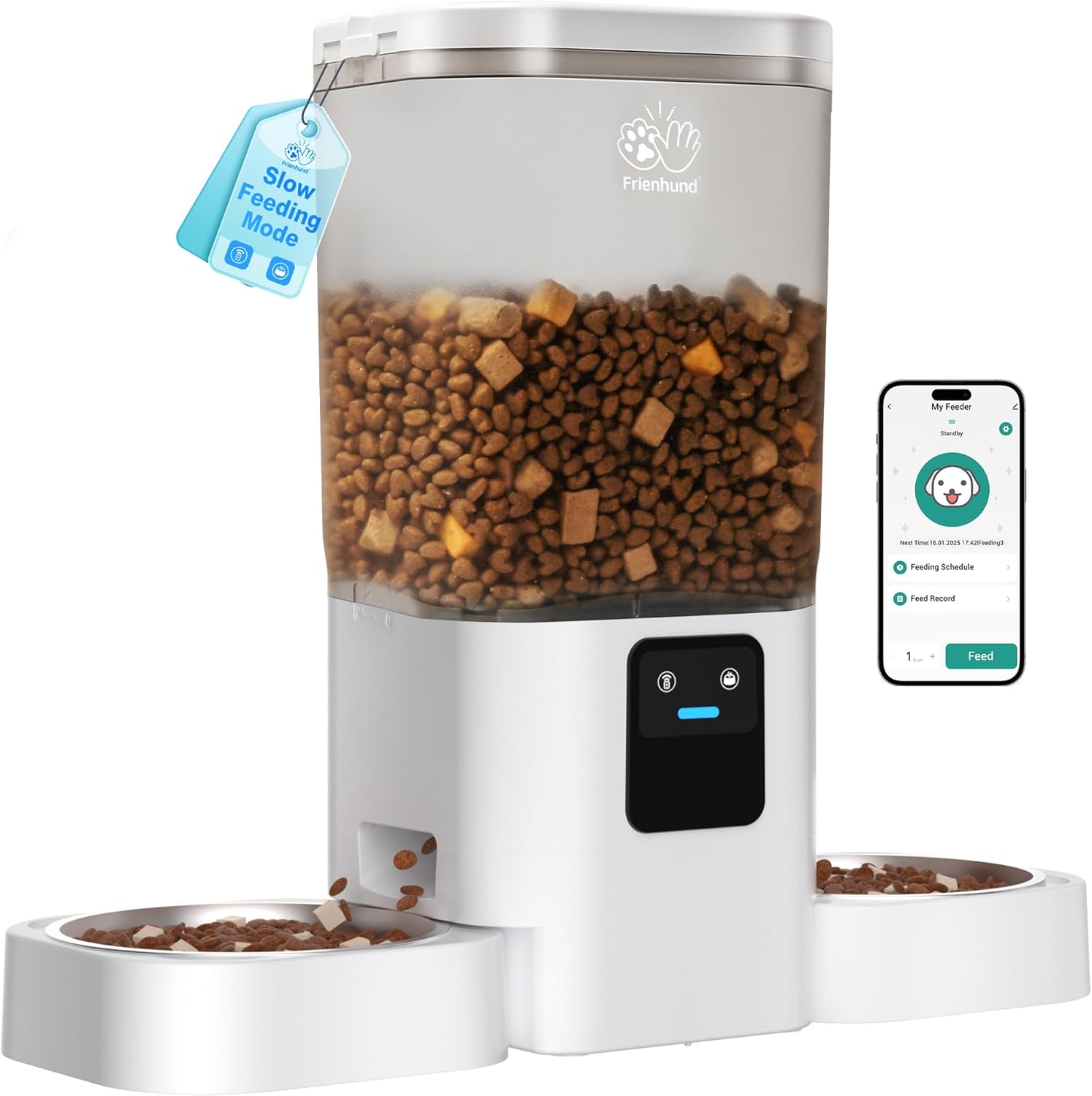
Image 1.1: The Frienhund 5G WiFi Automatic Cat Feeder, showcasing its main unit, transparent food tank, and two feeding bowls.
2. Nga waahanga matua
- Mana Taupānga Mamao: Manage feeding schedules, dispense food on demand, and review feeding history from anywhere using the "Smart Life" app (iOS/Android). Supports up to 30 meals per day with 1-12 portions per meal.
- Hononga WiFi Takirua-Rohe: Compatible with both 2.4GHz and 5GHz WiFi networks, ensuring stable and seamless app control without requiring router modifications.
- Dual Feeding Bowls with Safe Distance: Two feeding bowls are positioned 18.7 inches apart to provide a comfortable and stress-free eating space for multiple pets, preventing competition.
- Slow Feeding Mode: Dispenses food gradually (1 portion per minute) to prevent rapid eating, which can lead to choking, bloating, and obesity.
- 7L Large Capacity Food Storage: The transparent food tank holds 7 liters (approximately 29 cups) of dry food, sufficient for multiple pets for weeks. Includes a desiccant bag to maintain food freshness.
- Tuku Hiko Takirua: Operates via a DC 5V power adapter for daily use and can be backed up by 3 D cell batteries (not included) to ensure continuous feeding during power outages. Features chip memory to retain feeding schedules.
- Detachable Design for Easy Cleaning: The food tank and stainless steel bowls are removable for thorough cleaning. Stainless steel bowls are dishwasher safe.
- Stable Triangular Structure & Wall Mount: Designed with a stable base to resist overturning by pets. Includes carabiners and an ABS wall hook for optional wall mounting, providing additional stability.
- Anti-Bite Nylon Braided Wire: The power cable is made with durable nylon braiding to prevent pets from chewing on it, enhancing safety and product longevity.
- Hototahi ki a Alexa: Supports integration with Amazon Echo devices for voice-controlled feeding.

Image 2.1: Remote control functionality, illustrating how the feeder can be managed via a smartphone app, allowing for flexible feeding schedules whether at home, traveling, or working.

Image 2.2: Dual-band WiFi support, highlighting the feeder's compatibility with both 2.4GHz and 5GHz networks for enhanced connectivity stability.

Image 2.3: The dual feeding bowls, illustrating the 18.7-inch separation designed to allow two pets to eat simultaneously without interference.

Image 2.4: Slow feeding mode, demonstrating how this feature helps prevent common issues like bloating and obesity by dispensing food slowly.

Image 2.5: The 7L large capacity food storage, showing its suitability for feeding multiple cats or dogs over an extended period.

Image 2.6: Dual power supply system, illustrating the use of both a power adapter and D cell batteries to ensure uninterrupted operation.

Image 2.7: Detachable design, showing the feeder's components separated for easy and hygienic cleaning, including dishwasher-safe parts.

Image 2.8: Stable design, highlighting the feeder's robust structure and the option for wall mounting to prevent accidental tipping by pets.

Image 2.9: Alexa compatibility, demonstrating how users can control the feeder using voice commands through Amazon Echo devices.
3. Ihirangi mokete
Tirohia koa ko nga mea katoa kei raro nei kei roto i to kete:

Image 3.1: All components included in the Frienhund 5G WiFi Automatic Cat Feeder package.
- Te taupoki (x1)
- Meal Splitter (x1)
- Pūurutau Hiko (x1)
- Te whakamaroke (x1)
- Stainless Steel Feeding Bowl (x2)
- Food Tank (x1)
- Feeder Base (x1)
- Taura USB (x1)
- Desiccant Compartment (x1)
- Bowl Tray (x2)
- ABS Wall Hook (x1)
- Tīwiri (x4)
- Punga (x4)
- Pukapuka Kaiwhakamahi (x1)
4. Aratohu Tatūnga
- Assemble the Feeder:
- Place the feeder base on a flat, stable surface.
- Insert the food tank onto the feeder base, ensuring it clicks securely into place.
- Place the meal splitter inside the food tank if you intend to feed two pets.
- Attach the bowl trays to the front of the feeder base, then place the stainless steel bowls into the trays.
- Insert the desiccant bag into the desiccant compartment located under the lid, then close the lid securely.
- Hononga Hiko:
- Connect the USB cable to the feeder and the power adapter, then plug the adapter into a standard wall outlet.
- For backup power, insert 3 D cell batteries (not included) into the battery compartment at the bottom of the feeder. Ensure correct polarity.
- Tikiake me te Tāutahia te Taupānga:
- Scan the QR code in the included User Manual or search for "Smart Life" in your device's app store (iOS/Android).
- Whakauruhia te taupānga ka hanga kaute.
- Hono ki WiFi:
- Open the Smart Life app and follow the on-screen instructions to add a new device. Select "Pet Feeder" or similar category.
- Ensure your smartphone is connected to your home WiFi network (2.4GHz or 5GHz).
- Follow the app's prompts to connect the feeder to your WiFi network. This typically involves putting the feeder into pairing mode (refer to the specific instructions in the app or included manual for button presses).
- Uta Kai:
- Open the lid and pour dry pet food into the food tank. Ensure the food size is between 5-15mm (0.19-0.59 inches) for optimal dispensing.
- Katia te taupoki kia mau tonu kia hou tonu te kai.
5. Nga Tohutohu Whakahaere
5.1 Te Whakarite Whakaritenga Whangai
Use the Smart Life app to create customized feeding plans for your pets.
- Open the Smart Life app and select your Frienhund pet feeder.
- Navigate to the "Feeding Schedule" section.
- Tap to add a new feeding time. Set the desired time, number of meals (up to 30), and portion size (1-12 portions per meal).
- Save the schedule. The feeder will automatically dispense food at the programmed times.

Image 5.1: App interface for setting up feeding schedules, allowing precise control over meal times and portion sizes.
5.2 Te whangai a-ringa
Hei tohatoha kai tonu:
- Mā te Taupānga: On the main screen of the feeder in the Smart Life app, tap the "Feed" button and select the number of portions to dispense.
- Mā te Pātene Whāngai: Press the manual feed button on the feeder's control panel. Each press will dispense one portion.
5.3 Activating Slow Feeding Mode
This mode helps prevent rapid eating and digestive issues.
- I roto i te taupānga Smart Life, whakatere ki ngā tautuhinga whāngai.
- Locate and enable the "Slow Feeding Mode" option.
- When activated, the feeder will dispense one portion of food every minute until the scheduled amount is fully dispensed. This feature can be toggled on or off at any time.
5.4 Using with Alexa
Integrate your feeder with Amazon Alexa for voice commands.
- Ensure your Frienhund feeder is connected to the Smart Life app and your Alexa device is set up.
- Open the Alexa app, go to "Skills & Games," and search for "Smart Life." Enable the skill and link your Smart Life account.
- Discover devices. Once discovered, you can use voice commands such as: "Alexa, feed my cat [number] portions." or "Alexa, ask [feeder name] to feed."
6. Tiaki me te Whakapai
Mā te horoi i ia wā ka noho akuaku, ka roa ake hoki te ora o tō whāngai kai.
- Whakakorea:
- Unplug the feeder from the power outlet and remove any D cell batteries.
- Remove the lid and empty any remaining food from the tank.
- Detach the food tank from the feeder base.
- Remove the stainless steel bowls and bowl trays.
- Te horoi:
- The stainless steel bowls are dishwasher safe.
- The food tank, meal splitter, and bowl trays can be hand-washed with mild soap and water. Rinse thoroughly.
- Wipe the feeder base with a damp kakahu. Kaua e rumakina te turanga ki te wai.
- Ensure all components are completely dry before reassembling to prevent mold or mildew.
- Whakakapinga Desiccant:
- Replace the desiccant bag every 1-2 months, or as needed, to maintain food freshness.
7. Te Raru
| Raruraru | Take pea | Rongoā |
|---|---|---|
| Karekau te kai whangai e tuku kai. | Food tank empty; food jammed; power issue; incorrect schedule. | Refill food tank. Check for food jams and clear them. Ensure power adapter is connected and/or batteries are installed correctly. Verify feeding schedule in app. |
| Kāore e taea te hono atu ki te WiFi. | Incorrect WiFi password; feeder too far from router; router settings. | Double-check WiFi password. Move feeder closer to router. Ensure router supports 2.4GHz or 5GHz and try re-pairing. |
| App shows feeder offline. | WiFi disconnected; power outage. | Check home WiFi connection. Verify feeder has power (adapter or batteries). Reconnect feeder to WiFi if necessary. |
| Food gets stuck or dispenses unevenly. | Food size too large; moisture in food. | Use recommended food size (5-15mm). Ensure desiccant is fresh and lid is sealed. Clean the dispensing mechanism. |
| Feeder is unstable or knocked over. | Not placed on a flat surface; active pets. | Place on a firm, level surface. Utilize the included wall mount kit for added stability. |
8. Whakatakotoranga
| Āhuahira | Taipitopito |
|---|---|
| Ingoa Tauira | automatic cat feeder |
| Tauira Tuemi | ACF190W-C |
| Ahu (LxWxH) | 18.7 x 7.1 x 15.8 inihi |
| Taumaha Tūemi | 4.1 Pauna |
| Te Taaka Kai | 7 Rita (tata ki te 29 Kapu) |
| Rauemi | Acrylonitrile Butadiene Styrene (ABS), Stainless Steel (BPA-Free) |
| Tuku Hiko | DC 5V Power Adapter; 3 x D Cell Batteries (backup, not included) |
| Hononga Whatunga | 2.4G / 5G WiFi |
| Recommended Food Size | 5-15mm (0.19-0.59 inihi) |
| Rauemi Bowl | 304 Kowiri tira |
| Te Roa Waea Hiko | 59 inihi |
| Nga waahanga motuhake | Alexa Compatible, Feeding Schedule, Food Grade Material, Slow Feeding Mode, Smart App Control |

Image 8.1: Detailed dimensions of the Frienhund 5G WiFi Automatic Cat Feeder.
9. Pūtāhui me te Tautoko
Frienhund offers a Kotahi Tau Rarangi for this automatic cat feeder. This warranty covers manufacturing defects and malfunctions under normal use.
For any issues, questions, or support needs, please contact Frienhund customer service. You can typically reach support via the contact information provided on the product packaging, through your purchase platform (e.g., Amazon order details), or by visiting the official Frienhund webpae.

Image 9.1: Frienhund offers 24/7 online support for customer inquiries and assistance.


