1. Kupu Whakataki
This manual provides comprehensive instructions for the installation, operation, and maintenance of your Rollerhouse ERB22 Roller Battery Shade Motor Conversion Kit. This kit is designed to motorize existing Coolaroo roller shades with a 38mm tube, offering convenient wireless control.
Āhuatanga matua:
- Hototahi Tino: Engineered for Coolaroo 38mm tube roller shades.
- Battery Silent Motor: Operates shades up to 5 lbs with quiet performance.
- Mana Mamao Ahokore: Adjust shades using RF technology, even through walls.
- Tāuta DIY ngawari: Designed for straightforward setup without complex wiring.
2. Ihirangi mokete
Manatokohia ko nga mea katoa kei raro nei kei roto i to kete:
- 1x Shade Motor (38mm compatibility)
- 1x 38mm Tube Drive & Crown
- 1x Mana Mamao Ahokore
- 1x Motor Side Mounting Hardware
- 1x Tiki Panui USB XNUMXx
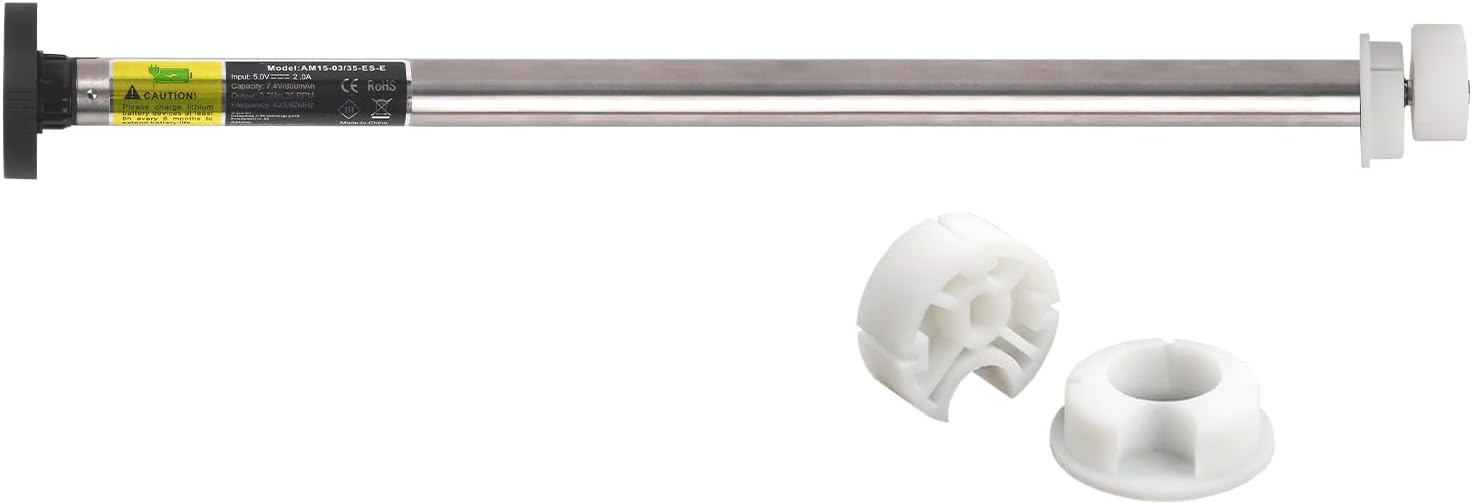
3. Hototahi
This conversion kit is specifically designed for Coolaroo roller shades that utilize a 38mm (1-1/2 inch) outer diameter tube. Before installation, it is crucial to verify the internal diameter of your shade's tube to ensure proper fitment. The kit includes a custom adapter sleeve for seamless integration.

4. Tatūnga me te Tāuta
Follow these steps to install your Rollerhouse ERB22 motor kit:
- Prepare the Shade Tube: Remove your existing Coolaroo roller shade from its mounting brackets. Carefully remove the manual operating mechanism (e.g., chain or wand) from one end of the shade tube.
- Tāutahia te Motini: Insert the motor unit into the shade tube. The 38mm tube drive and crown components should fit snugly into the tube. In some cases, minor filing of the adapter "gear" may be necessary to achieve a perfect fit. Ensure the motor is fully seated within the tube.
- Tāutahia te Ārai: Reinstall the shade tube with the motor into your existing mounting brackets. Ensure the motor side mounting hardware is securely fastened.
- Utuhia te Motini: Connect the USB charging cable to the motor and a suitable USB power source. Allow the motor to fully charge before initial use.
- Whakahoahoa te Mana Mamao:
- Locate the small programming hole on the back of the wireless remote control.
- Using a small pin or paperclip, press and hold the programming button until the motor responds (e.g., jogs slightly).
- Follow the specific pairing instructions provided with your remote control to link it with the motor.
- Set Upper and Lower Limits:
- Use the remote to move the shade to your desired upper limit position.
- Refer to your remote's instructions for the specific button sequence to set the upper limit. The motor will typically jog to confirm.
- Repeat the process for the desired lower limit position.
- Note: Setting limits is crucial. Without them, the motor will continue to run until manually stopped.
- Adjust Direction (if necessary): If the "Up" button moves the shade down and vice-versa, consult your remote's instructions to reverse the motor direction.
5. Nga Tohutohu Whakahaere
Once installed and programmed, operating your motorized shade is straightforward:
- Whakaarahia te whakamarumaru: Press the "Up" button on the remote control. The shade will move to its programmed upper limit.
- Taumarumaru Raro: Press the "Down" button on the remote control. The shade will move to its programmed lower limit.
- Whakamutua te whakamarumaru: Press the "Stop" or "Middle" button (if available) to halt the shade at any desired position.
- Intermediate Stop: Some remotes allow setting an intermediate stop point. Refer to your remote's specific instructions for this feature.
The RF technology allows control from anywhere within range, even through walls, without needing to point the remote directly at the shade.
6. Tiaki
Te Whakataki i te Pūhiko:
The motor is powered by an internal rechargeable battery. When the motor's performance diminishes or it stops responding, it indicates a low battery. Connect the provided USB charging cable to the motor's charging port and a standard USB power adapter (not included). A full charge typically lasts several months, depending on usage frequency.
Te horoi:
For cleaning the motor unit, use a dry or slightly damp cloth. Do not immerse the motor in water or use harsh chemical cleaners. The manufacturer recommends "Spot Clean Only" for the components.
7. Te Raru
Mena ka pāngia koe e ngā raruraru me ngā otinga o tō kete motuka, tirohia ēnei raruraru me ngā otinga e whai ake nei:
- Motor Not Responding to Remote:
- Check if the motor battery is charged.
- Ensure the remote control battery is functional.
- Re-attempt the remote pairing process as described in the "Setup" section.
- Shade Does Not Stop at Desired Position:
- The upper and lower limits may not be set correctly. Follow the "Set Upper and Lower Limits" steps in the "Setup" section to reprogram them.
- Kua Hurihia te Aronga o te Mōta:
- Consult your remote control's instructions for reversing the motor direction. This is typically a specific button combination.
- Motor Appears Weak or Cannot Lift Shade:
- Ensure the motor is fully charged.
- Verify that your shade's weight does not exceed the motor's 5 lb lift capacity.
- Check for any obstructions or excessive friction in the shade's movement path.
- Adapter "Gear" Does Not Fit:
- As noted in the setup, minor filing of the plastic adapter may be required for a snug fit within some shade tubes. Proceed carefully if this is necessary.
8. Whakatakotoranga
| Huanga | Taipitopito |
|---|---|
| Tau tauira | ERB22 |
| Waitohu | Whare roera |
| Hototahi | Coolaroo Roller Shades with 38mm (1-1/2") OD Tube |
| Whakaputa Kaha | Tae atu ki te 5 lbs |
| Momo Mana | Mana Mamao RF Ahokore |
| Puna Mana | Pūhiko Rechargeable (USB Charging) |
| Hunga Hua | 3 x 2.2 x 17.32 inihi |
| Taumaha Tūemi | 14.1 hekere |
| Nga Waahanga kei roto | Motor, Tube Drive & Crown, Remote Control, Mounting Hardware, USB Cable |
| Tohutohu Tiaki | Wahi Maama anake |
9. Pūtāhui me te Tautoko
For warranty information or technical support, please contact Rollerhouse customer service. Refer to the product packaging or the official Rollerhouse webpae mo nga taipitopito whakapā me nga kupu whakamana.
Tautoko Aipurangi: Visit the Rollerhouse Store on Amazon