1. Kupu Whakataki
Thank you for choosing the LEKATO CPD-1000 Electronic Drum Set. This portable electric drum set is designed to provide an authentic drumming experience with quiet mesh pads and a wide range of sounds. This manual will guide you through the setup, operation, and maintenance of your new instrument.
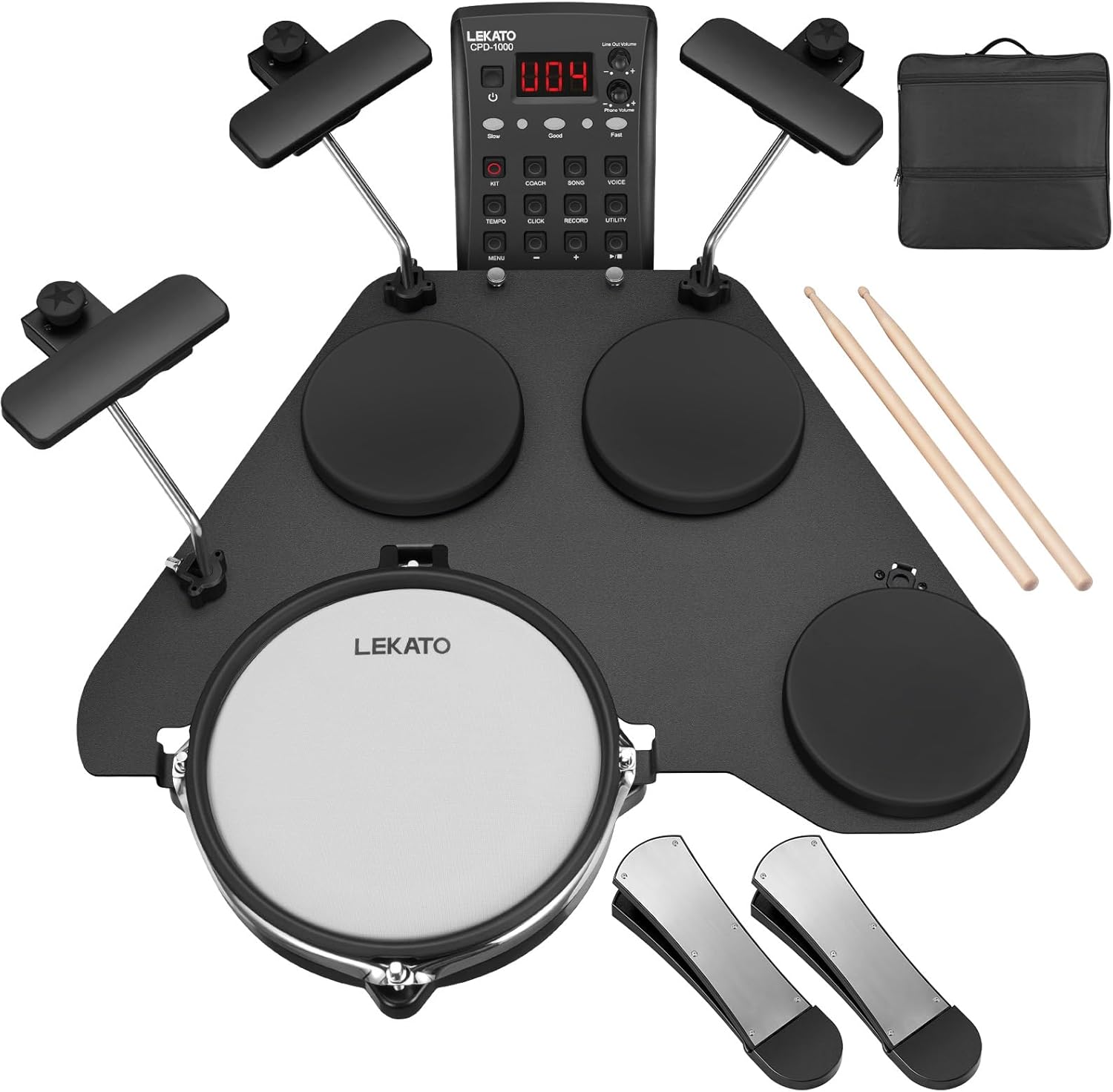
The CPD-1000 features a double-layer mesh snare for realistic rebound, three silicone toms, and three silicone cymbals for responsive play. It includes over 220 drum sounds, 10 preset kits, and 5 customizable kits. Connectivity options include AUX input for external audio, USB-MIDI for computer integration, and robust footswitch pedals for dynamic control.
2. Ihirangi mokete
I mua i te huihuinga, tirohia koa kei reira nga waahanga katoa:
- Main Pad (1x)
- Cymbal (3x)
- Whāurutau (1x)
- Pedal (2x)
- Wiring Harness (1x)
- Shoulder Bag (1x)
- Drum Key and Screws
- Rakau Pahū
- Pukapuka Kaiwhakamahi

3. Tatūnga
3.1 Huihuinga
The LEKATO CPD-1000 is designed for easy assembly and portability. It can be set up on a 14-inch snare drum stand or a tabletop.
- Place the main pad unit on a stable surface or a compatible drum stand.
- Attach the cymbal triggers to their designated positions on the main unit using the provided hardware. Adjust their height and angle for comfortable playing.
- Connect the footswitch pedals to the main unit. Ensure they are placed on a stable surface to prevent movement during play.
- Connect the wiring harness to the main pad unit and then to each individual pad (snare, toms, cymbals) and pedals. Ensure all connections are secure.

3.2 Hononga Hiko
Connect the provided power adapter to the DC 9V input on the drum module and plug it into a standard electrical outlet.
3.3 Hononga Ororongo
- Putanga Puoro: Connect headphones to the 3.5mm PHONE OUT jack for private practice.
- Putanga Raina: Hono atu ki tetahi amplifier or mixing console using the 6.35mm OUTPUT jack.
- Tāuru AUX: Connect an external audio device (e.g., smartphone, MP3 player) to the 3.5mm AUX IN jack to play along with your favorite music.

3.4 USB MIDI Hononga
Connect the drum module to a computer using a USB cable for MIDI functionality. This allows for recording into Digital Audio Workstations (DAW) or controlling virtual instruments.
3.5 Aratohu Ataata Huihuinga
Mō tētahi aratohu tirohanga mō te tukanga huihuinga, tirohia te ataata e whai ake nei:
4. Nga Tohutohu Whakahaere
4.1 Hiko / Whakaweto
Pehia te MANA button on the drum module to turn the unit on or off.
4.2 Sound Selection and Drum Kits
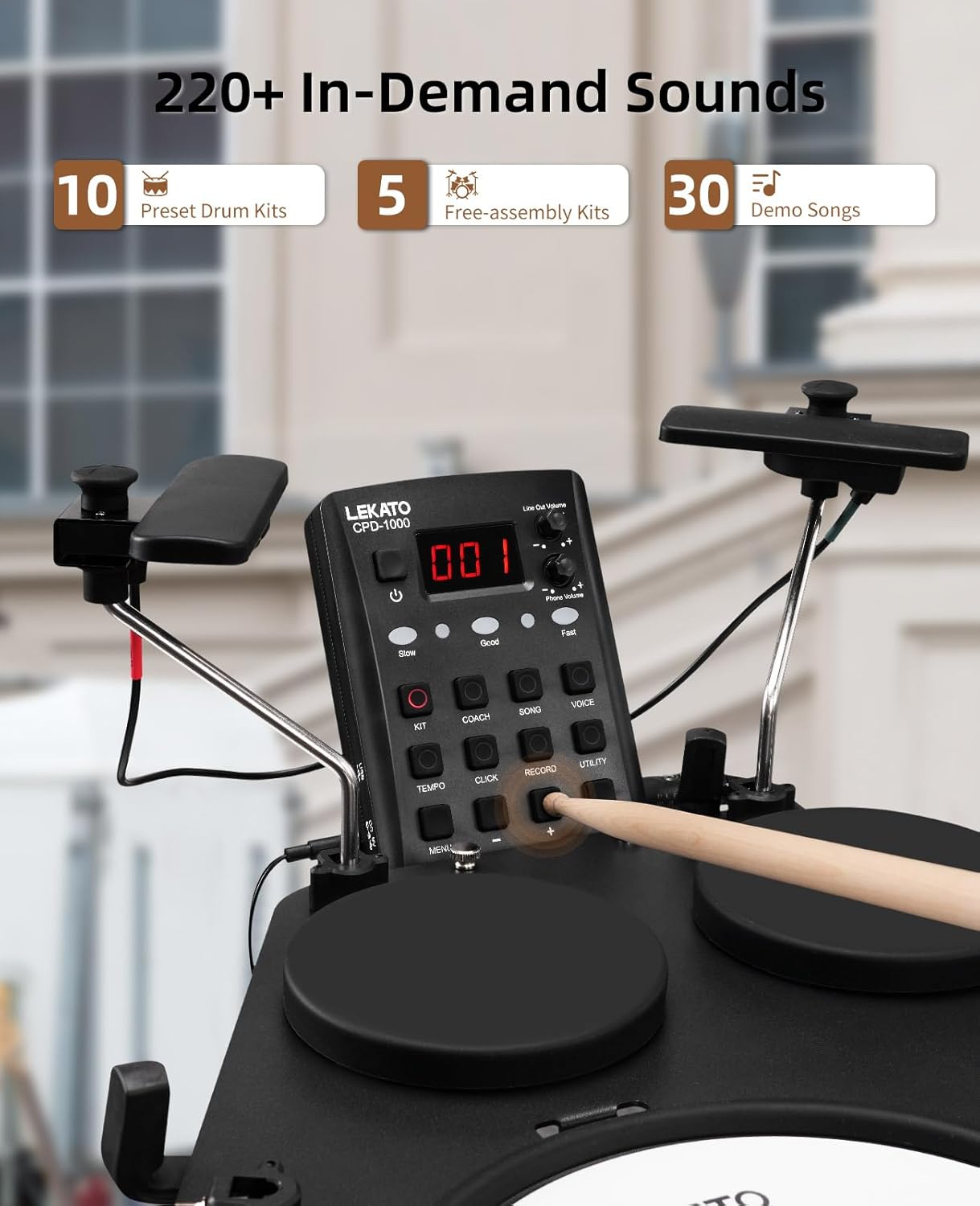
The CPD-1000 offers over 220 drum sounds and 10 preset drum kits. You can also create and save up to 5 freely combinable drum kits.
- Pehia te KIT button to cycle through the preset drum kits.
- Whakamahia te +/- buttons to adjust parameters or select different sounds within a kit.
4.3 Te purei i nga Pads
All pads on the CPD-1000 are touch-sensitive, including the snare, hi-hat, crash, ride, and tom pads (Tom1, Tom2, Tom3). The sound produced will vary based on the force and speed of your strike, providing a dynamic playing experience.

The robust footswitch pedals are designed to eliminate crosstalk and support dynamic input, ensuring clean and responsive kick and hi-hat control.

4.4 Practice Features
- Waiata Whakaatu: The module includes 30 demo songs for practice and inspiration. Use the WAIATA button to select and play demo tracks.
- Metronome: Activate the built-in metronome using the PAHIA button to improve timing and accuracy. Adjust the tempo with the TEMPO pātene.
- Aratau Kaiako: Whakauru KAUPAPA mode for guided practice exercises, helping beginners develop fundamental drumming skills.
- Te tuhi: Whakamahia te REKOTI function to capture your drumming sessions for review and progress tracking.

4.5 Advanced Pad Settings
The drum module allows for fine-tuning of individual pad parameters to customize your playing experience. Access these settings via the WHAKAMAHI pātene me te whakatere ma te whakamahi i te +/- pātene.
- Paepae: Adjusts the minimum force required to trigger a sound.
- Tairongo: Controls how responsive the pad is to different playing dynamics.
- Whakawhitiwhiti: Minimizes unwanted triggering of adjacent pads.
- Ānau: Modifies the velocity response curve of the pad.
- Whakakore-Whakakore: Helps prevent double-triggering.
- Rim-Adjust: Adjusts the sensitivity of rim shots on the snare pad.

5. Tiaki
5.1 Te horoi
To maintain the longevity and performance of your drum set:
- Wipe down the pads and module with a soft, dry cloth after each use.
- Mo te paru maro, whakamahia he paku damp kakahu ka whakamaroke rawa.
- Avoid using abrasive cleaners, solvents, or waxes, as these can damage the surfaces.
5.2 Rokiroki
When not in use, store the drum set in a cool, dry place away from direct sunlight and extreme temperatures. The drum set is designed for portability, with removable stands and a travel bag for convenient storage and transport.

6. Te Raru
If you encounter any issues with your LEKATO CPD-1000, please refer to the following common solutions:
- Kore Oro:
- Me whakarite kei te hono tika te urutau hiko, ā, kei te whakakā hoki te waeine.
- Check headphone or speaker connections and their volume levels.
- Verify that the main volume on the drum module is turned up.
- Confirm all pad cables are correctly plugged into the module.
- Pads Not Responding or Double Triggering:
- Check the cable connection for the affected pad.
- Adjust the pad's Paepae, Te tairongo, Whakawhitiwhiti, a Retrig-Cancel settings in the Utility menu (refer to Section 4.5).
- Ensure drumsticks are not damaged or excessively worn.
- Footswitch Issues (Kick/Hi-Hat):
- Ensure the footswitch cables are securely connected.
- Check for any obstructions preventing full depression of the pedal.
- Adjust the sensitivity settings for the kick and hi-hat pedals in the Utility menu.
- MIDI Connectivity Problems:
- Verify the USB cable is properly connected to both the module and the computer.
- Ensure the correct MIDI drivers are installed on your computer (if required).
- Check MIDI input settings within your DAW or software.
If the issue persists, please contact LEKATO customer support for further assistance.
7. Whakatakotoranga
| Āhuahira | Whakatakotoranga |
|---|---|
| Ingoa Tauira | CPD-2849US1 |
| Rauemi tinana | Kirihou |
| Rauemi Papa | Mesh, Silicone, Metal |
| Ahu (L x W x H) | 19.69 x 5.71 x 19.69 inihi |
| Taumaha Tūemi | 13.86 pauna (6.3 Kirokaramu) |
| Nga tangi | 220+ Drum Sounds |
| Kete Paoro | 10 Preset, 5 User-Combinable |
| Nga Mahi Whakangungu | 30 Demo Songs, Metronome, Coach Mode, Record Function |
| Hononga | USB MIDI, 3.5mm AUX Input, 3.5mm Phone Output, 6.35mm Output |
| Pedals | 2 Robust Footswitch Pedals (Kick, Hi-Hat) |
8. Pūtāhui me te Tautoko
For information regarding product warranty, please refer to the warranty card included in your package or visit the official LEKATO webpae. Puritia to tohu hoko mo nga kereme whakamana.
If you require technical assistance, have questions about your product, or need to report an issue, please contact LEKATO customer support through their official channels. Contact details can typically be found on the product packaging or the LEKATO brand webpae.


