Kupu Whakataki
This manual provides detailed instructions for the setup, operation, and maintenance of your new Merwry DL-4112T-02 Fan Remote Control Replacement. This remote is designed to be a direct replacement for Home Decorators Ceiling Fans, offering enhanced functionality and ease of use.
It features an all-in-one control design, allowing you to manage fan speeds, light functions, and reverse mode directly from the front of the remote, eliminating the need to access internal switches for reverse function.

Image: Comparison of the original remote (left) and the Merwry DL-4112T-02 replacement remote (right).
Tatūnga
1. Tāuta Pūhiko
The remote control requires one 9V battery (not included). To install the battery:
- Kimihia te uhi o te wahanga pākahiko kei muri o te mamao.
- Peia te uhi ki raro kia tuwhera.
- Insert a new 9V battery, ensuring the polarity (+/-) matches the diagram inside the compartment.
- Whakahokia te uhi ki tona waahi kia pao pai.
2. Te Whakataunga Maunga Taiepa
The remote comes with a convenient wall mount and screws for secure storage.
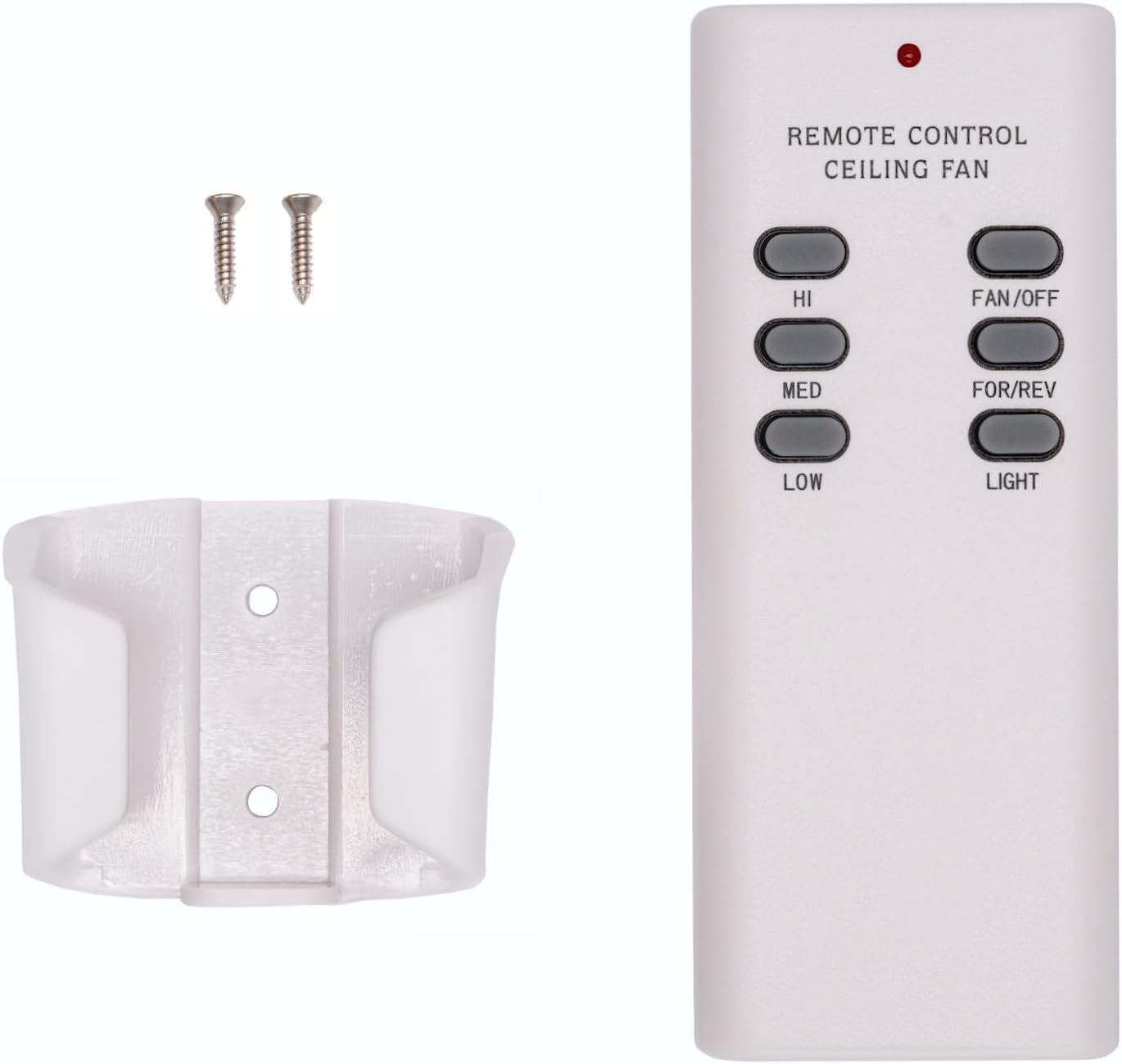
Image: The Merwry DL-4112T-02 remote control, its wall mount cradle, and two mounting screws.
Hei whakauru i te whakairinga taiepa:
- Choose a suitable location on a wall, away from direct heat or moisture.
- Use the wall mount as a template to mark the positions for the two screws.
- Tuhia nga rua pairati mehemea e tika ana.
- Whakamauhia te whakapiringa pakitara ki te pakitara mā te whakamahi i ngā tīwiri kua whakaratohia.
- Place the remote control into the mounted cradle for easy access.
3. Pairing Process (Syncing the Remote)
Follow these steps to pair your new remote control with your ceiling fan:
- Turn off power to the fan: Kimihia te pūwhiti hiko, te pana pakitara rānei e whakahaere ana i te hiko o tō pā hau tuanui, ka whakaweto. Me whakarite kua whakaweto katoatia te mana o te pā hau.

Image: A hand turning off a wall light switch, illustrating the first step of power cycling.
- Whakaora mana: After a few seconds, turn the power back ON at the circuit breaker or wall switch.
- Press and hold the "FAN/OFF" button: Within 30 seconds of restoring power, press and hold the "FAN/OFF" button on your remote control for 10 seconds. The fan light (if applicable) should blink, indicating successful pairing.

Whakaahua: He tata view of the Merwry DL-4112T-02 remote control, with the 'FAN/OFF' button highlighted by a green rectangle.
If pairing is unsuccessful, repeat the steps. Ensure the remote is within range of the fan's receiver during the pairing process.
Nga Tohutohu Whakahaere
The Merwry DL-4112T-02 remote control provides comprehensive control over your ceiling fan's functions. Familiarize yourself with the buttons:

Whakaahua: Mua view of the Merwry DL-4112T-02 replacement remote control, showing all control buttons.
- HI: Ka whakatakoto i te tere o te pā hau ki te Teitei.
- MED: Ka whakatakoto i te tere o te pā hau ki te Waenga.
- ITI: Ka whakatakoto i te tere o te pā hau ki te Iti.
- PAPA/WATA: Turns the fan off. Also used for pairing (see Setup section).
- FOR/REV: Toggles the fan's direction between forward (downward airflow for cooling) and reverse (upward airflow for heat distribution). This button is conveniently located on the front, unlike some original remotes.
- KAMAMA: Toggles the fan light On or Off.
Te tiaki
Whakakapinga Pūhiko
Replace the 9V battery when the remote's indicator light dims or if the remote becomes unresponsive. Refer to the "Battery Installation" section under Setup for instructions.
Te horoi
To clean the remote control, wipe it gently with a soft, dry cloth. Do not use abrasive cleaners, solvents, or expose the remote to excessive moisture, as this can damage the electronics.
Raparongoā
| Raruraru | Take pea | Rongoā |
|---|---|---|
| Kāore a Mamao e whakautu mai. | He iti te pākahiko kua mate ranei. | Whakakapihia te papahiko 9V. |
| Kāore a Mamao e whakautu mai. | Remote is not paired with the fan. | Perform the pairing process again (see Setup section). |
| Fan or light not responding after pairing. | Power interruption to the fan. | Ensure the fan's power supply (wall switch/breaker) is ON. |
| E mahi ana te pā hau engari kāore te mārama e mahi. | Light bulb issue. | Check if the light bulb is properly installed and not burnt out. |
| Fan direction (FOR/REV) does not change. | Fan motor issue or internal switch. | Ensure the fan is running at a low speed before attempting to change direction. If issues persist, consult your fan's manual or a qualified electrician. |
Whakatakotoranga
- Tau tauira: CD7030T4DS-2 (DL-4112T-02 Replacement)
- Waitohu: Whakamarie Tika
- Ngā Pūrere Hototahi: Home Decorators Ceiling Fans (Merwry series, 2A767-DL-4112T-01, 28865-DL4112T)
- Puna Hiko: 1 x 9V Pūhiko (kaore i whakauruhia)
- Āhuahira Motuhake: Radiofrequency (RF) control, All-in-One Control (Fan Speed, Light, Reverse)
- Tae: Mā
- Rahi Hua: 2.76 x 1.8 x 4.57 inihi
- Taumaha Tūemi: 4 hekere
- Whenua Taketake: Taiwan
Nga korero Whakaputanga
This Merwry DL-4112T-02 Fan Remote Control Replacement is backed by a 1-Tau Whakaputanga Kaihanga. Ka kapi tenei raihana i nga hapa o nga rawa me nga mahi i raro i te whakamahinga noa. Tena koa pupurihia to tohu mo te hoko mo nga kereme whakamana.
For specific warranty terms and conditions, or to initiate a warranty claim, please contact the manufacturer directly.
Tautoko Kiritaki
If you encounter any issues not covered in this manual or require further assistance, please contact Comfort Direct customer support. Refer to the product packaging or the retailer's webpae mo nga korero whakapā.
When contacting support, please have your product model number (CD7030T4DS-2) and purchase details ready.


