1. Kupu Whakataki
Welcome to your new Kaidi KD-7019 TWS Bluetooth Earbuds. This manual provides instructions for the setup, operation, and maintenance of your device. Please read it carefully to ensure proper use and to maximize your listening experience.
Ihirangi mokete
- 1 Pair of Kaidi KD-7019 Earbuds
- 1 Charging Case with Touch Screen
- 1 USB-C Utaura Whakatau
- 1 Pukapuka Kaiwhakamahi
- Multiple pairs of silicone ear tips (Small, Medium, Large)
2. Hua Neke Atuview
Wae Puoro
The Kaidi KD-7019 earbuds feature an ergonomic in-ear design for a comfortable and secure fit. Each earbud includes a touch-sensitive area for control functions.
Charging Case with Touch Screen
The charging case not only protects and charges your earbuds but also features an integrated touch screen display for advanced control and information.

Figure 2.1: The product packaging for the Kaidi KD-7019 TWS Bluetooth Earbuds, displaying the brand 'KRIDI' (Kaidi) and 'ANC TWS Tela Touch' (ANC TWS Touch Screen) along with the model number KD-7019.

Figure 2.2: An illustration of the Kaidi KD-7019 charging case's LCD touch screen, detailing various functions such as music control, volume control, sound equalizer, 'Find My Buds' locator, ambient sound modes (ANC), spatial sound, flashlight, and lock screen wallpaper.
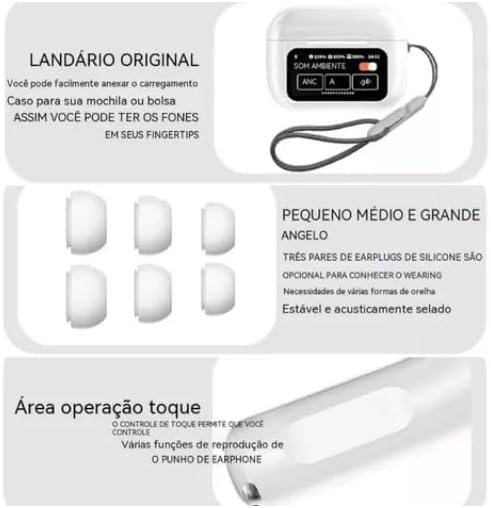
Figure 2.3: This image highlights key features: a lanyard attachment point on the charging case for portability, three pairs of silicone ear tips (small, medium, large) for a comfortable and secure fit, and the touch operation area on the earbuds for controlling playback and other functions.
3. Tatūnga
3.1 Te Whakataki i nga Paorooro me te Puhi
- Connect the provided USB-C cable to the charging case and a compatible power source (e.g., USB wall adapter, computer USB port).
- The touch screen on the charging case will display the current charging status.
- Ensure both earbuds are correctly placed inside the charging case to charge them simultaneously.
- A full charge for both the earbuds and the case typically takes approximately 2 hours.
3.2 Te hono ki te Pūrere Nihokikorangi
- Whakatuwheratia te taupoki o te pouaka utu. Ka whakakā aunoa ngā pane taringa, ā, ka uru ki te aratau takirua Nihokikorangi.
- On your desired device (e.g., smartphone, tablet, laptop), navigate to the Bluetooth settings.
- Whakahohehia te Nihokikorangi me te rapu mo nga taputapu e waatea ana.
- Select "Kaidi KD-7019" from the list of detected devices to initiate the connection.
- A voice prompt from the earbuds will confirm successful pairing.
4. Nga Tohutohu Whakahaere
4.1 Basic Earbud Controls (Touch)
The earbuds feature touch-sensitive areas for convenient control of audio playback and calls.
- Purei/Tatari: Pao kotahi ki runga i tetahi purongo.
- Riu Panuku: Pao rua ki te purongo matau.
- Riu o mua: Pao rua ki te purongo maui.
- Whakautu/Whakamutu Waea: Pao kotahi ki runga i tetahi purongo.
- Whakakore Waea: Press and hold either earbud for approximately 2 seconds.
- Whakahohe i te Kaiawhina Reo: Takitoru te pao ki runga i tetahi purongo.
4.2 Charging Case Touch Screen Functions
The integrated touch screen on the charging case provides additional control and information without needing to access your paired device.
- Mana Waiata: Navigate through tracks, play, and pause directly from the screen.
- Mana Rōrahi: Adjust the audio playback volume.
- Kaiwhakaōrite Oro: Select from various preset equalizer modes to customize your audio experience (e.g., Acid Rock, Pop, Classical).
- Ambient Sound Modes: Toggle between Active Noise Cancellation (ANC), Transparency Mode, and Normal mode to suit your environment.
- "Find My Buds" Locator: Activate this function to emit a sound from misplaced earbuds, aiding in their retrieval.
- Oro Mokowā: Enable or disable spatial audio features for an immersive sound experience.
- rama rama: Activate a small light feature on the charging case for convenience.
- Lock Screen Wallpaper: Customize the display background of the touch screen.
- Te Rā me te Wā Whakaaturanga: View the current date and time directly on the case screen.
5. Tiaki
5.1 Te horoi
- Use a soft, dry, lint-free cloth to clean the earbuds and the charging case.
- Do not use abrasive cleaners, alcohol, or chemical solvents, as these can damage the device.
- If necessary, gently clean the silicone ear tips with a damp cloth and mild soap, then ensure they are completely dry before reattaching them to the earbuds.
5.2 Rokiroki
- Always store the earbuds in their charging case when not in use. This protects them from damage and keeps them charged.
- A ape i te tuku i te taputapu ki te wera nui, te ra tika, te makuku nui ranei.
6. Te Raru
Nga take me nga otinga noa
- Kore Oro:
- Me whakarite kia tika te utu o nga taringa.
- Verify that the Bluetooth connection is active and stable.
- Adjust the volume on both your connected device and via the charging case touch screen.
- Kaore e taea te takirua:
- Confirm that the earbuds are in pairing mode (open case lid).
- Whakawetohia ka whakakāhia te Nihokikorangi i runga i to taputapu.
- If previously paired, try forgetting "Kaidi KD-7019" from your device's Bluetooth list and attempt pairing again.
- Ensure no other devices are currently connected to the earbuds.
- Nga take utu:
- Check the USB-C cable and power adapter for damage and proper connection.
- Ensure both earbuds are correctly seated in their charging slots within the case.
- Clean the charging contacts on both the earbuds and the case if they appear dirty.
- Nga Mana Pa Kare i te urupare:
- Ensure the touch areas on the earbuds are clean and dry.
- Place the earbuds back into the charging case, close the lid, and then reopen it to reset them.
7. Whakatakotoranga
Raraunga Hangarau
| Āhuahira | Taipitopito |
|---|---|
| Waitohu | Kaidi |
| Tauira | KD-7019 (also referred to as 3041) |
| Putanga Nihokikorangi | 5.3 |
| Kawa Tautokohia | HFP, HSP, A2DP, AVRCP |
| Waeine Atekōkiri | 13 mm |
| Tawhiti Whakawhiti | >10 mita |
| Raukaha Puku Earbud | 30 mah |
| Te Rahi Puhiko | 360 mah |
| Wā Purei Waiata | Tae atu ki te 5 haora (i te 80% rōrahi) |
| Te Wā Utu (Taringa me te Pouaka) | Tata ki te 2 haora |
| Tikanga Mana | Paa |
| Pūrere Hototahi | Waea Pūkoro, Papaaho, Pona |
| Mana Haruru | Whakakorea te Riihi Taiao (ENC) |
| Tiwhikete ANATEL | 10545-23-12308 |
| Taumaha Hua | 190 g |
| Ahu mōkihi | 23 x 13 x 4 cm |
8. Pūtāhui me te Tautoko
8.1 Nga Korero Whakaputanga
Based on the available product information, this product does not come with a manufacturer's warranty. Please refer to the return and warranty policies provided by your retailer or point of purchase for any potential coverage.
8.2 Tautoko Kiritaki
For further assistance, technical support, or inquiries regarding your Kaidi KD-7019 TWS Bluetooth Earbuds, please contact the retailer or seller from whom you purchased the product.


