1. Kupu Whakataki
Thank you for choosing the HTC GT-288 Electric Shaver. This manual provides essential information for the safe and effective operation, maintenance, and care of your new shaver. Please read these instructions thoroughly before first use and retain them for future reference.
2. Nga korero haumaru
Hei whakaiti i te mōrearea o te ru hiko, te whara, te pakaru rānei, me whai tonu i ēnei whakatūpato haumaru taketake:
- Kaua e rumakina te taura utu, te urutau hiko rānei ki roto i te wai, i ētahi atu wai rānei.
- Tiakina te taputapu mai i nga tamariki.
- Ensure the shaver is fully dry before connecting it to the charging cable.
- Do not use the shaver if the blade or foil is damaged, as this may cause injury.
- Whakamahia anake te taura tuku USB kua tohaina.
- This appliance is designed for personal use only.
3. Ihirangi mokete
Tena koa tirohia te kete mo nga mea e whai ake nei:
- 1 x HTC GT-288 Electric Shaver
- 1 x USB Utaura Whakatau
- 3 x Precision Combs (1mm, 3mm, 5mm)
- 1 x Paraihe horoi
- 1 x Hinu Whakahinuhinu
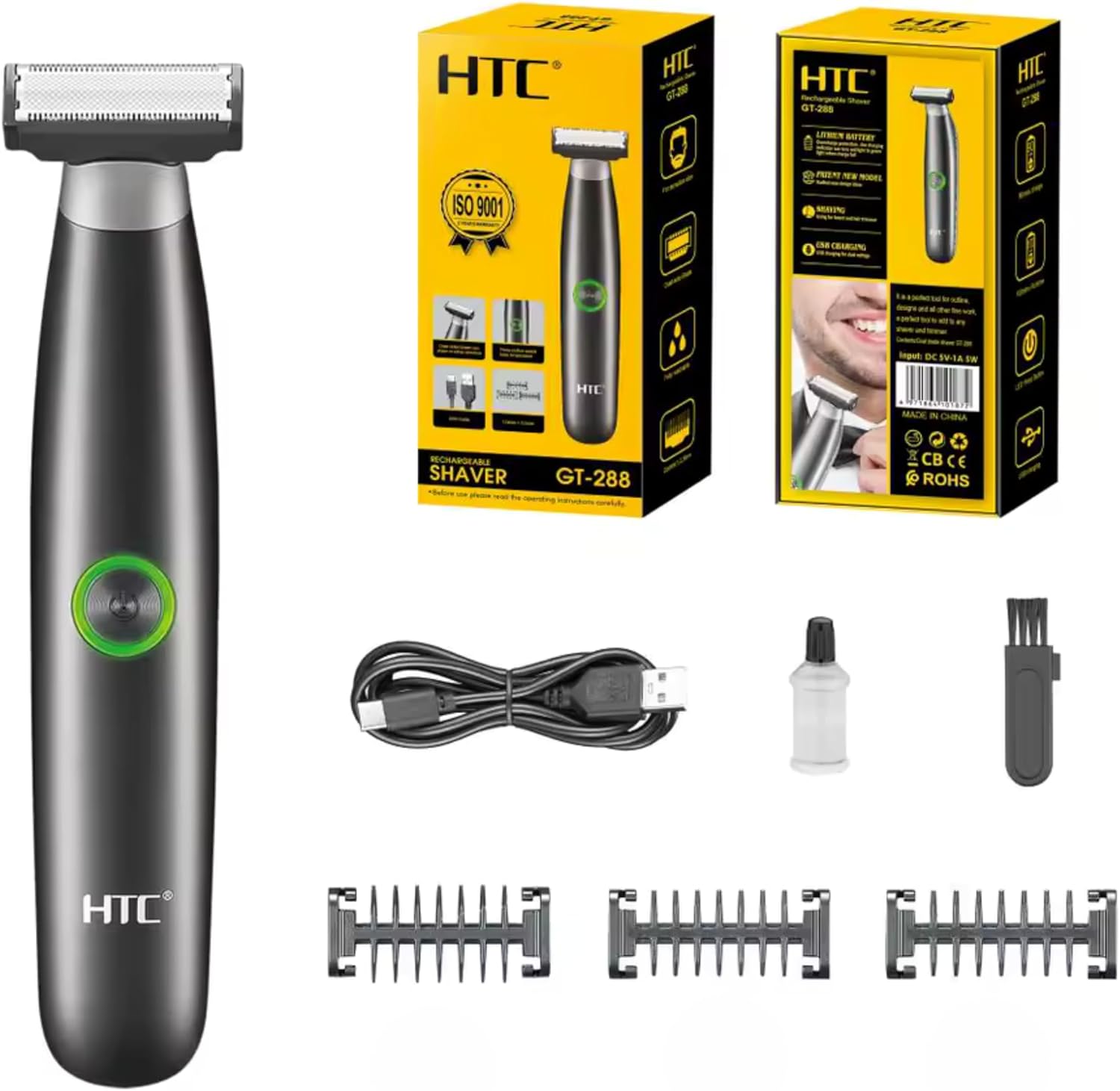
Image 3.1: Contents of the HTC GT-288 Electric Shaver package, including the shaver, USB cable, three precision combs, cleaning brush, and lubricating oil.
4. Hua Neke Atuview
The HTC GT-288 Electric Shaver features a sleek design with a dual-sided blade for efficient trimming and shaving. It includes an easy-to-operate press-button switch and is fully washable for convenient cleaning.
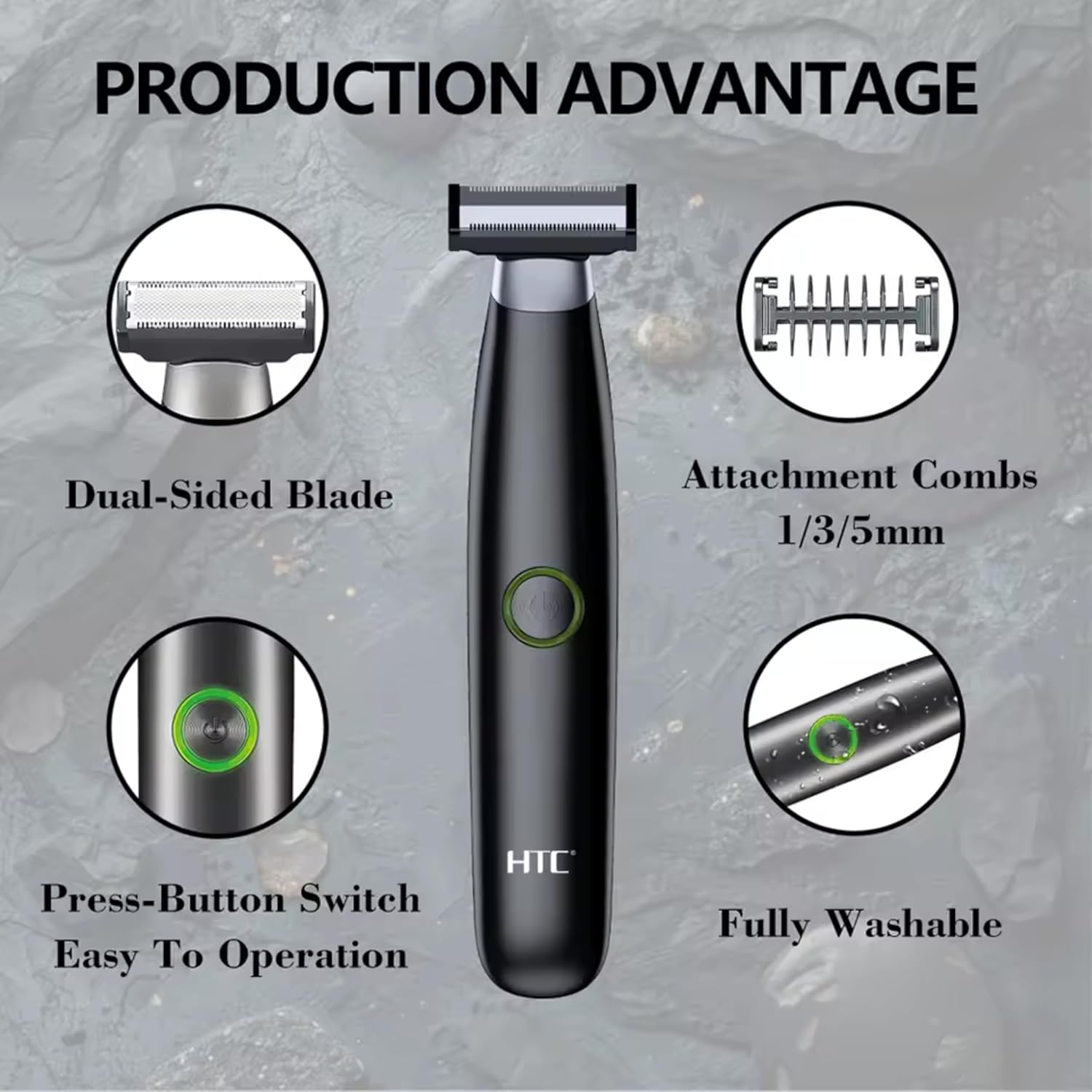
Whakaahua 4.1: Ka mutuview of the HTC GT-288 Electric Shaver's key features, highlighting the dual-sided blade, attachment combs (1/3/5mm), press-button switch, and fully washable design.

Image 4.2: Detail of the LED press button, which serves as the on/off switch for easy operation.
5. Tatūnga
- Wewete: Kia ata tangohia nga waahanga katoa mai i te kete.
- Akona Tuatahi: Before first use, fully charge the shaver. Refer to Section 6 for charging instructions.
- Attach Comb (Optional): If desired, select one of the three precision combs (1mm, 3mm, or 5mm) and slide it onto the shaver head until it clicks into place. Ensure it is securely attached.
6. Te utu
The HTC GT-288 Electric Shaver is equipped with a rechargeable battery for cordless operation.
- Me mohio kua weto te heu.
- Connect the small end of the USB charging cable to the charging port on the shaver.
- Connect the larger end of the USB cable to a compatible USB power source (e.g., computer, USB wall adapter).
- The LED indicator on the shaver will illuminate to show that it is charging.
- Allow the shaver to charge completely before its first use. A full charge typically takes several hours.
- Kia oti te utu, momotuhia te taura USB.
7. Nga Tohutohu Whakahaere
The HTC GT-288 shaver can be used for both wet and dry shaving.
- Whakahiko: Press the LED button to turn on the shaver.
- Heu maroke: For dry shaving, ensure your skin is clean and dry. Gently press the shaver against your skin and move it in slow, even strokes against the direction of hair growth.
- Heu Māku: For wet shaving, apply shaving foam or gel to your skin. The shaver is waterproof, allowing for use in the shower or with water. Move the shaver in gentle, even strokes.
- Using Precision Combs: Attach the desired 1mm, 3mm, or 5mm comb for trimming beards, sideburns, or other facial hair to a specific length. Move the shaver with the comb attached against the direction of hair growth for an even trim.
- Weto Whakakore: Press the LED button again to turn off the shaver after use.
8. Tiaki me te Whakapai
Mā te horoi auau ka tino pai te mahi, ka roa ake hoki te ora o tō heu.
- Whakaweto: Always turn off the shaver before cleaning.
- Horoi Upoko: The shaver is fully washable (IPX6 rated). You can rinse the shaver head directly under running water to remove hair clippings.
- Whakamahia te Paraihe horoi: For more thorough cleaning, use the provided cleaning brush to remove stubborn hair particles from the blade and comb attachments.
- Whakahinuhinu Mata: After cleaning and drying, apply a small drop of the provided lubricating oil to the blades. Turn on the shaver for a few seconds to distribute the oil evenly. This helps maintain blade performance.
- maroke: Tukua te heu kia maroke rawa i te hau i mua i te penapena, i te whakakī anō rānei.

Image 8.1: The HTC GT-288 Electric Shaver being rinsed under a faucet, illustrating its IPX6 fully washable design for easy cleaning.
9. Te Raru
| Raruraru | Take pea | Rongoā |
|---|---|---|
| Kare e ka ana te heu. | Kua pau te pākahiko. | Whakakīia katoatia te heu. |
| Shaver does not cut effectively. | Kua purua ngā mata e te huruhuru, kua memenge rānei. | Clean the shaver head thoroughly. Apply lubricating oil. If problem persists, blades may need replacement. |
| Shaver pulls hair. | Battery is low or blades are clogged. | Charge the shaver. Clean the shaver head. |
| Ka mutu te heu i te wa e whakamahia ana. | Kua pau te pākahiko. | Whakaorangia te heu. |
10. Whakatakotoranga
- Waitohu: HTC
- Ingoa Tauira: GT-288
- Puna Hiko: USB Rechargeable
- Nga waahanga motuhake: USB Cable, Adjustable Combs, Rechargeable, Water Resistant, Wet & Dry Use
- Whakamahinga Manakohia: Facial Shaving, Beard Trimming, Daily Use, Travel
- Nga Waahanga Kei roto: Electric Shaver, USB Cable, 3 Precision Combs, Cleaning Brush, Lubricating Oil
- Taumaha Hua: 250 Karamu
- Tae: Pango
- Rauemi Mata: Kowiri tira
- Momo upoko: Tapahi Motuhake
11. Pūtāhui me te Tautoko
This product is manufactured by HTC. For any questions, technical support, or warranty claims, please contact the seller or manufacturer directly through your purchase platform. Please retain your proof of purchase for warranty purposes.


