Kupu Whakataki
Thank you for choosing the MOZOTER SP9i Wireless Earbuds. These earbuds are designed to provide a comfortable and stable audio experience with advanced Bluetooth 5.3 technology, deep bass sound, and extended playtime. This manual will guide you through the setup, operation, and maintenance of your new earbuds to ensure optimal performance.
He aha kei roto i te Pouaka
- MOZOTER SP9i Wireless Earbuds (Left and Right)
- Puhi utu
- USB-C Uira Whakatau
- Ngā pito taringa (rahi S, M, L)
- Pukapuka Kaiwhakamahi
Ka mutu te huaview
The MOZOTER SP9i earbuds feature an over-ear hook design for secure fit and comfort. Each earbud is equipped with intuitive touch controls for easy management of audio and calls. The compact charging case provides additional battery life and convenient storage.

Image: The MOZOTER SP9i Wireless Earbuds resting in their open charging case, showcasing the over-ear hook design and the charging contacts.
Whakaahua: He taipitopito view of an earbud highlighting the integrated Bluetooth 5.3 technology for stable and efficient wireless connectivity.
Tatūnga
1. Te Whakataki i nga Paorooro me te Puhi
I mua i te whakamahinga tuatahi, whakakīia katoatia ngā pane taringa me te pouaka whakamātau. Honoa te taura USB-C kua whakaratohia ki te tauranga whakamātau i runga i te pouaka me te pūtake hiko. Mā ngā rama tohu i runga i te pouaka e whakaatu te tūnga whakamātau.
- Wā Whakataki: Tata ki te 1.5 haora mo te utu katoa.
- Wā Purei taringa: Tae atu ki te 12 haora i runga i te utu kotahi.
- Te Wā Tākaro Katoa me te Pouaka: Tae atu ki te 60 haora.

Image: The charging case with earbuds inside, illustrating the 60-hour total playtime, 12-hour single charge, and 48-hour case capacity, along with the USB-C charging port.
2. Tauhoa ki to Pūrere
- Ensure the charging case has power and the earbuds are inside.
- Whakatuwherahia te putea utu. Ka hiko aunoa nga taringa ka uru ki te aratau takirua.
- I runga i to taputapu (waea atamai, papa, pona), whakaahei i te Nihokikorangi.
- Rapua ngā taputapu Nihokikorangi e wātea ana, ā, tīpakohia "SP9i"mai i te rarangi.
- Kia honoa, ka rongo koe i te oro whakaū, ā, ka wetē, ka mura rānei ngā rama tohu o ngā pane taringa.
Ka hono aunoa nga taringa ki te taputapu takirua whakamutunga ina tangohia mai i te keehi, mena ka taea te Nihokikorangi ki runga i te taputapu.

Image: An illustration showing the MOZOTER SP9i earbuds in their open case, with a smartphone screen displaying a successful Bluetooth connection to "SP9i".
Mau Tohutohu
For optimal sound quality and comfort, it is important to wear the earbuds correctly and choose the appropriate eartip size.
1. Te Kōwhiri i ngā Tipi Taringa
The earbuds come with small (S), medium (M), and large (L) eartips. Experiment with different sizes to find the pair that provides the best seal and comfort for your ears. A good seal enhances bass response and passive noise cancellation.
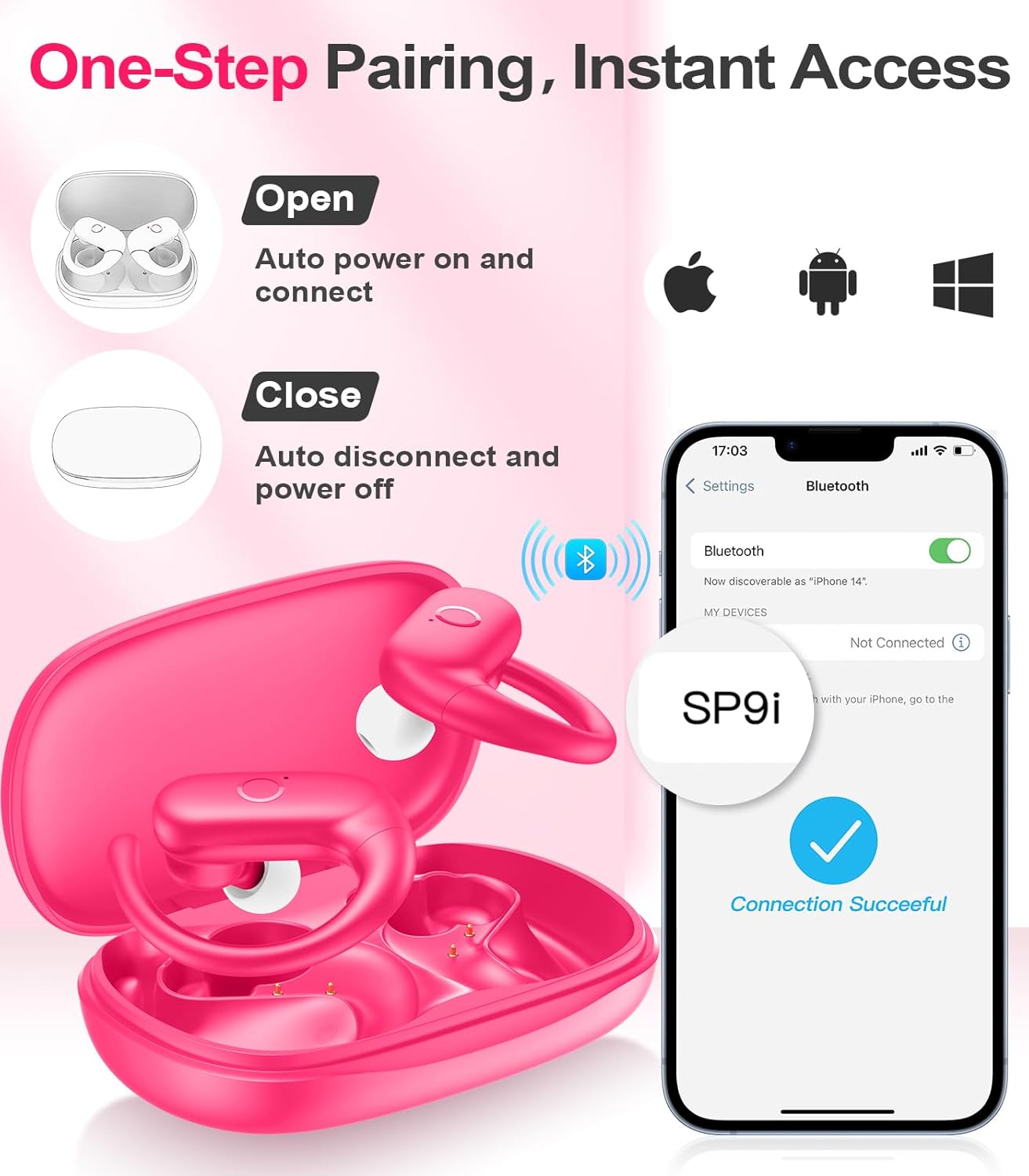
Image: A woman wearing an earbud, with an inset showing the three available eartip sizes (S, M, L) for a customized and comfortable fit.
2. Te Whakatutuki i te Taunga Haumaru
- Hipanga 1: Whakatakotoria te matau taringa ki runga i tō taringa.
- Hipanga 2: Me ata kuhu te purongo ki roto i to takere taringa.
- Hipanga 3: Rotate the earbud slightly to find a comfortable and secure angle. The flexible ear hooks ensure a stable fit, ideal for sports and active use.

Image: A three-step diagram illustrating the correct method to wear the MOZOTER SP9i earbuds, ensuring a secure and comfortable fit with the ear hook.

Image: A woman wearing the MOZOTER SP9i earbuds, demonstrating the ergonomic design that rests comfortably and securely on the ear.
Nga Tohutohu Whakahaere
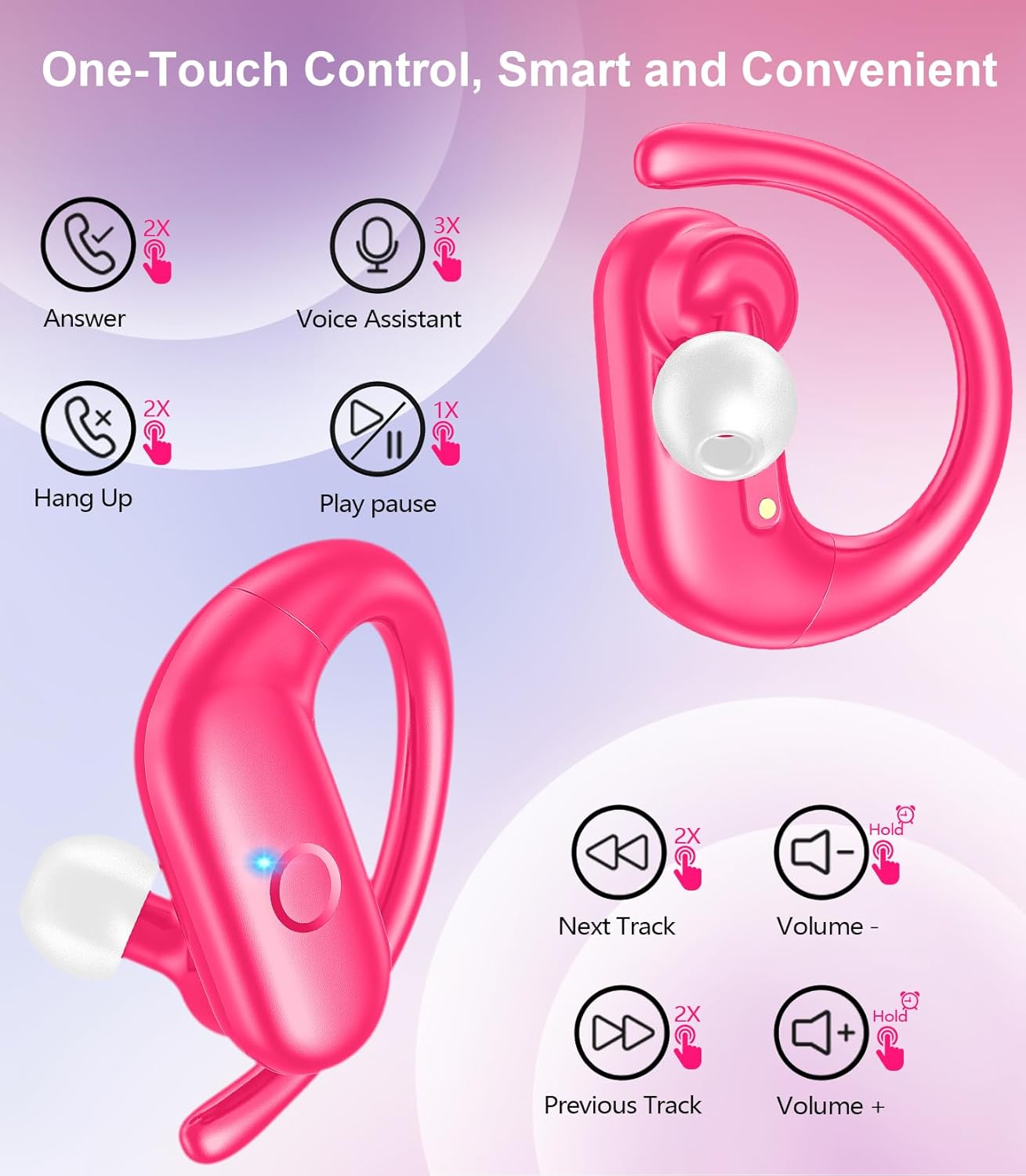
The MOZOTER SP9i earbuds feature intuitive touch controls on each earbud. The following table outlines the functions:
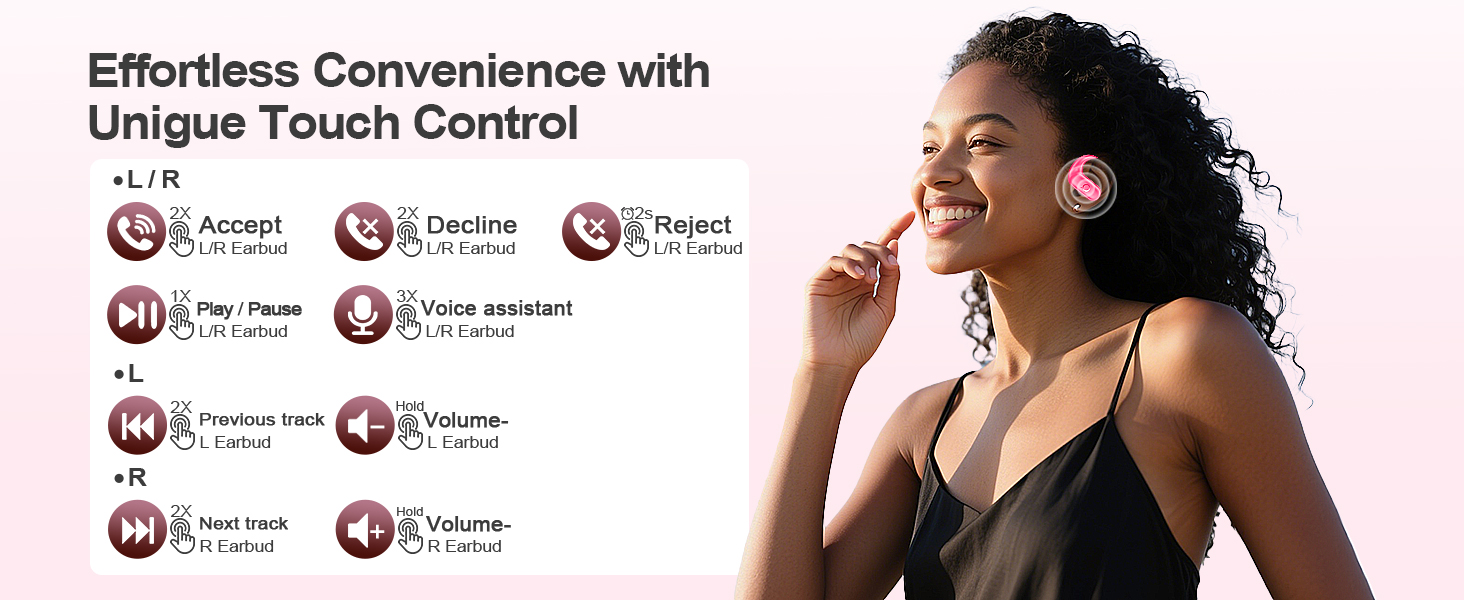
Image: A visual guide detailing the various touch control gestures for the MOZOTER SP9i earbuds, including call management, music playback, and volume adjustments.
| Mahi | Gesture (L/R Earbud) |
|---|---|
| Whakautu Karanga | Double-tap (2X) |
| Piihia te Waea | Double-tap (2X) |
| Whakakahoretia te Waea | Triple-tap (3X) |
| Purei/Tatari Waiata | Single-tap (1X) |
| Whakahohe Kaiāwhina Reo | Triple-tap (3X) |
| Riro Panuku | Double-tap (2X) on Matau taringa taringa |
| Tuhinga o mua | Double-tap (2X) on Mauī taringa taringa |
| Rōrahi Whakarunga | Kia mau Matau taringa taringa |
| Rōrahi Whakararo | Kia mau Mauī taringa taringa |
Te tiaki
Ma te tiaki tika ka mau te roa me te mahi o o taringa.
- Te horoi: Regularly clean the eartips and the charging contacts on both the earbuds and the case with a soft, dry, lint-free cloth. Avoid using harsh chemicals or abrasive materials.
- Rokiroki: Ki te kore e whakamahia, penapenahia nga purongo ki roto i o raatau pukoro hei tiaki i te puehu me te kino.
- Puranga wai: Ahakoa i hangaia mō ngā hākinakina, kaua e rumakina ngā pane taringa ki te wai. Horoia tonutia te werawera, te makuku rānei i muri i te whakamahinga.
Raparongoā
If you encounter any issues with your MOZOTER SP9i earbuds, please refer to the following common solutions:
- Karekau e honoa nga taringa: Ensure both earbuds are charged and removed from the case. Turn off and on your device's Bluetooth. If issues persist, try resetting the earbuds (refer to manufacturer's webpae mō ngā tohutohu tautuhi anō motuhake mēnā kāore i roto i te pukapuka ā-ringa).
- Kotahi anake te pukoro e mahi ana: Place both earbuds back into the charging case, close the lid, wait a few seconds, then open the lid and remove them. This often resynchronizes them.
- He pai te kounga oro: Ensure the eartips provide a good seal in your ear. Clean any debris from the earbud speakers. Check your device's volume and audio settings.
- Nga take utu: Me whakarite kia mau te hononga o te taura utu ki te pouaka me te pūtake hiko. Horoia ngā hononga utu i runga i ngā pane taringa me roto hoki i te pouaka.
- Ngā taringa e taka ana: Experiment with different eartip sizes and adjust the ear hooks for a more secure fit as described in the Wearing Instructions section.
Whakatakotoranga
| Āhuahira | Taipitopito |
|---|---|
| Ingoa Tauira | SP9i |
| Hangarau Hononga | Ahokore (Nihokikorangi 5.3) |
| Mana Haruru | Whakakahoretanga Noise Haangai |
| Te aukati | 4 Aue |
| Taumaha Earbud | Tata ki te 8g mō ia taringaoro |
| Waa purei Puoro | Tae atu ki te 12 haora |
| Wā Takaro Tapeke (me te pouaka) | Tae atu ki te 60 haora |
| Tauranga Whakatau | USB-C |
| Nga Waahanga kei roto | Taringa, Pouaka Utu, Tohu Taringa, Pukapuka Kaiwhakamahi |
Pūtāhui me te Tautoko
MOZOTER products are designed and manufactured to the highest quality standards. For warranty information and customer support, please refer to the documentation included with your purchase or visit the official MOZOTER website. If you require further assistance, please contact our customer service team.


