1. Nga Tohutohu Haumaru Nui
Tena panuihia nga tohutohu katoa i mua i te whakamahi i tenei taputapu. Puritia tenei pukapuka hei tohutoro a meake nei.
- Me whakarite te voltage rite ana te rahinga o te mea kua tohua ki te tapanga whakatauranga ki tō rahinga matuatage.
- Kaua e rumakina te pā hau, te mono, te taura rānei ki roto i te wai, i ētahi atu wai rānei.
- Unplug the fan from the outlet when not in use, before cleaning, or before moving.
- Do not operate the fan with a damaged cord or plug. Contact authorized service personnel for repair.
- Keep fingers and other objects away from the fan blades and openings.
- Do not use the fan near windows, in bathrooms, or in wet environments.
- Ko tenei taputapu ehara i te mea mo te whakamahi ma nga tangata (tae atu ki nga tamariki) he iti te kaha o te tinana, te tairongo, te hinengaro ranei, te kore mohio me te mohiotanga, mena ka tukuna atu ki a raatau te tirotiro, te tohutohu ranei mo te whakamahi i te taputapu e te tangata e whai mana ana mo to raatau haumaru. .
- Me mataki nga tamariki kia kore ai ratou e takaro ki te taputapu.
2. Hua Neke Atuview
The Mistral MFD4389DRW is a 43-inch DC Turbo Tower Fan designed for efficient air circulation. It features a DC brushless motor, 12 speed settings, and multiple operating modes. Control options include a full touch screen, remote control, and Wi-Fi with online voice control capabilities. The fan also offers a unique height conversion feature and 60-degree left-right oscillation.

Whakaahua 2.1: Mua view of the Mistral MFD4389DRW DC Turbo Tower Fan, showcasing its sleek design and touch control panel.

Whakaahua 2.2: Taha view of the Mistral MFD4389DRW DC Turbo Tower Fan, highlighting its slim profile.

Whakaahua 2.3: Hoki view of the Mistral MFD4389DRW DC Turbo Tower Fan, showing the air intake grille.
3. Ihirangi mokete
Manatokona kei roto nga waahanga katoa i roto i te kete:
- Mistral MFD4389DRW DC Turbo Tower Fan Unit
- Mana Mamao
- Pukapuka Kaiwhakamahi (tenei tuhinga)
- Base components (if not pre-assembled)
- Height extension component (for convertible height models)
4. Huihuinga
The Mistral MFD4389DRW fan features simple assembly. Typically, this involves attaching the base to the main fan unit. For models with height conversion, an additional extension piece may need to be secured.
- Kia ata tangohia nga waahanga katoa mai i te kete.
- Place the main fan unit upside down on a soft, flat surface to avoid scratching.
- Align the base with the bottom of the fan unit. Ensure the power cord passes through the designated opening in the base.
- Secure the base to the fan unit using the provided screws (if applicable).
- For height conversion, insert the extension component between the base and the main unit, ensuring it clicks securely into place or is fastened as per instructions.
- Whakatakotoria te pā hau ki runga i tētahi mata pumau, papatahi.
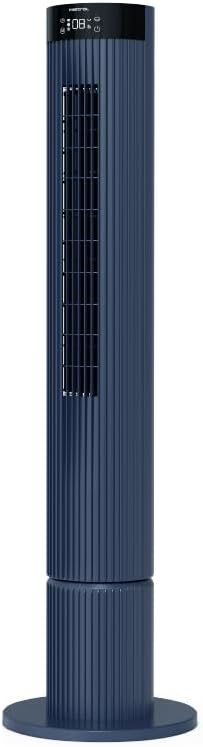
Figure 4.1: The fan demonstrating its convertible height feature, allowing adjustment between two different heights.
5. Tatūnga me te Whakamahi Tuatahi
After assembly, position the fan in your desired location. Ensure it is on a stable, flat surface and away from curtains or objects that could obstruct airflow.
- Plug the power cord into a suitable electrical outlet (220-240V~, 50-60Hz).
- The fan will enter standby mode. The touch screen display may illuminate briefly.
- To power on, touch the power icon on the control panel or press the power button on the remote control.
6. Nga Tohutohu Whakahaere
The fan can be operated via the full touch screen control panel on the unit or the included remote control.
6.1 Nga Mahi Paewhiri Mana
The touch screen control panel provides access to all fan functions:
- Pātene Hiko: Ka whakaka, ka weto ranei te powhiri.
- Whakatikatika Tere: Cycles through 12 fan speeds.
- Kōwhiringa Aratau: Switches between Turbo, One-key Cycle, and Baby modes.
- Whakatairite: Activates or deactivates 60-degree left-right oscillation.
- Matawā: Sets the pre-set On/Off timer for up to 12 hours.
- Tohu Wi-Fi: Ka whakaatu i te tūnga hononga Wi-Fi.
6.2 Mana Mamao
The remote control duplicates all functions available on the touch screen panel for convenient operation from a distance.
- Me whakarite kei te mana mamao nga pākahiko mahi.
- Point the remote control towards the fan's control panel for optimal signal reception.
6.3 Aratau Mahi
- Aratau Turbo: Provides maximum airflow for rapid cooling.
- One-key Cycle Mode: Automatically cycles through different fan speeds to simulate natural breeze.
- Aratau Pepi: Operates at a gentle, quiet speed suitable for nurseries or light sleeping.
7. Wi-Fi and Online Voice Control
The Mistral MFD4389DRW fan can be connected to your home Wi-Fi network for smart control via a mobile application and online voice commands.
7.1 Hononga Wi-Fi
- Download the official Mistral smart home application from your device's app store.
- Rēhita, takiuru ranei ki to putea i roto i te taupānga.
- Me mohio kei te hono to taputapu pūkoro ki te whatunga Wi-Fi 2.4GHz.
- Follow the in-app instructions to add a new device. This typically involves putting the fan into pairing mode (refer to the app or fan display for specific instructions, often by holding a Wi-Fi button).
- Once connected, the Wi-Fi indicator on the fan's control panel will illuminate steadily.
7.2 Online Voice Control
After successful Wi-Fi connection, you can link your fan to compatible smart home voice assistants (e.g., Google Assistant, Amazon Alexa) through the Mistral app settings.
- Open the Mistral app and navigate to the 'Integrations' or 'Voice Control' section.
- Select your preferred voice assistant and follow the prompts to link your Mistral account.
- Kia honoa, ka taea e koe te whakamahi i ngā whakahau reo pēnei i:
- "Turn on the fan."
- "Set fan speed to 5."
- "Turn off oscillation."
- "Change fan mode to Baby."
8. Tiaki
Ka awhina te horoi i nga wa katoa ki te pupuri i te mahi a te mea powhiriwhiri me te whakaroa i tona oranga.
8.1 Te horoi
- Wewetehia te powhiriwhiri mai i te putanga hiko i mua i te horoi.
- Whakamahia he ngohengohe, damp he kakahu hei muru i nga mata o waho o te mea powhiriwhiri. Kaua e whakamahi i nga kai horoi me nga whakarewa.
- Use a vacuum cleaner with a brush attachment to remove dust from the air intake and outlet grilles.
- Me whakarite kia maroke rawa te hau pā i mua i te mono anō me te whakamahi.
8.2 Rokiroki
If storing the fan for an extended period, unplug it, clean it thoroughly, and store it in its original packaging or a dust-free environment.
9. Te Raru
Mena ka pa ki a koe nga raru me to kaiwhaiwhai, tirohia nga raru me nga otinga e whai ake nei:
| Raruraru | Take pea | Rongoā |
|---|---|---|
| Kare te Fan e huri. | Karekau he hiko. | Tirohia mehemea kua honoa te taura hiko ki tetahi putanga mahi. |
| Te rere hau ngoikore. | Air intake/outlet blocked; Fan speed too low. | Clean grilles to remove dust. Increase fan speed. |
| Ka haruru rerekee te Fan. | Obstruction; Loose parts. | Unplug and check for any foreign objects. Ensure base is securely attached. |
| Kaore e mahi te mana mamao. | Dead batteries; Obstruction. | Replace remote control batteries. Ensure no objects are blocking the signal path. |
| Ka rahua te hononga Wi-Fi. | Kupuhipa Wi-Fi hē; Ngā raruraru pouara; He tawhiti rawa te hau i te pouara. | Verify Wi-Fi password. Ensure fan is within range of a 2.4GHz Wi-Fi network. Restart router and fan. |
Mena kei te haere tonu te raru i muri i te whakamatau i enei otinga, tena koa whakapā atu ki te tautoko a te kaihoko.
10. Whakatakotoranga
| Āhuahira | Whakatakotoranga |
|---|---|
| Tauira | MFD4389DRW |
| Voltage | 220-240V~, 50-60Hz 1.3A |
| Wattage | 40W |
| Rōrahi Hau | 29.54 m³ / min |
| Te Rerenga Hau | 4.26 m/s |
| Noise Level (Lowest Speed) | 33.2dB |
| Noise Level (Highest Speed) | 68.3dB |
| Rahi Hua (L*W*H) | 168 * 300 * 900 OR 1104 mm |
| Taumaha Kupenga | 4.46 KGS |
| Tohu Haumaru | 250467-11 |
| Nga waahanga motuhake | Remote Controlled, Timer, Wi-Fi Enabled |
| Te maha o nga tere | 12 |
11. Pūtāhui me te Tautoko
This Mistral MFD4389DRW DC Turbo Tower Fan comes with a comprehensive warranty:
- Pūtāhui Whānui: 1 Tau mai i te ra o te hoko.
- Pūtāhui Motor: An additional 3 Years for the motor only, totaling 4 years for the motor.
For warranty claims, technical support, or service inquiries, please contact your local Mistral authorized service center or refer to the contact information provided on the official Mistral webpae.


