Kupu Whakataki
This manual provides detailed instructions for the setup, operation, and maintenance of your HTC N15 Wireless Clip On Earbuds. Please read this manual thoroughly before using the product to ensure proper function and longevity.
Ihirangi mokete
Manatokona kei roto katoa nga mea kei roto i to kete hua:
- 1 Pair HTC N15 Clip On Earbuds
- 1 Keehi Whakatutuki
- 1 USB-C Utaura Whakatau
- 1 Quick Start Guide (Basic Operations)
Ka mutu te huaview
The HTC N15 Wireless Clip On Earbuds feature an open-ear design for situational awareness and a lightweight, secure fit. They come with a compact charging case for extended use.
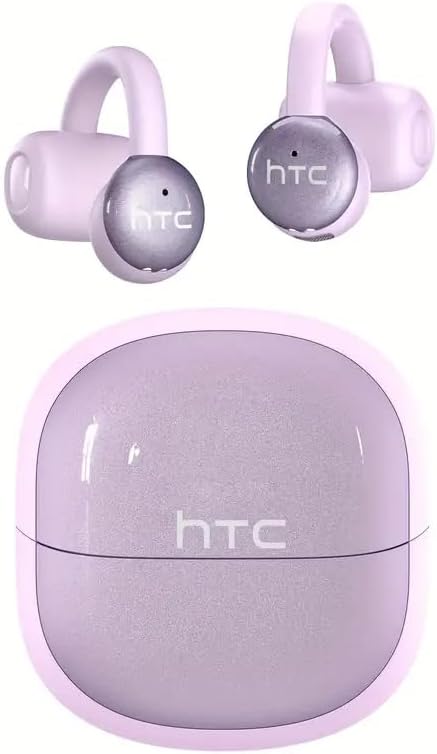
Image: HTC N15 Wireless Clip On Earbuds and Charging Case.

Image: The HTC N15 earbuds and charging case, highlighting battery life features such as 1.5 hours fast charging, 24 hours with the charge case, 8 hours on a single charge, and a Type-C charge port.
Te Whakataki i nga Pukarongo me te Puhi
Before first use, fully charge the earbuds and charging case. The charging case provides additional power for on-the-go charging.
- Kei te utu i te keehi: Connect the provided USB-C cable to the charging port on the case and a power source. The indicator lights on the case will show the charging status.
- Kei te utu i nga Puka-taringa: Whakatakotoria ngā pane taringa ki roto i te pouaka utu. Kia tika te whakanoho. Ka tīmata aunoa ngā pane taringa ki te utu.
A single charge provides approximately 8 hours of playback. The charging case extends total playtime to about 22 hours. Fast charging allows for quick power replenishment.

Image: Visual representation of the HTC N15 earbuds' battery life: 8 hours on a single charge, 24 hours with the charging case, and 1.5 hours for fast charging.
Tatūnga me te Takirua
The HTC N15 earbuds utilize Bluetooth 6.0 technology for a stable and low-latency connection. They are compatible with iOS and Android devices.
- Whakahiko: Whakatuwherahia te putea utu. Ka hiko aunoa nga taringa ka uru ki te aratau takirua.
- Whakahohe Nihokikorangi: I runga i to taputapu (waea atamai, papa, pona), whakaahei i te Nihokikorangi.
- Tīpako Pūrere: In your device's Bluetooth settings, search for 'HTC NE15' and select it to pair.
- Whakaū: Kia honoa, ka whakaūhia te hononga e te tohu reo.

Image: A diagram illustrating the 'Upgraded Bluetooth 6.0 Technology' with a comparison to Bluetooth 5.3 and 5.4, emphasizing low latency and fast connection.

Image: The HTC N15 earbuds and charging case shown with various compatible devices including notebooks, TVs, desktops, watches, phones, and iPads, demonstrating flexible connectivity. A phone screen displays 'HTC NE15 Connected'.
Operating Instructions (Touch Control)
The HTC N15 earbuds feature smart touch controls on both earbuds for easy management of calls and music playback.
- Whakautu/Whakamutu Waea: Click either earbud once.
- Whakakore Waea: Patohia me te pupuri i tetahi purongo mo te 2 hēkona.
- Purei/Tatari Puoro: Pāwhiri-rua i tētahi o ngā taringaoro.
- Waiata o mua: Pāwhiri-toru te taringa maui.
- Waiata Panuku: Pāwhiri-toru te taringa taringa matau.
- Runga Runga: Click the right earbud once.
- Raro Raro: Click the left earbud once.
- Kaiawhina Reo: Purihia te purongo maui mo te 2 hēkona.
- Aratau Kēmu: Purihia te purongo matau mo te 2 hēkona.

Image: A diagram illustrating the touch control functions for the HTC N15 earbuds, showing actions for answering/ending calls, rejecting calls, playing/pausing music, skipping tracks, adjusting volume, activating voice assistant, and enabling game mode.
Mau Tohutohu
The HTC N15 earbuds feature an ergonomic open-ear clip design for a secure and comfortable fit, allowing you to remain aware of your surroundings.
- Identify L/R: Confirm the left (L) and right (R) earbuds.
- Turanga: Confirm the direction of the earbud.
- Clip On: Gently clip the earbud onto the thinnest part of your ear by sliding it down.
- Whakarite: Adjust the earbud tip to align with your ear canal for optimal sound and comfort.
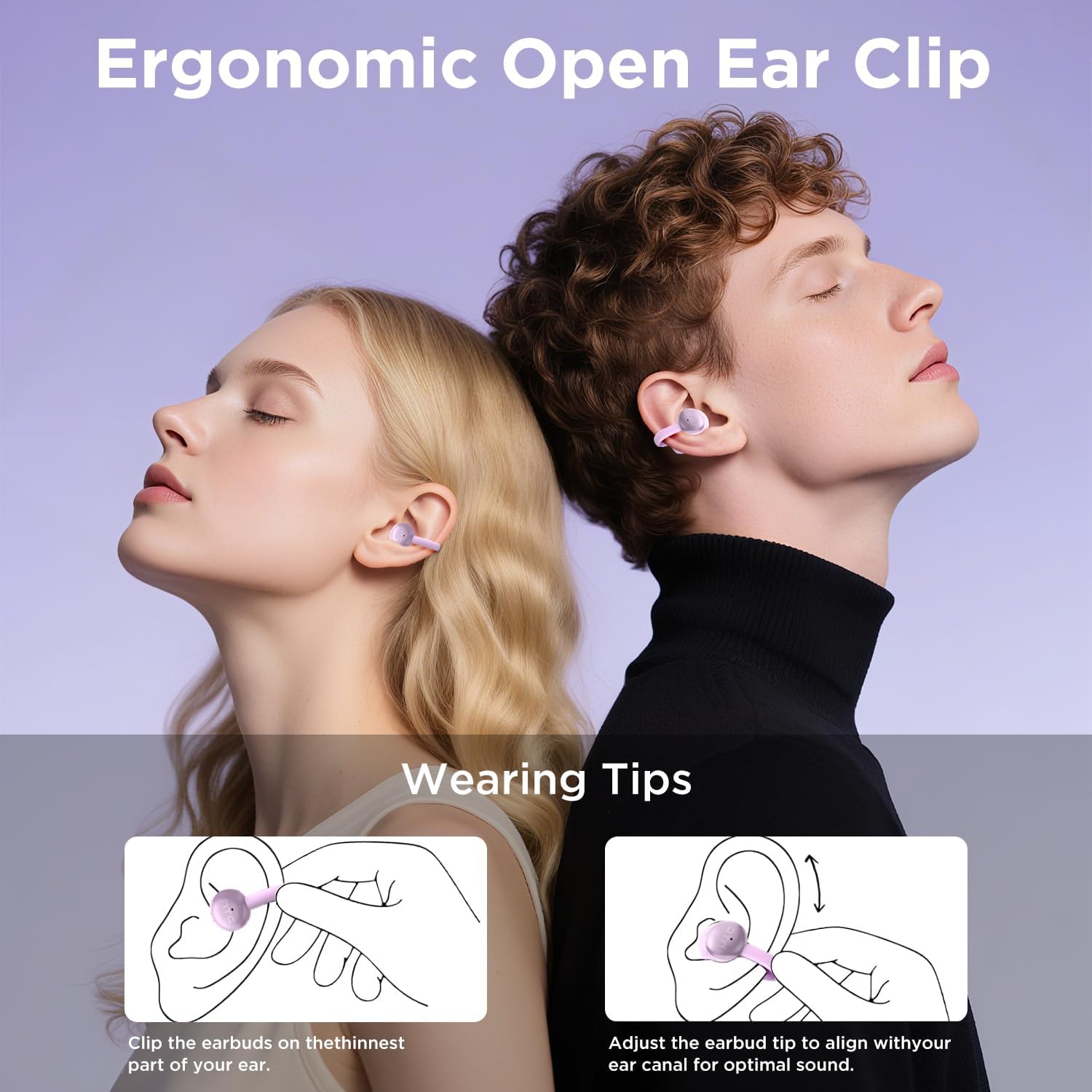
Image: A visual guide demonstrating the ergonomic open-ear clip design and wearing tips for the HTC N15 earbuds, showing how to clip them onto the ear and adjust for optimal sound.

Image: The HTC N15 earbuds emphasizing 'All-Day Comfort' with features like '4.7g Super Light' and a 'Flexible C-Bridge Design' for a secure fit.

Image: A four-step visual guide titled 'HOW TO WEAR?' showing how to correctly position and adjust the HTC N15 earbuds on the ear.
Te tiaki
To ensure the longevity and optimal performance of your HTC N15 earbuds, follow these maintenance guidelines:
- Te horoi: Horoia ngā pane taringa me te pouaka utu i ia wā ki te kakahu ngohengohe, maroke. Āta karohia te whakamahi i ngā matū kaha, i ngā mea whakakoi rānei.
- Ātete wai: The earbuds are IPX4 sweatproof, meaning they are resistant to splashes and sweat. Do not submerge them in water or expose them to heavy rain.
- Rokiroki: Ki te kore e whakamahia, penapenahia nga purongo ki roto i o raatau pukoro hei tiaki i te puehu me te kino.
- Te pāmahana: Āta tirohia ngā pane taringa ki ngā pāmahana tino wera (wera, makariri rānei) me te rā tika rānei mō te wā roa.
Raparongoā
If you encounter issues with your HTC N15 earbuds, refer to the following common solutions:
- Karekau e honoa nga taringa: Ensure both earbuds are charged and in pairing mode. Turn off and on your device's Bluetooth, then try pairing again.
- Karekau he oro, he iti te reo: Check the volume levels on both your device and the earbuds. Ensure the earbuds are correctly positioned in your ears. Due to the open-ear design, you may need to increase the volume slightly in noisy environments.
- Ngā taringa e taka ana: Ensure you are wearing the earbuds correctly as per the wearing instructions. Adjust the clip and earbud tip for a snug fit.
- Ko nga mana pa e kore e aro: Ensure your fingers are clean and dry. Try restarting the earbuds by placing them back in the case and taking them out again.
- Nga take utu: Verify the USB-C cable and power source are working. Ensure the earbuds are properly seated in the charging case.
Whakatakotoranga
| Āhuahira | Taipitopito |
|---|---|
| Ingoa Tauira | HTC NE15 |
| Hangarau Hononga | Ahokore (Nihokikorangi 6.0) |
| Hanga Whakatangitangi | Tuwhera-Tanga |
| Tikanga Mana | Paa |
| Te ora o te Pūhiko (Ngā taringa) | 8 Hāora (utu kotahi) |
| Wā Takaro Tapeke (me te Puhi) | 22 haora |
| Taumata Atete Wai | IPX4 (Ātete Werawera) |
| Rauemi | Kirihou, Silicone |
| Taumaha Tūemi | 4.6 hekere |
| Pūrere Hototahi | Waea Pūkoro, Papa |
| UPC | 768649989703 |
Ataata Hua
Ataata: He wetewete meka atuview of the HTC Wireless Clip On Earbuds N15 Bluetooth 6.0. This video demonstrates the product packaging, contents, and the physical appearance of the earbuds and charging case.
Pūtāhui me te Tautoko
HTC provides customer support for its products. For any questions or assistance, please refer to the contact information provided with your purchase or visit the official HTC support webpae.
Tautoko Kiritaki: 7*24 Live Chat Support is available for assistance with your HTC N15 earbuds.
Tena koa pupurihia to tohu mo te hoko mo nga kereme whakamana.