1. Kupu Whakataki
The Pecron E600LFP Portable Power Station is a versatile and reliable power solution designed for various applications, including camping, RV use, emergency backup, and home power needs. Featuring a 614Wh LiFePO4 battery and a 1200W AC output, it provides stable and efficient power for a wide range of electronic devices and appliances.
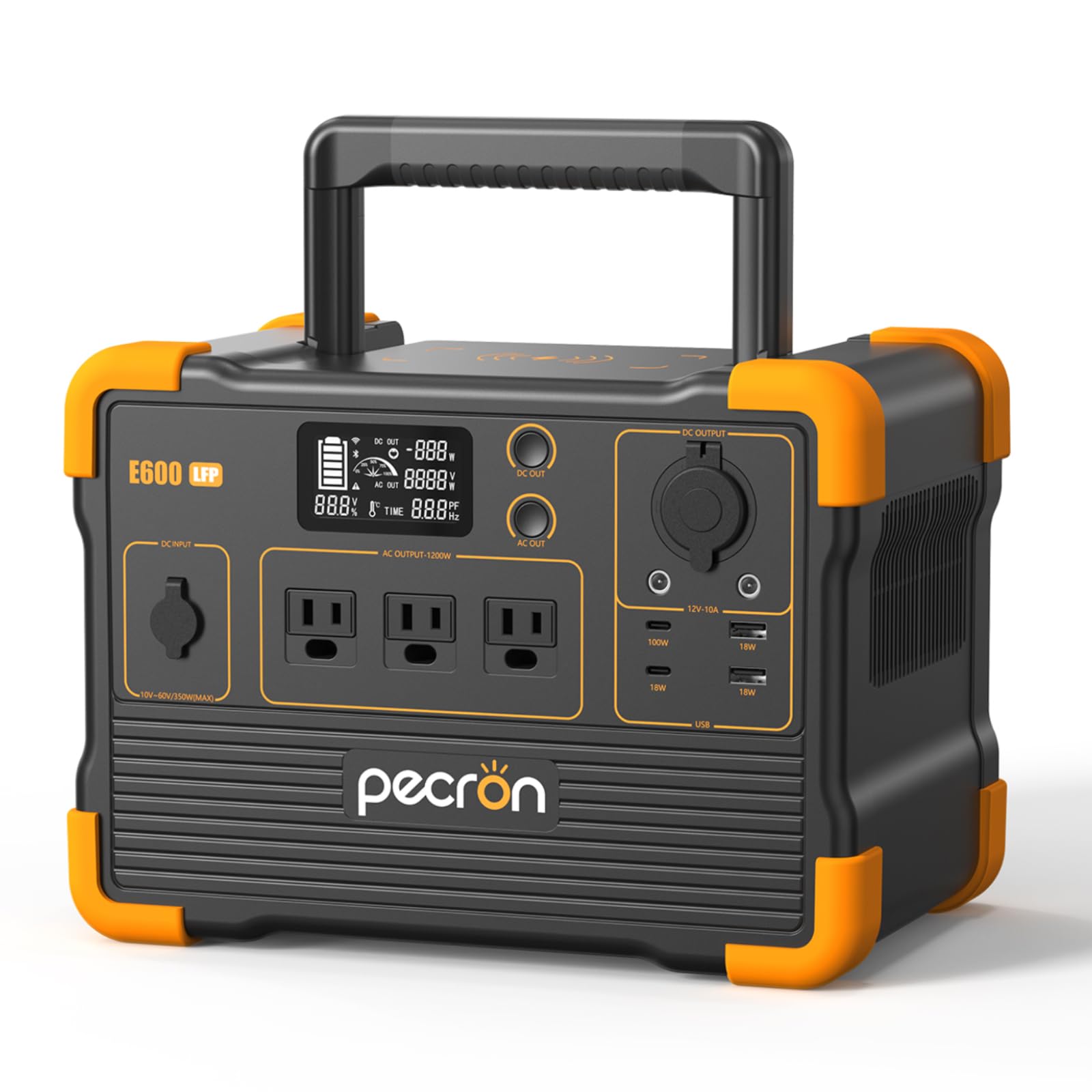
Image 1: The Pecron E600LFP Portable Power Station, showcasing tona hoahoa kiato me nga tauranga whakaputa maha.
2. Nga korero haumaru
Please read and understand all safety instructions before operating the Pecron E600LFP Power Station. Failure to follow these instructions may result in electric shock, fire, or serious injury.
- Kaua e wetewete, whakapai, whakarereke ranei i te waahanga.
- Tiakina te waeine mai i te ahi, te wai, me te wera nui.
- Me whakarite kia tika te hau i te wa e whakamahia ana kia kore e wera rawa.
- Kaua e whakamahia te taputapu mēnā kua pakaru, kua taka rānei.
- Kaua e taea e nga tamariki.
- Dispose of the unit and its battery according to local regulations.
3. Hua Neke Atuview
The Pecron E600LFP is equipped with a variety of ports and features to meet diverse power requirements.
3.1. Nga waahanga matua
- Raukaha Pūhiko: Pūhiko LiFePO4 614Wh.
- Huaputa AC: 1200W rated power (pure sine wave).
- Porohita Ora: Over 3500 cycles to 80%+ capacity.
- Te kawe: Compact design with integrated handle.
- Haumaru: Built-in Battery Management System (BMS) for protection against overheating, overloads, and short circuits.
3.2. Ngā Tauranga Putanga

Whakaahua 2: Taipitopito view of the Pecron E600LFP's 11 output ports, including AC, USB, and DC options.
- Putanga AC: 3 x 1200W AC outlets (100V~120V).
- Tauranga USB-C: 2 ports (18W / 100W Max).
- Tauranga USB-A: 2 ports (18W each).
- DC 5525 Output: 2 ports.
- 12V Cigar Port: 1 tauranga.
- Te Ahokore Ahokore: 1 on top of the unit.
3.3. Whakaatuhia nga korero
The integrated LCD display provides real-time information about the power station's status:
- Battery charge level (percentage and graphic).
- DC output wattage.
- AC putanga wattage.
- Estimated remaining runtime (in hours).
4. Tatūnga
Before first use, fully charge your Pecron E600LFP Power Station.
4.1. Te Wetewete me te Tirotiro
- Kia ata tangohia nga waahanga katoa mai i te kete.
- Verify that all included components are present (E600LFP unit, AC adapter, car charger cable, solar charging cable, user manual).
- Inspect the unit for any visible damage. If damaged, do not use and contact customer support.

Image 3: All components included with the Pecron E600LFP, such as the power station, various charging cables, and the user manual.
4.2. Whakataki Tuatahi
It is recommended to fully charge the power station before its first use to optimize battery performance.
- Connect the AC adapter to the DC input port on the power station.
- Monohia te urutau AC ki tetahi putanga pakitara paerewa.
- The display will indicate charging status. The unit is fully charged when the battery icon is full and the percentage tae ki te 100%.
5. Nga Tohutohu Whakahaere
5.1. Whakakahuria/Weto
- To turn on the main unit, press and hold the main power button.
- To activate AC output, press the 'AC OUT' button. The AC icon will appear on the display.
- To activate DC output, press the 'DC OUT' button. The DC icon will appear on the display.
- To turn off AC/DC output, press the respective button again.
- To turn off the entire unit, press and hold the main power button.
5.2. Pūrere hono
Plug your devices into the appropriate output ports. Ensure the total wattage of connected devices does not exceed the power station's rated output of 1200W.
- For AC-powered devices, use the 3-prong AC outlets.
- For USB-powered devices, use the USB-A or USB-C ports. The 100W USB-C port supports fast charging for compatible devices.
- For 12V DC devices, use the DC 5525 ports or the 12V cigar port.
5.3. Whakatau Ahokore
Whakatakotoria tō pūrere hototahi-Qi ki runga i te papa utu ahokore kei runga ake i te teihana hiko. Me whakarite kei waenganui te pūrere kia pai ai te utu.
6. Te Whakataki i te Teihana Hiko
The Pecron E600LFP offers multiple charging options for convenience.
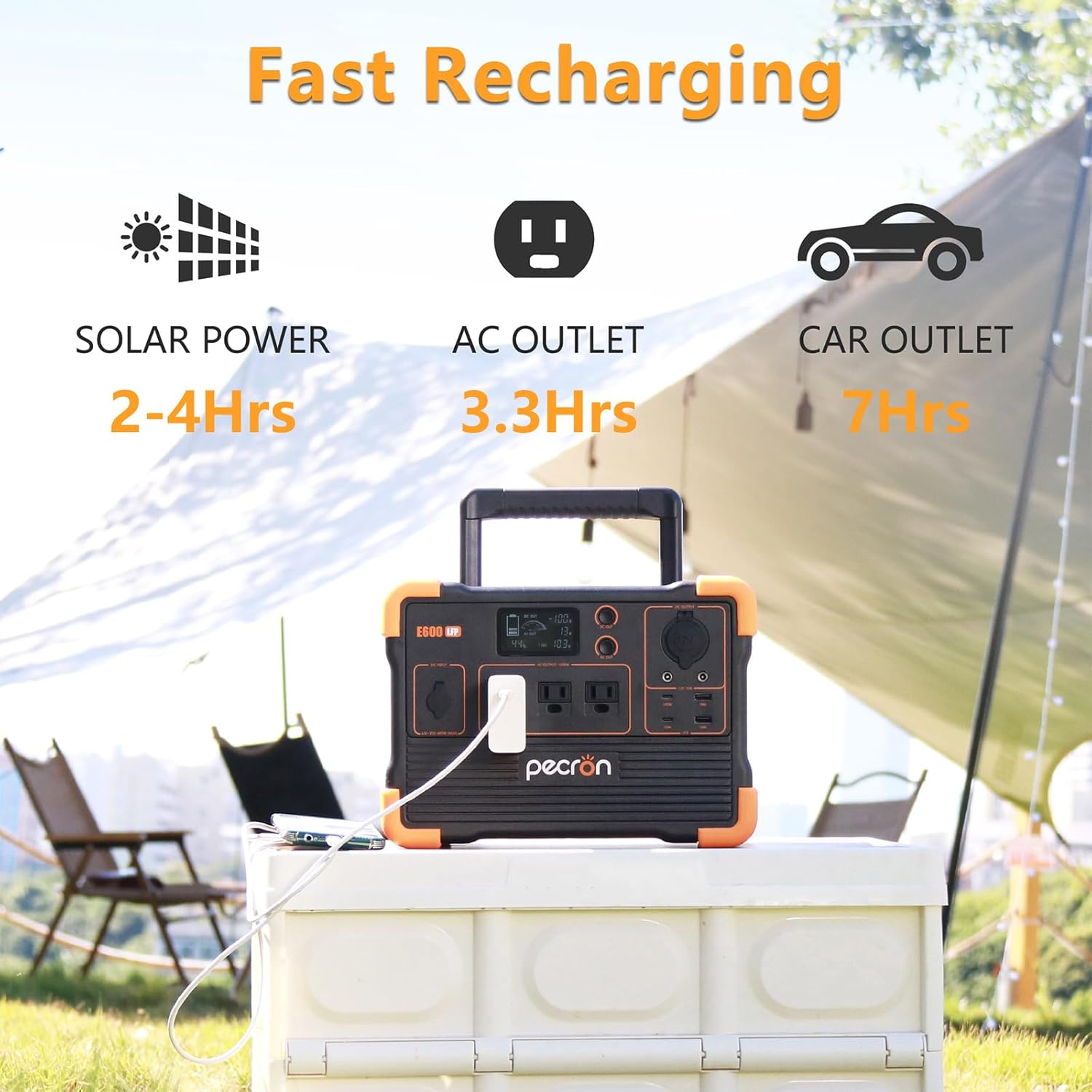
Image 4: Illustration of the Pecron E600LFP's fast recharging capabilities via solar, AC outlet, and car outlet.
6.1. AC Wall Charging
- Connect the provided AC adapter to the DC input port (12V-18V, 100W Max) on the power station.
- Monohia te urutau AC ki tetahi putanga pakitara paerewa.
- A full charge from a standard wall outlet takes approximately 3.3 hours.
6.2. Te Whakataunga Ra

Image 5: The Pecron E600LFP connected to a solar panel for efficient outdoor charging.
- Connect compatible solar panels (10V~60V, Max 350W PV input) to the GX16MF port on the power station using the appropriate cable.
- Whakanohoia nga panui solar ki te ra tika mo te pai o te utu.
- Charging time varies depending on solar panel wattage and sunlight intensity.
6.3. Te Whakataki Motuka

Image 6: The Pecron E600LFP being charged via a car's 12V outlet, providing convenient power on the go.
- Connect the car charger cable to the DC input port (12V-18V, 100W Max) on the power station.
- Monohia tetahi pito ki te putanga rama hikareti 12V o tō waka.
- Charging via car outlet is slower than AC wall charging.
7. Tiaki
Proper maintenance ensures the longevity and optimal performance of your Pecron E600LFP Power Station.
7.1. Tiaki Pūhiko
- For best results, fully charge the unit every 3-6 months, even if not in use.
- A ape i te whakaheke i te pākahiko i nga wa katoa.
- The LiFePO4 battery is designed for over 3500 charge cycles to retain 80%+ capacity.
7.2. Rokiroki
- Whakaorangia te teihana hiko ki te waahi makariri, maroke, kia matara atu i te ra tika me te wera nui.
- Me mohio kua weto te waeine i mua i te penapena.
7.3. Te horoi
- Whakamahia he kakahu maeneene, maroke hei horoi i waho o te waahanga.
- Kaua e whakamahi i nga kai horoi me nga whakarewa.
8. Te Raru
If you encounter issues with your Pecron E600LFP, refer to the following common troubleshooting steps:
- Karekau te waeine e whakakā ana: Ensure the battery is charged. Press and hold the main power button for a few seconds.
- Kāore he putanga mai i ngā tauranga: Verify that the specific output (AC or DC) is activated by pressing its respective button. Check if the device is properly connected and within the power station's wattage rohe.
- Puturi te utu: Ensure the charging cable and adapter are correctly connected. For solar charging, verify panels are in direct sunlight and clean.
- Kua whakahohehia te parenga taumaha: If the unit shuts down due to overload, disconnect some devices and restart the unit. Ensure total wattage kore e neke ake i te 1200W.
For persistent issues, please contact Pecron customer support.
9. Whakatakotoranga
| Āhuahira | Whakatakotoranga |
|---|---|
| Ingoa Tauira | E600LFP |
| Momo Pūhiko | LiFePO4 |
| Pūhiko Raukaha | 614Wh |
| Mana Hiko AC | 1200W (Rated), 1.2 Kilowatts (Max) |
| AC Putanga Voltage | 100V~120V |
| Putanga USB-C | Mōrahi 100W |
| DC Input (Car/AC Adapter) | 12V-18V, 100W Max |
| Solar Input (GX16MF) | 10V~60V, 350W Max |
| Hunga Hua | 11.7"L x 7.8"W x 8.5"H |
| Taumaha | Approximately 20 lbs (from image PT02) |
| Te Waahi Mahi (Kei te Whakataki) | 32°F ki te 113°F (0°C ki te 45°C) |
| Operating Temperature (Discharging) | -4°F ki te 113°F (-20°C ki te 45°C) |
10. Pūtāhui me te Tautoko
Pecron warrants the E600LFP power station for one year from the date of purchase. If the original purchaser registers their purchase within 30 days of purchase, the power station warranty is extended for an additional 1 year, totaling 2 years.
For warranty claims, technical support, or any inquiries, please visit the official Pecron webpaetukutuku, whakapā atu ranei ki ta raatau roopu ratonga kaihoko.