Kupu Whakataki
The Volkano Galena Series Wireless Keyboard is a compact, versatile input device designed for efficiency and portability. It offers multi-device connectivity and seamless switching, making it suitable for various operating systems including Windows, Android, and MacOS. This manual provides essential information for setting up, operating, maintaining, and troubleshooting your keyboard.
Ihirangi mokete
- Volkano Galena Series Wireless Keyboard
- 2 x AAA Pūhiko
- Pukapuka Tohutohu
Tatūnga
1. Tāuta Pūhiko
The Volkano Galena Series Wireless Keyboard operates on two AAA batteries. These are included in the package.
- Rapua te uhi o te wahanga pākahiko kei raro o te papapātuhi.
- Kiriata te uhi kia tuwhera.
- Insert the two AAA batteries, ensuring correct polarity (+ and - terminals).
- Katia kia mau te uhi o te wahanga pākahiko.
2. Te Whakakaha/Weto
Locate the power switch on the keyboard. Slide it to the 'ON' position to power on the keyboard. Slide it to the 'OFF' position when not in use to conserve battery life. The keyboard features an auto-power saving mode to further extend battery life during periods of inactivity.
3. Takirua Nihokikorangi
The keyboard supports Bluetooth 5.0 for a stable wireless connection. It can be paired with up to two devices simultaneously.

Image: The Volkano Galena Series keyboard, illustrating its compact design and key features such as Bluetooth 5.0 + BT 3.0 connectivity, multi-device switching, anti-slip rubber feet, and compatibility with Windows and Android operating systems.
- Me mohio kei te kaha te papapātuhi.
- On your device (Laptop, PC, Smart TV, Tablet), enable Bluetooth and search for available devices.
- Patohia me te pupuri i te fn+1 key combination for the first device, or fn+2 for the second device, until the corresponding indicator light (usually above the '1' or '2' key) starts blinking, indicating pairing mode.
- Select "Volkano Galena" or a similar name from the list of available Bluetooth devices on your screen.
- Follow any on-screen prompts to complete the pairing process. The indicator light will stop blinking once successfully paired.
Nga Tohutohu Whakahaere
1. Whakawhiti Pūrere-maha
The keyboard allows for quick switching between two paired devices.

Whakaahua: He taipitopito view of the Volkano Galena Series keyboard, showcasing its compact form factor and features like Bluetooth device switching, non-slip feet, a dedicated Copilot shortcut key, scissor-structure keycaps, and auto-power saving mode.
- To switch to the first paired device, press fn+1.
- To switch to the second paired device, press fn+2.
2. Ngā Kī Mahi (Fn)
The keyboard includes multimedia and special function keys accessible by pressing the Fn key in combination with the corresponding F-keys or other designated keys.
- Fn+F1-F12: Access various multimedia controls and system functions (e.g., volume, playback, screen brightness). Refer to the icons on the F-keys for specific functions.
- Fn + Q/W/E: Switch between operating system layouts (e.g., Android, Windows, iOS/MacOS).
- Copilot Shortcut Key: A dedicated key for quick access to AI assistant features on compatible operating systems.
3. He wheako patopato
The keyboard features quiet keys with a scissor structure, providing a comfortable and responsive typing experience suitable for focused environments.
Te tiaki
1. Te horoi
- Me whakaweto te mana o te papapātuhi i mua i te horoinga.
- Use a soft, dry, lint-free cloth to wipe the surface of the keyboard.
- Mo te paru maro, kia ngawari dampen te kakahu ki te wai, ki te horoi ngawari, kore-abrasive ranei. A ape i te makuku nui.
- Kaua e rehuhia nga rongoa horoi ki runga papapātuhi.
- Whakamahia te hau kōpeke hei tango i te para i waenganui i nga ki.
2. Rokiroki
- Whakaorangia te papapātuhi ki te waahi hauhautanga, maroke atu i te ra tika me te wera nui.
- If storing for an extended period, remove the AAA batteries to prevent leakage.
Raparongoā
- Kare te papapātuhi i te hiko: Check if the batteries are correctly inserted and fully charged. Replace batteries if necessary. Ensure the power switch is in the 'ON' position.
- Karekau te papapātuhi e hono mā te Nihokikorangi:
- Me mohio kei te whakahohea te Nihokikorangi ki to taputapu.
- Make sure the keyboard is in pairing mode (indicator light blinking).
- Delete previous pairings on your device and attempt to re-pair.
- Ensure the keyboard is within the 8-10 meter Bluetooth range of your device.
- Ngāna anō kia tīmata anō te papapātuhi me tō pūrere.
- Kī kore whakautu: Check battery level. Ensure the keyboard is properly connected to your device. Clean any debris from around the keys.
- Te takamuri, kua roa ranei te whakaurunga: Ensure there are no strong interferences (e.g., other wireless devices) nearby. Check battery level.
Whakatakotoranga
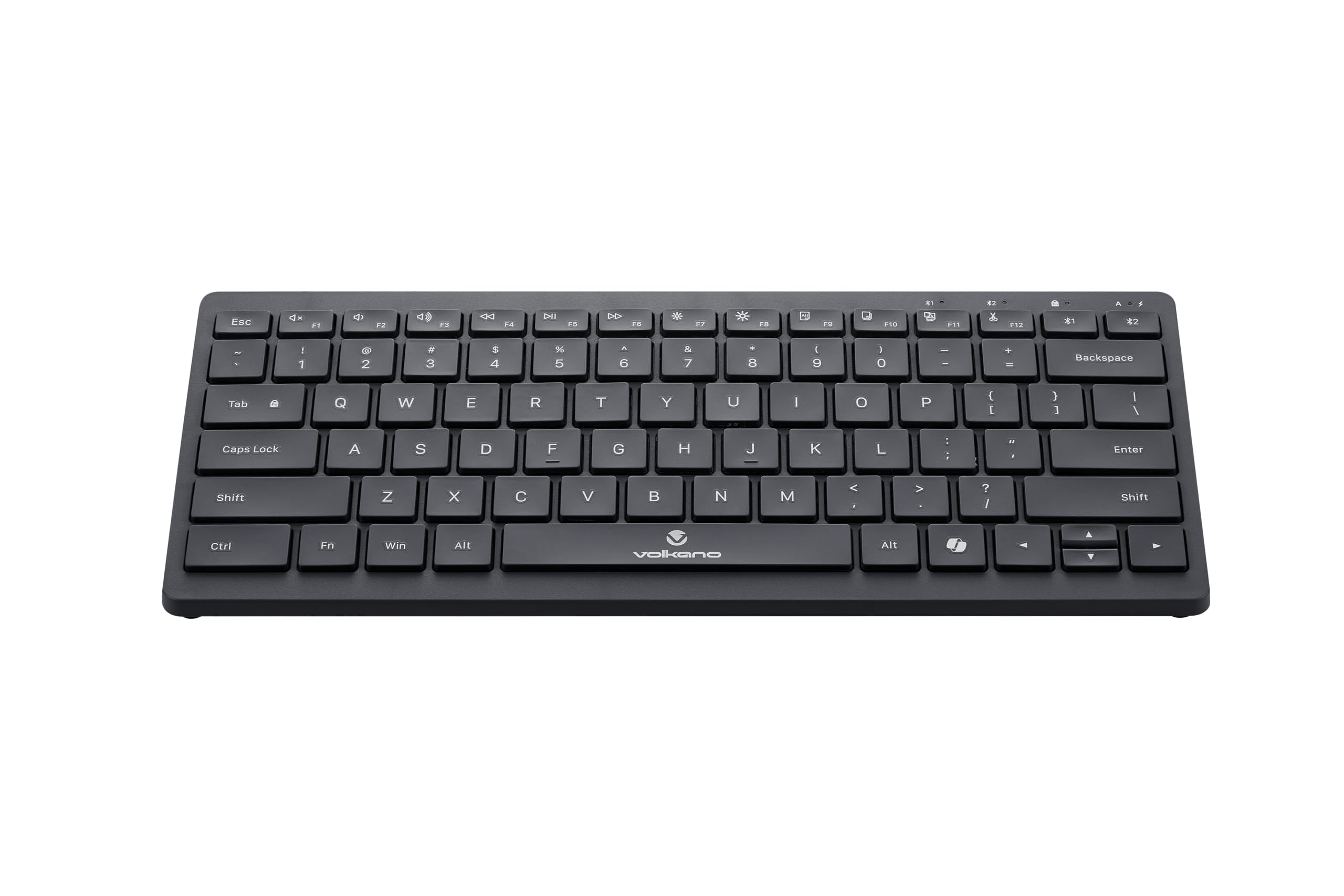
Image: A clear, angled view of the Volkano Galena Series Wireless Keyboard, highlighting its sleek black design and full key layout.
| Āhuahira | Taipitopito |
|---|---|
| Tau tauira | VK-20247-BK |
| Hononga | Hangarau Ahokore Nihokikorangi |
| Putanga Nihokikorangi | Bluetooth 5.0 + Bluetooth 5.0 (Dual Channel) |
| Mokowoko Korekore | 8-10 mita |
| Puna Mana | 2 x AAA Alkaline Battery (kei roto) |
| Momo Matua | Scissor Structure Keycaps |
| Nga waahanga motuhake | Quiet keys, Multi-device pairing, Instant switching, Anti-slip rubber base, Auto-power saving mode, Lightweight, Portable, Copilot Shortcut Key |
| Pūrere Hototahi | Laptop, PC, Smart TV, Tablet (Windows, Android, MacOS) |
| Ahu (L x W x H) | 29.5L x 12.8W x 2.2H henimita |
| Rauemi | Kirihou |
| Tae | Pango |
Pūtāhui me te Tautoko
1. Rarangi Whakaiti
This Volkano product is covered by a 12-Month Limited Coverage from the date of purchase. You can extend this coverage by an additional 12 months, for a total of 24 months, by registering your product with Volkano.
2. Tautoko Kiritaki
For any questions, assistance, or support regarding your Volkano Galena Series Wireless Keyboard, please contact Volkano customer service through their official channels. Refer to the Volkano webte pae tukutuku, te takai hua rānei mō ngā taipitopito whakapā.


