Kupu Whakataki
The DEERC Remote Control Rescue Helicopter SQN-002 offers a realistic and engaging flight experience, inspired by actual emergency aircraft. Designed for both beginners and experienced enthusiasts, this helicopter features aerodynamic rotor blades, a detailed cockpit, and rescue markings. It serves as an excellent introduction to aviation and STEM concepts, providing stable and precise control for indoor and outdoor use in calm conditions.
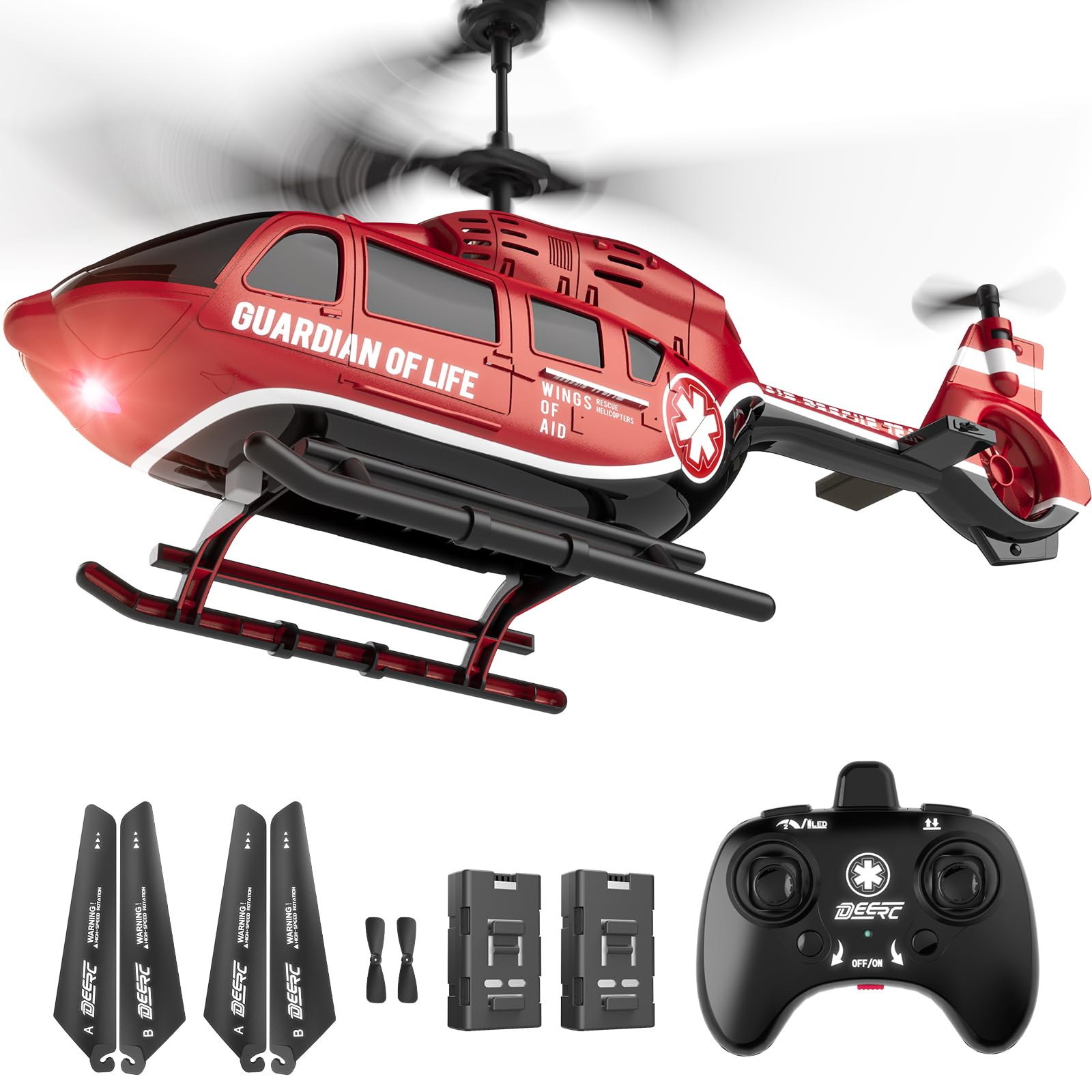
Image: The DEERC Remote Control Rescue Helicopter SQN-002 in its red variant, showcasing its realistic design and LED lights during flight.
He aha kei roto i te Pouaka
Upon unboxing your DEERC Remote Control Rescue Helicopter SQN-002, you will find the following components:
- 1 x RC Helicopter
- 1 x Kaiwhakahaere Mamao (kaore nga pākahiko)
- 2 x Modular Batteries
- 4 x Main Rotor Blade (A/B)
- 2 x Tail Rotor Blade
- 1 x USB-C Taura Whakamaa
- 1 x Kaihurihuri
- 1 x Manual Hua

Image: A visual representation of all items included in the DEERC Remote Control Rescue Helicopter SQN-002 package, laid out neatly.
Tatūnga
- Utu Pūhiko: Use the provided USB-C charging cable to fully charge both modular batteries. The LED indicator on the cable will typically change color or turn off when charging is complete.
- Install Helicopter Battery: Carefully insert one charged modular battery into the helicopter's battery compartment. Ensure it is securely connected and the compartment cover is closed.
- Install Remote Controller Batteries: Open the battery compartment on the remote controller using the provided screwdriver. Insert 3 AAA batteries (not included), ensuring correct polarity. Close the compartment.
- Whakahiko: Turn on the helicopter using its ON/OFF switch. Place it on a flat, level surface. Then, turn on the remote controller. The remote and helicopter will automatically pair, indicated by a solid light on both devices.

Image: The DEERC Remote Control Rescue Helicopter SQN-002, highlighting its two modular batteries and the USB-C charging cable for convenient power management.
Nga Tohutohu Whakahaere
The DEERC Remote Control Rescue Helicopter is designed for flexible and accurate maneuvering, suitable for various skill levels.
- Kotahi-Mahi Takeoff/Taunga: Press the dedicated one-key takeoff button on the remote for effortless launch. The helicopter will automatically ascend to a stable hovering altitude. Press the one-key landing button to initiate a smooth, controlled descent.
- Pupuri teitei: The built-in gyroscope and altitude hold system ensure stable hovering, allowing you to focus on directional control without constant throttle adjustments.
- Mana Aronga: Use the left joystick for ascending/descending and rotating left/right. Use the right joystick for moving forward/backward and strafing left/right.
- Tautuhinga Tere: The 3.5-channel transmitter offers adjustable speed settings (low, medium, high) to match your skill level. Experiment with different speeds for varied flight experiences.
- 2.4GHz Ārai-Whakararuraru: Advanced 2.4GHz technology allows multiple helicopters to fly simultaneously without signal interference, ideal for group play.
- Whakamaharatanga Pūhiko Iti: LED indicators on the helicopter will warn you when the battery is low, prompting you to land and recharge.

Image: The DEERC Remote Control Rescue Helicopter SQN-002 hovering above a helipad, illustrating its one-button takeoff/landing and altitude hold features, along with various speed modes.
Video: An official DEERC promotional video showcasing the Remote Control Rescue Helicopter SQN-002 in various flight scenarios, highlighting its features and ease of use. The video emphasizes the helicopter's realistic design and stable flight capabilities.
Te tiaki
Proper maintenance ensures the longevity and optimal performance of your DEERC Remote Control Rescue Helicopter.
- Rotor Blade Inspection: Regularly check the main and tail rotor blades for any signs of damage (cracks, bends). Replace damaged blades immediately using the provided spare parts and screwdriver.
- Tiaki Pūhiko: Always fully charge batteries before use. Do not overcharge. Store batteries in a cool, dry place when not in use.
- Te horoi: Use a soft, dry cloth to clean the helicopter body. Avoid using water or harsh chemicals, which can damage electronic components.
- Rokiroki: When not in use, store the helicopter and remote controller in a safe place, away from direct sunlight and extreme temperatures.
Raparongoā
If you encounter any issues with your DEERC Remote Control Rescue Helicopter, refer to the following common solutions:
- Helicopter Not Responding: Ensure both the helicopter and remote controller are powered on and fully charged. Re-pair the devices by turning both off and then on again.
- Rere/Te Maunu Kore Pūmau: Perform a calibration by placing the helicopter on a flat surface and following the calibration steps in the detailed product manual. Check for any bent or damaged rotor blades and replace if necessary.
- Short Flight Time: Ensure batteries are fully charged. Over time, battery capacity may decrease. Consider replacing older batteries if flight time significantly reduces.
- Kāore ngā Mata Rotor e Hurihuri: Check for obstructions around the rotor blades. The intelligent safety system automatically powers off the rotor if blocked. Clear any debris and restart.
- Nga Take Mana Mamao: Replace AAA batteries in the remote controller if it is unresponsive. Ensure no other 2.4GHz devices are causing interference nearby.
Whakatakotoranga
| Āhuahira | Taipitopito |
|---|---|
| Hunga Hua | 8.85 x 4.91 x 4.92 inihi |
| Taumaha Tūemi | 10.1 hekere |
| Tauira Tuemi | CA-SQN-002RED |
| E taunakitia ana e te Kaihanga Tau | 8 tau ki runga ake |
| Pūhiko | 2 pākahiko CR5 e hiahiatia ana (kei roto) |
| Taiao Whakamahi | Indoors or in windless outdoor conditions |
| Waa Whakatau | 40 meneti |
| Pūhiko Raukaha | 3.7V / 500mAh |
| Wā Rererangi | Up to 13 Minutes x 2 (26 minutes total with both batteries) |
| Te teitei teitei o te rererangi | 20 Mita |
| Awhe Mana | 30 Mita |

Image: A graphic summarizing the key product specifications for the DEERC Remote Control Rescue Helicopter SQN-002, including dimensions, weight, battery life, and control range.
Nga korero haumaru
Please adhere to the following safety guidelines to ensure a safe and enjoyable experience:
- Children under 14 should use this product with adult supervision.
- Me whakahaere tonu te hērakapa i ngā wāhi tuwhera, kia matara atu i te tangata, i te kararehe, me ngā arai.
- Do not fly near power lines, trees, or water bodies.
- Avoid flying in strong winds, as this can lead to loss of control.
- Kaua rawa e pā ki ngā mata e hurihuri ana i te wā e whakamahia ana.
- Turn off the helicopter and remote controller when not in use.
Pūtāhui me te Tautoko
The DEERC Remote Control Rescue Helicopter SQN-002 comes with a 3-month warranty. For any product inquiries, technical support, or warranty claims, please contact DEERC customer service. Refer to the official DEERC website or the contact information provided in your product manual for detailed support options.
For additional information and to explore other DEERC products, visit the DEERC Store.


