1. Kupu Whakataki
Thank you for choosing WOLFBOX Dash Cams. This manual provides detailed instructions for the WOLFBOX X5 3-Channel 4K HDR Dash Cam and the WOLFBOX X3 2.5K 60FPS Dash Cam. These advanced vehicle recording systems are designed to enhance your driving safety and provide reliable evidence in case of incidents. Please read this manual thoroughly before installation and operation to ensure proper use and optimal performance.
2. Nga korero haumaru
Kia mau ki nga aratohu haumaru e whai ake nei:
- Do not operate the dash cam or adjust settings while driving. Always pull over safely before making any adjustments.
- Ensure the dash cam is installed securely and does not obstruct your view o te rori, e whakararuraru rānei i te horahanga o te pēke hau.
- A ape i te tuku i te taputapu ki te wera nui, te ra tika mo te wa roa, te makuku nui ranei.
- Use only original WOLFBOX accessories and power cables to prevent damage and ensure proper functionality.
- Regularly check the memory card for errors and format it periodically to maintain optimal recording performance.
3. Ihirangi mokete
Tena koa tirohia kei roto katoa nga taonga kei roto i to kete:
- WOLFBOX X5 Dash Cam Unit (Front Camera)
- WOLFBOX X3 Dash Cam Unit (Front Camera)
- Rear Camera (for X5 and X3)
- Interior Camera (for X5 only)
- GPS Kōwae
- Kaitohu Motoka
- Taura Whakamuri Whakamuri
- Whakauranga Taiapa me te Papa Whakapiri
- Wiring Clips
- Pukapuka Kaiwhakamahi
- Memory Card (128GB for X5, 64GB for X3 - may vary by package)
4. Hua Neke Atuview
4.1 WOLFBOX X5 Dash Cam
The WOLFBOX X5 is a 3-channel dash cam system featuring a 4K front camera, 2.5K rear camera, and 1080P interior camera. It utilizes the STARVIS 2 IMX678 image sensor for superior low-light performance and includes smart voice control and a touch screen for intuitive operation.

Figure 4.1: WOLFBOX X5 Dash Cam Main Unit

Figure 4.2: WOLFBOX X5 Dash Cam with included accessories and mobile app view.

Figure 4.3: Illustration of WOLFBOX X5's 4K 3-Channel Recording capability.
4.2 WOLFBOX X3 Dash Cam
The WOLFBOX X3 is a dual dash cam system offering a 2.5K 60fps front camera and a 1080P 30fps rear camera. It features the STARVIS 2 IMX675 sensor for clear footage in low light and includes 5.8GHz Wi-Fi and GPS for fast data transfer and accurate location tracking.
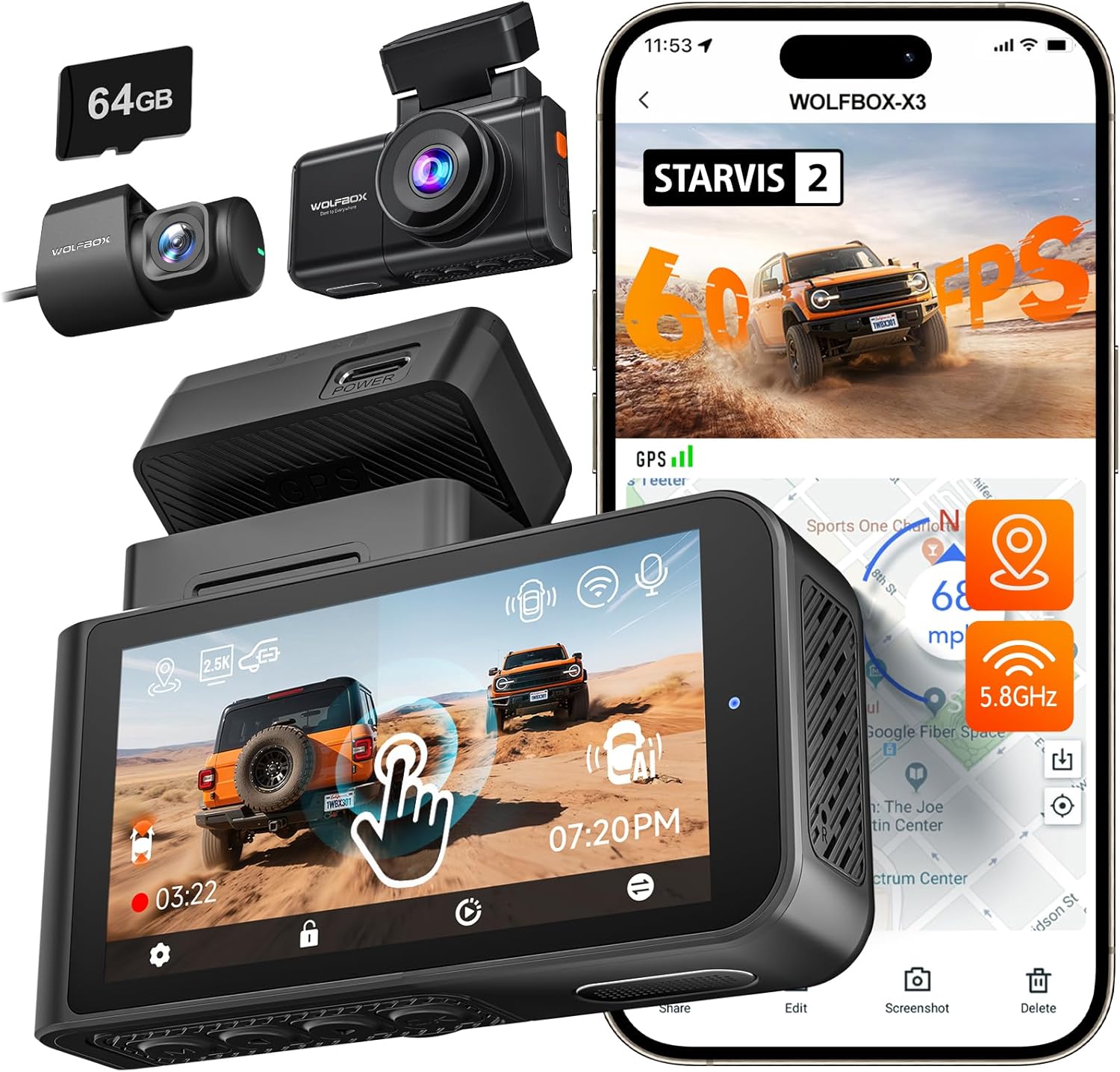
Figure 4.4: WOLFBOX X3 Dash Cam with included accessories and mobile app view.

Figure 4.5: Illustration of WOLFBOX X3's 60FPS Ultra Smooth Video recording.
5. Tatūnga me te Tāuta
Follow these steps for proper installation of your WOLFBOX Dash Cam:
- Whakaritea te Kāri Mahara: Insert the provided (or a compatible Class 10 U3 or higher) microSD card into the dash cam's card slot. Ensure it is inserted correctly until it clicks into place.
- Tāutahia te Kāmera o Mua: Kōwhiria he wāhi i runga i tō matapihi tuatahi kāore e ārai i a koe view, i muri i te tuara i te nuinga o te wāview mirror. Clean the area thoroughly. Attach the adhesive mount to the windshield and then slide the dash cam onto the mount.
- Tāutahia te Kāmera Whakamuri: Whakamaua te kāmera o muri ki te matapihi o muri, kia mārama ai view. Route the rear camera cable neatly along the vehicle's headliner and A-pillar to the front dash cam unit.
- Install the Interior Camera (X5 only): Connect the interior camera to the main X5 unit. Position it to capture the vehicle's interior.
- Connect the GPS Module: Attach the GPS module to the designated port on the dash cam unit. Position it with a clear view o te rangi mo te whiwhi tohu tino pai.
- Hononga Hiko: Connect the car charger to the dash cam's power input port and plug the other end into your vehicle's cigarette lighter socket. Route the power cable neatly to avoid interference with driving.
- Initial Power On and Formatting: Once connected, the dash cam will power on automatically when the vehicle starts. Follow the on-screen prompts to set the date/time and format the memory card. Formatting is crucial for stable recording.
6. Nga Tohutohu Whakahaere
6.1 Mahi Taketake
- Hiko Whakaka/Weto: The dash cam powers on automatically when connected to power and the vehicle starts. It powers off shortly after the vehicle is turned off.
- Te tuhi: Recording begins automatically upon power-on. A flashing indicator (usually red) confirms recording is active.
- Whakaatu Mata: The touch screen displays live views from the connected cameras. Tap the screen to access menu options or switch views.
6.2 Smart Voice Control (WOLFBOX X5)
The WOLFBOX X5 supports hands-free voice commands. Speak clearly and directly to the device. Available commands include:
- "Take Picture"
- "Turn on Wi-Fi"
- "Turn off Wi-Fi"
- "Lock the Video"
- "Whakaatuhia te Kāmera o Mua"
- "Show Rear Camera"
- "Show Interior Camera"
- "Turn on Audio"
- "Turn off Audio"
6.3 Wi-Fi Connectivity & WOLFBOX App
Both X5 and X3 models feature 5.8GHz Wi-Fi for fast and stable connection to the WOLFBOX mobile app. Download the WOLFBOX app from your device's app store.

Figure 6.1: Illustration of WOLFBOX X3's 5.8GHz Wi-Fi and GPS features.
- Whakahohe Wi-Fi: On the dash cam, enable Wi-Fi through the settings menu or by voice command (X5).
- Hono ma te Taupānga: Open the WOLFBOX app on your smartphone. Connect to the dash cam's Wi-Fi network (SSID and password usually displayed on the dash cam screen).
- Taumahinga Taupānga: Whakamahia te taupānga ki:
- View ora footage.
- Tikiake i ngā ataata me ngā whakaahua kua tuhia ki tō waea.
- Whakatikatikahia ngā tautuhinga o te kāmera papa.
- Whakahōu mārō.
6.4 GPS Mahi
The integrated GPS module accurately records your vehicle's speed and location data. This information is embedded directly into the video files, providing crucial evidence for accident reconstruction or trip logging.
6.5 Recording Modes & Features
- Roopu Hopu: Videos are recorded in continuous loops (e.g., 1, 3, or 5 minutes). When the memory card is full, the oldest unlocked files kua tuhiruatia.
- G-Sensor (Rekoata ohorere): The built-in G-sensor detects sudden impacts or collisions. When triggered, it automatically locks the current video segment to prevent it from being overwritten.
- Aroturuki Waka: With a hardwire kit (sold separately), the dash cam can monitor your vehicle while parked. It will automatically start recording if it detects a collision or motion (depending on settings).
- Matakitenga po: Both X5 (STARVIS 2 IMX678) and X3 (STARVIS 2 IMX675) feature enhanced night vision technology for clear recordings in low-light conditions. The X5 also benefits from advanced digital signal transmission for improved clarity.
7. Tiaki
- Te horoi: Use a soft, dry cloth to clean the dash cam's lenses and screen. Do not use abrasive cleaners or solvents.
- Tiaki Kaari Pumahara: Format the microSD card once a month to prevent data corruption and ensure smooth recording. Replace the memory card every 6-12 months, especially if used frequently, as memory cards have a limited lifespan.
- Whakahōu Firmware: Periodically check the WOLFBOX official website or the WOLFBOX app for firmware updates. Keeping your dash cam's firmware up-to-date ensures optimal performance and access to new features.
8. Te Raru
| Raruraru | Take pea | Rongoā |
|---|---|---|
| Karekau te kamera i te hiko. | No power, faulty cable, loose connection. | Check car charger connection. Ensure vehicle's cigarette lighter socket is working. Try a different power source if available. |
| Ka mutu te tuhi, ka whakatio ranei. | Memory card error, incompatible card, full card. | Format the memory card. Use a high-speed (Class 10 U3 or higher) reputable brand microSD card. Replace the card if issues persist. |
| Poor video quality / blurry images. | Dirty lens, protective film, incorrect settings. | Clean the camera lens. Remove any protective film. Check video resolution settings. |
| GPS not working / inaccurate. | GPS module not connected, poor signal. | Ensure GPS module is securely connected and has a clear view of the sky (not blocked by tinted windows or metal). |
| Nga take hononga Wi-Fi. | Incorrect password, app issues, interference. | Verify Wi-Fi password. Restart both dash cam and phone. Ensure the WOLFBOX app is updated. |
| Voice control (X5) not responding. | Microphone blocked, speaking too softly/unclearly. | Ensure nothing is blocking the microphone. Speak clearly and at a normal volume. |
9. Whakatakotoranga
9.1 WOLFBOX X5 Dash Cam
| Āhuahira | Taipitopito |
|---|---|
| Pūoko Whakaahua | STARVIS 2 IMX678 |
| Resolution Camera Mua | 4K (3840x2160P) |
| Rear Camera Resolution | 2.5K (2560x1440P) |
| Taumira Kāmera o Roto | 1080P (1920x1080P) |
| Whakaatu | Mata pa |
| Mana Reo | Yes (12 commands) |
| Wi-Fi | 5.8GHz |
| GPS | Hanga-i roto |
| Matakitenga Po | Enhanced (3D DNR, HDR & WDR, Aperture f/1.7) |
9.2 WOLFBOX X3 Dash Cam
| Āhuahira | Taipitopito |
|---|---|
| Pūoko Whakaahua | STARVIS 2 IMX675 |
| Resolution Camera Mua | 2.5K (2560x1440P) @ 60fps |
| Rear Camera Resolution | 1080P (1920x1080P) @ 30fps |
| Whakaatu | Mata pa |
| Mana Reo | Kao |
| Wi-Fi | 5.8GHz |
| GPS | Hanga-i roto |
| Matakitenga Po | Enhanced (IMX675, HDR, 3D DNR, Aperture f/1.5) |
10. Pūtāhui me te Tautoko
WOLFBOX products come with a standard manufacturer's warranty. For specific warranty terms and conditions, please refer to the warranty card included in your package or visit the official WOLFBOX website. If you encounter any issues or have questions regarding your dash cam, please contact WOLFBOX customer support:
- Īmēra: [Tirohia te takai hua, te aratohu ā-ture rānei] webpae]
- Webpae: www.wolfbox.com
Please have your model number and purchase information ready when contacting support.