1. Nga Tohutohu Haumaru Nui
Please read this manual thoroughly before use and retain it for future reference. Always follow basic safety precautions when using electrical appliances to reduce the risk of fire, electric shock, and injury.
- Do not place the humidifier on wet surfaces or near heat sources.
- Use only clean, purified, or distilled water to prevent mineral buildup and ensure optimal performance.
- Kaua e taea e nga tamariki me nga kararehe.
- Unplug the humidifier before cleaning or refilling.
2. Hoahoa Hoahoa
Familiarize yourself with the components of your DREO HM409S Humidifier.

Image: The DREO HM409S humidifier shown next to a smartphone displaying its control app. The humidifier features a translucent top section that glows with an RGB light, a digital display showing humidity, and touch controls.
- Putanga Kohu: Te wāhi e tukuna ai te kohu mātao.
- Tāke Wai: 3L capacity for water.
- Control Panel/Display: Digital screen and touch buttons for operation.
- turanga: Contains the ultrasonic atomizer and electronics.
- Waea Hiko: Mo te hono ki te putanga hiko.
3. Tatūnga me te Whakamahi Tuatahi
3.1 Te Wetewete
- Kia ata tango i nga taonga kapi katoa.
- Inspect the humidifier for any damage. Do not use if damaged.
- Whakatakotoria te whakamakuku hau ki runga i tētahi mata mārō, papatahi, ātete wai, kia 6 inihi (15 henemita) te tawhiti atu i ngā pakitara me ngā taputapu hiko.
3.2 Whakaki i te Taaka Wai

Image: A hand pouring water directly into the top opening of the DREO HM409S humidifier, demonstrating its top-fill design.
- Me whakarite kua momotu te hiko o te whakamakuku.
- Tangohia te uhi o runga.
- Pour clean, purified, or distilled water directly into the water tank up to the MAX fill line. Avoid overfilling.
- Whakakapihia te uhi o runga kia mau.
3.3 Te Whakahaa
- Monohia te taura hiko ki te putanga hiko 120V AC.
- Press the Power button on the control panel to turn on the humidifier.
3.4 Hononga Taupānga (Whiringa)
For smart features and remote control, download the DREO app from your smartphone's app store. Follow the in-app instructions to connect your humidifier to your Wi-Fi network. The humidifier is compatible with Alexa and Google Home for voice control.

Image: The DREO HM409S humidifier with a smartphone displaying its smart control interface, alongside logos for DREO, Alexa, and Hey Google, indicating smart home compatibility.
4. Nga Tohutohu Whakahaere
4.1 Mist Output Adjustment
Press the Mist Level button to cycle through different mist output settings (Low, Medium, High). The current setting will be displayed on the screen.
4.2 Mana Haumākū Aunoa
The humidifier features a built-in humidistat. Press the Auto Mode button to activate. The humidifier will automatically adjust mist output to maintain your desired humidity level (e.g., 45-55% for optimal comfort).
4.3 RGB Night Light and Sleep Routine Trainer
The humidifier offers over 1500 customizable RGB light options. Use the Light button on the unit or the DREO app to select colors, brightness, and special modes.
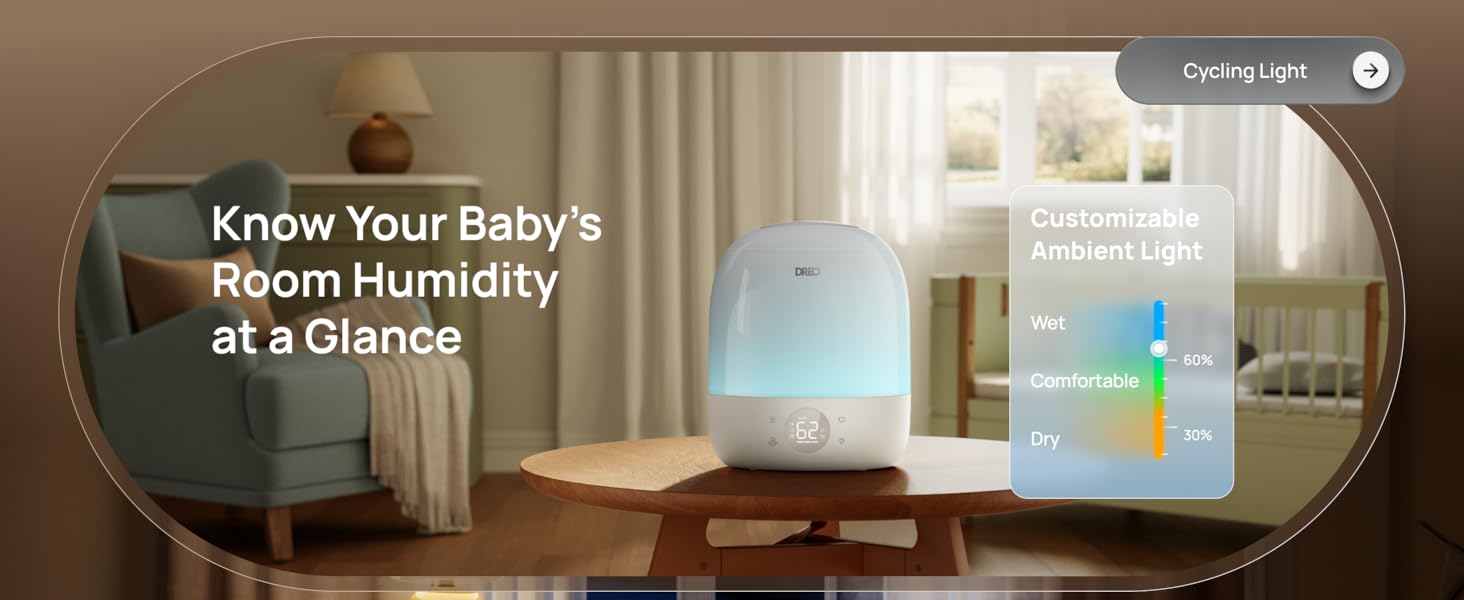
Image: The DREO HM409S humidifier with a smartphone displaying the customizable RGB lighting interface within the DREO app, showing a color wheel and various light modes.
- Sleep Routine Trainer: This feature uses light cues to guide sleep habits. The light dims at night to promote rest and brightens in the morning for waking.
- Maama Manawa: A gentle pulsing light for relaxation.
- Cycling Light: Ka huri haere i roto i ngā tae rerekē.
- Maama Tohu Maama: Changes color to indicate current humidity levels (e.g., blue for wet, green for comfortable, orange for dry).
4.4 Mahi Matama
Set the humidifier to operate for a specific duration using the Timer button or the DREO app. The timer can be set for up to 24 hours.
4.5 Kaihoroi Aro
Add a few drops of essential oil to the designated aroma pad in the base of the humidifier for a personalized atmosphere. Do not add essential oils directly into the water tank.
4.6 Tiltable Nozzle
The mist nozzle can be tilted up to 30 degrees to direct the mist flow as needed.
5. Tiaki
He mea nui te horoi me te tiaki i ia wā mō te mahi tino pai me te roa o te wā o tō whakamakuku.
5.1 Cleaning the Humidifier
- Wewetehia te whakamahana i mua i te horoi.
- Tangohia te taupoki o runga, ka ringihia te wai e toe ana i te tāke me te turanga.
- Wipe the inside of the water tank and base with a soft cloth. For mineral buildup, use a solution of white vinegar and water (1:1 ratio) and let it soak for 15-20 minutes before scrubbing gently with the provided cleaning brush.
- Rinse all components thoroughly with clean water and dry completely before reassembly.
5.2 Cartridge Replacement (Optional)
The DREO HM409S supports optional demineralization and clean mist cartridges to reduce limescale and maintain mist purity. The DREO app will provide reminders when it's time to replace cartridges (typically every 600 hours of use).

Image: The DREO HM409S humidifier with a smartphone displaying a filter life indicator and reminder for cartridge replacement.
6. Te Raru
If you encounter any issues with your humidifier, please refer to the following common problems and solutions:
| Raruraru | Take pea | Rongoā |
|---|---|---|
| Kaore he kohu, he kohu iti ranei te whakaputa | Low water level; Mineral buildup; Mist outlet blocked. | Refill water tank; Clean the humidifier, especially the atomizer; Ensure mist outlet is clear. |
| Te kakara kino | Stagwai paru; tāke wai paru. | Empty and clean the water tank regularly; Use fresh water daily. |
| Kāore te whakamakuku e hono ana ki te taupānga | Kupuhipa Wi-Fi hē; He tawhiti rawa te pouara; whatunga Wi-Fi 5GHz. | Ensure correct password; Move humidifier closer to router; Ensure you are connecting to a 2.4GHz Wi-Fi network. |
| Haruru nui | Unit not on a flat surface; Water level too low. | Place on a stable, flat surface; Refill water tank. |
If the problem persists, please contact DREO Customer Support.
7. Whakatakotoranga
- Waitohu: Dreo
- Ingoa Tauira: DR-HHM009S
- Aratau Mahi: Ultrasonic
- Te Raukaha Tane Wai: 3 rita
- Horahanga Rahi Morahi: 300 Puawai Tapawha
- Te Wā Mahi: Tae atu ki te 30 haora
- Taumata Haruru: 28dB (Whisper-Quiet)
- Voltage: 120 Volts
- Wattage: 29 Watts
- Nga waahanga motuhake: Adjustable Humidity Control, Aroma Diffuser, Auto Shut Off, Digital Display, Humidistat, RGB Night Light, Sleep Routine Trainer, Smart App Control (Wi-Fi), Alexa/Google Home Compatible, Top-Fill Design, 30° Tiltable Nozzle, BPA-Free Materials.
- Nga Waahanga Kei roto: 1 × Dreo 3L Humidifier, 1 × Quick Start Guide, Cleaning Brush, User Manual.
8. Pūtāhui me te Tautoko
DREO products are manufactured with high-quality materials and craftsmanship. For warranty information and customer support, please refer to the official DREO webte waahi, te kaari whakamana ranei kei roto i to hua.
For further assistance, you may also refer to the official user manual PDF: DREO HM409S User Manual (PDF)
DREO is committed to providing excellent customer service. If you experience any issues, please contact their support team for prompt assistance.


