1. Kupu Whakataki
This manual provides detailed instructions for the installation, operation, and maintenance of your VIOFO HK6 Type-C Hardwire Kit. This kit is designed to provide continuous power to compatible VIOFO dashcams, enabling advanced parking surveillance features and protecting your vehicle's battery from discharge. Please read this manual thoroughly before installation and use to ensure proper functionality and safety.

Whakaahua: Ka mutuview of the VIOFO HK6 Hardwire Kit components.
2. Nga Hua o te Hua
- 24-Hour Parking Surveillance: Provides continuous power to your dashcam for surveillance when the vehicle engine is off, protecting the car battery from discharge.
- Battery Discharge Prevention: Features 4 configurable voltage cut-off options. The HK6 stops powering the dashcam when the car battery voltage drops to the selected threshold, preventing complete battery discharge.
- Seamless Parking Mode Switching: Utilizes ACC detection to automatically transition the dashcam to parking mode when the engine is turned off and resume normal recording when the vehicle starts.
- Detachable Design for Easy Upgrades & Maintenance: Modular design with detachable input and output cables simplifies installation, future upgrades, and replacements.
- Aunoa Voltage Whakaatu: Broadcasts the car battery voltage via Bluetooth, allowing the dashcam to automatically detect and display it on recorded video for real-time monitoring without manual pairing.
- 12/24V Compatible: Connects directly to vehicles running on 12-24V systems, suitable for cars, trucks, buses, SUVs, and big rigs.
3. Ihirangi mokete
- HK6 Hardwire Cable: 1 unit
- Pukapuka Kaiwhakamahi: 1 wae
- MINI(ATS) Fuse: 2 units
- MINI Low Profile Fuse: 2 units
- Micro 2 Fuse: 2 units
- ATO(ATC) Fuse: 2 units

Image: All components included in the HK6 Hardwire Kit package.
4. Aratohu Whakauru
He mea nui te tāutanga tika mō te mahi tino pai. Mena kāore koe i te tino mōhio ki tētahi o ngā mahi, me rapu āwhina ngaio.
- Kimihia Tō Pouaka Fuse: The location and type of your vehicle's fuse box can vary. Refer to your car's owner's manual for specific instructions.
- Identify Battery & ACC Fuses: Use a multimeter to identify a constant power fuse (Battery) and an accessory power fuse (ACC). The constant power fuse should show 12V/24V with the engine off, while the ACC fuse should show 0V with the engine off and 12V/24V with the engine on.
- Remove Selected Fuses: Carefully remove the identified Battery and ACC fuses using a fuse puller.
- Crimp Add-A-Fuse Kit: Crimp the appropriate add-a-fuse kit to the red (Battery+) and yellow (ACC) wires of the hardwire cable.
- Connect Fuse Tap: Insert the metal strands of the hardwire cable into the metal tube of the fuse tap, then crimp it tightly. Insert the original fuses into the fuse taps.
- Install Fuse Taps: Insert the fuse taps into the previously identified fuse slots in the fuse box.
- Install Ground Wire: Select a metal screw near the fuse box, loosen it, insert the black (Ground) wire's metal terminal under the screw, and tighten securely.
- Connect Hardwire Cable to Dashcam: Connect the HK6 hardwire cable's Type-C plug into the power port on the top of the dashcam's GPS mount. Ensure it is connected to the GPS Type-C port only.
- Test the Dashcam: Start the vehicle to power on the dashcam. Enter the dashcam settings menu and enable Parking Mode. The parking mode icon should appear on the screen.
- Huna Waea: Follow the recommended wiring shown in the diagram below and use the trim removal tool to hide the hardwire cable along the vehicle's interior.

Image: Visual guide for hardwire kit installation steps.
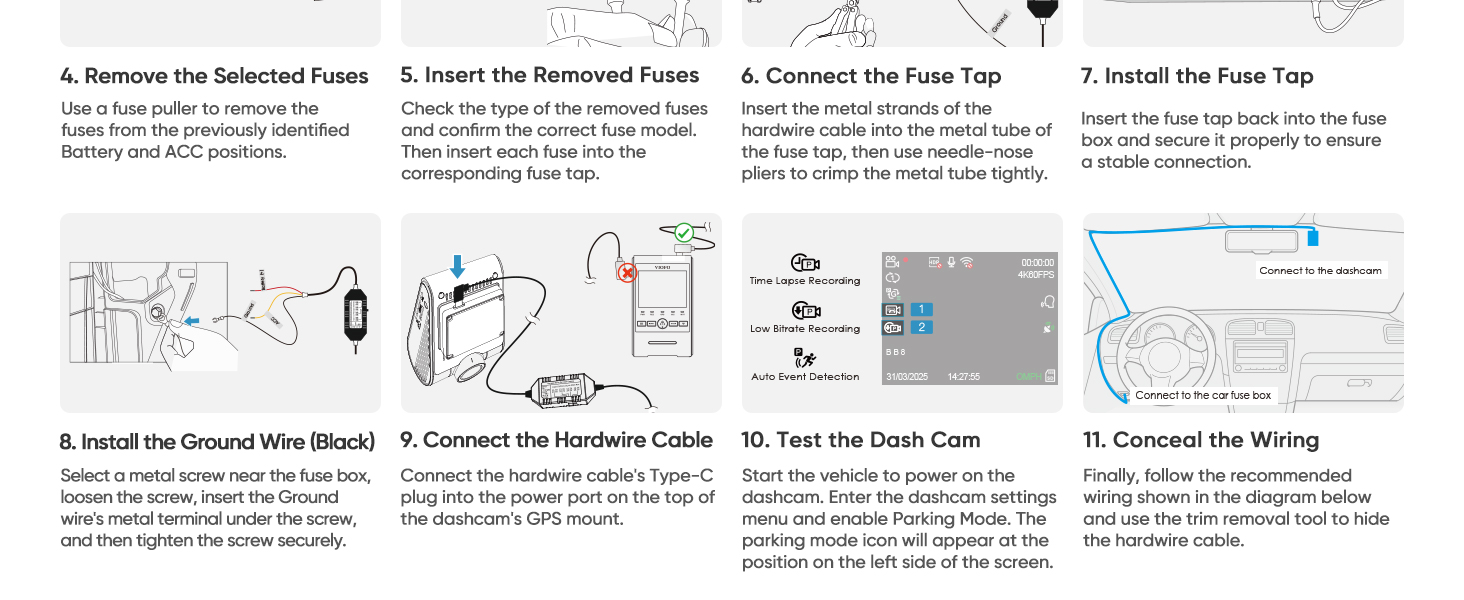
Image: Correct cable connection to the dashcam's GPS Type-C port.
5. Hoahoa Waea
The HK6 Hardwire Cable features three main wires for connection:
- Red Wire (Battery+): Connects to a constant fuse slot (always-on power).
- Yellow Wire (ACC): Connects to an ACC fuse slot (switched power, on when ignition is on).
- Waea Pango (Whenua): Connects to a metal ground point on the vehicle chassis.
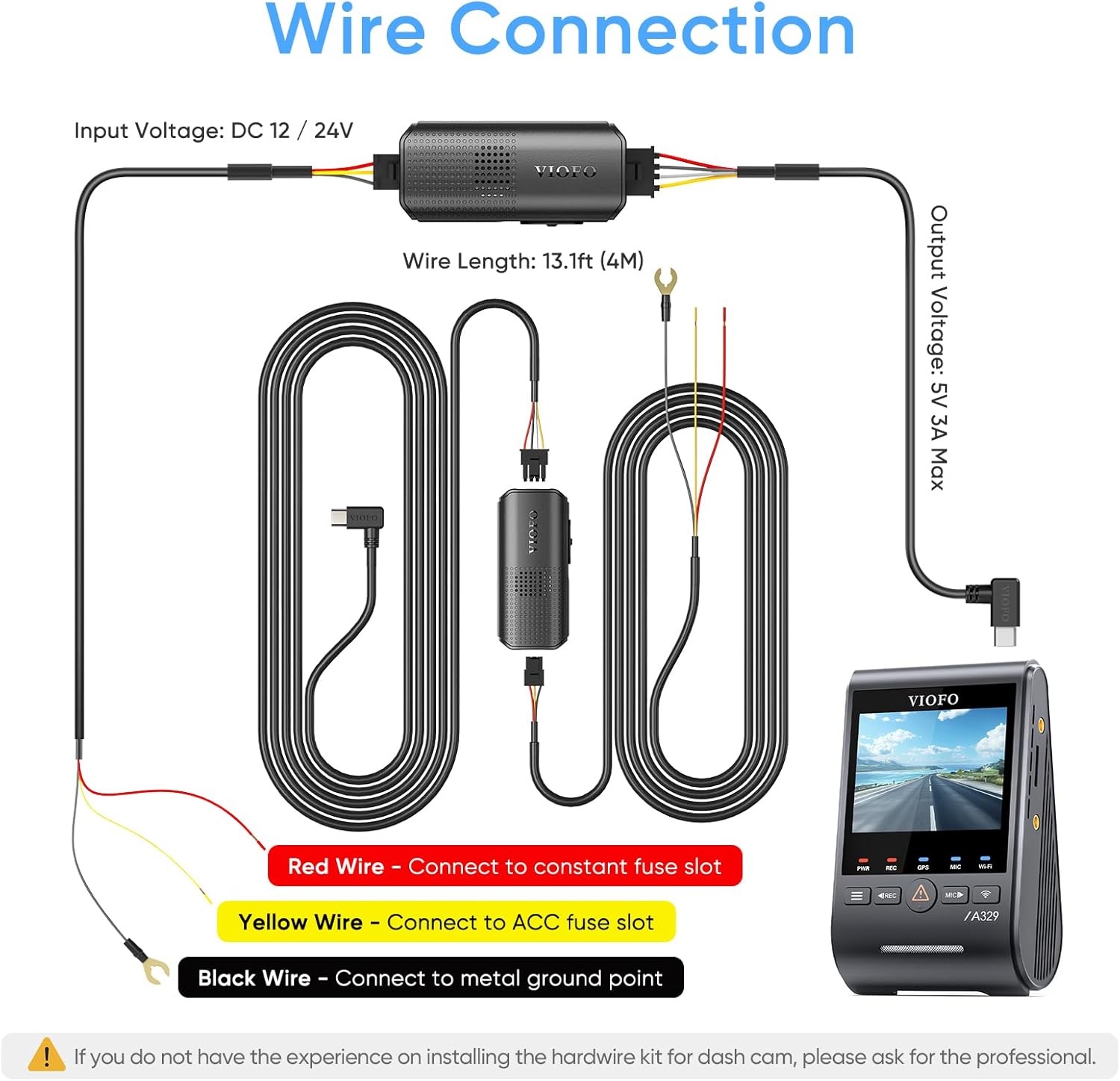
Image: Detailed wiring diagram for the HK6 Hardwire Kit.
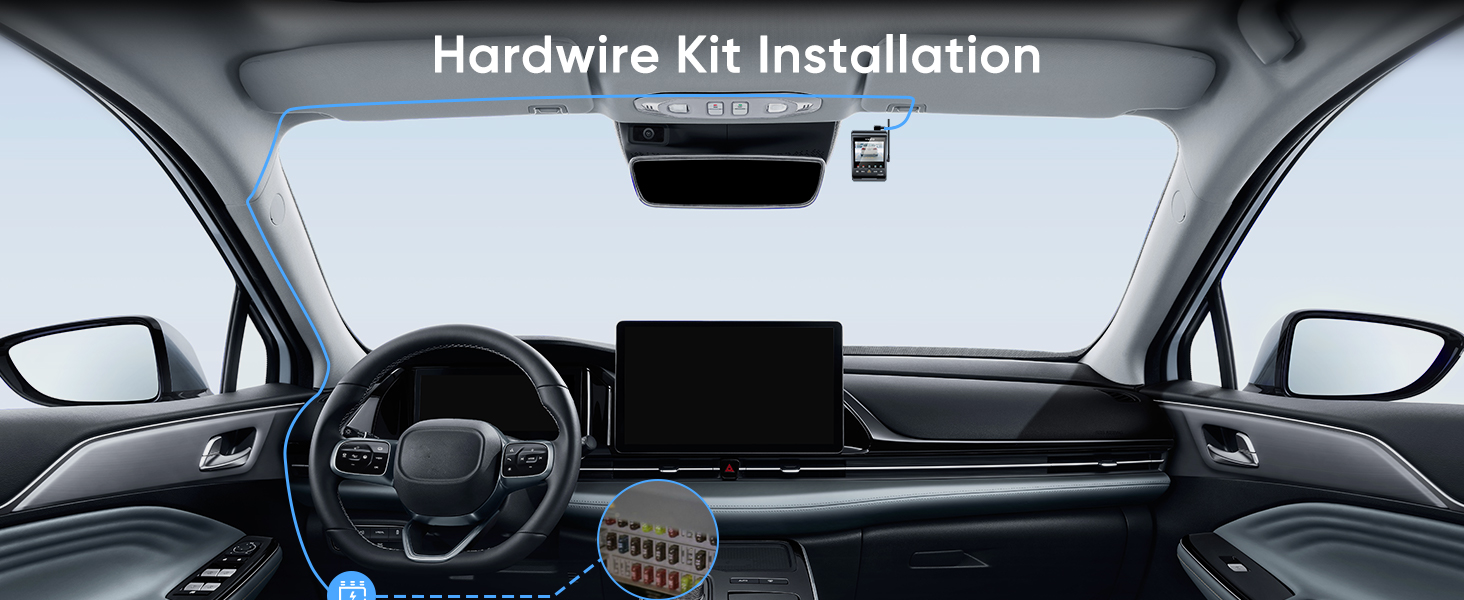
Image: Labeled product diagram of the HK6 Hardwire Cable components.
6. Nga Tohutohu Whakahaere
6.1. Aratau Waka
The HK6 Hardwire Cable supports Hybrid Parking Mode for the A329S Series and A119M Pro, automatically switching between normal parking recording and Low-Power Impact Detection mode based on your configured "Cut-off Voltage" and "Cut-off Time" settings.

Image: Hybrid Parking Mode operation.
6.2. Puawai Aunoatage Whakaaturanga
The HK6 features an always-on Bluetooth broadcast that transmits the car battery voltage. No pairing or user interaction is required. Your dashcam automatically detects the HK6 signal, reads the voltage, and displays it on the recorded video for real-time monitoring.

Image: Automatic voltage display on the dashcam screen.
6.3. Battery Discharge Prevention & Voltage Tapahi-tapahia
The HK6 Hardwire Cable provides continuous power to your dashcam in parking mode until your car battery voltage drops to the configured threshold. It offers 4 voltage cut-off options to prevent battery discharge. When the vehicle's battery voltage reaches the selected threshold, the HK6 stops supplying power to the dashcam.

Image: Configurable voltage cut-off options on the HK6.
6.4. Seamless Parking Mode Switching
With ACC detection, the dashcam seamlessly enters parking mode when the vehicle's engine is turned off and resumes normal recording once the vehicle is started.

Image: Seamless parking mode switching via ACC detection.
6.5. Ultra-Low Power Consumption
The HK6 Hardwire Cable offers ultra-low power consumption (≤300uA) when the dashcam is turned off, ensuring extended parking monitoring without significant vehicle battery discharge. When paired with the A329S Series, the Low Power Impact Detection parking mode continues to monitor your vehicle with minimal energy draw.

Image: Ultra-low power consumption for extended parking monitoring.
6.6. Official Product Video: A329S Fuse Tap Unboxing
Video: An unboxing video of the A329S Fuse Tap, demonstrating the components included in the kit.
7. Tiaki
To ensure the longevity and optimal performance of your HK6 Hardwire Kit, regular maintenance is recommended:
- Tirotiro Hononga: Periodically check all wiring connections (fuse taps, ground wire, Type-C plug) to ensure they are secure and free from corrosion.
- Whakaha Uepu: Ensure cables remain tucked away and are not exposed to excessive heat, sharp edges, or moving parts that could cause damage.
- Whakahōu Firmware: Regularly check the VIOFO website for firmware updates for your compatible dashcam, as these may include improvements for hardwire kit functionality.
8. Te Raru
If you encounter issues with your HK6 Hardwire Kit, refer to the following common troubleshooting steps:
- Dashcam Not Powering On in Parking Mode:
- Verify that the red (Battery+) wire is connected to a constant power fuse.
- Ensure the black (Ground) wire is securely connected to a clean metal chassis point.
- Check the fuse taps and fuses for proper installation and integrity.
- Confirm that Parking Mode is enabled in your dashcam's settings.
- Battery Discharge Warning/Dashcam Shuts Off Prematurely:
- Whakaritea te voltage cut-off setting on the HK6 to a higher threshold if your vehicle battery is older or prone to discharge.
- Ensure the vehicle battery is in good condition.
- Parking Mode Not Switching Seamlessly:
- Verify that the yellow (ACC) wire is connected to a switched power fuse that activates and deactivates with the ignition.
- Check dashcam settings for correct parking mode configuration.
- No Automatic Voltage Whakaatu:
- Ensure the HK6 is properly powered and connected.
- Check dashcam settings for Bluetooth and voltage display options.
9. Whakatakotoranga
| Hunga Hua | 2.3 x 3.8 x 1.75 inihi |
| Taumaha Tūemi | 9.9 hekere (0.28 Kirokaramu) |
| Hangarau Hononga | Momo-C |
| Āhuahira Motuhake | Hardwire Kit, Automatic Voltage Whakaaturanga |
| Momo Ratonga Taikaha | Car, Truck, Bus, SUV, Big Rig |
| Whakauru Voltage | 12-24V |
| Putanga Voltage | 5V 3A Mōrahi |
| Parking Mode Support | Hybrid Parking Mode, Low Power Impact Detection |
| Voltage Cut-off Options | 4 kōwhiringa e wātea ana |
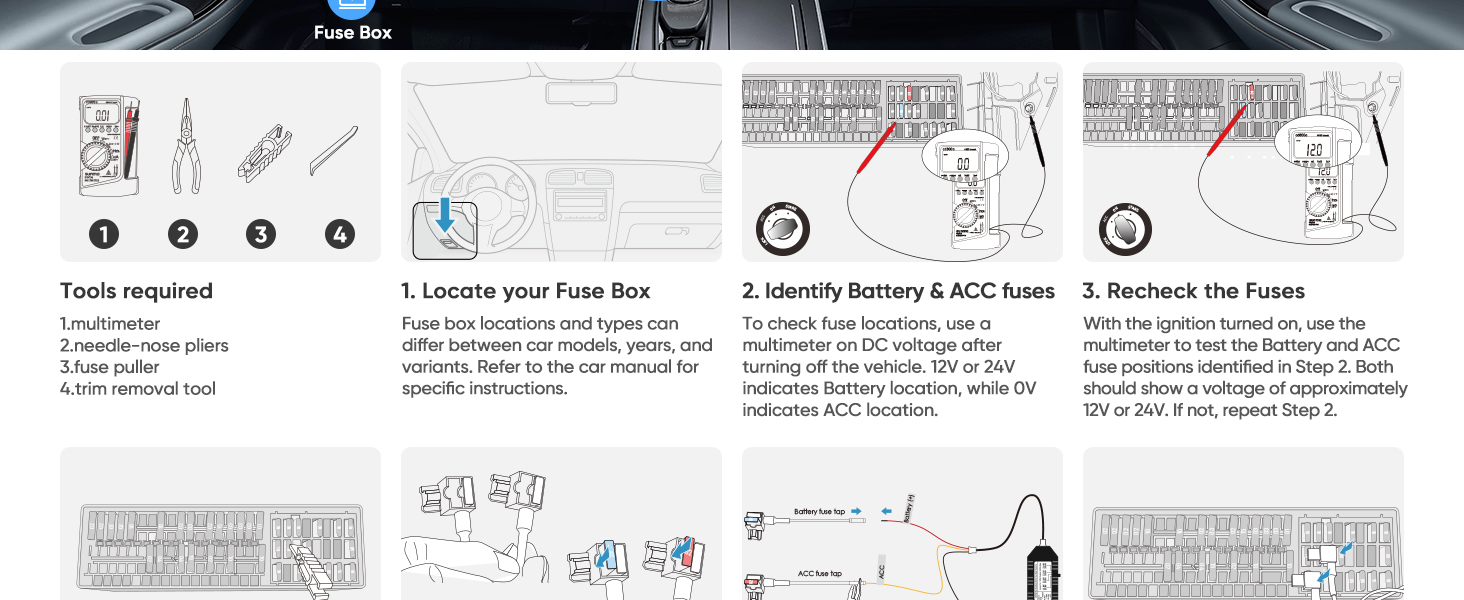
Image: VIOFO Hardwire Kit comparison table.
10. Pūtāhui me te Tautoko
The VIOFO HK6 Hardwire Kit comes with a 24-Month Warranty Coverage Extended. For any inquiries, technical assistance, or support, please contact VIOFO customer service:
- Īmēra: tautoko@viofo.com
- Waea (US): +1 323 505 9898


