1. Nga Tohutohu Haumaru Nui
Please read and understand all safety instructions before operating the OUKITEL P1000 PLUS. Failure to follow these instructions may result in electric shock, fire, or serious injury.
- Kaua e wetewete, whakapai, whakarereke ranei i te waahanga.
- Tiakina te waeine mai i te ahi, te wai, me te wera nui.
- Do not use the unit in wet conditions or expose it to rain.
- Me whakarite kia tika te hau i te wa e whakamahia ana kia kore e wera rawa.
- Kaua e taea e nga tamariki me nga kararehe.
- Whakamahia nga taputapu kua whakaaetia me nga taura utu.
- If the unit emits smoke, strange odors, or unusual noise, discontinue use immediately and contact support.
2. Hua Neke Atuview
The OUKITEL P1000 PLUS is a portable power station designed to provide reliable power for various applications, from home backup to outdoor adventures. It features a robust LiFePO4 battery, multiple output ports, and fast charging capabilities.
Āhuatanga matua:
- 1800W Continuous Output (3600W Peak): Powers a wide range of appliances.
- 1024Wh Raukaha: Extended runtime for essential devices.
- 1200W Tere Tere: Recharges from 0-100% in approximately 41 minutes (AC + Solar).
- Pūhiko LiFePO4: Offers over 3,500 charge cycles for a lifespan exceeding 10 years.
- Mana Taupānga: Monitor and manage the power station via a smartphone application.
- 0.01s Mahi UPS: Provides uninterrupted power during outages.
- 11 Ngā Tauranga Putanga: Versatile connectivity for various devices.

Image: The OUKITEL P1000 PLUS providing power to common household appliances, demonstrating its capacity and output.
3. Te Timata
Ihirangi mōkī:
Manatokona kei roto katoa nga mea kei roto i te kete:
- OUKITEL P1000 PLUS Power Station
- Taura Whakamaa AC
- Tauera Whakatau Motuka
- Taura Utu Pūngao Rā (MC4 ki XT60)
- Pukapuka Kaiwhakamahi
Akona Tuatahi:
Before first use, fully charge the OUKITEL P1000 PLUS. Connect the AC charging cable to a wall outlet and to the AC input port on the power station. The display will indicate charging status. It is recommended to fully charge the unit every 3 months if not in regular use to maintain battery health.
4. Nga Tohutohu Whakahaere
Kei te Hia/Weto:
- To turn on the unit, press and hold the main power button for 3 seconds. The display will illuminate.
- To turn off the unit, press and hold the main power button for 3 seconds. The display will turn off.
Te Whakamahi i ngā Tauranga Putanga:
The P1000 PLUS features 11 output ports:
- 4 x AC Outlets: For standard household appliances (1800W continuous, 3600W peak). Press the AC power button to activate.
- 2 x USB-A Quick Charge 3.0 Ports: Mō ngā taputapu USB hototahi e tere ana te utu.
- 1 x USB-C PD 20W Port: For charging smaller USB-C devices.
- 1 x USB-C PD 100W Port: For fast charging laptops and other high-power USB-C devices.
- 2 x DC5521 Outlets: For 12V DC devices. Press the DC power button to activate.
- 1 x Cigarette Lighter Port: For 12V car accessories. Press the DC power button to activate.
Ensure that the total power consumption of connected devices does not exceed the unit's maximum output capacity to prevent overload.

Whakaahua: Taipitopito view of the OUKITEL P1000 PLUS's optimized and versatile output ports.
5. Te Whakataki i te Teihana Hiko
The OUKITEL P1000 PLUS supports multiple charging methods:
Te Whakataki Taiepa AC:
Connect the AC charging cable to the unit's AC input port and a standard wall outlet. The unit supports 1200W fast AC charging, reaching 0-70% in approximately 30 minutes.

Image: The power station undergoing fast AC charging from a wall outlet.
Whakatauhia te ra:
Connect compatible solar panels (up to 500W) to the unit's solar input port using the provided MC4 to XT60 cable. The unit can be fully charged in approximately 2 hours with 500W solar input.

Image: The power station being charged by solar panels in an outdoor setting.
AC + Solar Combined Charging:
For the fastest charging, combine AC and solar inputs. This method can charge the unit from 0-100% in approximately 41 minutes.
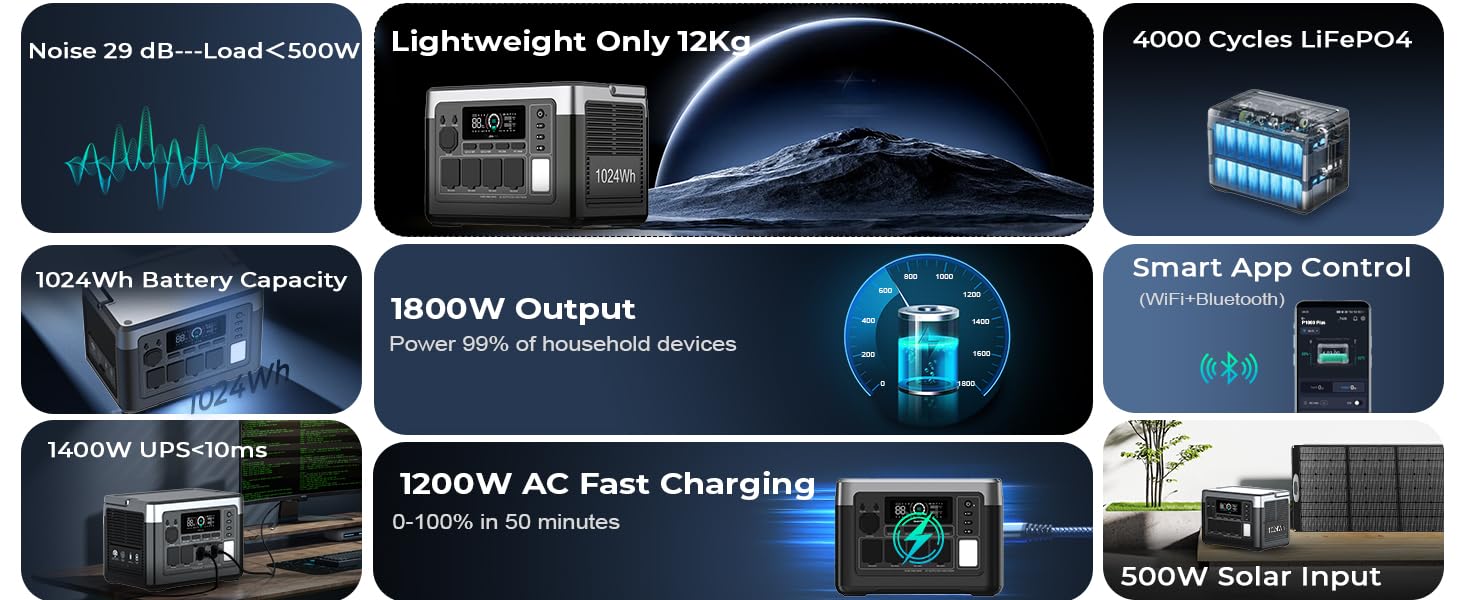
Image: The power station utilizing both AC and solar panel inputs for rapid charging.
Te Whakataki Motuka:
Connect the car charging cable to your vehicle's 12V cigarette lighter socket and the unit's input port. This method is suitable for charging on the go.
6. Mana Taupānga
The OUKITEL P1000 PLUS can be controlled and monitored using the OUKITEL smartphone application. This allows for remote management and real-time data access.
Te hono ki te Taupānga:
- Download the OUKITEL app from your device's app store.
- Me mohio kei te whakahohea te Nihokikorangi me te Wi-Fi i runga i to waea atamai.
- Open the app and follow the on-screen instructions to pair with your P1000 PLUS.
Āhuatanga Taupānga:
- Monitor real-time battery level, input/output power, and charging status.
- Adjust AC charging power.
- Control individual output ports.
- View temperature and other operational data.

Image: A user interacting with the OUKITEL app on a smartphone to manage the power station.
7. UPS Function (Uninterruptible Power Supply)
The OUKITEL P1000 PLUS features a 0.01-second Uninterruptible Power Supply (UPS) function. When connected to an AC wall outlet and simultaneously powering devices, the unit can automatically switch to battery power in the event of a power outage, te whakarite mahi tonu mo te hikohiko hono.
How to Use UPS:
- Connect the P1000 PLUS to an AC wall outlet using the AC charging cable.
- Connect your critical devices (e.g., computers, medical equipment) to the AC output ports of the P1000 PLUS.
- In case of a power failure, the P1000 PLUS will automatically provide power from its internal battery to the connected devices with minimal interruption.
This feature is ideal for protecting sensitive electronics from data loss or disruption during unexpected power interruptions.

Image: The power station acting as a UPS, keeping essential home appliances running during a power interruption.
8. Te Whakatikatika me te Penapena
Tiaki Whānui:
- Horoia te waeine ki te kakahu maroke, ngohengohe. Kaua e whakamahi i ngā kaihoroi whakakoi, i ngā whakarewa rānei.
- Regularly check ports for dust or debris and clean if necessary.
- A ape i te tuku, te tuku ranei i te waeine ki nga paanga kaha.
Rokiroki:
- Store the unit in a cool, dry place, away from direct sunlight and heat sources.
- For long-term storage, charge the unit to approximately 50-80% every 3 months to prolong battery life.
- Avoid storing the unit in environments with extreme temperatures (below 0°C or above 40°C).

Image: An illustration of the advanced battery technology and BMS for safety and longevity.
9. Te Raru
If you encounter issues with your OUKITEL P1000 PLUS, refer to the following common problems and solutions:
| Raruraru | Take pea | Rongoā |
|---|---|---|
| Karekau te waeine e ka ana | Battery is depleted; Power button not pressed long enough. | Whakakīia te taputapu; Pēhia, ka pupuri i te pātene mana mō te 3 hēkona. |
| No output from AC ports | Kāore te putanga AC i whakahohea; Kua whakahohehia te tiaki taumaha. | Press the AC power button; Reduce connected load, then restart AC output. |
| Te utu puhoi mā te pūngao rā | He iti te ra o te ra; Ko nga panui kaore i te tino koki; Nga panui paru. | Ensure direct sunlight; Adjust panel angle; Clean panels. |
| Nga take hononga taupānga | Bluetooth/Wi-Fi off; App not updated; Unit too far from phone. | Enable Bluetooth/Wi-Fi; Update app; Move phone closer to unit. |
If the problem persists, please contact OUKITEL customer support.
10. Whakatakotoranga
Detailed technical specifications for the OUKITEL P1000 PLUS:
| Āhuahira | Whakatakotoranga |
|---|---|
| Tauira | P1000 ATU |
| Momo Pūhiko | LiFePO4 |
| Te kaha | 1024Wh |
| Putanga AC | 1800W (Continuous), 3600W (Peak), 120V |
| USB-He Putanga | 2 x Utu Tere 3.0 |
| Putanga USB-C | 1 x PD 20W, 1 x PD 100W |
| Kounga DC | 2 x DC5521, 1 x Cigarette Lighter Port |
| Whakauru AC | 1200W Maora |
| Whakauru Solar | 500W Maora |
| Waa Whakawhiti UPS | 0.01s |
| Ahu (L x W x H) | 11.42" x 6.7" x 7.87" |
| Taumaha | 13.2 pauna (6 Kirokaramu) |
| Te Waahi Mahi | 0°C ki te 40°C (32°F ki te 104°F) |
11. Pūtāhui me te Tautoko
The OUKITEL P1000 PLUS comes with a 5-year warranty, ensuring reliable service and peace of mind. This warranty covers defects in materials and workmanship under normal use.
Tautoko Kiritaki:
For technical assistance, warranty claims, or any questions regarding your OUKITEL P1000 PLUS, please contact our dedicated customer support team. You can find contact information on our official website or through the OUKITEL app.
- Tautoko Aipurangi: Haerenga www.oukitel.com mo nga FAQ me nga rauemi tautoko.
- Tautoko Īmēra: Tirohia to kete hua, whai mana ranei webpae mo te wahitau imeera tautoko.


