1. Kupu Whakataki
The Waveshare ESP32-S3 AI Smart Speaker Development Board is a versatile platform designed for smart audio applications. It integrates a powerful ESP32-S3R8 module, dual microphones with noise reduction, RGB lighting, and extensive expansion interfaces for external displays and cameras. This manual provides essential information for setting up, operating, and developing with your board.
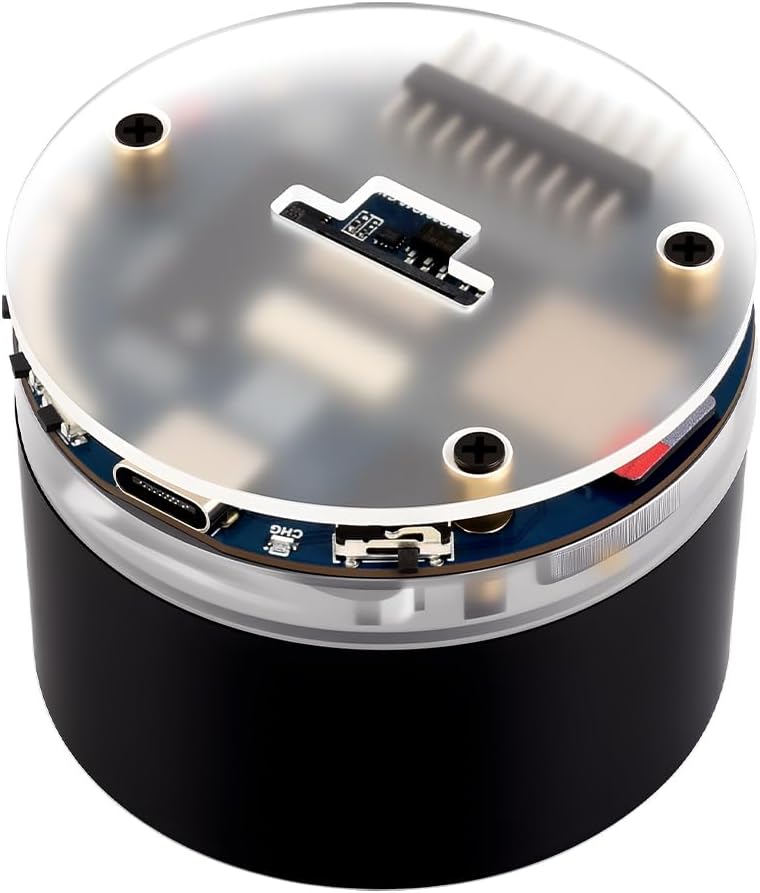
Whakaahua 1: Mua view of the Waveshare ESP32-S3 AI Smart Speaker Development Board.
2. Ihirangi mokete
Manatokohia ko nga mea katoa kei raro nei kei roto i to kete:
- ESP32-S3-AUDIO-Board-EN x1

Figure 2: The package contains one ESP32-S3-AUDIO-Board.
3. Pūmārō Neke Atuview
The ESP32-S3-AUDIO-Board features a compact design with various integrated components and interfaces for diverse applications.
3.1 Nga waahanga matua
- MCU Mahi-Teitei: Equipped with the ESP32-S3R8 module, featuring a powerful Xtensa 32-bit LX7 dual-core processor operating at up to 240MHz.
- Hononga Ahokore: Built-in 2.4GHz Wi-Fi (802.11 b/g/n) and Bluetooth 5 (LE) with an onboard antenna.
- Advanced Voice Interaction: Dual microphone array with noise reduction and echo cancellation for accurate speech recognition and near/far-field wake-up.
- Nga Painga Rama Hihiko: 7x programmable surround RGB LEDs for visual feedback.
- Extensive Expansion: SPI LCD display, DVP camera, USB, I2C, and multiple reserved buttons.
- Ahuatanga Rongorau: Onboard audio decoding chip, microphone integration, and TF card slot.
- Storage Resources: Integrated 512KB SRAM, 384KB ROM, 8MB PSRAM, and external 16MB Flash memory.

Figure 3: Detailed diagram of the ESP32-S3-AUDIO-Board components and interfaces.
3.2 Interfaces and Pinout
The board provides various interfaces for connectivity and expansion. Refer to the diagram below for a detailed pinout and interface definitions.

Figure 4: Pinout and interface definitions for the ESP32-S3-AUDIO-Board.
3.3 Ahu
The physical dimensions of the board are provided for integration into custom enclosures or projects.

Figure 5: Outline dimensions of the ESP32-S3-AUDIO-Board.
4. Tatūnga
4.1 Tuku Hiko
The ESP32-S3-AUDIO-Board requires a 3.7V MX1.25 lithium battery for operation, which is not included and must be purchased separately. The board includes a battery recharge management module.
4.2 Hononga Tuatahi
Connect the board to a power source via the USB Type-C port. The charge indicator LED will light up when charging. The light status may be uncertain if no battery is connected.
5. Nga Tohutohu Whakahaere
5.1 Tāuru/Putanga Ororongo
The board supports high-quality audio processing with an onboard audio decoding chip, dual microphones, and a speaker header. This enables clear audio input and output for voice-activated applications.

Figure 6: Audio input and output capabilities of the development board.
5.2 AI Speech Interaction
The dual microphone array, combined with noise reduction and echo cancellation, facilitates accurate speech recognition and responsive near/far-field wake-up functionality. This makes it suitable for developing AI speakers and interactive HMI screens.

Figure 7: AI speech interaction capabilities, including access to online large model platforms.
5.3 External Display and Camera Support
The board includes interfaces for SPI LCD displays and DVP cameras, allowing for expanded multimedia experiences.

Figure 8: The board supports external LCD displays and DVP cameras.
5.4 Dynamic Lighting
Seven programmable surround RGB LEDs are integrated into the board, enabling the creation of various dynamic lighting effects for enhanced user interaction and visual appeal.
6. Development & Customization
The ESP32-S3-AUDIO-Board supports various development tools and frameworks, including Arduino IDE and ESP-IDF. Comprehensive SDK open-source tutorials are available to facilitate easy integration into your applications.
6.1 Software Development Kits (SDKs)
The board is compatible with both Arduino IDE and ESP-IDF, providing flexibility for developers. Detailed documentation and examples are typically provided by Waveshare to assist with project development.
6.2 Whakaritenga
The independent shell body allows for customization of the board's appearance. Users can also DIY suitable back covers to meet specific usage scenarios.
6.3 Ataata Hua Whaimana
Video 1: This video demonstrates the features and capabilities of the Waveshare ESP32-S3 Touch LCD 1.85C, which shares many functionalities and the form factor with the AI Smart Speaker Development Board. It showcases the high-performance processor, display, audio processing, AI voice interaction, wireless connectivity, and expansion options.
7. Whakatakotoranga
| Āhuahira | Taipitopito |
|---|---|
| Tukatuka | Xtensa 32-bit LX7 dual-core, up to 240 MHz |
| RAM | LPDDR4, 512KB SRAM, 8MB PSRAM |
| Mahara Kohiko | 16MB |
| ROM | 384KB |
| Hononga Ahokore | 2.4GHz Wi-Fi (802.11 b/g/n), Bluetooth 5 (LE) |
| Pūnaha Mahi | FreeRTOS |
| Tuku Hiko | 3.7V MX1.25 Lithium Battery (not included), USB Type-C |
| Āhuatanga Ororongo | Dual Microphones (noise reduction, echo cancellation), Onboard Audio Decoding Chip, Speaker Header |
| Whakaatu Tautoko | SPI LCD display interface |
| Tautoko kāmera | DVP camera interface |
| Ētahi atu Atanga | USB, I2C, GPIO, TF Card Slot, Reserved Buttons |
| Taumaha Tūemi | 4.9 hekere |
| Ahu mōkihi | 4.49 x 3.27 x 2.83 inihi |
8. Te Raru
8.1 No Sound from Speaker
If you experience no sound from the speaker, ensure that the power amplifier is correctly initialized in your software configuration. This is a common solution for speaker-related issues.
8.2 Ngā Take Hononga Whānui
If the board is not connecting via Wi-Fi or Bluetooth, verify that the onboard antenna is properly connected and that your software configuration for wireless modules is correct. Ensure the device is within range of your network or Bluetooth device.
9. Tiaki
To ensure the longevity and optimal performance of your Waveshare ESP32-S3 AI Smart Speaker Development Board, follow these maintenance guidelines:
- Kia maroke: Avoid exposing the board to moisture or humidity, which can damage electronic components.
- Horoi Ataahua: Use a soft, dry cloth to clean the board. Avoid using harsh chemicals or abrasive materials.
- Te hapai me te tiaki: The board contains sensitive electronic components. Avoid dropping or subjecting it to strong impacts.
- Rokiroki Tika: When not in use, store the board in a cool, dry place, away from direct sunlight and extreme temperatures.
10. Raihana me te Tautoko
For warranty information, technical support, or further assistance, please refer to the official Waveshare webpaetukutuku, whakapā atu ranei ki ta raatau ratonga kaihoko. Puritia to rihiti hoko mo nga kereme whakamana.


