1. Kupu Whakataki
This manual provides detailed instructions for the safe and effective use of your VILTROX Spark Z3-N TTL Flash for Nikon cameras. Please read this manual thoroughly before operating the device and retain it for future reference.
The VILTROX Spark Z3-N is a compact and powerful on-camera flash designed for Nikon systems, featuring TTL auto mode, manual control, and a high-capacity rechargeable battery.
2. Nga korero haumaru
- Do not disassemble or modify the flash unit. Unauthorized repairs can lead to electric shock or malfunction.
- Keep the device away from water and moisture to prevent electric shock or fire.
- Avoid direct eye exposure to the flash light, especially at close range, as it can cause temporary vision impairment.
- Use only the specified charging cable and power adapter to charge the battery.
- Do not operate the flash in environments with flammable gases or liquids.
- Rokirokihia te rama uira ki te wāhi hauhautanga, maroke hoki ina kore e whakamahia.
3. Ihirangi mokete
Manatokona kei roto katoa nga mea kei roto i to kete:
- VILTROX Spark Z3-N Flash Unit
- Soft Cover (Diffuser)
- USB Type-C Charging Cable (not explicitly listed but implied by Type-C port)
- Pukapuka Tohutohu (tenei tuhinga)

Image: Contents of the VILTROX Spark Z3-N package, including the flash unit, soft cover, and documentation.
4. Hua Neke Atuview
Familiarize yourself with the components and controls of your VILTROX Spark Z3-N flash unit.

Whakaahua: Runga view of the VILTROX Spark Z3-N flash, highlighting its compact design and visible internal components.

Whakaahua: Taha view of the VILTROX Spark Z3-N flash, detailing the charging port, trigger mode switch, and battery indicator.
- Upoko kohiko: Ka tuku mārama.
- Maunga Hu Wera: Connects to the camera's hot shoe.
- Mode Dial (A/M): Selects between TTL Auto and Manual flash modes.
- Power Adjustment Dial (Full 1/2...): Adjusts flash output in Manual mode.
- S1/OFF/S2 Switch: Controls optical slave modes and power.
- Tauranga Whakatau Momo-C: Mo te whakahou i te pākahiko o roto.
- Power Indicator/Ready Light: Shows power status and flash readiness.
5. Tatūnga
5.1 Whakataunga Pūhiko
The VILTROX Spark Z3-N features a built-in 3.7V/1800mAh rechargeable lithium battery. Before first use, fully charge the battery.
- Connect the provided USB Type-C cable to the flash unit's Type-C charging port.
- Connect the other end of the cable to a 5V/2A USB power adapter (not included).
- The charging indicator will show the charging status. A full charge takes approximately 70 minutes.
- Kia oti te utu, momotuhia te taura.
The flash automatically enters sleep mode after 15 minutes of inactivity to conserve battery life.
5.2 Te Whakamau ki te Kāmera
The flash unit is designed to mount onto a camera's hot shoe.
- Ensure both the camera and flash are powered off.
- Slide the flash's hot shoe mount into the camera's hot shoe slot until it clicks into place.
- Tighten the locking ring on the flash unit to secure it firmly to the camera.

Image: The VILTROX Spark Z3-N flash securely attached to a Nikon camera's hot shoe.

Image: Detail of the hot shoe mount, showing the contacts for communication with the camera.
5.3 Attaching the Softbox
The included soft cover acts as a diffuser to soften the flash light.
- Gently slide the soft cover over the flash head until it fits snugly.
- Ensure the soft cover is securely attached to prevent it from falling off during use.
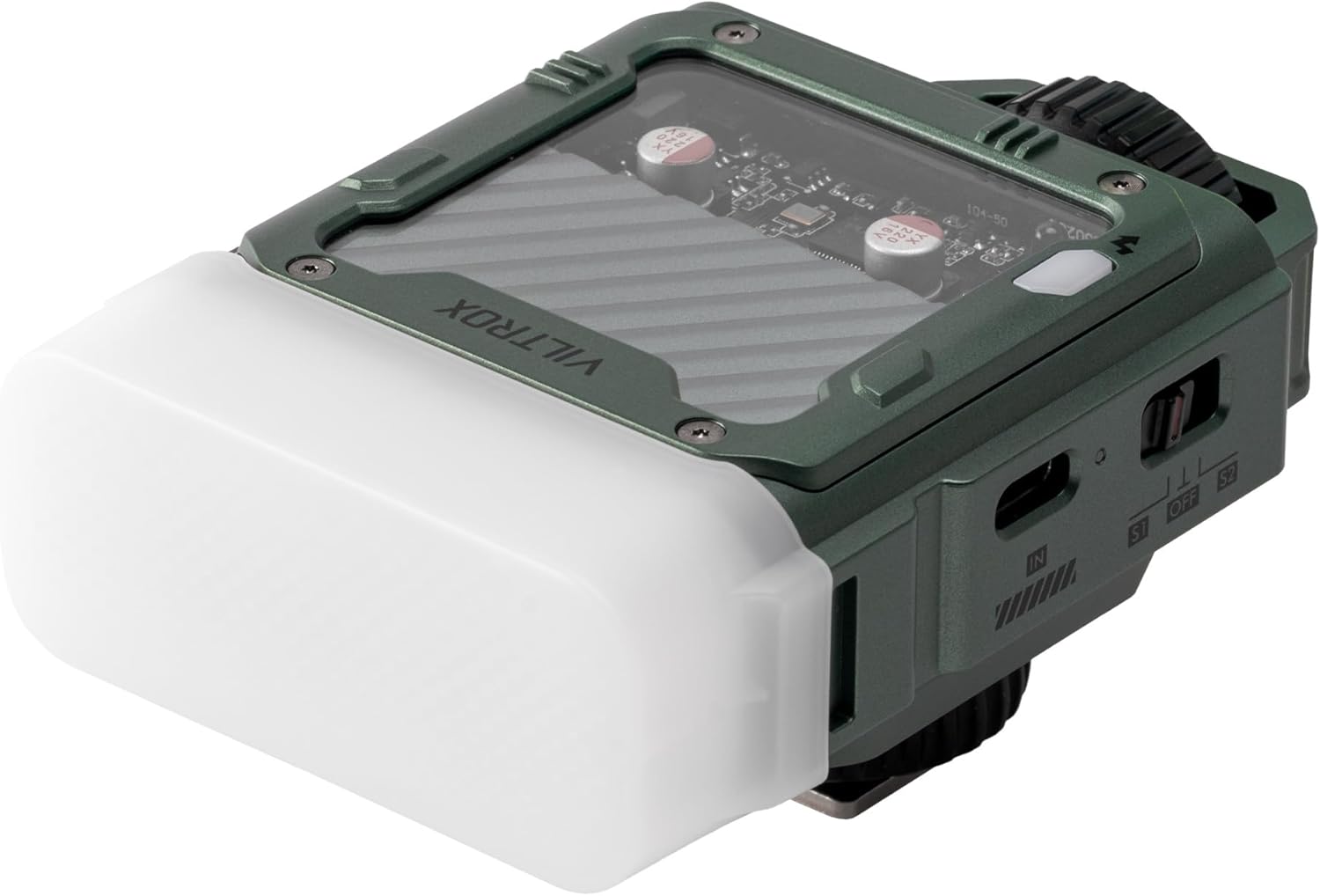
Image: The VILTROX Spark Z3-N flash with its softbox diffuser attached, ready for use.
6. Aratau Mahi
The VILTROX Spark Z3-N offers various operating modes to suit different photographic needs.
6.1 TTL Auto Mode (A)
In TTL (Through-The-Lens) mode, the flash automatically adjusts its output based on the camera's metering system, providing optimal exposure for your subject.
- Set the mode dial on the flash to 'A' (Auto).
- Ensure your camera's flash settings are configured for TTL operation.
- The flash will fire with appropriate power for balanced exposure.
6.2 Aratau Ā-ringa (M)
Manual mode allows precise control over the flash output, ideal for consistent lighting in controlled environments.
- Set the mode dial on the flash to 'M' (Manual).
- Use the power adjustment dial to select the desired flash output, ranging from 1/1 (full power) to 1/64.
- Adjust camera settings (aperture, ISO) to achieve the desired exposure in conjunction with the manual flash power.
6.3 S1 Synchronous Trigger Mode
S1 mode is an optical slave mode where the flash fires in response to another flash, without pre-flash suppression.
- Set the S1/OFF/S2 switch to 'S1'.
- The flash will trigger when it detects the main flash from another unit. This is suitable for main flashes that do not emit a pre-flash.
6.4 S2 Pre-flash Suppression Mode
S2 mode is an optical slave mode designed for use with main flashes that emit a pre-flash for TTL metering.
- Set the S1/OFF/S2 switch to 'S2'.
- The flash will ignore the pre-flash from the main unit and fire on the second, actual flash.
7. Tiaki
- Clean the flash unit with a soft, dry cloth. Do not use solvents or abrasive cleaners.
- Keep the hot shoe contacts clean and free from dust or debris.
- When not in use for extended periods, store the flash in a protective case and charge the battery periodically to maintain its health.
- Āraia te pāmahana tino nui me te haumākū tiketike.
8. Te Raru
| Raruraru | Take pea | Rongoā |
|---|---|---|
| Ko te Flash e kore e mura. | Low battery; Flash not powered on; Incorrect mode; Loose hot shoe connection. | Charge battery; Power on flash; Select correct mode (A or M); Re-seat and tighten flash on hot shoe. |
| He ngoikore/kaha rawa te putanga kohiko. | Incorrect manual power setting; TTL metering issue. | Adjust manual power dial; Check camera's exposure compensation or flash exposure compensation. |
| Optical slave (S1/S2) not triggering. | Incorrect S1/S2 setting; Main flash too far or obstructed; Main flash type incompatible. | Ensure correct S1/S2 mode; Reduce distance or clear obstructions; Verify main flash compatibility (e.g., pre-flash for S2). |
| Flash not charging. | He hapa te taura/urunga; he raruraru te tauranga utu. | Try a different USB Type-C cable and 5V/2A adapter; Contact customer support if issue persists. |
9. Whakatakotoranga
| Āhuahira | Taipitopito |
|---|---|
| Tauira | Spark Z3-N |
| Tau Aratohu (GN) | GN16 (ISO 100) |
| Putanga Kohiko | 26W/s |
| Te Paemahana Tae | 5600K |
| Whakatikatika Mana | 7 taumata (1/1 ki te 1/64) |
| Wā Hangarua | 1 hēkona |
| Pūhiko | 3.7V/1800mAh rechargeable lithium battery (included) |
| Nga uira mo ia utu | Tae atu ki te 650 (mana katoa) |
| Tauranga Whakatau | Momo-C (5V/2A) |
| Waa Whakatau | Approx. 70 meneti |
| Aratau Keu | TTL (A), Manual (M), S1, S2 |
| Hunga Hua | 3 x 2.6 x 2.2 inihi (7.6 x 6.6 x 5.6 cm) |
| Taumaha Tūemi | 9.2 hekere (260 karamu) |
10. Pūtāhui me te Tautoko
VILTROX products are covered by a limited warranty. For specific warranty terms and conditions, please refer to the warranty card included in your product packaging or visit the official VILTROX website. For technical support, troubleshooting assistance, or service inquiries, please contact VILTROX customer service through their official channels.
Tena koa pupurihia to tohu mo te hoko mo nga kereme whakamana.


