1. Nga Korero Haumaru Nui
Please read and understand all safety instructions before assembly, installation, or use of this product. Failure to follow these instructions may result in injury or damage to the product.
- Momotuhia te mono o te taura whakamahana i mua i te huihuinga, i te wetewete rānei.
- Be cautious of sharp edges and pinch points during assembly.
- Do not exceed the weight limit of 72.75 pounds on the vanity surface.
- Keep electrical components dry and away from heat sources.
- Me aroturuki tonu i ngā tamariki i te taha o te wāhi horoi.
- Kia mahara kia noho haumaru nga hononga katoa i mua i te whakamahinga.
- Use the provided anti-tip anchors to secure the vanity to a wall to prevent tipping.
2. Hua Neke Atuview
The Driftalia Vanity Desk with Mirror and Lights (Model IF240040) is designed to provide a functional and organized space for personal grooming. It features a large mirror with adjustable LED lighting, ample storage options, and a built-in power hub for convenience.

Whakaahua 2.1: Mua view of the Driftalia Vanity Desk, showcasing the mirror with lights, central drawer, and side cabinet.
Āhuatanga matua:
- Integrated Mirror with LED Lights: 11 LED bulbs offer 3 color modes (Cool White, Warm White, Warm Yellow) and 10 brightness levels.
- Rokiroki maha: Includes a large storage drawer, 5 open shelves, a hidden 3-tier cabinet, and a dedicated hairdryer holder.
- Built-in Power Hub: Features 2 AC outlets and 2 USB ports for charging devices and powering styling tools.
- Hanga Roa: Made with engineered wood, scratch-resistant surfaces, and equipped with anti-tip anchors and adjustable feet for stability.
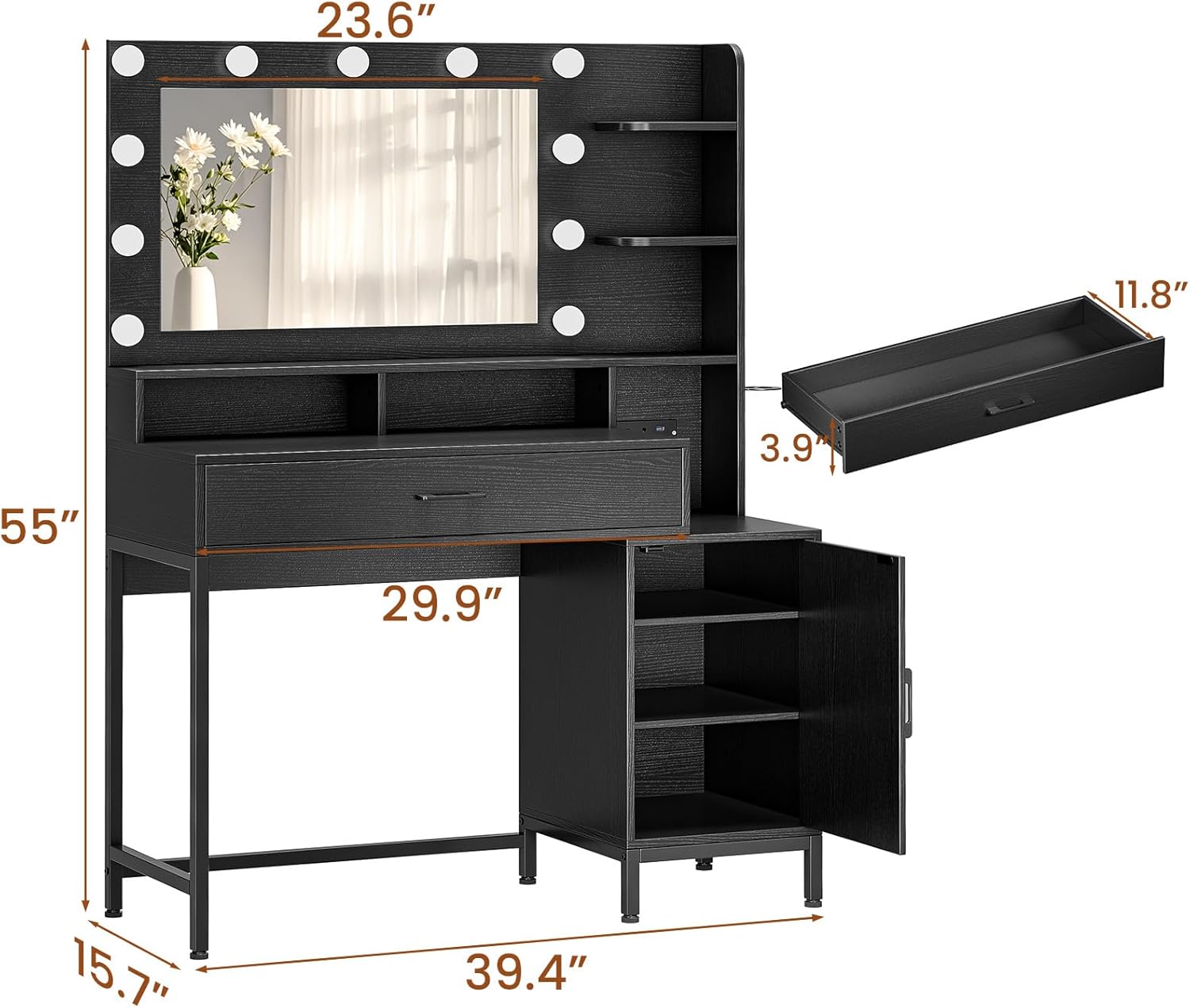
Whakaahua 2.2: Ahu view of the vanity desk, showing overall measurements of 39.4"W x 15.7"D x 55"H.
3. Ihirangi mokete
I mua i te tiimata o te huihuinga, tirohia koa ko nga waahanga katoa kei raro nei kei te noho me te kore e pakaru. Mena kei te ngaro, kua pakaru ranei etahi waahanga, waea atu ki te tautoko a te kaihoko.
- Ngā Paewhiri Tēpu Whakamārama (ngā rahi rerekē)
- Whakaata me ngā Rama LED Whakauru
- Drawer Components and Glides
- Cabinet Door and Hinges
- Power Outlet Unit with USB Ports
- Kaipupuri Hairdryer
- Pūmārō Huihuinga (ngā tīwiri, ngā raka, raka kamera, aha atu)
- Anti-Tip Anchors
- Waewae Whakaritea
- Pukapuka Tohutohu (tenei tuhinga)
4. Tatūnga me te Runanga
Assembly typically requires two adults and basic household tools (e.g., screwdriver, hammer). Follow the step-by-step instructions provided in the separate assembly guide included with your package. Ensure you have adequate space and a clean, flat surface for assembly.
Nga Waahi Huihuinga Nui:
- Wewetehia nga waahanga katoa ka manatoko ki te rarangi ihirangi mokihi.
- Assemble the main desk frame according to the diagrams.
- Install the drawer glides and assemble the drawer.
- Attach the side cabinet and install the door.
- Mount the mirror unit to the desk.
- Install the power outlet unit and hairdryer holder.
- Attach the adjustable feet to the base of the vanity.
- Secure the vanity to the wall using the provided anti-tip anchors.
Refer to the detailed graphical instructions in your assembly guide for specific part identification and fastening methods.
5. Nga Tohutohu Whakahaere
5.1. Pūnaha Whakamārama Whakaata

Image 5.1: Illustration of the three lighting modes: Cool White, Warm White, and Warm Yellow, with 10 brightness levels.
The vanity mirror is equipped with 11 LED bulbs offering adjustable lighting for various needs.
- Hiko Whakaka/Weto: Locate the touch button on the mirror surface. Tap once to turn the lights on or off.
- Huri Aratau Tae: With the lights on, tap the touch button repeatedly to cycle through the 3 color modes: Cool White (6000K), Warm White (4000K), and Warm Yellow (3000K).
- Whakaritea te Tirohanga: With the lights on, press and hold the touch button to smoothly adjust the brightness level. Release when the desired brightness is achieved. There are 10 distinct brightness levels.
5.2. Built-in Power Hub

Atahanga 5.2: Whakatata view of the built-in power station with 2 AC outlets and 2 USB ports.
The integrated power hub provides convenient access to electrical outlets and USB charging ports.
- Putanga AC: Two 125V/12A AC outlets are available for powering hair tools, small appliances, or other electrical devices.
- Tauranga USB: E rua ngā tauranga USB 5V/2A e whakaratohia ana mō te utu i ngā waea atamai, ngā papa me ētahi atu taputapu e whakamahia ana e te USB.
- Whakamahinga: Simply plug your devices into the appropriate ports. Ensure the vanity is plugged into a wall outlet for the power hub to function.
5.3. Nga waahanga rokiroki

Whakaahua 5.3: Ka mutuview of the vanity's storage capabilities, including the large drawer, open shelves, and cabinet.
- Pouaka Rokiroki Nui: Utilize the spacious central drawer for cosmetics, accessories, and other items. The smooth glide rails ensure easy opening and closing.
- Papa Tuwhera: Five open shelves provide accessible storage for frequently used items, decorative pieces, or skincare products.
- Hidden 3-Tier Cabinet: The side cabinet offers concealed storage with three adjustable tiers, ideal for larger items or keeping clutter out of sight.
- Kaipupuri whakamaroke makawe: A dedicated holder keeps your hairdryer or other styling tools neatly organized and easily accessible.
6. Tiaki me te Tiaki
Proper care will ensure the longevity and appearance of your vanity desk.
- Papa horoi: Horoia nga mata ki te ngohengohe, damp kakahu. A ape i nga kaihoroi awhiowhio, i nga matū kino ranei e kino ai te mutunga.
- Whakaata Whakaata: Use a glass cleaner specifically designed for mirrors and a lint-free cloth. Spray cleaner onto the cloth, not directly onto the mirror, to prevent liquid from seeping into the edges.
- Wae Hiko: Ensure the power hub and light connections remain dry. Do not expose to excessive moisture.
- Whakapaia nga taputapu: Tirohia i ia wa me te whakakoi i nga wiri me nga here kia mau tonu.
- A ape i te utaina nui: Do not exceed the recommended weight capacity for any part of the vanity.
7. Te Raru
If you encounter issues with your vanity desk, refer to the following common problems and solutions.
| Raruraru | Take pea | Rongoā |
|---|---|---|
| Kaore nga rama e ka ana. | Vanity not plugged in; loose connection; faulty bulb/wiring. | Ensure the vanity's main power cord is securely plugged into a working wall outlet. Check all internal wiring connections. If individual bulbs are replaceable, check them. |
| Lights not changing color or brightness. | Incorrect operation of touch button. | Tap the touch button to cycle modes. Press and hold to adjust brightness. Refer to Section 5.1. |
| Ko nga putanga hiko / tauranga USB kaore e mahi. | Vanity not plugged in; overloaded circuit; faulty power hub. | Verify the vanity is plugged in. Unplug other devices to check for overload. Test with a different device. |
| He maro te pouaka, kaore ranei e kati pai. | Misaligned glides; obstruction; loose hardware. | Check that the drawer glides are properly aligned and free of debris. Ensure all drawer hardware is tightened. |
| Vanity feels unstable. | Uneven floor; loose hardware; anti-tip anchors not installed. | Adjust the leveling feet on the bottom of the vanity. Tighten all assembly hardware. Ensure anti-tip anchors are correctly installed and secured to a wall stud. |
If the problem persists after attempting these solutions, please contact Driftalia customer support.
8. Whakatakotoranga
| Āhuahira | Taipitopito |
|---|---|
| Tau tauira | IF240040 |
| Waitohu | Driftalia |
| Ahu Hua (Tanui) | 39.4"W x 15.7"D x 55"H (Approximate) |
| Taumaha Tūemi | 72.8 pauna |
| Rauemi | Rakau Hangaia |
| Tae | Pango |
| Whakamarama | 11 LED Bulbs, 3 Color Modes (6000K, 4000K, 3000K), 10 Brightness Levels |
| Nga Panui Mana | 2 Putanga AC (125V/12A) |
| Tauranga USB | 2 Tauranga USB (5V/2A) |
| UPC | 850062367616 |
9. Tautoko Kiritaki
For further assistance, missing parts, or warranty inquiries, please contact Driftalia customer support. Refer to your purchase documentation for specific contact details or visit the official Driftalia webpae.
Kaihanga: Driftalia
Te Ra Tuatahi Wātea: Mahuru 10, 2025