1. Hua Neke Atuview
The Baseus BS1 NC Semi-in-Ear Noise Cancelling Earbuds offer a blend of comfort and advanced audio technology. Featuring Adaptive Hybrid Active Noise Cancellation (ANC), Hi-Res Audio with LDAC support, and a lightweight design, these earbuds are engineered for extended listening and clear communication. They are also equipped with a 6-microphone AI system for clear calls and IP55 water and dust resistance.

Image: Baseus BS1 NC Semi-in-Ear Noise Cancelling Earbuds and their charging case in black.
2. Ihirangi mokete
Me mohio kei roto katoa nga mea kei roto i te kete:
- Baseus Bass BS1 NC Semi-in-Ear Earbuds (Left and Right)
- Puhi utu
- USB-C Uira Whakatau
- Aratohu Timata Tere

Image: The complete retail package for the Baseus BS1 NC Earbuds, showing the earbuds, charging case, USB-C cable, and quick start guide.
3. Te Whakataki i nga Paorooro me te Puhi
Mō te mahi tino pai, whakakīia katoatia ngā pane taringa me te pouaka utu i mua i te whakamahinga tuatahi.
3.1 Te Whakataki i nga Paorooro
- Whakanohoia nga purongo ki roto i te pukoro utu. Me whakarite kia tika te noho ki roto i o raatau waahi (L mo te taha maui, R mo te taha matau).
- Close the charging case. The earbuds will begin charging automatically.
3.2 Te Whakautu i te Pouaka
- Honoa te taura utu USB-C kua whakaratohia ki te tauranga utu kei runga i te pouaka.
- Honoa te tahi pito o te taura ki te urutau hiko USB (kaore i whakauruhia), ki te tauranga USB rorohiko ranei.
- The LED indicator on the case will show the charging status:
- Kākāriki: 75% - 100% kua utua
- Kowhai: 25% - 75% kua utua
- Whero: I raro iho i te 25% te utu
- A full charge for the case provides up to 40 hours of total playtime for the earbuds (with ANC off). A 10-minute charge can provide up to 2 hours of playback.

Image: The Baseus BS1 NC Earbuds resting in their open charging case, highlighting the 40-hour total playtime and rapid charging capabilities.
4. Takirua me te Hononga
4.1 Takirua Tuatahi
- Whakatuwherahia te putea utu. Ka uru aunoa nga taringa ki te aratau takirua.
- I runga i to taputapu (waea atamai, papa, rorohiko), whakaahei i te Nihokikorangi.
- Rapua "Baseus Bass BS1 NC" in the list of available Bluetooth devices.
- Select "Baseus Bass BS1 NC" to connect. A voice prompt will confirm successful pairing.
4.2 Hononga Aunoa
Once paired, the earbuds will automatically reconnect to the last connected device when removed from the charging case and within Bluetooth range.
4.3 Hononga Ira Maha
The Baseus BS1 NC supports Baseus Smart-Connect (BSC) technology, allowing simultaneous connection to two devices. This enables seamless switching between audio sources without manual re-pairing.
To use multipoint connection:
- Tāruatia ngā pane taringa ki tō pūrere tuatahi.
- Momotuhia ngā pane taringa mai i ngā tautuhinga Nihokikorangi o te pūrere tuatahi (kaua e wetewete).
- Tāruatia ngā pane taringa ki tō pūrere tuarua.
- Reconnect the earbuds to the first device from its Bluetooth settings. The earbuds should now be connected to both devices.
Ka huri aunoatia te ororongo ki te taputapu e purei ana i nga ihirangi ka whiwhi waea ranei.
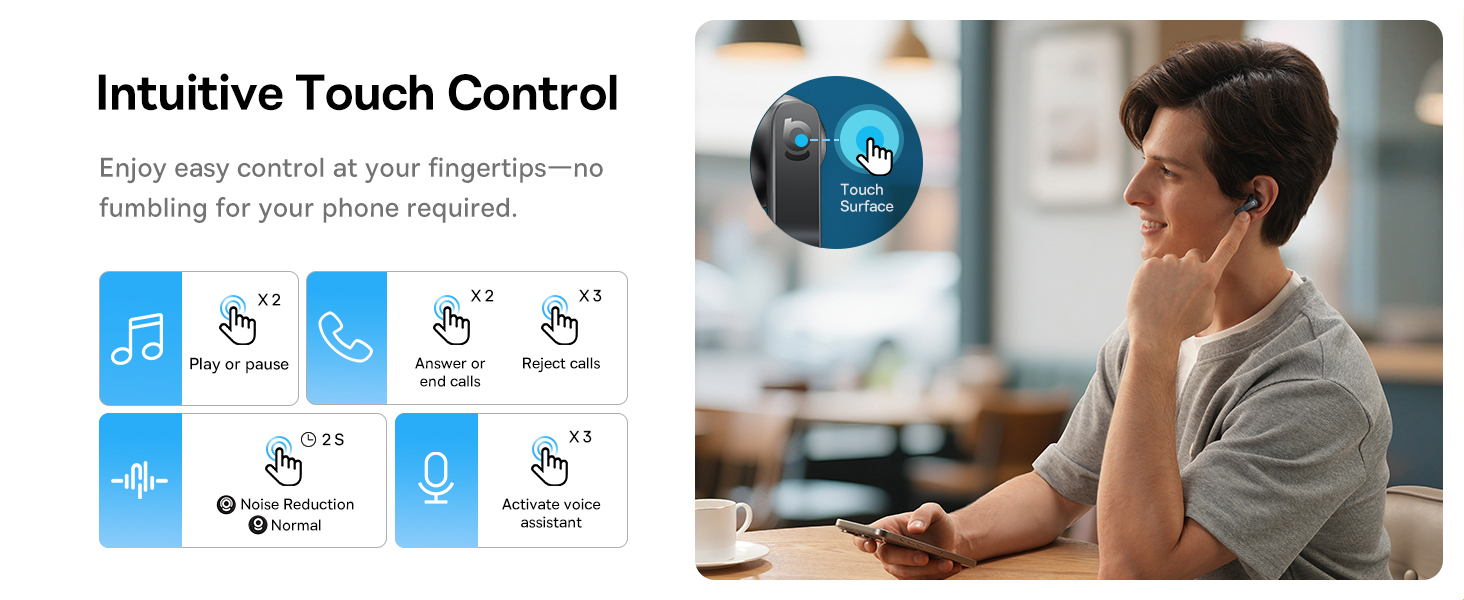
Image: A visual representation of the Baseus BS1 NC Earbuds connected to both a laptop and a smartphone, showcasing the instant multipoint connection feature.
5. Te mau i nga Paorooro
The Baseus BS1 NC earbuds feature a semi-in-ear design for comfortable, pressure-free wear. For optimal sound quality and noise cancellation, ensure a proper fit.
- Tautuhia te maui (L) me te matau (R) pukoro.
- Whakauruhia marietia ia purongo ki roto i to takere taringa.
- Adjust the earbud until it feels secure and comfortable. The stem should point slightly forward or downward.

Image: A person wearing the Baseus BS1 NC Earbuds, illustrating their ergonomic and lightweight design for all-day comfort.
6. Nga Tohutohu Whakahaere
6.1 Mana Pa
The earbuds feature intuitive touch controls on their stems. The following are default functions, which may be customizable via the Baseus app:
| Mahi | Mahi |
|---|---|
| Double-tap (Left or Right Earbud) | Purei / Okioki puoro, Whakautu / Waea mutunga |
| Triple-tap (Left or Right Earbud) | Reject call, Activate voice assistant |
| Paatohia kia mau (2 hēkona) | Switch Noise Control Mode (ANC/Normal/Transparency) |

Image: An illustration detailing the intuitive touch controls on the Baseus BS1 NC Earbuds for various functions like play/pause, call management, noise reduction, and voice assistant activation.
6.2 Aratau Mana Haruru
The Baseus BS1 NC earbuds offer three noise control modes:
- Adaptive Hybrid ANC (Active Noise Cancellation): Ka whakaiti i te haruru o te taiao mō te wheako whakarongo rumaki. He pai mō ngā taiao haruru.
- Aratau Puataata: Allows you to hear your surroundings while still enjoying your audio. Useful for awareness in urban settings or conversations.
- Aratau Pūnoa: Te purei oro paerewa, kāore he āhuatanga whakakore haruru hohe, he āhuatanga mārama rānei.
Switch between modes by pressing and holding the touch area on either earbud for 2 seconds.

Image: A cutaway diagram of a Baseus BS1 NC earbud in an ear, illustrating the semi-in-ear fit and the availability of Adaptive Noise Cancelling and Transparency Mode.
6.3 Hi-Res Audio with LDAC
These earbuds support LDAC technology, enabling high-resolution audio transmission for a detailed and rich sound experience. Ensure your device supports LDAC and activate it in your device's Bluetooth settings for the best audio quality.

Image: The Baseus BS1 NC Earbuds surrounded by sound waves, emphasizing features like Hi-Res Audio, SuperBass 2.0, and 13mm dynamic drivers for powerful sound.
6.4 6-Mic AI Clear Calls
The earbuds are equipped with 6 microphones and AI noise isolation technology to ensure your voice is clear during calls, even in noisy environments. Wind noise reduction further enhances call clarity outdoors.
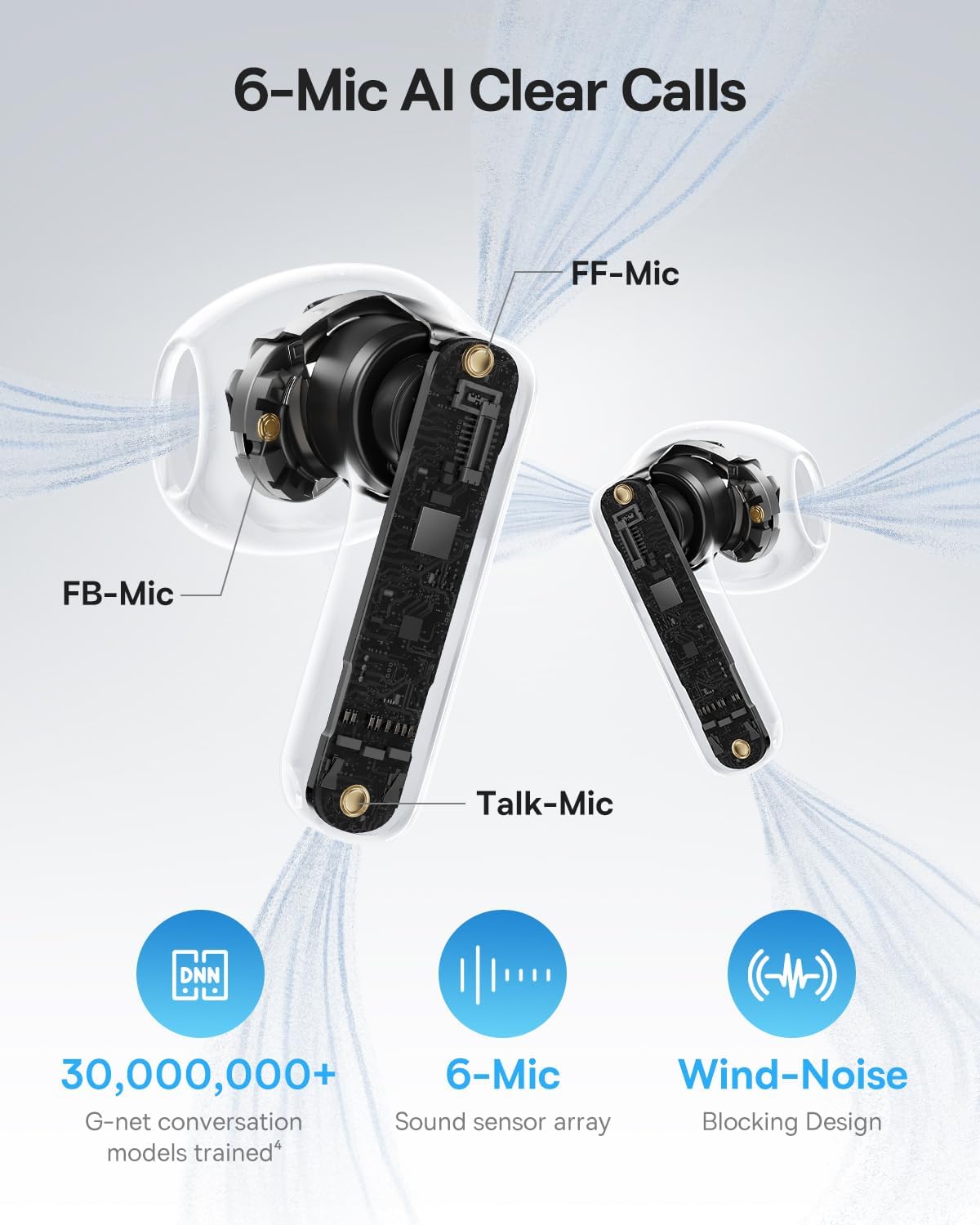
Image: A detailed diagram of the Baseus BS1 NC earbud, highlighting the placement of the FF-Mic, FB-Mic, and Talk-Mic, which contribute to the 6-Mic AI Clear Call technology and wind-noise blocking design.
6.5 Mana App Smart
Download the dedicated Baseus app for enhanced control and customization options. The app allows you to:
- Adjust Bass Boost levels.
- Select from various EQ Modes.
- Control Spatial Acoustics settings.
- Use the "Find Your Earbuds" feature.
Note: In guest mode, no account creation or permissions are required to customize features, but GPS access is needed to locate lost earbuds.

Image: A smartphone displaying the Baseus app interface, which offers various sound control options including Bass Boost, EQ Modes, Spatial Acoustics, and a "Find Your Earbuds" function.
7. Tiaki me te Tiaki
7.1 Te horoi
- Me horoi i nga wa katoa nga pukoro me te pukoro utu ki te kakahu ngohengohe, maroke, kore-puru.
- Kaua e whakamahi i nga matū kino, i nga whakarewa horoi, i nga horoi kaha ranei.
- Gently remove any earwax or debris from the earbud mesh and charging contacts using a small, soft brush or cotton swab.
7.2 Atete Wai me te Puehu (IP55)
The earbuds are rated IP55, meaning they are protected against limited dust ingress and low-pressure water jets from any direction. This makes them suitable for workouts and light rain exposure.
- Kaua e rukuhia nga taringa ki te wai.
- Me whakarite kia maroke ngā pane taringa i mua i te whakahokinga ki roto i te pouaka utu hei ārai i te kino o ngā hononga utu.
- Ko te putea utu kaore i te wai-atete.

Image: The Baseus BS1 NC Earbuds shown with water droplets, signifying their IP55 rating for dust and water resistance.
7.3 Rokiroki
Whakaorangia nga purongo i roto i o raatau putea karekau e whakamahia ana hei tiaki me te pupuri i te utu.
8. Te Raru
If you encounter issues with your Baseus BS1 NC earbuds, refer to the following common solutions:
- Karekau he take oro/hononga:
- Me mohio kei te utu nga taringa.
- Verify Bluetooth is enabled on your device and "Baseus Bass BS1 NC" is selected.
- Try placing earbuds back in the case, closing it, and then reopening to reset the connection.
- Warewarehia te taputapu i o tautuhinga Nihokikorangi ka takirua ano.
- Kotahi Puoro Kare e Mahi:
- Me whakarite kia utu nga purongo e rua.
- Whakahokia ngā pane taringa e rua ki roto i te pouaka, katia, ka whakatuwhera anō.
- Horoia ngā hononga utu o ngā pane taringa me roto hoki o te pouaka.
- Kounga oro kino:
- Me whakarite kia noho tika nga taringa ki o taringa.
- Clean the earbud mesh to remove any obstructions.
- Check your device's audio settings and ensure LDAC is enabled if supported.
- ANC Kaore i te whai hua:
- Ensure ANC mode is activated via touch control or the Baseus app.
- Adjust the earbuds for a better seal in your ears.
9. Whakatakotoranga
| Āhuahira | Taipitopito |
|---|---|
| Ingoa Tauira | Baseus Bass BS1 NC |
| Mana Haruru | Whakakorenga Haruru Urutau, Whakakorenga Haruru Taiao, Whakakorenga Haruru Ranu |
| Hangarau Hononga | Nihokikorangi 6.0, Ahokore |
| Hangarau Whakawhitiwhiti Ahokore | Nihokikorangi 6.0 |
| Awhe Nihokikorangi | 10 Mita |
| Momo Atekōkiri Ororongo | Atekōkiri Hihiko |
| Rahi Atekōkiri Ororongo | 13 Mirimita |
| Whakautu auau | 40 KHz |
| Latency Ororongo | 60 Milihekona |
| Te ora o te Pūhiko (Ngā taringa) | 7 Hāora (ANC whakaweto) |
| Wā Takaro Tapeke (me te Puhi) | 40 Hāora (ANC whakaweto) |
| Charging Time (Rapid Charge) | 10 meneti mo te 2 haora te purei |
| Taumata Atete Wai | IP55 (Ngā taringa anake) |
| Momo Mana | Mana Pa |
| Rauemi | Acrylonitrile Butadiene Styrene (ABS), Polycarbonate (PC) |
| Taumaha o te Taonga (Ngā Taringa) | 4g mo ia pukoro |
| Product Dimensions (Earbuds) | 1.2 x 0.7 x 0.7 inihi |
| Pūrere Hototahi | Devices with Bluetooth Audio Capability, including iOS, Android, Windows, Mac OS and Switch. |
10. Ataata Hua Whaimana
Watch the official product video for a visual guide on the Baseus BS1 NC Earbuds:
Video: An official product video from Baseus showcasing the features and usage of the Baseus BS1 NC Semi-in-Ear True Wireless Earbuds.
11. Pūtāhui me te Tautoko
For warranty information, technical support, FAQs, and further assistance, please visit the official Baseus support center.
Refer to the Quick Start Guide included in your package for a direct link or visit the Baseus webpae.
Note: Protection plans may be available for purchase separately.


