1. Hua Neke Atuview
The KLIM Cassette Player Boombox is a versatile audio device combining classic cassette playback with modern features like AM/FM radio, Bluetooth connectivity, and USB playback/recording. Its portable design allows for use at home or on the go.
Āhuatanga matua:
- Kaipāho Ripene me te Kaituhi
- AM/FM Radio Tuner
- Bluetooth Connectivity for wireless streaming
- USB Port for MP3 playback and recording
- Integrated Microphone for direct recording
- Headphone Jack for private listening
- Dual Power: AC power cord or 4 x C-type batteries (not included)
- Portable design with a carrying handle
He aha kei roto i te Pouaka:
- KLIM Cassette Player Boombox
- Waea hiko AC
- Pukapuka Kaiwhakamahi

Whakaahua 1: Mua view of the KLIM Cassette Player Boombox, showcasing its controls and cassette compartment.
2. Tatūnga
Whakakaha ana i te Pūrere:
The KLIM Cassette Player Boombox can be powered in two ways:
- Mana AC: Connect the included AC power cord to the device's power input and then to a standard wall outlet.
- Mana Pūhiko: For portable use, insert 4 x C-type batteries (not included) into the battery compartment located on the underside of the device. Ensure correct polarity.

Whakaahua 2: Raro view showing the battery compartment for portable power.
3. Nga Tohutohu Whakahaere
3.1. Cassette Player/Recorder
- Slide the function selector to 'TAPE'.
- Press the 'OPEN' button to open the cassette compartment.
- Insert a cassette tape with the open side facing up.
- Katia te wahanga rīpene.
- Use the 'PLAY', 'STOP/EJECT', 'FFWD' (Fast Forward), and 'REW' (Rewind) buttons to control playback.
- To record, ensure a blank tape is inserted. Press the 'REC' button to start recording from the built-in microphone, radio, or USB.

Whakaahua 3: Runga view of the boombox with a cassette tape inserted into the compartment.
3.2. Reo Irirangi AM/FM
- Slide the function selector to 'RADIO'.
- Whakaroahia te antenna telescopic kia pai ai te manaaki.
- Use the 'BAND' switch to select between AM and FM frequencies.
- Rotate the 'TUNING' knob to find your desired radio station.
3.3. Hononga Nihokikorangi
- Slide the function selector to 'BT' (Bluetooth).
- The device will enter pairing mode, indicated by a flashing light or audible prompt.
- I runga i to waea atamai, papa ranei, whakaaheitia te Nihokikorangi me te rapu mo nga taputapu e waatea ana.
- Select 'KLIM Cassette Player' (or similar name) from the list to pair.
- Once paired, you can stream audio wirelessly from your device.
3.4. Purei me te Hopuoro USB
- Slide the function selector to 'USB'.
- Whakauruhia he puku kohiko USB kei roto te ororongo MP3 files ki te tauranga USB.
- The device will automatically begin playing the audio files. Use the playback controls (play/pause, skip) to navigate.
- To record to USB, ensure a USB drive is inserted. Press the 'REC' button while in radio or cassette mode to record the audio source directly to the USB drive.
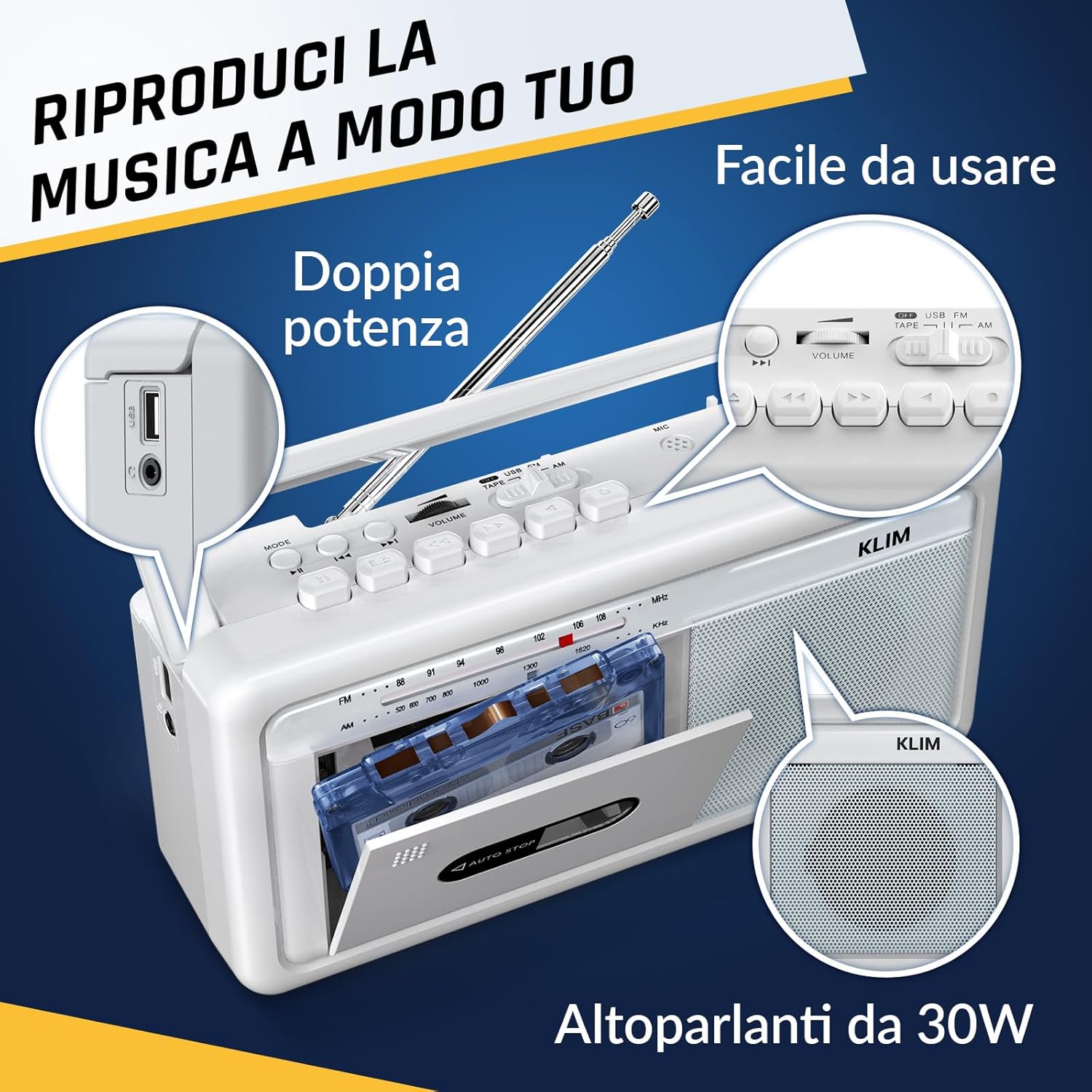
Whakaahua 4: Taha view highlighting the USB port for media playback and recording.
3.5. Whakamahi Waeaoro
Connect standard 3.5mm headphones to the headphone jack for private listening. The internal speakers will automatically mute when headphones are connected.
Video 1: Instructions on how to record a tape to USB using the WTB-795 model. This video demonstrates the USB recording functionality.
Ataata 2: Ka mutuview of a retro cassette player with USB, Bluetooth, and AM/FM radio features, similar to the KLIM Cassette Player Boombox.
4. Tiaki
- Puritia te pūrere kia ma mā te muru ki te kakahu ngohengohe, maroke. Kaua e whakamahi i ngā wai horoi, i ngā whakarewa rānei.
- Regularly clean the cassette head and pinch rollers with a cotton swab lightly dampi whakakaohia ki te waipiro isopropyl hei whakarite i te kounga oro pai me te aukati i te kino o te riipene.
- Keep the device away from direct sunlight, heat sources, and excessive dust or moisture.
- Ki te kore e whakamahia mō te wā roa, tangohia ngā pākahiko hei ārai i te turuturu.
5. Te Raru
| Raruraru | Rongoa pea |
|---|---|
| Karekau he kaha | Check if the AC power cord is securely connected. If using batteries, ensure they are inserted correctly and are not depleted. |
| Kaore he tangi mai i nga kaikorero | Increase the volume. Ensure headphones are not connected. Check the function selector is in the correct mode (TAPE, RADIO, BT, USB). |
| He pai te powhiri reo irirangi | Extend the telescopic antenna fully. Adjust the antenna direction. Try moving the unit to a different location. |
| Kāore te rīpene kaseti e purei/e hopu ana | Ensure the tape is inserted correctly. Check if the tape is damaged. Clean the cassette head and pinch rollers. |
| Nihokikorangi kore hono | Ensure the unit is in Bluetooth mode. Make sure your device's Bluetooth is enabled and within range. Try unpairing and re-pairing the device. |
| Nga take purei USB | Ensure the USB drive is formatted correctly (FAT32) and contains compatible audio files (MP3, WAV, WMA, AAC, FLAC). Try a different USB drive. |
6. Whakatakotoranga
- Waitohu: KLIM
- Tauira: Kaitangi Ripene
- Rahi Hua: 25 x 13.1 x 7.6 cm
- Taumaha Tūemi: 1 kg
- Ngā Pūrere Hototahi: MP3 Player, Waea atamai, Papa
- Aratau Putanga Ororongo: Tirooro
- Hōputu Ororongo Tautokona: Cassette, Analog Radio, MP3, WAV, WMA, AAC, FLAC, Bluetooth
- Puna Hiko: Corded Electric (AC) / 4 x C-type Batteries (not included)
- Hangarau Hononga: USB, Nihokikorangi
- Tae: Frost White
- Tau Tūemi: KLSIN4825
7. Raihana me te Tautoko
The KLIM Cassette Player Boombox comes with a 5-tau pūtāhui. For any questions, technical assistance, or warranty claims, please contact KLIM customer support. Our team is available 24/7 to assist you.
Please refer to the contact information provided in your product packaging or visit the official KLIM webpae mo etahi atu korero taipitopito.


