Kupu Whakataki
This manual provides detailed instructions for the safe and effective operation of your BAOFENG BF-1904 two-way radio. Please read this manual thoroughly before using the device to ensure proper function and to prevent damage.
The BAOFENG BF-1904 is a professional UHF two-way radio designed for reliable communication across a frequency range of 400-520MHz. It features 16 channels, a 2800mAh battery, and supports both USB-C and charging base charging methods.
Ihirangi mokete
Manatokohia ko nga mea katoa kei raro nei kei roto i to kete:
- 1 x BAOFENG BF-1904 Radio
- 1 x Taramu
- 1 x Pūhiko (2800mAh)
- 1 x Taura Utu Momo-C
- 1 x Papa Whakatau
- 1 x Charging Cable (US Plug)
- 1 x Topenga Whitiki
- 1 x Raina
- 1 x English User's Manual (this document)

Image: The BAOFENG BF-1904 radio with its antenna attached, showcasing tona hoahoa kiato.
Whakatakotoranga
| Tau tauira | BF-1904 |
| Awhe Auautanga | 400-520MHz (UHF) |
| Te maha o nga hongere | 16 |
| Pūhiko Voltage | 7.4V |
| Pūhiko Raukaha | 2800mAh |
| Te Waahi Mahi | -20 ℃ ki te +60 ℃ |
| Te Ara Mahi | Same frequency simplex or different frequency simplex |
| Whakawaenga | Frequency Modulation (F3E) |
| Wehenga Wehenga Mōrahi | ≤±5KHz |
| Residual Wave Radiation | <-60dB |
| Tukunga Naianei | ≤2.6A |
| Pūmautanga Auautanga | ±2.5ppm |
| Te Whiwhi i te Maamaa | <0.15μV |
| Te Mana Ororongo | ≥400MW |
| CTCSS/DCS | 50 Groups CTCSS, 105 Groups of standard DCS |
| Rahi Hua (D x W x H) | 1.41" x 2.17" x 5.31" |
| Taumata Atete Wai | Wai Atete |

Image: Diagram showing the dimensions of the BAOFENG BF-1904 radio: 13.5cm (5.31in) height, 5.5cm (2.17in) width, and 3.5cm (1.41in) depth.
Tatūnga
- Tāutahia te Pūhiko: Align the battery with the grooves on the back of the radio and slide it into place until it clicks securely.
- Whakapirihia te Antenna: Hurihia te antenna ki roto i te hononga ki runga o te reo irirangi tae noa ki te kati maihao. Kaua e whakakaha rawa.
- Attach the Belt Clip (Optional): If desired, attach the belt clip to the designated area on the back of the radio using the provided screws.
- Whakataunga Tuatahi: I mua i te whakamahinga tuatahi, whakakiia katoatia te pākahiko o te reo irirangi. Tirohia te waahanga "Te utu" mo nga tohutohu taipitopito.
Nga Tohutohu Whakahaere
- Hiko Whakaka/Weto: Rotate the power/volume knob clockwise to turn the radio on. Continue rotating clockwise to increase the volume. Rotate counter-clockwise to decrease volume and turn off the radio.
- Tīpakonga Hongere: Rotate the channel selector knob on the top of the radio to choose one of the 16 available channels.
- Te tuku: To transmit, press and hold the Push-To-Talk (PTT) button on the side of the radio. Speak clearly into the microphone. Release the PTT button to stop transmitting and return to receive mode.
- Kei te whiwhi: When the radio is on and tuned to an active channel, it will automatically receive incoming transmissions. Adjust the volume knob for comfortable listening.

Image: The BAOFENG BF-1904 radio depicted in different operational environments, including security and construction settings.
Ngā āhuatanga
Voice Reporting (Chinese/English)
To switch between Chinese and English voice prompts, turn off the radio. Then, press and hold both the PTT key and the MONI key simultaneously while turning the radio on. This function is available on Channel 15.
Mahi Aroturuki
The MONI key allows you to monitor weaker signals that may be difficult to hear under normal operating conditions. You can also use this key to adjust the volume when no signal is present on your selected channel.
VOX (Te Whakawhitinga Reo) Mahi
The VOX function enables hands-free transmission. To activate or deactivate VOX, turn off the radio. Then, press and hold both the PTT key and the MONI key simultaneously while turning the radio on. This function is available on Channel 1. For advanced configuration, it is recommended to use the frequency writing software.
Aratau Tiaki Pateri
The battery save mode helps conserve power. This feature can be configured using the frequency writing software. When enabled, if no operation is performed for approximately 5 seconds, the radio will automatically enter a power-saving state. Turning off the radio does not save power in the same manner as this mode.
Te utu
The BAOFENG BF-1904 offers two convenient charging methods:
- USB-C Toha Tika: Connect the provided Type-C charge cable directly to the USB-C port on the side of the radio and to a compatible USB power source.
- Turanga Whakatau: Place the radio into the charging base. Connect the charging cable (US Plug) to the charging base and then to a power outlet. Ensure the radio is properly seated in the base for charging to begin.
The radio's battery voltage is automatically detected upon power-on. A "low battery" prompt will sound when the voltage drops. While you can continue to use it briefly, excessive transmission will quickly drain the remaining power. When the battery voltage becomes critically low, an error alarm will sound, and transmission will be disabled. At this point, charge or replace the battery pack.
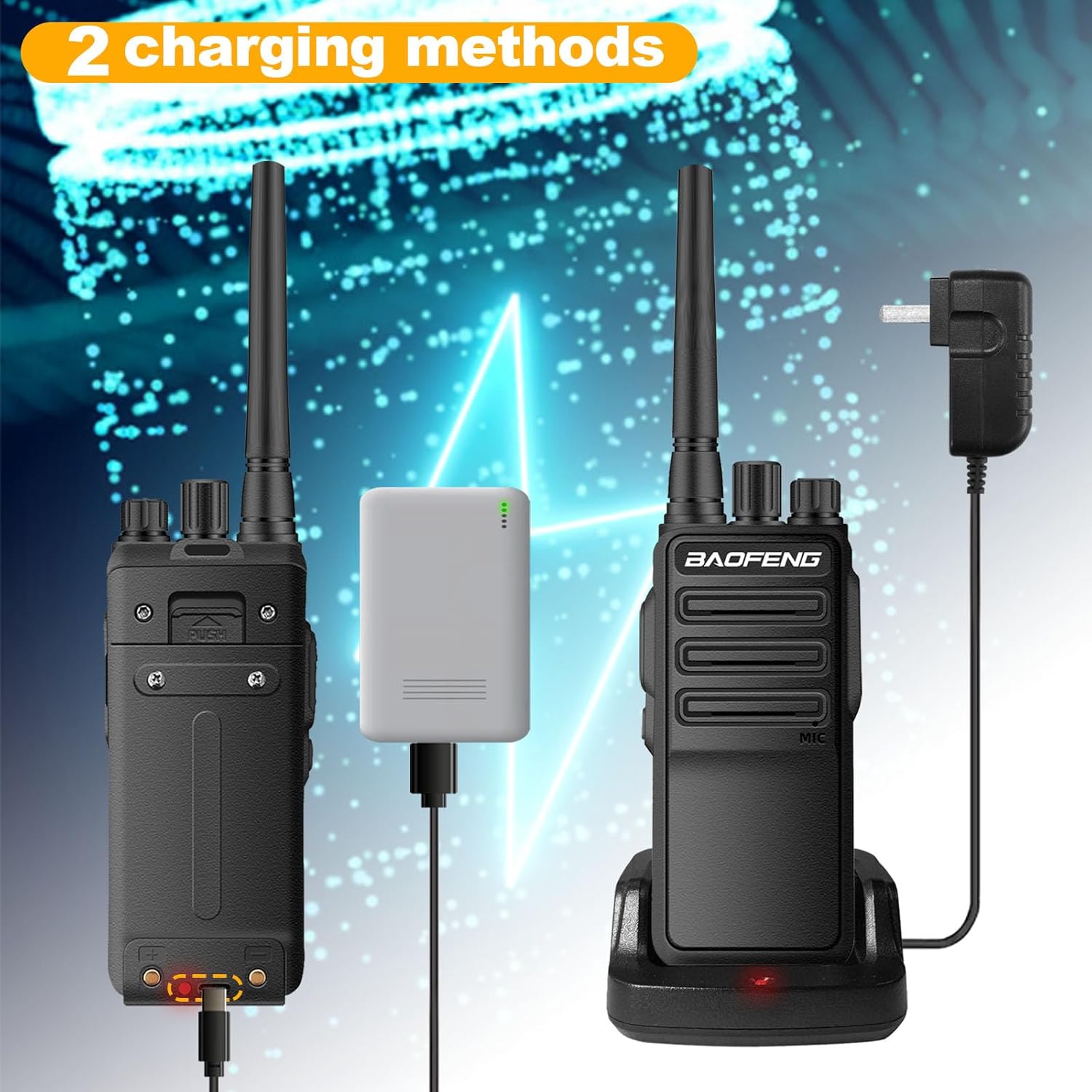
Image: Illustration showing the two charging methods: direct USB-C cable connection and placement in the charging base.

Image: Close-up of the radio's battery compartment area, highlighting the 2800mAh battery capacity for extended use.
Te tiaki
- Te horoi: Whakamahia he ngohengohe, damp he kakahu hei horoi i waho o te reo irirangi. Kaua e whakamahi i nga matū kino me nga horoi horoi.
- Rokiroki: Store the radio in a cool, dry place when not in use. Remove the battery if storing for extended periods.
- Tiaki Antenna: Avoid bending or stressing the antenna, as this can affect performance.
- Ātete Whakataka: The radio features a hard sealing shell designed to withstand drops up to 4 meters. However, avoid unnecessary impacts to maintain optimal performance and longevity.

Image: The BAOFENG BF-1904 radio shown with an illustration of its fall resistance, indicating it can withstand drops from up to 4 meters.
Raparongoā
Low Battery Warning / Cannot Transmit
Tohu: The radio prompts "low battery" or emits an error alarm, and transmission is not possible.
Take: Ko te puhiko voltage he tino arohaehae.
Rongoā: Immediately charge the battery using either the USB-C cable or the charging base. If the issue persists after charging, consider replacing the battery pack.
Pūtāhui me te Tautoko
Ka tae mai tenei hua me te 1-tau pūtāhui e tukuna ana mā "Shiqun Electronics Co., Ltd" anake. Puritia tō taunakitanga hoko mō ngā kereme whakamana.
For technical support or warranty inquiries, please contact your retailer or the manufacturer directly.


