1. Kupu Whakataki
Thank you for choosing the KAIWEETS KC200D Digital Clamp Meter. This device is a compact, high-precision instrument designed for electrical measurements in various settings, including home, commercial, and industrial environments. It features True RMS technology for accurate readings of complex waveforms, Non-Contact Voltage (NCV) detection for enhanced safety, and a clear backlit LCD for easy readability. This manual provides essential information for safe and effective use of your clamp mita.
2. Nga korero haumaru
To ensure safe operation, please read and understand all safety warnings and operating instructions before using this instrument. Failure to observe these warnings can result in serious injury or death.
- Kia mau tonu ki nga ture haumaru o te rohe me te motu.
- Kaua e whakamahia te mita ki te ahua kua pakaru, ki te whakararu ranei te whakamaarama o te arataki whakamatautau.
- Kaua e tono nui ake i te reiti voltage, as marked on the meter, between terminals or between any terminal and ground. The maximum operating voltage 600V.
- Kia tino tupato ki te mahi me te voltages above 60V DC or 30V AC RMS. These voltaghe morearea ohorere.
- Keep your fingers behind the finger guards on the test leads during use.
- Kaua e whakahaerehia te mita i roto i ngā taiao pahū hau, kohu, puehu rānei.
- Tangohia ngā taura whakamātautau i te ara iahiko i mua i te whakawhiti mahi.
- Always turn off the power to the circuit under test before connecting or disconnecting the test leads.
- Ensure the battery cover is securely closed before operating the meter.
3. Ihirangi mokete
Manatokohia kei te wātea katoa ngā tūemi kua whakarārangihia i raro nei, ā, kāore he pakaru:
- 1 x KAIWEETS KC200D Digital Clamp mita
- 1 x Pukapuka Kaiwhakamahi
- 1 x Puke Rokiroki
- 2 x Ngā Ārahi Whakamātautau (Whero me te Mangu)
- 2 x AAA 1.5V Pūhiko
4. Hua Neke Atuview
The KAIWEETS KC200D is designed for ease of use and durability. Familiarize yourself with the main components:
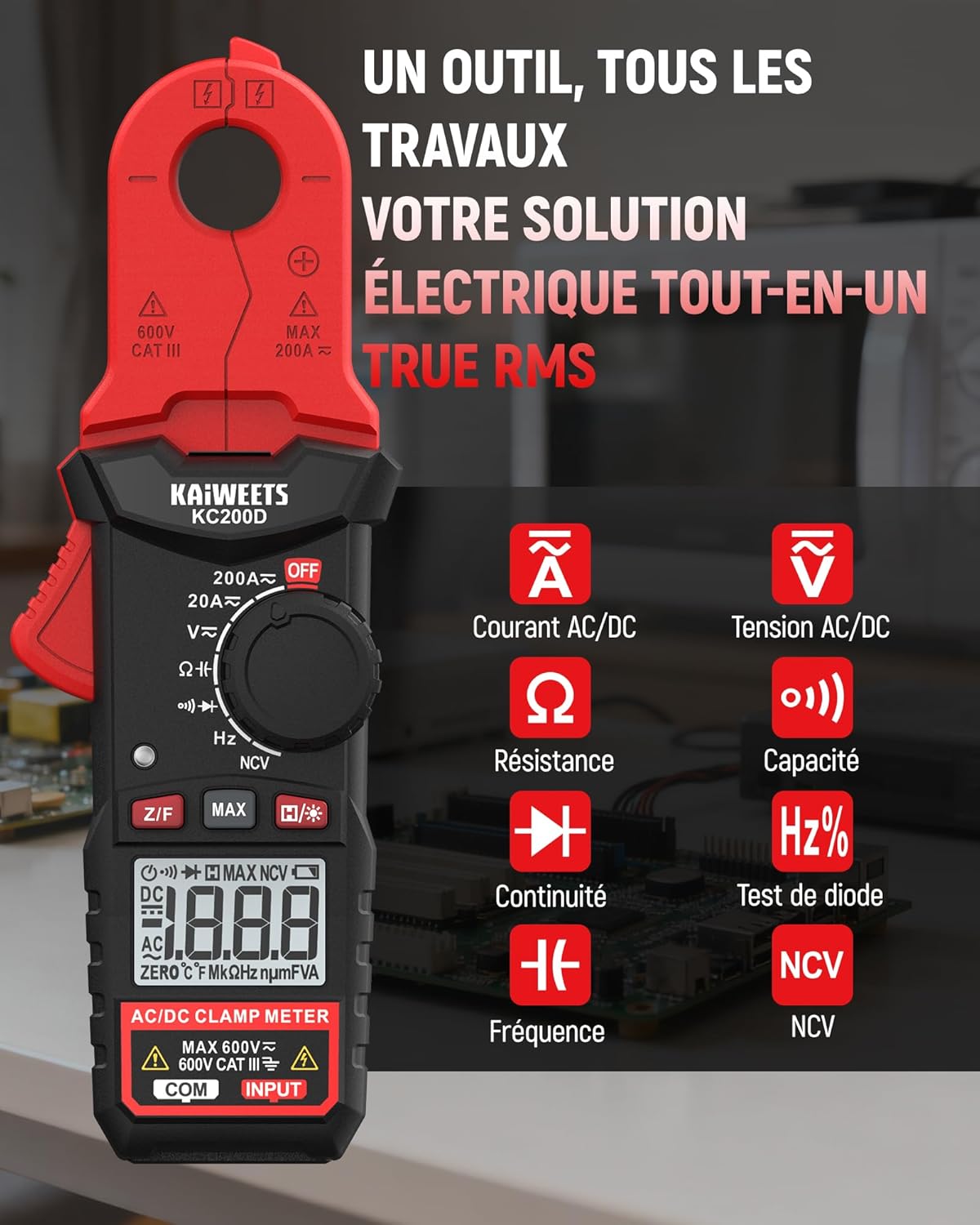
Whakaahua 4.1: KAIWEETS KC200D Clamp Meter with its various measurement functions highlighted, including AC/DC Current, AC/DC Voltage, Resistance, Capacitance, Frequency, Diode Test, Continuity, and NCV.
4.1 Waenga Matua
- Clamp kauae: Whakamahia mō te ine i te iahiko AC/DC kore-pa.
- Waea Mahi: Rotary switch to select measurement modes.
- Whakaaturanga LCD: E whakaatu ana i ngā pānui ine, ngā waeine, me ngā tohu.
- Pātene: For special functions like Data Hold, MAX/MIN, DC Zero, Backlight, and NCV.
- Taputapu Whakauru: Mō te hono i ngā taura whakamātautau mō te voltage, resistance, capacitance, frequency, diode, and continuity measurements.
5. Tatūnga
5.1 Tāuta Pūhiko
The KC200D requires two AAA 1.5V batteries (included).
- Me mohio kua whakawetohia te mita.
- Rapua te wahanga pākahiko kei muri o te mita.
- Whakamahia he huriwiri hei whakatuwhera i te uhi o te wahanga pākahiko.
- Whakauruhia ngā pākahiko AAA e rua, me te tirotiro tonu i te polarity tika (+ me te -).
- Whakakapia te uhi o te wahanga pākahiko ka mau ki te huri.
5.2 Te hono i nga kaiarahi Whakamātautau
For measurements requiring test leads (voltage, resistance, capacitance, frequency, diode, continuity):
- Insert the red test lead into the "INPUT" terminal.
- Insert the black test lead into the "COM" (Common) terminal.
6. Nga Tohutohu Whakahaere
Always select the appropriate function before making any measurement. Turn the function dial to the desired measurement mode.
6.1 AC/DC Inenga o naianei (Clamp)
Whakamahia te clamp jaw for non-contact current measurement. This method is ideal for safely measuring current without breaking the circuit.

Whakaahua 6.1: Ko te clamp jaw of the KC200D measuring current on a single electrical wire, demonstrating its compact design and precision.
- Hurihia te waea mahi ki te 20A~ or 200A~ position for AC current, or 20A= or 200A= for DC current.
- Pehia te clamp trigger to open the jaw.
- Encircle only kotahi conductor with the clamp kauae. Kaua e taupokinaamp around multiple wires, as this will result in an inaccurate reading.
- For DC current measurement, press the Z/F button to zero the display before clamping.
- Pānuihia te uara o nāianei i runga i te whakaaturanga LCD.
6.2 AC/DC Voltage Inenga
Hei ine voltage, use the test leads.
- Hurihia te waea mahi ki te V~ (Rohe ACtage) ranei V= (DC Voltage) tūnga.
- Connect the red test lead to the positive side of the circuit and the black test lead to the negative side (or ground).
- Pānuihia te voltage uara i runga i te whakaaturanga LCD.
6.3 Ine Atete
Me mohio kua whakakorehia te hiko i mua i te ine i te parenga.
- Hurihia te waea mahi ki te Ω tūnga.
- Honoa nga arataki whakamatautau puta noa i te waahanga hei ine.
- Pānuihia te uara ātete i runga i te mata LCD.
6.4 Inenga Raukaha
Discharge capacitors completely before measurement to avoid damage to the meter or injury.
- Hurihia te waea mahi ki te Te kaha position (often shared with Diode/Continuity, press FUNC to cycle).
- Honoa ngā taura whakamātautau puta noa i te pūnga.
- Pānuihia te uara pūnga i runga i te whakaaturanga LCD.
6.5 Ine Auautanga
Ki te ine i te auau:
- Hurihia te waea mahi ki te Hz% tūnga.
- Connect the test leads across the circuit where frequency is to be measured.
- Pānuihia te uara auau i runga i te whakaaturanga LCD.
6.6 Whakatautau Diode
Me whakarite kua momotu te diode mai i te ara iahiko.
- Hurihia te waea mahi ki te Diode position (often shared with Capacitance/Continuity, press FUNC to cycle).
- Connect the red test lead to the anode and the black test lead to the cathode.
- He rōrahi whakamuatage drop will be displayed for a good diode. Reverse the leads; the display should show OL (Open Loop).
6.7 Whakamātautau Tonu
Me whakarite kia whakakorea te hiko o te ara iahiko.
- Hurihia te waea mahi ki te Tonu position (often shared with Diode/Capacitance, press FUNC to cycle).
- Connect the test leads across the component or wire.
- If there is continuity (low resistance), the meter will emit an audible beep.
6.8 Whakapā-kore Voltage (NCV) Rapunga
The NCV function allows for quick and safe detection of live AC voltage kore whakapā tika.

Whakaahua 6.2: The KC200D performing Non-Contact Voltage (NCV) detection near an electrical outlet, showing visual indicators for low and high voltage te aroaro.
- Hurihia te waea mahi ki te NCV tūnga.
- Bring the top end of the meter near the conductor or outlet.
- The meter will emit an audible beep and illuminate LED indicators, with frequency increasing hei rōrahitagka piki ake te kaha o e.
6.9 Nga Mahi Motuhake

Whakaahua 6.3: The KC200D highlighting its user-friendly functions: MAX for peak value, Z/F for DC current zeroing, H for data hold, backlight for low-light conditions, and auto-off for battery saving.
- Data Hold (H/* button): Pēhia ki te whakatio i te panui o naianei kei te whakaaturanga. Patohia ano kia tukuna.
- MAX/MIN (MAX button): Press to display the maximum or minimum measured value. Press again to cycle.
- DC Current Zero (Z/F button): For DC current measurements, press this button before clamping to zero out any residual readings.
- Backlight (H/* long press): Long press the H/* button to turn the display backlight ON or OFF for improved visibility in low-light conditions.
- Weto-Aunoa: The meter automatically powers off after approximately 15 minutes of inactivity to conserve battery life. Press any button or rotate the function dial to wake it up.
7. Tiaki
7.1 Te horoi
Wipe the meter with a dry, soft cloth. Do not use abrasives or solvents.
7.2 Whakakapinga Pūhiko
When the battery indicator appears on the LCD, replace the batteries as described in the Setup section (5.1 Battery Installation).
7.3 Rokiroki
If the meter is not used for an extended period, remove the batteries to prevent leakage and damage. Store the meter in its carrying bag in a cool, dry place.
8. Te Raru
| Raruraru | Take pea | Rongoā |
|---|---|---|
| Karekau te mita i te hiko | Dead batteries; Incorrect battery installation | Whakakapia ngā pākahiko; Tirohia te kaha o te pākahiko |
| Inaccurate current reading | Multiple conductors in clamp jaw; DC current not zeroed | Ensure only one conductor is clamped; Press Z/F button for DC current |
| "OL" displayed (Overload) | Measurement exceeds range; Open circuit (for continuity/resistance) | Select a higher range (if available); Check circuit connections |
| No NCV detection | Kore AC voltage present; Meter not close enough to source | Manatoko AC voltage presence; Move meter closer to the live conductor |
9. Whakatakotoranga
Technical specifications for the KAIWEETS KC200D Digital Clamp mita:
| Āhuahira | Whakatakotoranga |
|---|---|
| Tau tauira | KC200D |
| Whakaatu | 2000 Tatau, LCD Whakamuri |
| AC o nāianei | 20A/200A (±(2.5% + 5 digits)) |
| DC Naianei | 20A/200A (±(2.5% + 5 digits)) |
| AC Voltage | 2V/20V/200V/600V (±(1.0% + 5 digits)) |
| DC Voltage | 200mV/2V/20V/200V/600V (±(0.5% + 5 digits)) |
| Ātete | 200Ω/2kΩ/20kΩ/200kΩ/2MΩ/20MΩ (±(1.0% + 5 digits)) |
| Te kaha | 2nF/20nF/200nF/2µF/20µF/200µF/2mF/20mF (±(4.0% + 5 digits)) |
| Auautanga | 2Hz/20Hz/200Hz/2kHz/20kHz/200kHz/2MHz/20MHz (±(1.0% + 3 digits)) |
| Whakamatau Diode | Ae |
| Whakamātautau Tonu | Ae |
| Rapunga NCV | Ae |
| Tuku Hiko | 2 x AAA 1.5V Pūhiko |
| Whakatauranga Haumaru | CAT III 600V, Pollution Level: 2 |
| Ahu | 20.7 x 11.3 x 4.7 cm (Pake) |
| Taumaha | 308 karamu (Pake) |
10. Pūtāhui me te Tautoko
KAIWEETS products are designed for reliability and performance. For warranty information, technical support, or service inquiries, please refer to the contact information provided on the KAIWEETS official website or contact your local distributor. Please retain your purchase receipt as proof of purchase for warranty claims.


