1. Kupu Whakataki
The COUGAR CFV235 is an innovative PC case featuring a Central Floating Ventilation (CFV) structure. This design separates the power supply unit compartment from the main chamber, utilizing the space between them as a highly effective ventilation channel to enhance cooling performance. The CFV235 combines a full panoramic view, a compact footprint, and structurally reinforced cooling capabilities to achieve superior airflow beyond traditional case designs.
This manual provides essential information for the proper installation, operation, and maintenance of your COUGAR CFV235 PC case. Please read it thoroughly before beginning assembly.
2. Nga waahanga matua
- Central Floating Ventilation (CFV) Structure: Innovative design for enhanced cooling efficiency.
- Full Panoramic View: Clear tempered glass panels for showcasinngā wāhanga o roto.
- Hoahoa Rere Hau Teitei: Optimized for superior air circulation.
- Hototahi Whānui: Supports Mini ITX, Micro ATX, ATX, and CEB motherboards.
- AmpNgā Kōwhiringa Rokiroki: Multiple drive bays for 3.5" HDDs and 2.5" SSDs.
- Te Whakawāteatanga Waenga Nui: Accommodates long GPUs, tall CPU coolers, and standard PSUs.
- Hanga Roa: Built with robust materials for longevity.

Whakaahua 2.1: Taha-mua view of the COUGAR CFV235 PC case, highlighting its panoramic glass panels and illuminated interior.

Figure 2.2: The COUGAR CFV235 PC case showcasing its design in both black and white variants, with internal components and customizable RGB lighting.
3. Aratohu Tatūnga
3.1 Te Wetewete i te Kete
- Tangohia marietia te pouaka rorohiko mai i tōna takai.
- Inspect the case for any signs of damage during transit. Contact your retailer immediately if any damage is found.
- Remove all protective films and internal packaging materials.
3.2 Te Whakaritenga Wae
Before installing components, ensure you have all necessary tools, including a Phillips head screwdriver.
- Tāutatanga Papa Matua:

Figure 3.1: Interior of the CFV235 case, showing pre-installed motherboard standoffs.
- Tāutahia te whakangungu I/O ki roto i te pūaha o muri o te pouaka.
- Align your Mini ITX, Micro ATX, ATX, or CEB motherboard with the pre-installed standoffs.
- Whakamauhia te papahoahoa mā te whakamahi i ngā tīwiri kua whakaratohia.
- Wae Tuku Hiko (PSU) Tāutatanga:
- The CFV235 features a dedicated PSU compartment. Install your ATX PSU (up to 200mm length) into this compartment.
- Whakaorangia te PSU me nga wiri mai i muri o te keehi.
- Tāuta Puku Rokiroki:

Figure 3.2: Rear interior of the CFV235, illustrating cable management options and locations for 2.5" and 3.5" drive bays.
- Install 3.5" HDDs into the designated drive bays (up to 2 drives).
- Install 2.5" SSDs into the dedicated SSD mounts (up to 4 drives, 2 of which are shared with 3.5" bays).
- Ensure all drives are securely fastened.
- Tāutatanga Kāri Whakairoiro (GPU):

Figure 3.3: Diagram indicating the maximum GPU length of 430mm supported by the CFV235 case.
- Ka tautokohia e te keehi nga GPU tae atu ki te 430mm te roa.
- Insert your GPU into the appropriate PCIe slot on the motherboard and secure it with the retention clip and screw.
- Tāutatanga Matao CPU:
- The case supports CPU coolers up to 175mm in height.
- Tāutahia tō mātao PTM kia rite ki nga tohutohu a te kaihanga.
- Whakaha Uepu:
- Utilize the cable routing cutouts and tie-down points behind the motherboard tray to manage cables neatly.
- Proper cable management improves airflow and aesthetics.
4. Nga Tohutohu Whakahaere
4.1 Paewhiri Whakauru/Whakaputa o Mua

Figure 4.1: The front I/O panel of the CFV235, featuring USB ports, audio jacks, and the power button.
Mā te papatohu I/O o mua ka taea te uru atu ki ngā tauranga me ngā mana whakahaere nui:
- Pātene Hiko: Press to power on/off your system.
- Patene Tautuhi Anō: Press to restart your system.
- Tauranga USB: Honoa nga taputapu USB.
- Jacks Ororongo: Honoa ngā pane whakarongo me ngā hopuoro.
4.2 Te Rere o te Hau me te Whakamatao
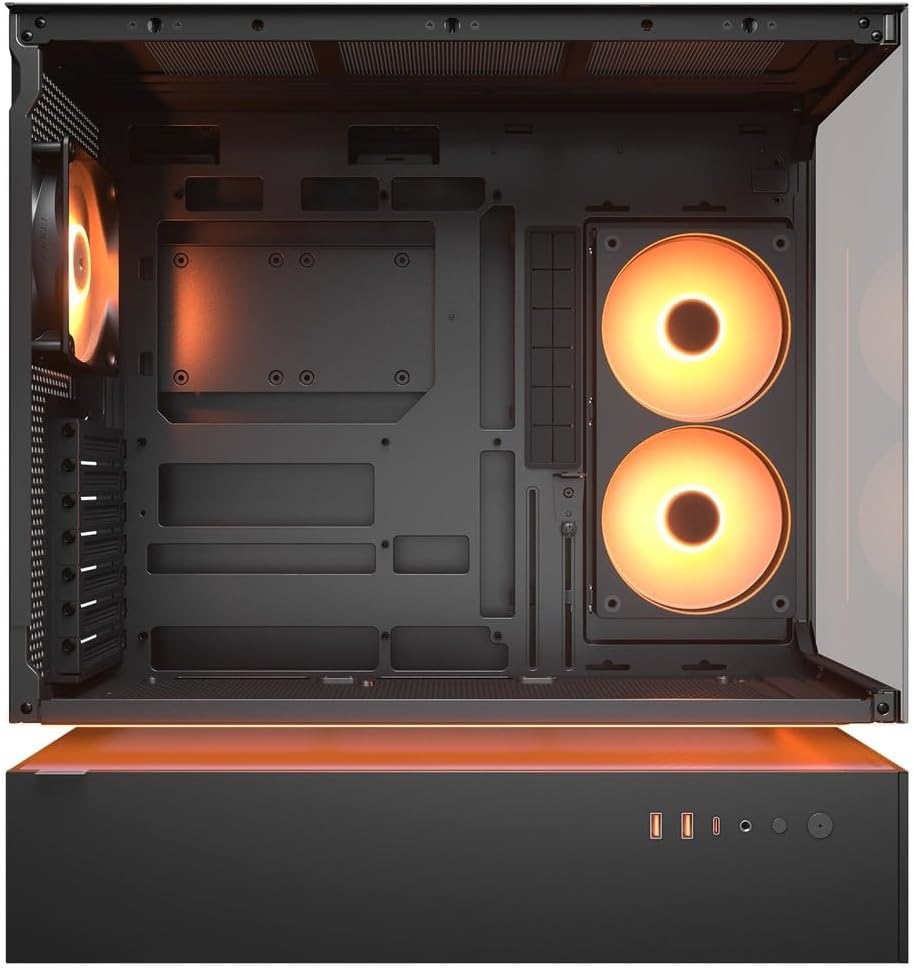
Whakaahua 4.2: Roto view of the CFV235 with fans installed, demonstrating the potential for high airflow.
The CFV235 is designed for optimal airflow. Ensure all fans are correctly installed and oriented to facilitate efficient cooling. The Central Floating Ventilation structure promotes direct airflow to critical components.
5. Tiaki
5.1 Puehu Tātari Whakapai

Figure 5.1: Removable magnetic dust filter for easy cleaning.
Regular cleaning of dust filters is crucial for maintaining optimal airflow and preventing dust buildup inside your PC. The CFV235 features easily removable dust filters:
- Gently remove the magnetic dust filters located on the top and bottom of the case.
- Horoia ngā tātari mā te whakamahi i te hau kōpeke, mā te horoi rānei ki te wai. Me whakarite kia maroke rawa i mua i te tāpiri anō.
- Reattach the filters to their respective positions.
5.2 Whakapai Whanui
- Whakamahia he ngohengohe, damp cloth to wipe down the exterior surfaces of the case.
- Avoid using harsh chemicals or abrasive materials that could damage the finish or tempered glass.
- For internal cleaning, use compressed air to remove dust from components and fan blades.
6. Te Raru
E aro ana tēnei wāhanga ki ngā take noa ka pā mai pea ki a koe. Mō ngā raruraru uaua ake, tirohia te wāhanga tautoko.
6.1 Kaore te Pūnaha i te hiko
- Check if the power cable is securely connected to both the PSU and the wall outlet.
- Ensure the PSU switch is in the "ON" position.
- Manatokohia kei te hono tika te taura pātene mana o te papa o mua ki te papahoahoa.
- Confirm that all internal power connections (24-pin ATX, CPU, GPU) are firmly seated.
6.2 Nga Take Whakawera
- Me whakarite kei te tika te mahi a ngā pā hau katoa me ngā whakamatao CPU/GPU.
- Clean any dust buildup from fans and dust filters (refer to Section 5.1).
- Verify that fans are oriented for optimal airflow (intake and exhaust).
- Check for proper cable management to avoid obstructing airflow.
6.3 USB/Audio Ports Not Working
- Ensure the front panel USB and audio cables are correctly connected to the motherboard headers.
- Check your operating system's device manager for any driver issues.
7. Whakatakotoranga
| Āhuahira | Whakatakotoranga |
|---|---|
| Waitohu | KAUPAPA |
| Ingoa Tauira | CFV235 |
| Nga Ruri Hua (W x H x D) | 235 x 493 x 460 mm |
| Taumaha Hua | 9.5 kg |
| Papamatua Tautokohia | Mini ITX / Micro ATX / ATX / CEB |
| Peia Bays | 5.25" x0 / 3.5" x2 / 2.5" SSD x2+2 (2 shared with 3.5" bays) |
| Max GPU Roa | 430 mm |
| Max CPU Cooler Teitei | 175 mm |
| Max PSU Roa | 200 mm |
| Tae | Pango |
| Ngā āhuatanga | Central Floating Ventilation, Panoramic Glass, High Airflow, Built-in Fans |
8. Pūtāhui me te Tautoko
Your COUGAR CFV235 PC case comes with a 1-tau pūtāhui mai i te ra o te hokonga. Ka hipokina e tenei raihana nga koha hanga me nga koha rawa i raro i te whakamahinga noa.
For technical support, warranty claims, or further assistance, please visit the official COUGAR website or contact your local retailer. Please have your product model number (CFV235) and proof of purchase ready when contacting support.
COUGAR Whaimana Webpae: cougargaming.com


