Kupu Whakataki
This manual provides instructions for the RORRY M4 3-in-1 MagSafe Wireless Charging Station with a 5000mAh detachable power bank. This device is designed to efficiently charge your iPhone, Apple Watch, and AirPods simultaneously, offering both stationary and portable power solutions.
Ihirangi mokete
- RORRY 3-in-1 charging station * 1
- 5,000mAh power bank * 1
- 45W charger adapter * 1
- 1m USB-C to USB-C cable * 1
- Magnetic metal ring * 1
- Pukapuka Kaiwhakamahi * 1
Ka mutu te huaview
The RORRY M4 is a versatile charging solution featuring a main charging station and a detachable 5000mAh MagSafe power bank. It supports wireless charging for compatible iPhone models (12-17 series), Apple Watch (Ultra/SE/Series 4-11), and AirPods. The station also includes an adjustable stand for optimal viewing angles and multiple safety features.

This image displays the RORRY 3-in-1 charging station, highlighting its ability to charge an iPhone, Apple Watch, and AirPods simultaneously. The detachable power bank is visible, emphasizing its portability.
Tatūnga
1. Connecting the Charging Station
- Connect the provided 1m USB-C to USB-C cable to the USB-C input port on the charging station.
- Plug the other end of the USB-C cable into the 45W charger adapter.
- Insert the 45W charger adapter into a power outlet. The station's indicator lights will illuminate.
2. Charging the Detachable Power Bank
The 5000mAh power bank is integrated into the main station. When the station is powered, the power bank will charge automatically. Ensure the power bank is correctly seated in its slot.
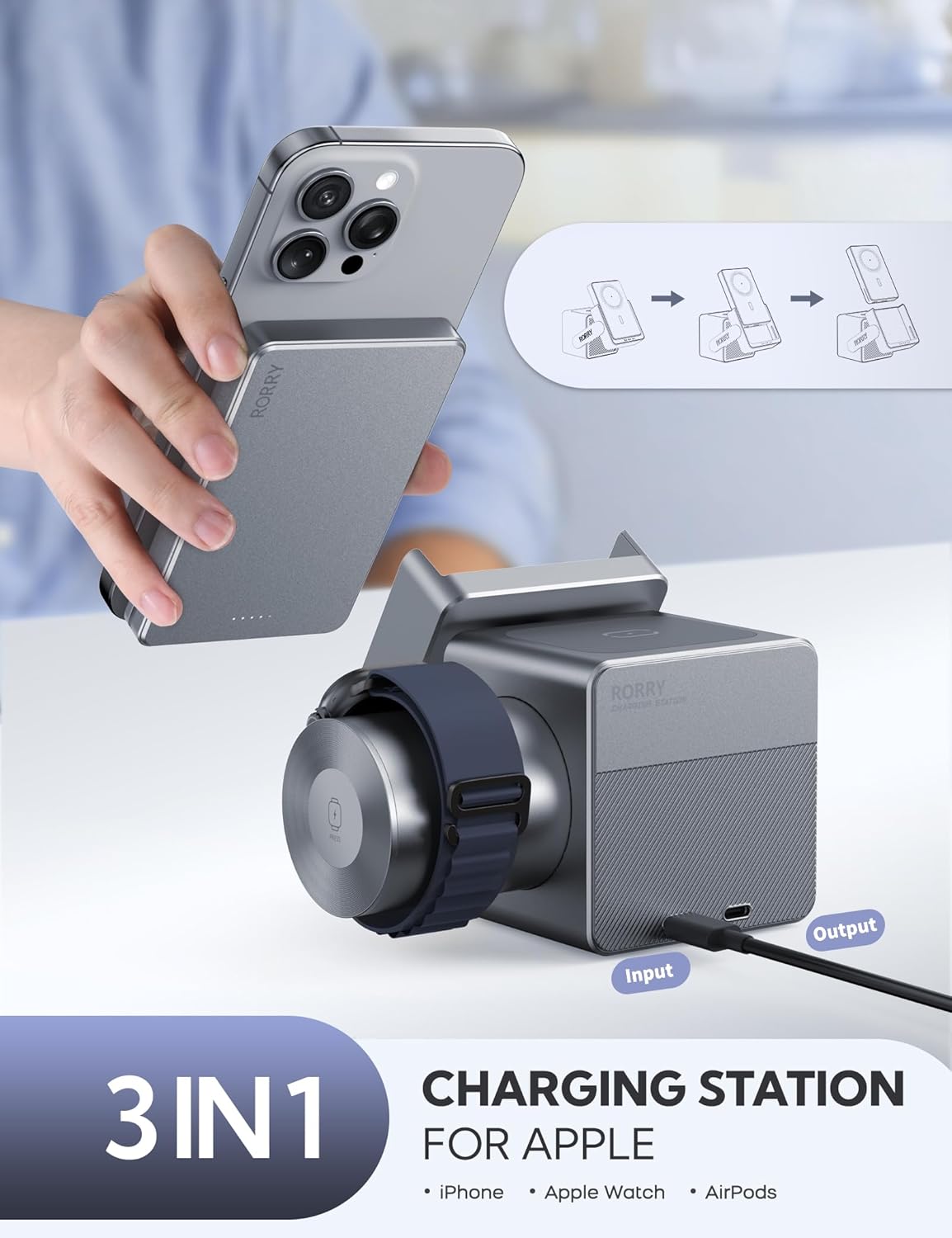
He taha view of the charging station, illustrating the 'Input' and 'Output' ports for power connection and external device charging.
Nga Tohutohu Whakahaere
1. Charging iPhone (MagSafe Compatible)
Place your MagSafe-compatible iPhone (iPhone 12-17 series) directly onto the magnetic charging pad of the detachable power bank. The strong magnets will secure your device. Ensure your iPhone is centered for optimal charging.
If your iPhone is not MagSafe compatible or you use a non-MagSafe case, attach the included magnetic metal ring to your phone case for magnetic alignment.
2. Ka utu Apple Watch
The Apple Watch charging module is located on the side of the main station. Simply place your Apple Watch (Ultra/SE/Series 4-11) onto the charging module. It will automatically begin charging.
3. Charging AirPods
Place your AirPods charging case onto the designated wireless charging area at the base of the station. Ensure the case supports wireless charging.
4. Using the Detachable 5000mAh Power Bank
To use the power bank on the go, gently detach it from the main charging station. It can then wirelessly charge your iPhone for instant power, anywhere.

This image shows a user detaching the 5000mAh MagSafe power bank, emphasizing its portability for charging devices while on the move.
5. Ka taea te whakarite Viewing Koki
The charging station features an adjustable viewing angle up to 60 degrees. This allows for comfortable viewing of your iPhone in both portrait and landscape modes, ideal for video calls, media consumption, or using it as a bedside clock.

An iPhone is shown mounted on the charging station, illustrating its adjustable viewing angle for hands-free use.
6. Putanga USB-C
The main charging station includes an additional USB-C output port. This allows you to charge a fourth device, such as an iPad or another smartphone, using a compatible USB-C cable.
7. Tohu Mana
The charging station features LED indicator lights to show the charging status of your devices and the power bank.

The charging station is depicted on a nightstand, simultaneously charging an iPhone, Apple Watch, and AirPods, with the iPhone displaying a clock.
Hototahi Ao
The RORRY M4 is designed for broad compatibility within the Apple ecosystem:
- iPhone: Compatible with iPhone 12, 13, 14, 15, 16, 17 series (MagSafe compatible).
- Apple Watch: Compatible with Apple Watch Ultra, Series 4, 5, 6, 7, 8, 9, 10, 11, and SE models.
- AirPods: Compatible with AirPods/AirPods Pro models that support wireless charging.

A visual guide illustrating the wide range of Apple devices compatible with the RORRY 3-in-1 charging station, including different iPhone, Apple Watch, and AirPods models.
Nga waahanga haumaru
The RORRY M4 incorporates advanced safety mechanisms to protect your devices:
- Parenga werawera: Prevents excessive temperature buildup.
- Parenga Awa Tuwera: Safeguards against current surges.
- Whakawhanatage Parenga: Protects from voltage huringa.
- Parenga-Poto: Ka ārai i ngā kino o ngā poto hiko.
- Hanga Roa: Adventure-grade, drop-resistant aluminum shell for enhanced durability.
- Tiwhikete: CE, UL, and other relevant safety certifications.
Whakatakotoranga
| Āhuahira | Taipitopito |
|---|---|
| Hunga Hua | 4.56 x 3.54 x 3.34 inihi |
| Taumaha Tūemi | 2.2 pauna |
| Tauira Tuemi | M4 |
| Pūhiko Raukaha | 5000 Miliamp Nga haora |
| Momo Tuhono | Momo USB C |
| Nga waahanga motuhake | Fast Charging, LED Indicator Lights, Magnetic Wireless Charging, MagSafe Compatible, Short Circuit Protection |
| Tae | Kerei Metara |
| Kaihanga | ShenzhenXianyangInnovationTechnologyCo.,Ltd |
Mahi Tere Tere
- Fully charge iPhone 16 Pro in approximately 2.5 hours.
- Fully charge Apple Watch Series 9 in approximately 1.2 hours.
- Fully charge AirPods in approximately 3 hours.
This image provides an infographic illustrating the fast charging capabilities of the RORRY station, showing approximate charging times for various Apple devices.
Raparongoā
Kaore te Pūrere i te utu
- Ensure the charging station is properly connected to the 45W adapter and a power outlet.
- Verify that your device is correctly aligned on the wireless charging pad (for iPhone, ensure MagSafe alignment; for Apple Watch, ensure it's seated on the module; for AirPods, ensure proper placement on the base).
- Check if your AirPods case supports wireless charging.
- Tangohia nga pukoro waea matotoru, konganuku ranei ka raru te utu ahokore.
- Confirm the detachable power bank is fully charged if using it portably.
Puturi te Whakatau
- Ensure you are using the provided 45W charger adapter and USB-C cable. Lower wattagTērā pea ka puhoi ake te utunga mai i ngā urutau hiko.
- Avoid charging multiple devices simultaneously if you require the fastest possible charge for a single device.
- Check for proper alignment of devices on the charging pads.
Te werawera
- Disconnect devices and power off the station. Allow it to cool down.
- Ensure adequate ventilation around the charging station. Do not place it in enclosed spaces.
- Mena ka roa te wera, whakapā atu ki te ratonga kiritaki.
Pūtāhui me te Tautoko
The RORRY M4 3-in-1 Charging Station comes with a 12-marama whakamanawa-kore-awangawanga. For any product issues or inquiries, please contact our friendly customer service team.
For returns and exchanges, a 30-day policy is typically available. Please refer to your purchase documentation for specific details.
Ataata Hua Whaimana
Watch these official videos from RORRY DIRECT for more information on your charging station:
This video demonstrates the features and usage of the RORRY 3-in-1 Charging Station, including its detachable power bank and multi-device charging capabilities.
This video highlights the Apple Watch charging functionality of RORRY products, showcasing how to place and charge your Apple Watch.


