Kupu Whakataki
This manual provides detailed instructions for the AGPTEK A55PL USB C MP3 Player. It covers setup, operation, maintenance, and troubleshooting to ensure optimal use of your device. The A55PL is a versatile music player featuring USB-C connectivity, 64GB storage, FM radio, and voice recording capabilities, powered by a replaceable AAA battery.
Ihirangi mokete
Manatokohia ko nga mea katoa kei raro nei kei roto i to kete:
- Pūoro MP3 AGPTEK A55PL
- Kāri TF 64GB (kua tāutahia i mua)
- Momo-C ki te Tauera Whakatau USB
- Pukapuka Kaiwhakamahi

Image: Contents of the AGPTEK A55PL MP3 Player package, showing the player, USB-C cable, 64GB TF card, and user manual.
Ka mutu te huaview me nga ahuatanga
The AGPTEK A55PL MP3 Player is designed for portability and ease of use, offering multiple functionalities in a compact form factor.
Āhuatanga matua:
- Direct Type-C & Universal USB Connectivity: Connects directly to Type-C phones for file transfer or to laptops/PCs using the included adapter/cable.
- Swappable AAA Batteries: Operates on a single AAA battery (not included), allowing for instant power replacement without needing charging outlets.
- Massive 64GB Storage: Comes with a pre-loaded 64GB TF card, supporting over 13,000 songs and high-fidelity formats like FLAC, APE, and WAV. Functions as a U disk for data transfer.
- Crisp LED Display: Features an energy-efficient LED screen for clear navigation and song title display.
- Voice Recorder & FM Radio: Built-in voice recorder for capturing audio and an FM radio (requires wired headset as antenna) for broadcasts.

Whakaahua: Kua mutuview of the AGPTEK A55PL MP3 Player's capabilities, including its Type-C port, music playback, recording, FM radio, and 64GB TF card storage.
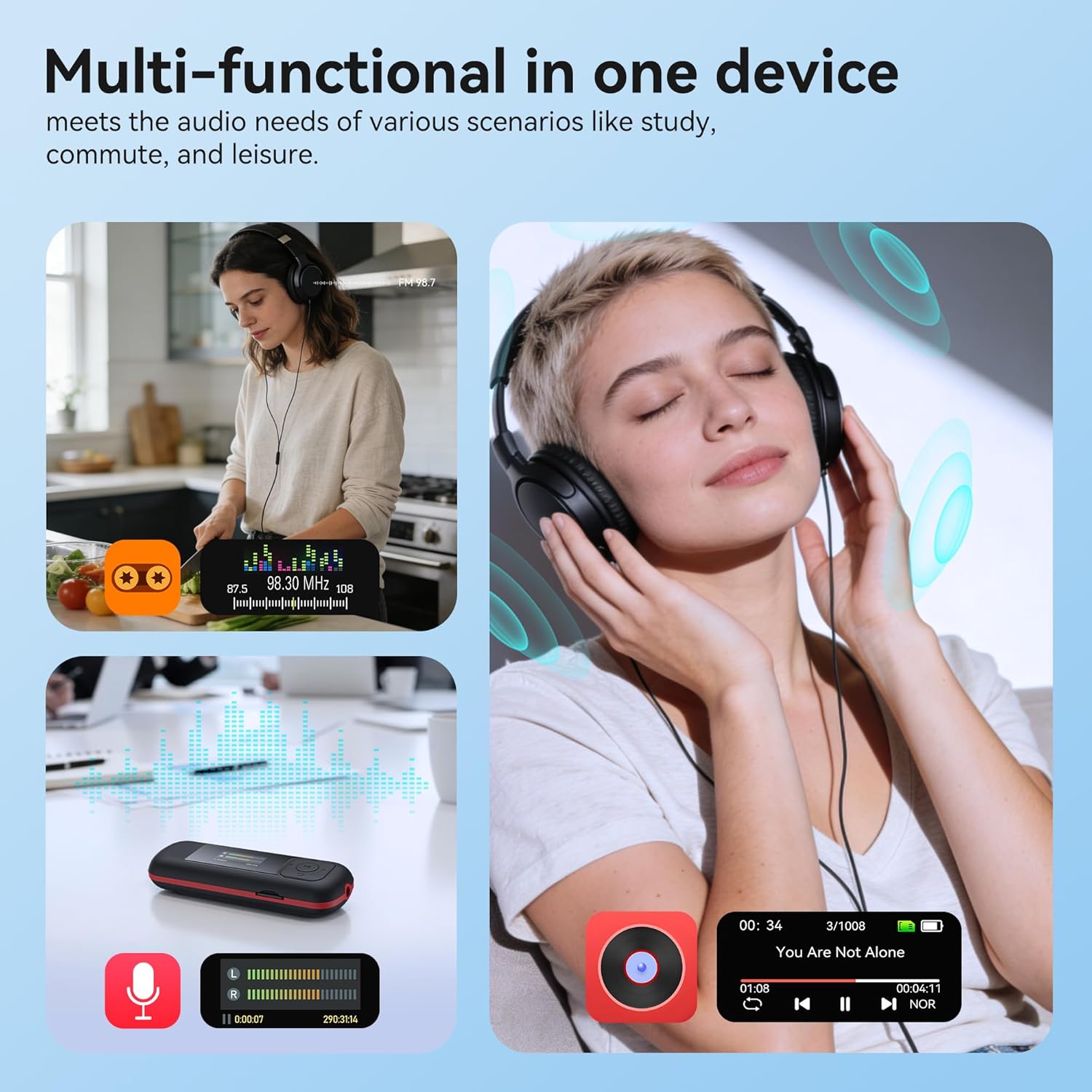
Image: The AGPTEK A55PL MP3 Player showcasing its multi-functional capabilities, including FM radio, voice recording, and music playback, suitable for various scenarios.
Tatūnga
1. Tāuta Pūhiko
The AGPTEK A55PL uses one AAA battery (not included). Ensure correct polarity when inserting the battery.
- Kimihia te uhi o te wahanga pākahiko kei muri o te taputapu.
- Press the center of the cover and slide it forward to unlock and remove.
- Insert one AAA battery, matching the positive (+) and negative (-) terminals with the indicators inside the compartment.
- Whakahokia te uhi ki tona waahi kia pao pai.

Image: Step-by-step guide for removing the USB cap and installing the AAA battery into the AGPTEK A55PL MP3 Player.
Tuhipoka: USB charging is not supported. The device relies solely on AAA battery power. The battery display on the screen is based on voltage changes at the battery terminal.
2. Initial Connection and File Whakawhiti
You can transfer music and other files to your MP3 player from a computer or a Type-C smartphone.
- Mo Rorohiko: Use the included Type-C to USB cable. Connect the Type-C end to the player and the USB-A end to your computer's USB port. The player will appear as a removable disk.
- For Type-C Phones: Plug the player's Type-C connector directly into your phone's Type-C port. The player will be recognized as external storage. (For iPhones, a Lightning-to-Type-C OTG adapter is needed, not included).

Image: Demonstrates connecting the AGPTEK A55PL MP3 Player to a computer via USB cable and directly to a Type-C smartphone for file whakawhitinga
Nga Tohutohu Whakahaere
Mana Taketake
The player features a simple interface with dedicated buttons for easy navigation.
- Pātene Hiko: Pēhi me te pupuri kia whakakā/whakaweto.
- Pātene Purei/Tatari: Pēhia ki te purei, ki te whakatairi waiata.
- Patene Whakaterenga (Runga/Raro/Maui/Matau): Ka whakamahia ki te whakatere i nga tahua me te whakatika i nga tautuhinga.
- Pātene Rōrahi (+/-): Dedicated buttons on the side to adjust playback volume.
- Pātene Tahua (M): Uru atu ki ngā tahua horopaki-arotahi.
- Pātene Hoki/Whakahoki: Ka hoki ki te mata o mua, ki te tahua ranei.
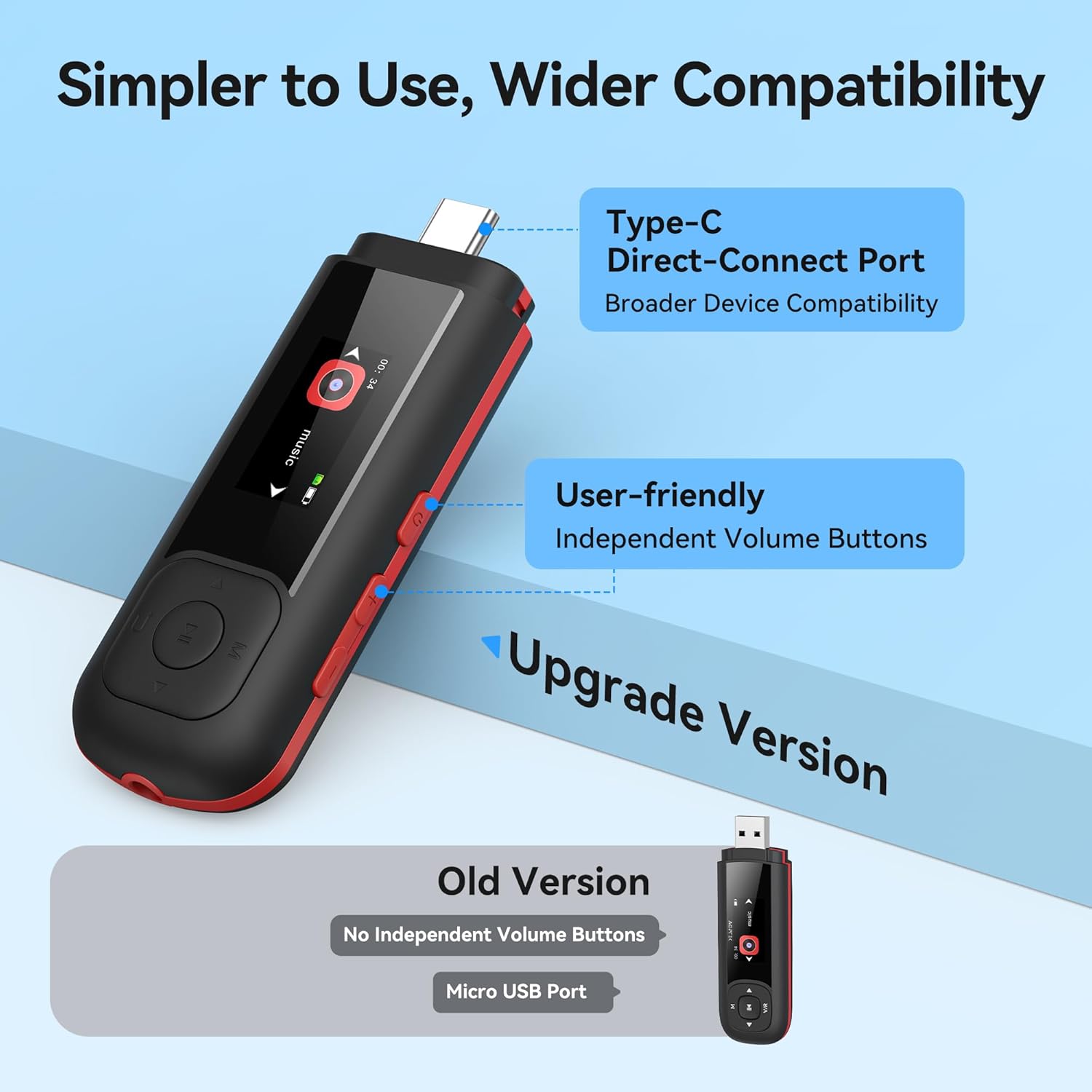
Image: Close-up of the AGPTEK A55PL MP3 Player, showing the Type-C direct-connect port and the independent volume buttons for user-friendly operation.
Purei Waiata
The player supports various audio formats including MP3, WMA, APE, FLAC, and WAV.
- Connect wired headphones to the 3.5mm audio jack.
- Navigate to the "Music" option on the main menu.
- Tirotirohia tō whare pukapuka waiata mā te kaitoi, te pukaemi, te kōpaki rānei.
- Tīpakohia he waiata hei timata i te purei.
- Use the Play/Pause button to control playback and the volume buttons to adjust sound levels.

Image: A person enjoying music through headphones, highlighting the AGPTEK A55PL MP3 Player's support for multi-format lossless audio quality.

Image: Illustrates the different playback modes available on the AGPTEK A55PL MP3 Player, including Folder Mode and Music Mode with options like repeat, shuffle, and play in order.
Irirangi FM
To use the FM radio function, a wired headset must be connected as it acts as the antenna.
- Honoa o waea waea waea.
- Navigate to the "FM Radio" option from the main menu.
- Whakamahia nga paatene whakatere ki te matawai mo nga teihana, ki te whakatangi-a-ringa ranei ki te auau.

Image: A user enjoying FM radio on the AGPTEK A55PL MP3 Player, emphasizing that wired headphones are required to function as an antenna.
Kaituhi reo
The built-in voice recorder allows you to capture audio on the go.
- Navigate to the "Recorder" option from the main menu.
- Select "Start Recording" to begin.
- Press the Play/Pause button to stop and save the recording.
- Recordings can be accessed and played back from the "Recordings" list.

Image: The AGPTEK A55PL MP3 Player showing its portable recorder function, ready for effortless on-the-go audio capture.
Custom Playlists
You can create and manage custom playlists by connecting the player to a computer.
- Connect the MP3 player to your computer using the Type-C to USB cable.
- Access the player's storage as a removable disk.
- Whakaritea to puoro files into folders or create M3U playlist filekei runga tonu i te pūrere.
- The player supports up to 3 built-in customizable playlists.

Image: Demonstrates how to create and edit custom playlists by connecting the AGPTEK A55PL MP3 Player to a computer via USB.
Te tiaki
- Te horoi: Whakamahia he kakahu ngohengohe, maroke hei horoi i te taputapu. Āta karohia ngā wai horoi, ngā whakarewa rānei.
- Rokiroki: Whakaorangia te kaitakaro ki tetahi waahi makariri, maroke atu i te ra tika me te wera nui.
- Tiaki Pūhiko: Remove the AAA battery if the device will not be used for an extended period to prevent leakage.
- Pūrua Raraunga: He mea nui te whakahoki i nga wa katoa files from the player to a computer to prevent data loss.
Raparongoā
Kaore te Pūrere e Huri
- Ensure the AAA battery is inserted correctly with the correct polarity.
- Whakakapihia te pākahiko AAA ki te pākahiko hou.
- Patohia me te pupuri i te paatene mana mo etahi hēkona.
Kāore e taea te whakawhiti Files
- Verify the Type-C to USB cable is securely connected to both the player and the computer/phone.
- Whakamātauria tētahi tauranga USB rerekē i tō rorohiko.
- Ensure your computer's operating system recognizes external storage devices.
- For phones, ensure the phone supports OTG (On-The-Go) functionality for external storage.
Karekau he oro i te purei
- Check if wired headphones are properly plugged into the 3.5mm audio jack.
- Me whakarite kia kaua te rōrahi e tautuhia ki te iti, ki te wahangu ranei.
- Whakamātauria ki tētahi atu takirua paneoro hei whakakore i ngā raruraru paneoro.
- Manatokohia te oro files are not corrupted and are in a supported format (MP3, WMA, APE, FLAC, WAV).
Te Reo Irirangi FM Kaore e Mahi
- Confirm that wired headphones are connected, as they serve as the antenna.
- Try scanning for stations again in an open area.
Whakatakotoranga
| Āhuahira | Taipitopito |
|---|---|
| Ingoa Tauira | A55PL |
| Waitohu | AGPTEK |
| Te Rokiroki Mahara | 64 GB (via TF Card) |
| Hangarau Hononga | USB Type-C, Aux (3.5mm) |
| Nga waahanga motuhake | FM Radio, Voice Recorder, Replaceable AAA Battery |
| Tae | Pango |
| Rahi Mata | 0.96 Inches (LED) |
| Pūrere Hototahi | Headphones, Computers, Type-C Smartphones |
| Momo Media | Micro SD |
| Taumaha Tūemi | 3.87 hekere |
| Ahu mōkihi | 6.57 x 5.12 x 0.94 inihi |
Pūtāhui me te Tautoko
Mō ngā mōhiohio pūtāhui me te tautoko hangarau, tirohia te AGPTEK mana webpaetukutuku, whakapā atu ranei ki ta raatau ratonga kaihoko. Puritia to riirii hoko hei tohu mo te hoko mo nga kereme whakamana.
Tautoko Aipurangi: Tirohia te Toa AGPTEK i Amazon mo nga korero hua me nga rauemi tautoko.


