1. Kupu Whakataki
This manual provides essential information for the safe and efficient operation of your Panasonic TH-55PX735DX 55-inch 4K Ultra HD Smart LED TV. Please read these instructions thoroughly before using the television and retain them for future reference.
The Panasonic TH-55PX735DX is a 55-inch 4K Ultra HD Smart LED TV designed to enhance your home entertainment experience. It features a bezel-less display and a High Bright Panel, delivering vibrant colors, deep contrast, and sharp detail. The television supports HDR10+ and Dolby Vision for optimized visuals and Dolby Atmos for immersive audio. It integrates smart TV functionalities with Google TV, offering access to various streaming applications and connectivity options including Bluetooth and Dual-Band WiFi.
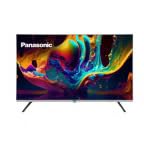
Whakaahua 1.1: Mua view of the Panasonic TH-55PX735DX Smart LED TV. This image displays the television's bezel-less design and its screen displaying vibrant colors.
2. Nga Korero Haumaru Nui
Kia mau ki nga whakaritenga haumaru e whai ake nei hei aukati i te kino me te whakarite i te mahi haumaru:
- Puna Hiko: Connect the TV only to an AC 230V, 50/60Hz power supply.
- Whakahau: Me whakarite kia pai te hau huri noa i te pouaka whakaata. Kaua e araia nga whakatuwheratanga hau.
- Te wai me te makuku: Kaua e tukuna te pouaka whakaata ki te ua, ki te makuku ranei. Kaua e tuu i nga mea kua whakakiia ki te wai ki runga i te pouaka whakaata.
- Te horoi: Wewetehia te pouaka whakaata i mua i te horoi. Whakamahia he kakahu ngohengohe, maroke. A ape i nga kai horoi wai.
- Turanga: Place the TV on a stable, level surface or mount it securely to a wall according to instructions.
- Ratonga: Kaua e ngana ki te mahi i te pouaka whakaata i a koe ano. Tukuna nga ratonga katoa ki nga kaimahi ratonga whai tohu.
3. He aha kei roto i te Pouaka
Manatokohia ko nga waahanga katoa e whai ake nei kei roto i to kete:
- 1 LED TV (Panasonic TH-55PX735DX)
- 1 Ripanga Tu Runga
- 1 Pukapuka Kaiwhakamahi (tenei tuhinga)
- 1 Kaari Raati
- 1 Mana Mamao
- 2 Pūhiko AAA (mo te mana mamao)
4. Aratohu Tatūnga
4.1 Te Whakapiri i te Tūnga Papa Tēpu
- Tuhia te mata-whakararo pouaka whakaata ki runga i te mata ngawari, papatahi kia kore ai e pakaru.
- Tiarohia te turanga o runga tepu me nga kohao whakairi ki raro o te pouaka whakaata.
- Whakapaia te turanga ma te whakamahi i nga wiri kua whakaratohia. Me whakarite kia mau te turanga.
Alternatively, for wall mounting, consult a professional installer and refer to the wall mount kit's instructions.
4.2 Te hono i nga taputapu o waho
Your TV offers various connectivity options. Refer to the back panel for port locations.
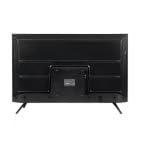
Whakaahua 4.1: Whakamuri view of the Panasonic TH-55PX735DX Smart LED TV, illustrating the location of various input and output ports.
- HDMI: Connect Blu-ray players, gaming consoles, or set-top boxes using HDMI cables. The TV supports multiple HDMI inputs.
- USB: Honoa nga taputapu rokiroki USB mo te purei pāpāho.
- Antenna/Cable: Honoa to antenna, pouaka pouaka whakaata ranei.
- Mana: Honoa te taura hiko ki te pouaka whakaata, katahi ki te putanga pakitara.
4.3 Te Hiko-Ai Tuatahi me te Tatūnga Whatunga
- Monohia te pouaka whakaata ki te putanga hiko.
- Patohia te paatene mana i runga i te mana mamao, i te TV ranei.
- Follow the on-screen instructions to select your language, country, and perform initial channel scanning.
- Connect to your Wi-Fi network by selecting your network name and entering the password. The TV supports Dual-Band WiFi.
- Log in with your Google account to access Google TV features and apps.
5. Whakahaerehia Tou TV
5.1 Nga Mahi Mana Mamao
The included remote control provides intuitive navigation. Insert the two AAA batteries into the remote control, observing polarity.
- Pātene Hiko: Ka whakakā, whakaweto rānei i te pouaka whakaata.
- Papa Whakatere: Use the arrow keys to navigate menus and the OK button to confirm selections.
- Rōrahi +/-: Whakaritea te taumata oro.
- Channel +/-: Hurihia nga hongere pouaka whakaata.
- Pātene Kāinga: Ka uru ki te mata o te Google TV.
- Pātene Tāuru: Ka tīpako i ngā pūtake tāuru (HDMI, USB, me ētahi atu).
- Pātene Taupānga: Dedicated buttons for popular streaming services like Netflix, Prime Video, YouTube, and JioCinema.
5.2 Ataata Ataata (TV a Google)
Your Panasonic TH-55PX735DX runs on Google TV, providing a personalized entertainment experience.
- Taupānga Uru: Download and stream content from a wide range of applications available on the Google Play Store.
- Mana Reo: Use the built-in Google Assistant (via remote control microphone) to search for content, control smart home devices, and get information.
- Nga Tohutohu Ihirangi: Google TV learns your preferences and suggests movies, shows, and live TV from your subscriptions.
5.3 Tautuhinga Pikitia me te Oro
Arotauhia to viewte wheako me te whakarongo ma te tahua tautuhinga o te pouaka whakaata.
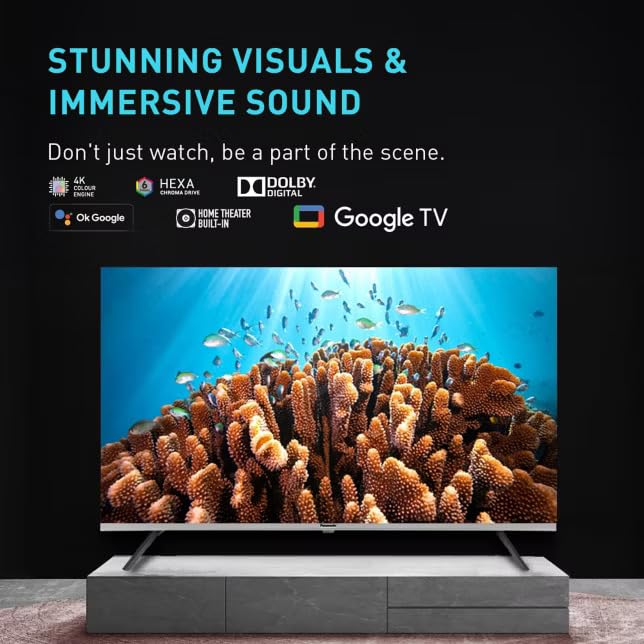
Image 5.1: The TV screen showcasing its capability for stunning visuals and immersive sound, highlighting features like 4K Hexa Chroma Drive, Dolby Digital, and Google TV integration.
- Aratau Pikitia: Select from various preset picture modes (e.g., Standard, Vivid, Cinema, Game) or customize settings like brightness, contrast, color, and sharpness. The TV features a High Bright Panel and supports HDR10+ and Dolby Vision for enhanced picture quality.
- Aratau oro: Choose sound modes (e.g., Standard, Music, Movie, Speech) or adjust equalizer settings. Experience immersive audio with Dolby Atmos support.
- Aratau Kēmu: Activate Game Mode for reduced input lag, ideal for gaming.
5.4 Hononga Nihokikorangi
Connect Bluetooth-enabled devices such as headphones or soundbars wirelessly to your TV.
- Go to the TV's settings menu.
- Navigate to 'Remotes & Accessories' or 'Bluetooth Settings'.
- Enable Bluetooth and put your device in pairing mode.
- Tīpakohia tō pūrere mai i te rārangi kei runga i te mata pouaka whakaata hei hono atu.
6. Tiaki me te Tiaki
- Whakapai Mata: Me ata horoia te mata ki te kakahu ngohengohe, kore-puru. Mo nga tohu pakeke, paku dampen te kakahu ki te wai, ki te horoi mata motuhake ranei (kaua e rehu tika ki te mata).
- Te horoi i te rūnanga: Horoia te pouaka pouaka whakaata ki te kakahu ngohengohe, maroke.
- Puehu: Purua i nga wa katoa nga tuwhera o te hau kia kore ai e wera rawa.
- Waea Hiko: Tirohia te taura hiko i ia wā, i ia wā, mō tētahi pakaru.
7. Te Raru
Mena ka raru koe ki to pouaka whakaata, tirohia nga rongoa e whai ake nei:
| Raruraru | Rongoa pea |
|---|---|
| Karekau he kaha | Ensure the power cord is securely plugged into both the TV and the wall outlet. Check if the power outlet is working. |
| Karekau he pikitia, engari he oro | Tirohia te puna whakauru. Me mohio kei te whakahikohia nga taputapu o waho me te hono tika. |
| Karekau he oro, engari he pikitia kei reira | Check the volume level. Ensure mute is not activated. Verify audio cables for external devices. |
| Ko te mana mamao kaore e mahi | Whakakapia ngā pākahiko AAA. Kia kore he arai i waenganui i te mana mamao me te pouaka whakaata. |
| Kaore e taea te hono ki Wi-Fi | Ensure your router is on and within range. Re-enter the Wi-Fi password. Restart the TV and router. |
| Ko nga taupānga TV Smart kaore e utaina | Check your internet connection. Clear the app's cache or reinstall the app. Update the TV's software. |
8. Whakatakotoranga Hangarau
| Āhuahira | Whakatakotoranga |
|---|---|
| Waitohu | Panasonic |
| Tauira | TH-55PX735DX |
| Rahi Mata | 55 Inihi (139 Henimita) |
| Hangarau Whakaatu | LED, IPS Panel |
| Whakatau | 4K Ultra HD (3840 x 2160 Pika) |
| Rere tāmata | 60 Hz |
| Tautoko HDR | Dolby Vision, HDR10+ |
| Hangarau Ororongo | Dolby Atmos, Kaikōrero Hanga-roto |
| Pūnaha Mahi | Google TV |
| Te Rokiroki Mahara | 16 GB |
| Hononga | Bluetooth, HDMI, USB, Wi-Fi (Dual-Band) |
| Nga waahanga motuhake | Bezel-Less Design, High Bright Panel, Game Mode, Micro Dimming, ALLM |
| Rahi Hua (LxWxH) | 123.6 x 6.8 x 71.8 cm |
| Taumaha Tūemi | 20 kg |
| Voltage | 230 Volts |
| Wattage | 150 Watts |
| Tau tauira | 2025 |
9. Pūtāhui me te Tautoko
9.1 Nga Korero Whakaputanga
Your Panasonic TH-55PX735DX Smart LED TV comes with a 1 Year Warranty Care from the date of purchase. Please refer to the included Warranty Card for detailed terms and conditions, including coverage and exclusions.
9.2 Tautoko Kiritaki
For technical assistance, service requests, or warranty claims, please contact Panasonic customer support. Contact details can be found on the Panasonic official webpae, i runga ranei i to kaari whakamana.
Kaihanga: Panasonic Life Solutions India Private Limited


