Kupu Whakataki
Mauruuru koe mo te hokoasing the HOMCOM Industrial Style TV Stand. This manual provides important information regarding the assembly, operation, maintenance, and safety of your new TV stand. Please read these instructions carefully before assembly and retain them for future reference.
This TV stand is designed to accommodate televisions up to 65 inches and features a built-in charging station, five fabric drawers, and two open shelves for organized storage.

Nga korero haumaru
- Me whai tonu i nga tohutohu a te huihuinga.
- Me whakarite kia mau nga waahanga katoa i mua i te whakamahi.
- Do not overload the TV stand. The maximum load capacity is 50 kg (110 lbs).
- Place the TV stand on a flat, stable surface to prevent tipping.
- Kia matara atu nga waahanga iti me nga taonga takai mai i nga tamariki.
- Kaua e tukua nga tamariki kia piki ki runga i te turanga pouaka whakaata.
- When using the charging hub, ensure devices are compatible with the specified voltage and current. Do not exceed the maximum power rating of the charging hub.
- Unplug the charging hub from the wall outlet when not in use or during electrical storms.
Ihirangi mokete
Before beginning assembly, please check that all components listed below are present and undamaged. If any parts are missing or damaged, please contact customer support.
- TV Stand Panels (engineered wood)
- Nga Waahanga Taapapa maitai
- 5 Kaiutuutu papanga
- Built-in Charging Hub (pre-installed or separate unit)
- Assembly Hardware (screws, bolts, cam locks, etc.)
- Papa Waewae Whakaritea
- Ngā taputapu whakakotahi (hei tauira, te kī Allen, te tīwiri - kei roto pea, e hiahiatia ana rānei)
Whakaritenga me nga Tohutohu Huihuinga
Assembly is required for this TV stand. It is recommended to have two people for assembly. Please follow the step-by-step instructions provided in the included assembly guide (not part of this digital manual). Ensure you have a clear, spacious area for assembly.
- Wewetehia nga waahanga katoa: Me ata tango i nga waahanga katoa mai i te kete ka whakatakoto ki runga i te mata ngawari, ma kia kore e pakaru.
- Assemble the steel frame: Connect the steel frame components using the provided hardware. Ensure all connections are tight and secure.
- Attach panels: Secure the engineered wood panels to the steel frame according to the assembly guide.
- Tāutahia ngā whata: Place the two open shelves into their designated slots.
- Insert fabric drawers: Fold and insert the five fabric drawers into their respective compartments.
- Adjust foot pads: Once assembled, place the TV stand in its desired location. Adjust the foot pads at the bottom of the steel frame to ensure the stand is level and stable on uneven floors.
- Connect charging hub: If the charging hub is not pre-installed, follow the instructions to secure it and plug its power cord into a wall outlet.
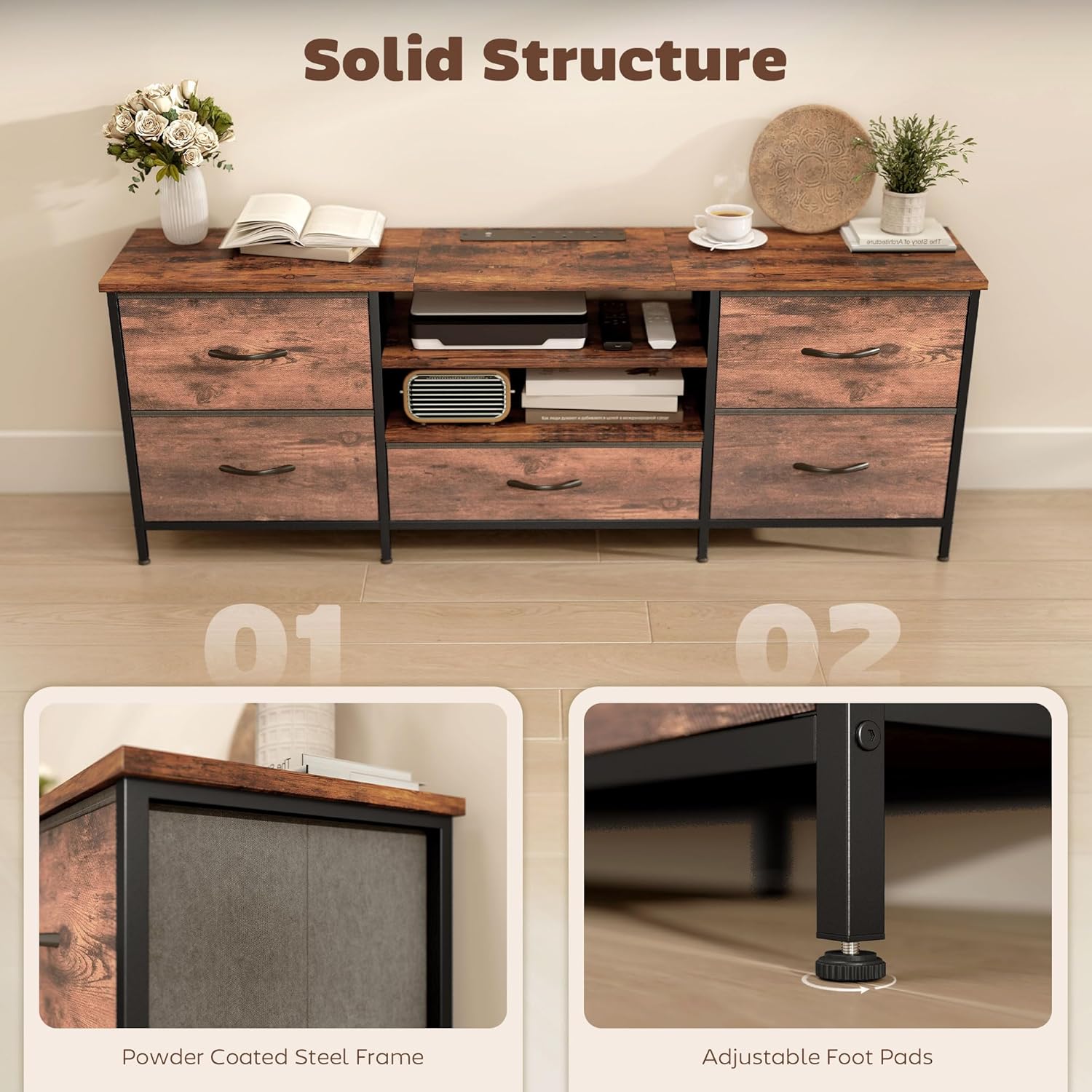
Nga Tohutohu Whakahaere
Te whakatakoto i to Pouaka Whakaata
This TV stand is designed to hold televisions up to 65 inches in size and a maximum weight of 50 kg (110 lbs). Carefully place your television on the top surface of the stand, ensuring it is centered and stable.

Using the Built-in Charging Hub
The TV stand features a convenient built-in charging hub with three AC sockets and two USB ports (5V, 2.1A). This allows you to power and charge various media devices directly from the stand.
- Plug the charging hub's power cord (1.5m length) into a standard wall outlet (220-250V, 50Hz).
- Connect your media devices (e.g., DVD players, gaming consoles, soundbars) to the AC sockets.
- Connect your mobile devices (e.g., smartphones, tablets) to the USB ports for charging.
- Ensure that the total power consumption of connected devices does not exceed the hub's maximum rating.

Te whakamahi i te waahi rokiroki
Ko te turanga pouaka whakaata he maha nga whiringa rokiroki:
- Papa Tuwhera: Use the two open shelves for media players, game consoles, or decorative items that require easy access or ventilation.
- Kaiutuutu papanga: The five fabric drawers provide concealed storage for cables, remotes, games, DVDs, or other accessories, helping to keep your living space tidy.

Te tiaki
Hei whakarite i te roa me te āhua o tō tūnga pouaka whakaata HOMCOM, whai i ēnei aratohu tiaki māmā:
- Te horoi: Wipe the surfaces with a soft, dry cloth. Avoid using harsh chemicals, abrasive cleaners, or excessive moisture, as these can damage the finish.
- Maringi: Immediately wipe up any spills with a dry cloth to prevent staining or damage to the engineered wood.
- Pūmārō: Tirohia ngā tīwiri me ngā here katoa i ia wā, kia mau tonu ai. Whakamaua mēnā e tika ana kia mau tonu ai te pumau.
- Te Ra: Avoid prolonged exposure to direct sunlight, which can cause fading or discoloration of the wood-effect finish.
- wera: Kaua e tuu tika nga mea wera ki runga i te mata. Whakamahihia nga kaitao me nga papa whakamarumaru.
Raparongoā
| Raruraru | Take pea | Rongoā |
|---|---|---|
| E wiri ana, e kore rānei e pumau te tūnga pouaka whakaata. | Papa koretake; toromoka wewete. | Adjust the foot pads at the bottom of the stand. Check and tighten all assembly screws and bolts. |
| Charging hub is not working. | Not plugged into wall outlet; wall outlet not active; device not properly connected; device incompatible; hub overloaded. | Ensure the hub's power cord is securely plugged into a live wall outlet. Test the outlet with another device. Check device connections. Verify device compatibility and ensure total load does not exceed hub capacity. |
| Karekau nga utuutu e paheke pai. | Drawer not assembled correctly; obstruction. | Ensure fabric drawers are fully expanded and correctly inserted. Check for any items obstructing the drawer's movement. |
Whakatakotoranga
| Tau tauira | UK83B-662V70RB0331 |
| Ahu Taapiri (L x W x H) | 140 x 30 x 50 cm (55.1 x 11.8 x 19.7 inihi) |
| Taumaha | 14 kg (30.8 lbs) |
| Rauemi | Te Rakau Hangaia, Te Rakau Hangarau |
| Tae | Rustic Brown |
| Rahi TV Morahi | 65 inihi |
| Te Kaha Uta Morahi | 50 kg (110 lbs) |
| Tuhinga o nga Kaitoi | 5 (Kakahu) |
| Te maha o nga whata | 2 (Tuwhera) |
| Kaitakihia te Puta | 3 AC Sockets, 2 USB Ports (5V, 2.1A) |
| Whakauru Mana | 220-250V, 50Hz |
| Te Roa Waea Hiko | 1.5 m |
| Nga waahanga motuhake | Fabric Drawers, Integrated Charging Hub, Adjustable Feet |

Pūtāhui me te Tautoko
Mo nga korero whakamana, tautoko kaihoko ranei, tirohia nga tuhinga kei roto i to hokonga, toro atu ranei ki te HOMCOM mana website. If you encounter any issues not covered in this manual, please contact HOMCOM customer service for assistance.
Kaihanga: I hokona e MHSTAR


