

 Kaiwhakahaere Mahi-maha
Matua(1PCS)-XA003
Pukapuka Kaiwhakamahi
Core-A11
Ngā āhuatanga
- 2.4Ghz mana mamao ahokore, 10m te tawhiti mana me te rahi-iti.
- Ko te utu nui o te utu, he pai mo nga motuka, kaipuke, me nga tauira tank, etc.
- Whakaratohia kia 10 nga hongere hei hono i nga taputapu rereke.
- Voltage: 4.5V~12.6V(1S-3S), mahi o naianei: 65mA.
- Puawai Whakauru Kaiwhiwhitage: 7.4V-12.6V(2S-3S), tūtatari nāianei: 60mA, mahi nāianei: 200~300mA, nāianei mōrahi: 3A.
- Tautokohia te whirihoranga i runga waea pukoro me nga PC, me te atanga ratarata-kaiwhakamahi.
Kaiwhiwhi & Whakawhiti Shield
Parepare Whakawhiti Mana Mamao

Kei te taha maui me te taha matau o te whakangungu rakau tuku, e 3 nga hongere whakauru ADC. Kei raro iho, e 4 nga hongere whakauru mamati. Ko te mokamoka hina i te tuara ko te mokamoka mo te matua whakahaere maha-mahi. Ka taea te whakahaere ma te whakauru hiko XH2.54.
- Tauranga whakauru ADC L1~L3,R1~L3: 3pin SH1.0 mokamoka. Ka taea te hono ki te kōwae rakau harikoa tuaka kotahi/rua, kōwae whakakā rocker-toru, aha atu.
- Tāuru Mamati Tauranga K1~K4: 2-titi SH1.0 mokamoka. Ka taea te hono atu me te paatene mo te wa poto, me etahi atu.
- XH2.54 DC whakauru hiko: 2-titi XH2.54 mokowhiti. Ka taea te hono ki te 4.5V~12.6V te hiko hiko.
Mana Mamao Receiver Shield

Kei te taha maui me te taha matau o te whakangungu rakau, kei reira, he tauranga motuka DC me te tauranga WS2812. Kei waenganui, e 4 nga tauranga servo. Ka taea te whakahaere ma te whakauru hiko XH2.54.
- DC Motor Port M1, M2: 2pin SH1.0 mokamoka. Ka taea te hono atu me te motuka DC, e tautoko ana i te mana hurihuri whakamua me te whakamuri me te ture tere PWM.
- WS2812 Tauranga D1, D2: 3pin SH1.0slot. Ka taea te hono ki nga tari rama WS2812, ki etahi atu taarai marama ranei e whakamahi ana i te kawa WS2812.
- Tauranga Servo S1~S4: pane 3-titi. Ka taea te hono me nga motuka servo 5V.
- Mokamoka Matua: He mokamoka hina-rua-rarangi. Ka taea te hono atu me te matua whakahaere maha-mahi.
- XH2.54 Whakauru Mana: 2-pin XH2.54 mokamoka. Ka taea te hono ki te 7.4V~12.6V te mana hiko.
Matua-Mahi-Mahi Kaiwhakahaere Matua
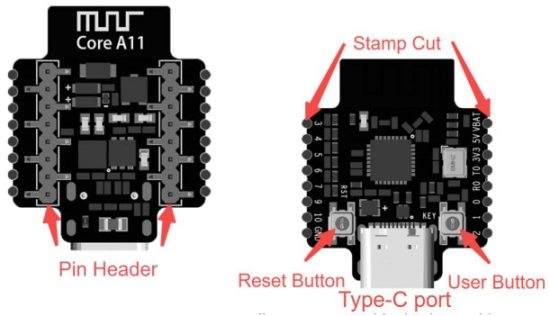
- Stamp Tapahia: Pinout Solderable. Ka taea e nga kaiwhakamahi te whakauru i nga arahi ki te whakatutuki i nga hononga ara iahiko kua whakaritea.
- Patene Tautuhi Anō: Pēhia ki te tautuhi anō i te kaupapa matua.
- Pātene Kaiwhakamahi: Mahi Ritenga.
- Momo-C Port: Tauranga Momo-C. Tūhono ki te PC mā te taura raraunga mō te hōtaka me te tahu i te hōtaka.
- Pane titi: Pane titi. Ka hono ki te Shield.
Hononga taputapu i waenga i te matua o te kaiwhakahaere me te parepare kaiwhakawhiti/kaiwhakawhiwhi mana mamao
Ka rite ki te whakaatu i te ahua, ko te matua o te kaiwhakahaere, ko te whakangungu rakau kaiwhiwhi mana mamao, me te parepare whakawhiti mana mamao he tohu antenna. I te wa e hono ana, me whakarite kia rite tonu nga tuunga o enei tohu e toru me nga titi ki tetahi ki tetahi.
He rite tonu nga whakatakotoranga o enei tohu e toru.

He rite nga titi ki tetahi ki tetahi.
Te Whakamaramatanga o te Tohu Paerewa Pūnaha
- Kei te hiko engari kaore i te hono: ka kaariki te rama
- Nihokikorangi hono: marama puru ka
- 2.4GHz hono: kowhai te rama
- Nihokikorangi& 2.4GHz hono: ka whiti te marama i waenga i te puru me te kowhai
- Profile te whakahou ake: ka whiti te rama matomato i te auau o te 2Hz ka haere tonu kia mutu te tuku.
- Mana whakamohiotanga ahanoa: Ka whiti te rama matomato i te auau o te 1 Hz mo te 5 hēkona.
Hono atu ki te RC Transmitter & Receiver i runga i te kiritaki PC.
Whakakahangia te matua kaiwhakahaere ma te tauranga Momo-C, te Tauranga Mana XH2.54 ranei i runga i te whakangungu rakau roha.

Whakahaerehia te kiritaki CyberBrick, huri ki te Whakahaere Pūrere

Patohia te [+] ki te kimi i to taputapu

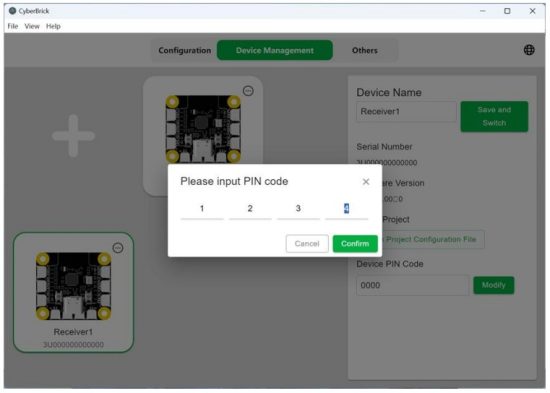
Honoa te taputapu ma te whakauru i te waehere PIN. Mena kare ano te PIN i te wa i te hononga tuatahi, whakau tika.

Whai muri i te hononga angitu, ka puru te tohu o te matua kaiwhakahaere, ka whakaatu te kiritaki i tenei taputapu.

Patohia te tohu roha i te kokonga matau o runga o te taputapu. Mena kua honoa e koe nga taputapu maha, pawhiria i runga i te Ahumahi, a ko te tohu mana o te taputapu kua tohua ka kakariki; ki te hiahia koe ki te momotu mai i te taputapu kua tohua, pawhiria te Momotu.

Patohia te taputapu, ka taea e koe te whakarereke i te ingoa o te taputapu kei te kokonga matau o runga kia maamaa ake te tautuhi ina he maha nga taputapu.

Mena ka hiahia koe ki te huri i te waehere PIN o te taputapu, ka taea e koe te paato i te Whakakē i te kokonga matau o raro ka uru ki te waehere PIN hou.
Whirihorahia te pro pūmana matuafile
Patohia te Whirihoranga, pawhiria te Waihanga Whirihoranga, ka tiimata me te tauira, he whirihoranga putua ranei [Ritenga].
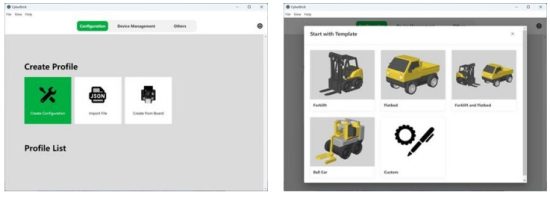
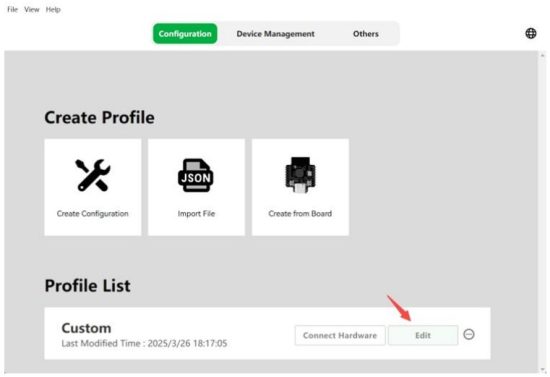
I konei ka tango tatou i te whirihoranga putunga ritenga hei exampte, pāwhiri i runga i Ritenga, a ka pāwhiri i runga i Whakatika i roto i te rārangi whirihoranga i raro.
I muri i te whakaurunga ki te atanga whirihoranga, tuatahi, pawhiria te Tāpiri Kaiwhiwhi ki te taha maui, ka whakauru i te ingoa o te kaiwhiwhi.
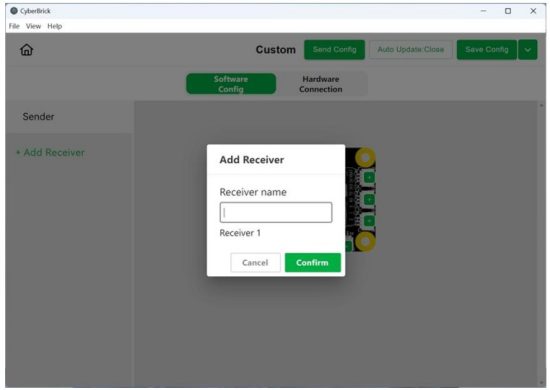
Patohia te hononga taputapu i runga ake ka toia te taputapu kaiwhiwhi me te taputapu kaiwhakahaere ki te waahi e rite ana.

Paatohia kia timata te takirua. Whai muri i te pai o te mahi takirua, ko nga tohu mana o enei taputapu me whiti te puru me te kowhai.

I muri i te whakarereketanga o te whirihoranga, mahara ki te tiaki i te whirihoranga i te rohe me te Tiaki Config i te kokonga matau o runga, me te whakahou i te whirihoranga ki te taputapu me te Tukua Config.
Rarangi o nga ture FCC e tika ana
FCC Wāhanga 15.247
Te tapanga me nga korero tautukunga
Ko te tapanga FCC ID i runga i te punaha whakamutunga me tapaina ki te "Kei roto FCC ID: 2A6J8-COREA11" ranei "Kei roto i te kōwae whakawhiti FCC ID: 2A6J8-COREA11".
Nga korero mo nga momo whakamatautau me etahi atu whakaritenga whakamatautau
Whakapaa atu ki a Shenzhen Tuozhu Technology Co., Ltd. ka whakarato i tetahi aratau whakamatautau mo te kaiwhakawhiti whakawhiti. Ka hiahiatia etahi atu whakamatautau me te tiwhikete ina whakamahia nga waahanga maha i roto i te ope.
Ētahi atu whakamātautau, Wāhanga 15 Wāhanga iti B Whakakape
Hei whakarite kia tautukunga ki nga mahi kore-whakawhiti katoa, ma te kaihanga kaihautu te kawenga ki te whakarite kia u ki nga waahanga kua whakauruhia me te mahi katoa. Mo te exampe, ki te mea kua whakamanahia he kaihautu i mua hei radiator pohehe i raro i te tikanga Whakapuakanga a te Kaituku mo te Whakaaetanga me te kore he waahanga kua whakamanahia e te kaiwhakawhiti me te taapiri i tetahi kōwae, ko te kaihanga kaihautu te kawenga mo te whakarite, i muri i te whakaurunga me te whakahaere o te kaupapa, kei te whai tonu te kaihautu ki nga whakaritenga o te Waahanga 15B. I te mea ka whakawhirinaki pea tenei ki nga korero mo te whakaurunga o te kōwae ki te kaihautu, ka tuku a Shenzhen Tuozhu Technology Co., Ltd. ki te arahi ki te kaihanga kaihautu mo te whakatutuki i nga whakaritenga Wāhanga 15B.
Whakatupato FCC
Ka tutuki tenei taputapu ki te Wahanga 15 o nga Ture FCC. Ko te mahi i raro i nga tikanga e rua e whai ake nei:
(1) Kare pea tenei taputapu e whakararu kino, a (2) me whakaae tenei taputapu ki nga wawaotanga ka tae mai, tae atu ki te pokanoa ka puta he mahi kore.
FAKATOKANGA 1: Ko nga huringa me nga whakarereketanga ki tenei waahanga kaore i tino whakaaehia e te roopu kawenga mo te hanganga ture ka whakakorehia te mana o te kaiwhakamahi ki te whakahaere i nga taputapu.
Tauākī Whakaaturanga Irirangi FCC:
Ko enei taputapu e whai ana ki nga tepe whakamaarama iraruke FCC kua whakaritea mo te taiao kore whakahaere. Me whai nga kaiwhakamahi mutunga ki nga tohutohu whakahaere motuhake kia pai ai te tutukitanga o te whakaaturanga RF.
Tuhipoka 1: Ka whakamanahia tenei waahanga ki te whakatutuki i nga whakaritenga whakakitenga RF i raro i nga tikanga pūkoro, kua whakaritea ranei; Ko tenei kōwae me whakauru anake ki roto i nga tono pūkoro, kua whakaritea ranei.
Ko te taputapu pūkoro e kiia ana he taputapu tuku i hangaia kia whakamahia ki nga waahi i tua atu i nga waahi pumau me te whakamahi i te nuinga o te waa ka mau tonu te tawhiti wehenga o te 20 henimita neke atu i waenga i te (nga) anga o te kaiwhakawhiti me te tinana o te kaiwhakamahi me nga tangata tata. Ko nga taputapu tuku i hangaia kia whakamahia e nga kaihoko me nga kaimahi ka ngawari te neke, penei i nga taputapu ahokore e hono ana ki te rorohiko whaiaro, ka kiia he taputapu pūkoro mena ka tutuki i te 20-henemita te whakaritenga wehenga.
Ko te taputapu kua tautuhia he taputapu kua tiakina a tinana ki tetahi waahi kaore e taea te neke ngawari ki tetahi atu waahi.
Tuhipoka 2: Ko nga whakarerekētanga ka mahia ki te kōwae ka whakakorehia te Karaati Tiwhikete. He iti tenei waahanga ki te whakaurunga OEM anake, kaua e hokona ki nga kaiwhakamahi mutunga; Karekau he tohutohu a te kaiwhakamahi mutunga ki te tango, ki te whakauru ranei i te taputapu, ko te raupaparorohiko me te tikanga whakahaere anake ka tuu ki roto i te pukapuka whakahaere o nga hua whakamutunga.
Tuhipoka 3: Ka taea anake te whakahaere me te antenna kua whakamanahia. Ko nga antenna he rite tonu te ahua me te rite, iti ake ranei te whiwhinga ahu ki te antenna kua whakamanahia me te radiator whakaaro ka taea te hokohoko me te whakamahi me taua radiator whakaaro.
Tuhipoka 4: Mo nga hua katoa e hokona ana i te US, me whakawhäitihia e te OEM nga waahana mahi i CH1 ki te CH11 mo te roopu 2.4G ma te tuku i tetahi taputapu whakamaori rorohiko. Kaua te OEM e tuku taputapu, korero ranei ki te kaiwhakamahi mutunga mo te whakarereketanga Rohe Whakahaere.
Whakatūpato IC
Kei roto i tenei taputapu nga kaiwhakawhiti kua whakakorehia he raihana e u ana ki nga RSS kua whakakorehia te raihana hou, Pūtaiao me te Whanaketanga Ohaoha a Canada. Ko te mahi i raro i nga tikanga e rua e whai ake nei:
- Kare pea tenei taputapu e pokanoa.
- Me whakaae tenei taputapu ki tetahi pokanoa, tae atu ki te pokanoa ka puta he mahi kino o te taputapu.
Tauākī Whakaaturanga Irirangi IC:
Ko tenei taputapu me ona antenna(ng) kaua e noho tahi me etahi atu kaiwhakawhiti engari ma nga tikanga hua tuku-maha IC. Ma te korero mo te kaupapa-whakawhiti-maha, ka taea te whakahaere-whakawhiti-maha me te (ng) waeine i te wa kotahi, me te kore e whakarereketia e te arotake.
E haangai ana tenei taputapu ki nga rohe whakamaanu radiation IC RSS-102 kua whakaritea mo tetahi taiao kore whakahaere. Me whakauru enei taputapu me te whakahaere kia 20cm te tawhiti ki waenga o te radiator me to tinana.
He iti tenei waahanga ki te whakaurunga OEM anake, kaua e hokona ki nga kaiwhakamahi mutunga; Karekau he tohutohu a te kaiwhakamahi mutunga ki te tango, ki te whakauru ranei i te taputapu, ko nga raupaparorohiko me nga tikanga whakahaere anake ka tuu ki roto i te pukapuka whakahaere o nga hua whakamutunga. Ka hiahiatia etahi atu whakamatautau me te tiwhikete ina whakamahia nga waahanga maha.
Ko nga huringa me nga whakarereketanga kaore i tino whakaaetia e te kaihanga ka taea te whakakore i te mana o te kaiwhakamahi ki te whakahaere i enei taputapu.
Me tapaina te hua mutunga ki tetahi waahi ka kitea me enei e whai ake nei: “Kei roto IC: 28436-COREA11 “.

Matua-Mahi-Mahi Kaiwhakahaere Matua

Whakatakotoranga Hua
| Tau Tuemi | Waehanga | Mahi |
| 1 | W52812LED | Tohu mana o te punaha RGB |
| 2 | Stamp Tapahia | Pinout taea solderable |
| 3 | Patene Tautuhi | Pēhia ki te tautuhi anō i te kaupapa matua |
| 4 | Tauranga Momo-C | E tahu ana i te firmware me te hotaka |
| 5 | Pātene Kaiwhakamahi | Mahi Mahi |
| 6 | Pane titi | Ka hono ki nga momo whakangungu rakau |
| 7 | Tohu Takotoranga | Me whakarite kia tika te whakatikanga whakaurunga |
| ID hua | XA003 |
| Tauira | A11 matua |
| Momo-C Whakauru Voltage | DC 5V |
| VBAT Whakauru Voltage | 3.7V-12.6V |
| Momo Antenna | Antenna PCB |
| Tawhiti Mana Mamao | Tae atu ki te 100m (i te waahi tuwhera) |
| Taumaha | 6g |
| Rahi | 27*22mm |
Tuhinga / Rauemi
 |
Tuozhu Core-A11 Kaiwhakahaere Mahi Maha [pdf] Pukapuka Kaiwhakamahi Core-A11, Core-A11 Kaiwhakahaere Mahi Maha, Kaiwhakahaere Mahi Maha, Kaiwhakahaere |